





 Shopify
 Stripe
 Slack
Slack Notion
 Google Workspace
 Confluence

What Is Multi-Agent Customer Support, and When Do Sub-Agents Beat One Agent?


One support agent that handles billing, orders, refunds and escalations works until its instructions grow to two thousand words and it starts confusing the refund policy with the cancellation policy. Splitting that work across specialist sub-agents fixes the reliability problem, at a cost in latency and tokens.
Key takeaways
- Multi-agent customer support splits one generalist AI agent into specialist sub-agents, such as triage, billing, orders and docs agents, that delegate tasks to each other.
- In Macha, sub-agent delegation nests up to three levels deep, and circular-reference prevention blocks loops both when an agent is saved and at runtime.
- Macha sub-agents are read-only in interactive chat but can post replies and update tickets when the parent agent runs autonomously from a trigger.
- Anthropic measured a single agent using about 4 times the tokens of a chat and a multi-agent system about 15 times, so extra specialists cost latency and tokens.
- Macha bills per ticket, so a triage hand-off that touches three agents still counts as one ticket on plans starting at $299 a month for 750 tickets.
Multi-agent customer support replaces one generalist AI agent with a small team of specialist sub-agents: a triage agent that reads the ticket and decides where it goes, a billing agent that knows Stripe, an orders agent wired to Shopify, and a docs agent that searches your knowledge base, with each one able to delegate to the others. In Macha, that delegation can nest up to 3 levels deep and runs on top of the help desk you already use (Zendesk, Freshdesk, Gorgias, Front, HubSpot or Intercom) rather than replacing it. It earns its keep once one agent's prompt and toolbox get too big to stay reliable, and it is overkill before that.
| Single agent | Multi-agent (sub-agents) | |
|---|---|---|
| Instructions | One long prompt covering every job | A short prompt per specialist |
| Tools | Every tool in one context | A small toolbox per specialist |
| Token use | About 4 times a chat (Anthropic) | About 15 times a chat (Anthropic) |
| Best for | One task, low volume | Distinct specialties that keep colliding |
What is a multi-agent support system?
Strip away the jargon and a multi-agent system is one idea: an agent can call another agent the same way it calls a tool. A "parent" agent receives the ticket, decides part of the work belongs to a specialist, and hands that sub-task off. The sub-agent runs with its own model, its own tools, and its own knowledge, returns a result, and the parent carries on.
The standard support shape, and the one Salesforce describes in its own primer, is triage-and-delegate. A router agent classifies each incoming ticket by intent, urgency, and customer tier, then hands off to the right specialist: billing, technical, returns, account management. Each specialist pulls context from the system it owns and either resolves the issue or escalates with everything already gathered. (Salesforce's primer frames it the same way.)
That's the difference between a multi-agent system and a single bot with a long prompt: boundaries. Each agent has a narrow job, a short instruction set, and a small toolbox — which is exactly what makes each one reliable.
Why does one big support agent eventually break?
The strongest argument for sub-agents isn't a benchmark, it's the failure mode you hit without them. As a single agent's responsibilities grow, three things degrade together:
- Prompt overload. One instruction block trying to cover billing tone, refund eligibility, shipping SLAs, and escalation rules becomes self-contradicting. The model spends attention deciding which job it's doing instead of doing it.
- Tool sprawl. Give one agent twenty tools across four connectors and its tool-selection accuracy drops. It calls the Shopify lookup on a billing ticket, or updates the wrong field.
- Blurred responsibility. When something goes wrong, you can't tell which part of the mega-prompt is at fault, so every fix risks regressing another behaviour.
The practitioner guidance is blunt about this: a Towards Data Science breakdown (May 2026) lists "overloaded prompting, poor tool routing, unclear agent responsibilities and reduced reliability" as the common issues that signal it's time to split. Specialisation fixes all of them at once: a billing agent with five tools and a 200-word prompt is simply more reliable than a generalist with twenty tools and a 2,000-word one.
There's a scaling argument too. Specialists run in parallel and stay independently testable, which is why enterprise deployments lean multi-agent as volume climbs — but for most support teams the reliability win arrives long before the scale one does.
How do sub-agents work in Macha?
Macha builds this directly into the agent model. Every agent you create is a potential sub-agent for another — there's no separate "orchestrator" object to learn. You design specialists the same way you design any agent, then wire delegation between them.

On the agent configuration page, a Sub-Agents block — "Delegate tasks to other agents" — sits alongside the agent's tools and data sources. Linking another agent there turns it into a callable specialist: the parent now has a "hand this off" capability the same way it has a "look up an order" tool.
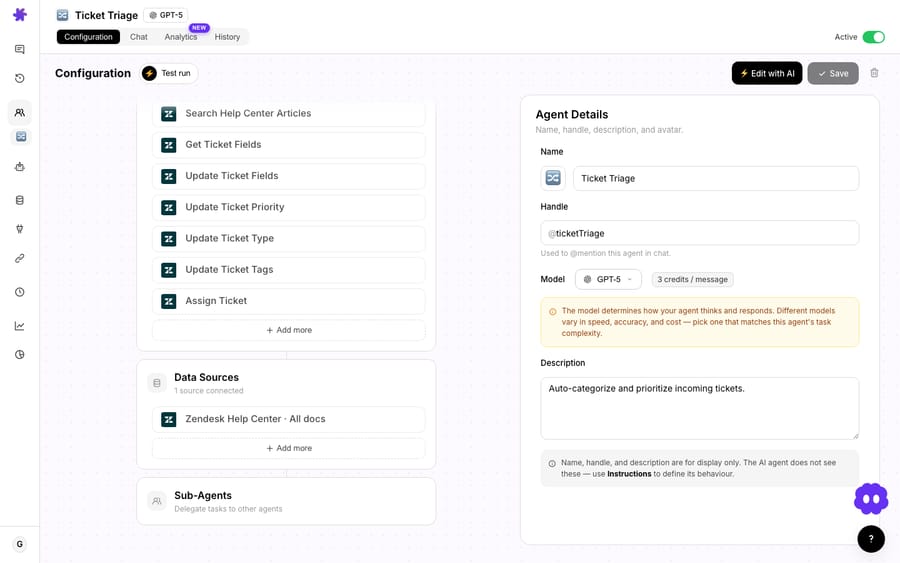
A few design choices matter, and Macha's are deliberately conservative:
- Each sub-agent keeps its own model, tools, and knowledge base. Your triage agent can run a fast, cheap model to classify, while a billing specialist runs a stronger one for the tricky reasoning. You pay for the heavy model only on the tickets that reach it.
- Delegation goes up to three levels deep, with circular-reference prevention. A parent can call a specialist that calls a sub-specialist, and a call beyond the third level is blocked. The system also blocks loops (A → B → A), checking when you save and again at runtime, so a misconfiguration can't run away. Each sub-agent gets up to 15 tool-call iterations to finish its task before it returns. The AI Agent Builder runs the same circular-dependency check when it wires agents up for you.
- Sub-agents are read-only in interactive chat, and can write in autonomous mode. During live chat a delegated agent can look things up but not change them — a safety default. When the parent is fired by a trigger (a new ticket, a webhook), sub-agents are allowed to take write actions like posting a reply or updating a ticket. You get caution where a human is watching and capability where the workflow is doing the work end to end.
Seeing what each sub-agent did
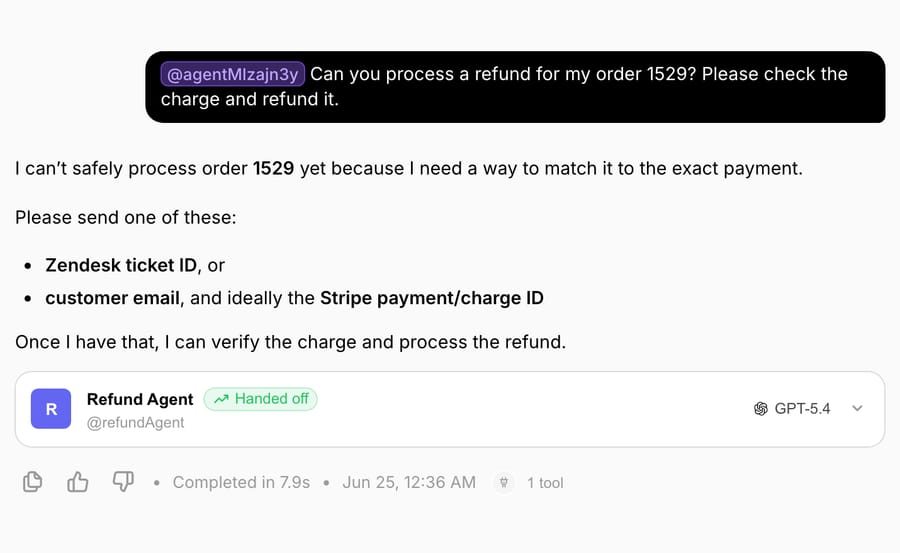
The thing that usually makes multi-agent systems scary is opacity — you can't tell what the second agent actually did. Macha closes that gap. Every sub-agent invocation produces its own conversation record linked back to the parent. In chat, an expandable card appears under the delegated message showing the sub-agent's avatar, handle, model, connector logos, and tool count, with a green "Handed off" badge. Expand it and you get the full nested run — system prompt, every tool call with its arguments, every tool result, and the final reply — rendered like any other conversation. Those sub-runs are kept for 45 days but stay out of your user-facing conversation count, so audits are easy and your metrics stay clean.
The Agents list also gained a Sub-agents column showing how many specialists each agent has wired up; hover and you see their names. It's a small thing that makes a wide multi-agent setup legible at a glance.
What does a triage-and-specialists setup look like?
Here's the shape most support teams should start with, mapped to Macha agents:
| Agent | Job | Model | Tools / knowledge |
|---|---|---|---|
| Ticket Triage (parent) | Read the ticket, classify intent + urgency, route | Fast / cheap | Helpdesk read, field tools; sub-agents linked |
| Billing specialist | Resolve charges, invoices, subscription questions | Stronger | Stripe / Razorpay |
| Orders specialist | "Where is my order", lookups, cancellations | Mid | Shopify |
| Docs specialist | Answer policy/how-to from the knowledge base | Mid | Notion / Confluence / Help Center |
The triage agent never tries to be the billing expert — it just recognises a billing ticket and delegates. Each specialist stays small and sharp. And when a ticket genuinely needs a human, the specialist that gathered the context is best placed to escalate cleanly — the same logic behind escalating with a full context bundle rather than dumping a raw ticket on an agent.
This composes nicely with everything else Macha sits on. Because the whole system runs as a layer on top of Zendesk and the rest, the specialists read and write through the helpdesk your human agents already live in — no migration, no parallel inbox.
When should you not use multi-agent support?
Multi-agent is a tool, not a trophy. Reaching for it too early is a classic over-engineering mistake, and the best guidance on agents is unusually candid about this. Anthropic's Building Effective AI Agents argues for finding the simplest solution that works and only adding complexity when it delivers measurable value — because agentic systems trade latency and cost for performance. The trade is real. Anthropic measured its own research agents and found that a single agent uses about 4 times the tokens of a chat, and a multi-agent system about 15 times, since every delegation is another model call with its own context (Anthropic, How we built our multi-agent research system). Towards Data Science lists the same costs: more latency, more spend, more moving parts to maintain.
So skip the orchestra when:
- One agent with a tight prompt and a handful of tools is already resolving the tickets. If it isn't broken, splitting it just adds calls and latency.
- Your volume is low. The reliability gains from specialisation are worth the most at scale; at ten tickets a day the extra coordination rarely pays for itself.
- The work is genuinely one task. "Answer FAQs from the help center" is a single agent. You don't need a router to point at one specialist.
- You haven't measured a single-agent baseline yet. Build the simple version, watch where it actually fails, then split along those failure lines. Splitting on a guess produces agents that are specialists in the wrong things.
The honest rule: add a sub-agent when a specific, repeating failure points at a specific missing specialist — not because multi-agent sounds more sophisticated.
What does a multi-agent setup cost on Macha?
Macha bills per ticket — one conversation, charged once, however many steps it takes to finish. A triage hand-off that fires one specialist is still one ticket; so is a chain that touches three agents. That takes the usual objection off the table: the delegation that makes the system more reliable doesn't show up on the bill, and the model you assign each agent doesn't change the price either. What multi-agent actually costs you is latency — every hop is another model call, so a chain is slower than a single agent and worth building only where the reliability is worth the wait. Plans start at $299 a month for up to 750 tickets and scale by ticket volume (see the pricing page); sub-agents are part of Macha's core agent model, not a premium add-on.
FAQ
What's the difference between a multi-agent system and a single agent with lots of tools? Boundaries. A single agent holds every responsibility, tool, and instruction in one context. A multi-agent system splits those across specialists that each do one job well, with a router delegating between them — which improves tool-selection accuracy and makes each agent independently testable.
How deep can delegation go in Macha? Up to three levels — a parent can call a specialist that calls a sub-specialist — with automatic circular-reference prevention so agents can't loop back on each other.
Can a sub-agent take actions, or only look things up? Both, depending on context. In interactive chat, sub-agents are read-only for safety. When the parent runs autonomously via a trigger, sub-agents can perform write actions like posting replies or updating tickets.
Will I be able to see what a sub-agent did? Yes. Every delegation produces a linked, expandable "Handed off" card in chat showing the sub-agent's model, tools, every tool call and result, and its final reply. Sub-runs are retained for 45 days and kept out of your user-facing conversation count.
Is multi-agent always better than a single agent? No. It trades latency and cost (Anthropic measured about 15 times the tokens of a chat) for reliability on complex, multi-step work. For low volume or genuinely single-task workflows, one well-scoped agent is the right call. Build the simple version first, then split where it measurably fails.
How should you start with sub-agents?
The case for sub-agents isn't "more agents are better." It's that boundaries make agents reliable — and when your support work has real, distinct specialties, modelling them as separate agents beats cramming everything into one prompt. Start with a single agent, watch where it breaks, and split along those seams. Macha lets you do exactly that without leaving your helpdesk: design specialists, wire delegation, and see every hand-off in full.
Want to try it? Start a free trial ($50 of usage, no credit card required), build a triage agent, link your first specialist, and read the sub-agents docs for the full walkthrough. More on agent design over on the Macha blog.
Written by Abbas (Customer Support & AI, Macha) · Reviewed by Ankeet Guha (Co-founder & CTO) · Published 2026-06-24 · Last updated 2026-09-24.






