





 Shopify
 Stripe
 Slack
Slack Notion
 Google Workspace
 Confluence

Can One AI Agent Work Across Two Zendesk Accounts? Multi-Instance Connectors Explained


Agencies, companies mid-acquisition and merchants with one Stripe account per legal entity all run several accounts of the same tool. Macha's multi-instance connectors let one AI agent work across all of them, with separate credentials and tools labeled by account.
Key takeaways
- Macha's multi-instance connectors, shipped March 8, 2026, let one AI agent work across several accounts of the same connector, such as two Zendesk instances or three Stripe accounts, each with its own credentials.
- Zendesk's AI agents live inside a single Zendesk account, and Zendesk multibrand covers up to 5 brands on Suite Growth and Professional or 300 on Enterprise.
- When two instances of a connector exist, Macha suffixes each tool name with the account name and tags each tool group, so the model sees separate, labeled tools per account.
- In one Macha workspace, two Zendesk instances, macha-ai.zendesk.com and d3v-macha, ran side by side with all 17 Zendesk tools active independently.
- Multi-instance connectors carry no separate charge; Macha bills about $0.40 a ticket from $299 a month for 750 tickets, and that includes the Macha team building the agent and a dedicated success manager who handles your changes.
Yes, one Macha agent can work across two Zendesk accounts, three Stripe accounts or any mix of repeated connectors: you connect each account as its own instance with its own credentials and name, and Macha suffixes every tool with that name so the model knows which account it's acting on. The feature is called multi-instance connectors, it shipped on March 8, 2026, and it's included in the plan at no extra charge.
| Question | Short answer |
|---|---|
| Which connectors? | Any connector you can add more than once: Zendesk, Stripe, Freshdesk and others |
| Credentials | Separate per instance; revoking one never touches the others |
| How the agent tells them apart | Tool names get an account suffix and each tool group is tagged with the account name |
| Zendesk tools per instance | All 17, active independently |
| Extra cost | None; Macha bills about $0.40 a ticket from $299 a month for 750 tickets, setup included |
Macha is the AI agent layer that sits on top of the help desks you already run (Zendesk, Freshdesk, Gorgias, Front, HubSpot or Intercom). It isn't a help desk and it isn't trying to replace yours. Multi-instance connectors point one agent at several of your existing accounts, and the sections below cover why that's harder than it sounds, what Macha does under the hood, and when you should still keep things separate.
Why can't native AI agents span two Zendesk accounts?
If you've tried to do this with native tooling, you've met the wall. Zendesk's AI agents are built and billed inside one Zendesk account. Zendesk's own answer for a multi-brand setup is to keep it inside that account: connect a single AI agent to email and split behavior by brand with actions, conditional blocks, segments and brand-scoped search rules (Zendesk help). Multibrand covers up to 5 brands on Suite Growth and Professional and up to 300 on Enterprise and Enterprise Plus, but it's still a single account, and every brand-specific branch lives in that one agent's flows.
The moment your accounts are genuinely separate (different orgs, different billing, different owners), the overhead compounds. Zendesk's own guidance on running multiple instances spells it out: "Multiple Support instances require setup and configuration of each custom integration," and "Apps need to be installed and configured in each Support instance" (Zendesk help). In automation terms, every integration, bot and macro gets configured and maintained N times over. Two accounts means twice the surface area to keep in sync. Three Stripes means three lookup flows that drift apart.
The usual escape hatches all cost something:
| Approach | What it means | The catch |
|---|---|---|
| Merge / migrate accounts | Consolidate two Zendesks into one via API or a migration tool | Slow, risky, irreversible; duplicate users to reconcile; not an option mid-acquisition |
| Multibrand (one account) | Up to 5 brands (Growth/Pro) under a single Zendesk | Only works if the accounts can be one account; brand logic piles into one agent's flows |
| One bot per account | Stand up a separate AI agent for each instance | N copies of prompts, tools, and knowledge to maintain and keep in sync |
| Macha multi-instance | One agent, many connector instances, auto-disambiguated | You keep a separate set of credentials per account |
Multi-instance connectors are the option that doesn't force you to merge accounts you can't merge, and doesn't make you maintain the same agent twice.
What is a multi-instance connector?
There are exactly two pieces to the March 8 release, and they map cleanly onto the two problems above. (If the building blocks are new to you, our primer on connectors, tools, and triggers explains how a connector becomes a set of agent tools in the first place.)
1. Each instance gets its own credentials and name
When you add a connector in Macha, you're connecting a specific account: not "Zendesk the product" but this Zendesk subdomain, authenticated with these credentials. Multi-instance support means you can do that more than once for the same connector type. On a connected Zendesk you'll see an Add Another button; click it, and you connect a second Zendesk with its own subdomain, own credentials (Zendesk authenticates via OAuth or API key; Stripe via API key), and a human-readable name you choose so the two stay legible everywhere in the product.
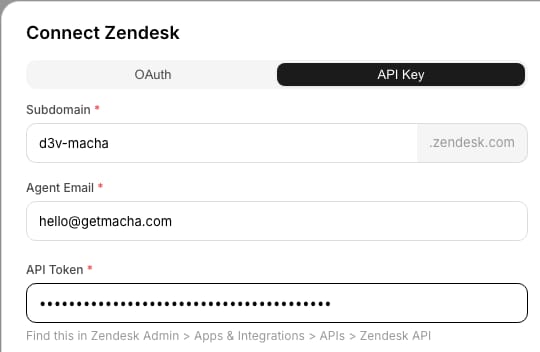
Do that twice and the connectors list shows both accounts as independent, fully connected instances. Here it's macha-ai.zendesk.com and a second instance named d3v-macha, each with all 17 Zendesk tools active and its own Add Another control:

Because each instance is fully isolated at the credential level, there's no token bleed between accounts. Revoking or reconnecting one instance never disturbs the others. This is the part that makes the agency and post-acquisition cases safe: client A's data and client B's data are reached through separate, independently revocable connections.
2. Automatic disambiguation (the part that makes it usable)
Giving an agent two Zendesk connections is the easy half. The hard half is making sure the model never gets confused about which Zendesk it's searching, replying on, or updating. A naive setup would expose two tools both called search_tickets, and the agent would have no reliable way to tell them apart.
Macha handles this automatically. When more than one instance of the same connector type exists, tool names are auto-suffixed and tool groups are tagged with the account name, so the underlying model sees one Get Ticket for macha-ai.zendesk.com and a separate Get Ticket for d3v-macha as distinct, clearly labeled tools. Under the hood the tool name carries the instance name as a suffix (for example zendesk_get_ticket__production and zendesk_get_ticket__sandbox), and the description starts with the account label. You can see it in an agent's tool picker, where the same Zendesk connector appears twice, each tool group headed by its account:
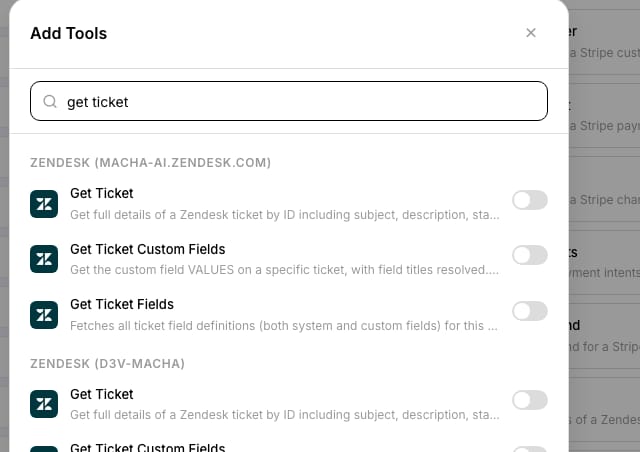
The disambiguation is what lets a single agent route an action to the correct account without you hand-writing brittle "if the ticket is from the EU brand, use tool X" logic. The practical effect: you write one agent, one set of instructions and one knowledge configuration, and it operates correctly across every connected account because the tools carry the account identity, not the prompt.
Who needs one agent across several accounts?
Two Zendesks: an agency or BPO. You run support for two clients, each on their own Zendesk. With multi-instance connectors you build one triage-and-draft agent and connect both client Zendesks. Triggers fire per account (Macha's Zendesk connector offers eight triggers, including New Ticket, Customer Reply, Status Changed, Ticket Assigned and a custom webhook), and the agent replies on whichever account the ticket came from, using that account's tools. One agent to improve, two clients served.
Two Zendesks: mid-acquisition. You bought a competitor; both help desks are live while you plan a migration that will take months. Instead of freezing automation until the dust settles, connect both Zendesks now and let one agent cover the combined queue. When the migration finishes and you collapse to a single instance, you remove a connector and the agent doesn't change.
Three Stripes: multiple legal entities. A merchant with US, EU, and India entities runs three separate Stripe accounts. Connect all three, and a billing agent on top of your help desk can look up the customer, list their payments, and (with a human-in-the-loop confirmation) issue a refund in the correct entity, because the Stripe tools are tagged per account. No more "which Stripe is this charge in?" tab-roulette. (Stripe in Macha authenticates by API key and exposes ten tools: Get Customer, Get Payment, List Payments, Get Charge, Get Subscription, List Subscriptions, List Invoices, Cancel Subscription, Create Refund and Create Payment Link.)
The common thread: the agent is the reusable asset. Multi-instance connectors let you build it once and aim it at many accounts, instead of cloning it.
How do you connect a second Zendesk or Stripe account?
The flow is the same as connecting any single account. You just do it more than once:
- Open Connectors in the dashboard and add your first instance of the connector (e.g. Zendesk), authenticating and giving it a clear name like Acme US.
- Add the connector again for the second account (Acme EU), with its own credentials and name.
- In your agent's tools, enable the tools from each instance you want it to use. They'll appear separately per account. Name the accounts in the instructions too ("for EU customers, use the Acme EU tools").
- Test in chat or with a real trigger, and confirm the agent acts on the right account. Macha's connector test/verify step and the in-chat confirmation cards for write actions let you check this before you go live.
See the Connectors documentation for the full walkthrough, and the Zendesk and Stripe connector pages for the exact tools each exposes.
When should you keep separate agents instead?
The trade-offs:
- Each instance is a separate connection to maintain. Two Zendesks means two sets of credentials to keep valid, two reconnects when a token expires, and two connectors to watch on the connector-health page. If you only have one account, you don't need any of this. See pricing for what's included.
- One agent isn't always the right boundary. If two clients have genuinely different policies, tone, and escalation rules, you may want separate agents (or sub-agents, which shipped in the same March 8 release) rather than a single agent juggling both, for clean separation and per-client analytics. Multi-instance connectors and multiple agents are complementary, not either/or.
- Permissions are per connection, by design. Each instance is reached with its own credentials. That's good for isolation, but it means access control lives at the account level. Scope each API key or OAuth grant to exactly what that account's agent needs.
- Disambiguation helps the model; it doesn't excuse vague instructions. Auto-suffixed tools make the accounts distinguishable. If your agent's instructions are ambiguous about when to act on which account, tighten the prompt and lean on per-account triggers so the right tool is the obvious one.
For the broader picture of how Macha layers onto your help desk, see Macha on Zendesk.
FAQ
Can one AI agent really work across two separate Zendesk accounts? Yes. With Macha's multi-instance connectors you connect each Zendesk account as its own instance (own credentials, own name) and a single agent can use the tools from both. Zendesk's native AI agents live inside a single Zendesk account.
How does the agent know which account to act on? Automatic disambiguation. When multiple instances of the same connector exist, Macha auto-suffixes the tool names and tags each tool's description with the account name, so the model treats each account's tools as distinct and labelled.
Does this work for connectors other than Zendesk? Yes. It's a connector-level capability, so it applies to any connector you can connect more than once, including Stripe (e.g. three accounts for three legal entities), Freshdesk, and others.
Do I have to merge my accounts first? No. You keep the accounts separate (different credentials, different data) and let one agent reach across them. It's especially useful mid-acquisition when merging isn't an option yet.
What does it cost? There's no separate charge for multi-instance connectors. Macha bills per ticket: one conversation is charged once however many accounts the agent reaches into, from $299 a month for 750 tickets, about $0.40 each. That price includes setup: you connect each account, and the Macha team builds the agent across them, tests it on your past tickets and runs it in safe mode until the drafts are right, with a dedicated success manager who handles your changes after that. See the pricing page, or start a free trial ($50 of usage, no credit card required).
Is one agent across many accounts worth it?
Most automation tools quietly assume you run one account of everything. Real businesses don't. They have client A and client B, a US entity and an EU entity, the company you were and the company you just bought. If your accounts share a policy set, yes: one agent, many accounts, each isolated at the credential level and addressed by name. If they don't, use separate agents or sub-agents and still share the connectors.
Start a free trial ($50 of usage, no credit card required), or read the Connectors docs for the setup walkthrough.
Written by Abbas (Customer Support & AI, Macha) · Reviewed by Ankeet Guha (Co-founder & CTO) · Published 2026-06-24 · Last updated 2026-09-24.






