





 Shopify
 Stripe
 Slack
Slack Notion
 Google Workspace
 Confluence

How Do You Get Slack Alerts for Trending Support Topics?


Spikes usually start as a few tickets about the same error landing in different queues an hour apart. A scheduled Macha agent reads the queue every hour and posts to Slack when one topic clearly rises above normal.
Key takeaways
- A scheduled Macha agent can search recent Zendesk tickets every hour, group them by topic, and post a Slack alert when one topic is elevated and concentrated.
- Macha's scheduled triggers run at a minimum 1 hour interval, cap at 24 runs per trigger per day, and auto-disable after 5 consecutive errors.
- In the worked example, the Macha agent flagged Login issues at 12 tickets in two hours against a normal of about 3, all tied to a 502 error.
- Scheduled triggers work on the free trial and every Macha plan, from $299 a month for 750 tickets; every plan includes setup by the Macha team and a dedicated success manager.
- Running a Macha Study across ticket history gives the hourly alert agent a measured topic baseline instead of a guessed one.

To get alerted about a trending support topic, run a scheduled Macha agent every hour that searches the last two hours of Zendesk tickets, groups them by topic, and posts to a Slack channel only when one topic is well above its normal rate, for example 12 login tickets against a normal of about 3. It's a small background agent that watches the queue for you, so you find out from a bot, not from an angry escalation.
| Setting | Value |
|---|---|
| Trigger | Scheduled run, cron expression 0 * * * * for hourly (minimum 1 hour between runs) |
| Run limits | 24 runs per trigger per day; 3 scheduled runs at once per organization |
| Failure handling | Auto-disabled after 5 consecutive errors, with an email to you |
| Tools | Zendesk Search Tickets (read), Slack Send Message (post) |
| Plan | Every plan and the free trial; paid plans start at $299 a month for 750 tickets |
Macha is an AI agent layer that sits on top of the help desk you already run (Zendesk, Freshdesk, Gorgias, Front, HubSpot or Intercom) and wires it to the rest of your stack. So this isn't a separate analytics product to log into, it's an agent living next to your tickets, firing into the Slack channel your team already has open.
What counts as a trending support topic?
Before building anything, it's worth being precise about the goal, because "trending topic detection" gets oversold. A good spike alert answers three questions the instant it fires: what changed, where it's concentrated, and whether it's still accelerating. That framing comes straight from the support anomaly-detection playbook, teams that get this right define a baseline by time window, channel and contact reason, with thresholds that flex for known seasonality (Cobbai's guide), then alert on concentrated deviations rather than raw volume. Twelve tickets at 9am Monday might be normal; twelve tickets about one error string in two hours is not.
So the agent we want isn't "count the tickets." It's:
- Pull the last slice of tickets from Zendesk.
- Cluster them by what they're actually about (the model reads subjects and descriptions, not just tags).
- Compare each topic's current rate to its normal rate.
- If one topic is both high and concentrated, raise a clearly-worded alert with the common thread and a suggested owner.
Steps 2 and 3 are where an AI agent earns its place, it reads unstructured tickets and groups "can't log in," "login broken," and "502 on sign-in" into one cluster that a keyword report would scatter.
What does the alert workflow look like?
Here's the use case as a Macha agent. It's deliberately small, two connectors, one schedule.
| Piece | What it does |
|---|---|
| Trigger | Macha Scheduled run, hourly topic analysis |
| Read | Zendesk Search Tickets, pull recent tickets to analyze |
| Reason | The agent clusters tickets by topic and compares each to its baseline |
| Act | Slack Send Message, post a "Trending Topic Alert" to #ops if a topic spikes |
A real fire looks like this. The hourly run pulls the last two hours of tickets, the agent notices "Login issues" up ~300%, 12 tickets versus a normal ~3, spots that the common thread is a "502 error" on the login page, and posts:
🔥 Trending Topic Alert "Login issues" is spiking, 12 tickets in the last 2 hours (normal: ~3). Common thread: customers reporting a "502 error" on the login page. This may indicate a service issue. Consider checking with engineering.
That message is the whole point: it lands in Slack with what, how much, and what to do next, while it's still a dozen tickets and not a hundred.
How do you set up the scheduled trigger?
The engine behind this is Macha's scheduled (cron) trigger, the same feature that lets any agent run on a cron schedule instead of waiting for a ticket event. You attach it to your trend-monitor agent and set the cadence as a cron expression: 0 * * * * runs it at the top of every hour.
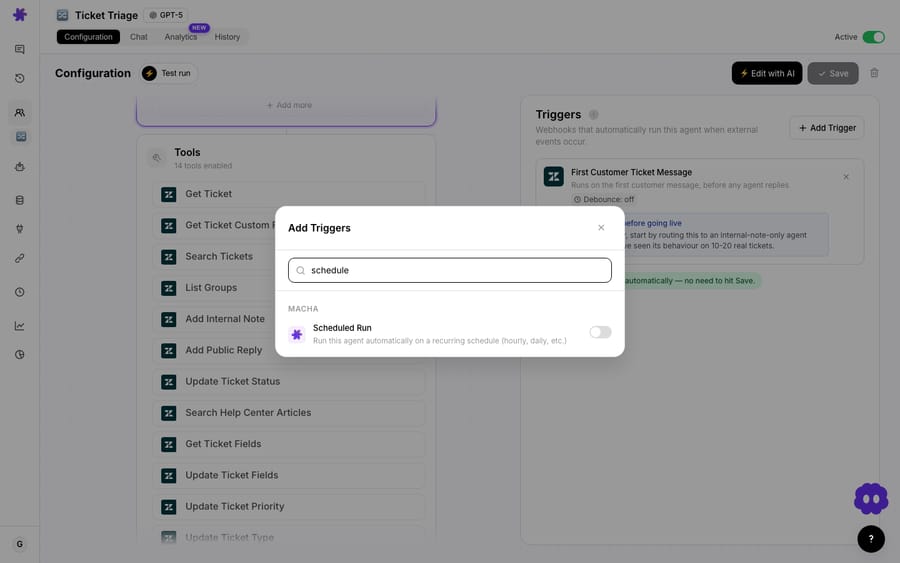
A few product facts that matter for this use case (all current behavior):
- Cadence is a cron expression. The minimum interval is 1 hour, a hard floor by design, so this is early warning, not real-time streaming. Macha's scheduler checks every 60 seconds for triggers that are due.
- Guardrails are built in: a cap of 24 runs per trigger per day and a limit of 3 simultaneous scheduled runs per organization, so a misconfigured schedule can't stampede.
- Auto-disable on failure: if a scheduled trigger fails 5 times in a row, Macha disables it and emails you, a runaway loop won't silently keep firing.
- Included on every plan and the free trial: scheduled triggers come with every tier, as do unlimited agents and seats. (See pricing.)
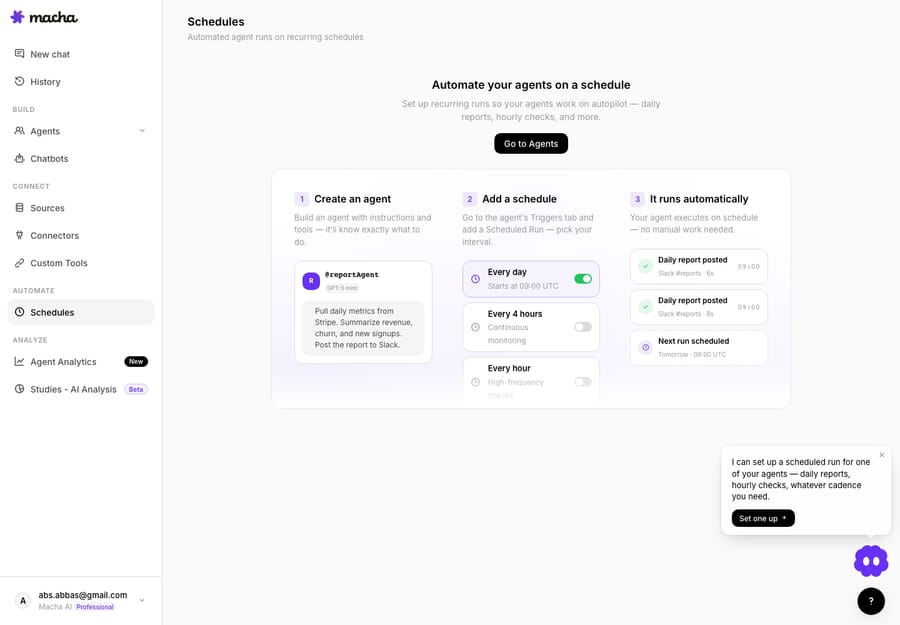
You can see all of an org's scheduled agents and their cadences in one place, which is handy once you're running a trend monitor alongside other periodic jobs.
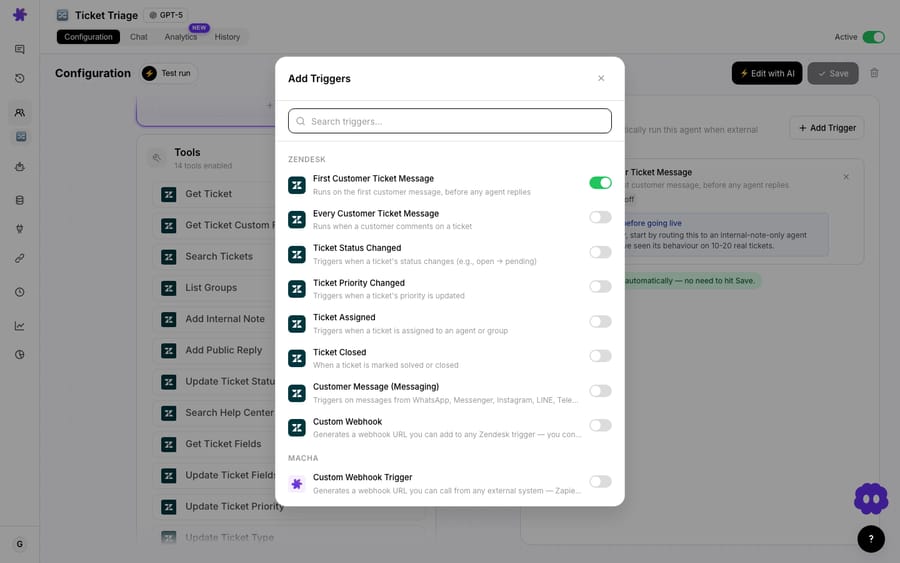
If you've never wired a trigger before, every Macha trigger, scheduled, Zendesk ticket events, Slack mentions, custom webhooks, is picked from the same panel on the agent's config page.
What should the agent's instructions say?
The schedule decides when; the agent's instructions decide what good looks like. This is a read-and-report agent, so it gets Zendesk Search Tickets and Slack Send Message as tools, and nothing that writes to a customer. The instructions carry the judgment:
- Scope the read. Tell it to search the recent window (e.g. tickets created in the last ~2 hours) so each run looks at fresh volume.
- Define normal. Give it the baseline you actually know, "typical volume for login is ~3/hour; shipping runs ~8/hour", or have it pull a wider window to estimate the baseline itself. The honest version: an LLM eyeballing counts is a heuristic, not a control chart (more on that below).
- Set the bar to alert. "Only post if a single topic is both clearly elevated and concentrated, a meaningful multiple of normal, not noise." This is what keeps it from crying wolf at every quiet fluctuation.
- Make the alert useful. Require the message to name the topic, the count vs. normal, the common thread (the shared phrase or error), and a suggested owner ("consider checking with engineering").
That last instruction, common thread + suggested owner, is the difference between an alert people act on and an alert people mute. "Tickets are up" gets ignored; "12 login tickets, all '502 error,' check eng" gets someone moving.
How do you give the agent a real baseline?
The scheduled agent is your smoke detector, cheap, always-on, deliberately twitchy toward early warning. It is not a rigorous statistical baseline, and you shouldn't pretend it is. When you want the defensible picture, "what are the genuine top trends across thousands of tickets, with real percentages", that's a job for Macha Studies, which runs an AI analysis across your whole ticket history and returns charts you can trust.
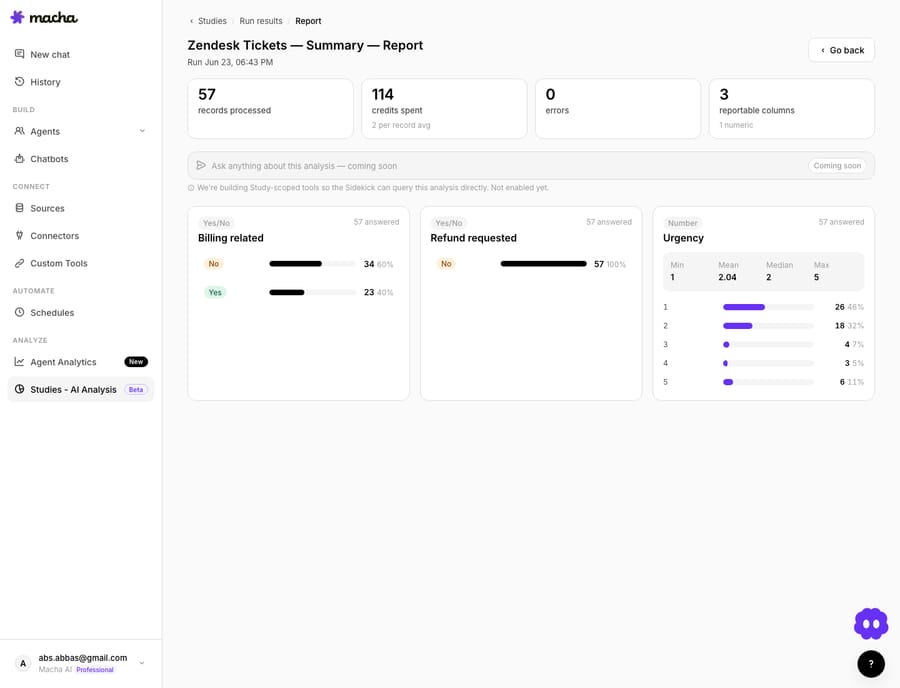
The two work together: run a Study monthly to establish what "normal" topic mix and volume actually are, then feed those numbers into the scheduled agent's baseline so its hourly alerts fire against reality instead of a guess. Smoke detector for the moment, Study for the season.
What does a scheduled trend monitor cost?
Macha bills per ticket, one conversation, charged once, however many steps the agent takes inside it. Pricing starts at $299 a month for 750 tickets, about $0.40 each, and the model you assign doesn't change that rate, so run this monitor on whichever model reads your queue best rather than on whichever one looks cheapest. Setup is done for you on every plan: the Macha team builds and tests the monitor, and the price includes a dedicated success manager who handles your changes afterwards, such as a new cadence, instruction changes or new tools.
The thing to size for is that a scheduled trigger runs on every interval whether or not anything's wrong, 24 runs a day at hourly cadence. That's the trade you're making: a monitor that is always on so you never miss the early signal. You can run this on the free trial ($50 of usage, no credit card), scheduled triggers included; once it's running, watch a day of runs and tune the cadence and search window to fit your real volume.
When is a scheduled alert the wrong tool?
This pattern is genuinely useful, but be honest about its edges:
- It's hourly, not instant. The 1-hour floor means a topic can climb for up to an hour before the next run sees it. For a true real-time page (full outage, payment processor down), back this with status-page monitoring and event-driven triggers, don't make an hourly cron your only outage detector.
- LLM counting isn't anomaly detection. The model reads and clusters beautifully, but "is 12 a spike vs 3" is a judgment call it makes from your guidance, not a Z-score. For statistically tight thresholds, compute the baseline with Studies (or a custom tool) and tell the agent the number, Cobbai recommends correlating tickets with logs, status metrics and sentiment before escalating.
- Tune for false positives. A too-eager bar floods Slack and gets muted; a too-strict bar misses the early window. Review the alerts it sent each week and adjust, alert quality is a tuning loop, not a set-and-forget.
- It needs context to be smart about seasonality. Monday mornings and post-launch days are supposed to be busy. Put known spikes (launches, billing runs, maintenance) in the instructions so it doesn't alert on expected volume.
- Run volume. An hourly schedule is 24 runs a day whether or not anything is wrong, pick the loosest cadence that still catches the spike, and weigh this one against your other periodic agents.
If your queue is tiny, you'll see trends with your own eyes and this is overkill. It earns its keep once volume is high enough that no single person sees the whole queue at once, which is exactly when spikes hide.
FAQ
How quickly will I find out about a spike? Within your interval. At the hourly minimum, the agent sees new volume on the next run, so worst case ~60 minutes, typically sooner. For instant outage detection, pair it with event-driven triggers and status monitoring rather than relying on the schedule alone.
Does it work with help desks other than Zendesk? The pattern is the same, a scheduled agent that reads recent tickets and posts to Slack. The example here uses Zendesk's Search Tickets action; Macha also runs on Zendesk, Freshdesk, Gorgias, Front, HubSpot or Intercom, and those connectors expose their own ticket reads. See the docs and the Macha-on-Zendesk overview.
How does it know what "normal" is? You tell it, either a baseline you already know, or one you compute from a wider ticket window or a Studies run. The agent then judges each run against that baseline. It's a heuristic, so tune the threshold over the first week.
Will it spam my Slack channel? Only if you set the alert bar too low. The instruction to fire only on topics that are both clearly elevated and concentrated is what keeps it quiet on normal days. Review the alerts weekly and tighten or loosen from there.
Which plan do I need? Any plan, and the free trial works too. Scheduled triggers are included everywhere; paid plans start at $299 a month for 750 tickets. The pricing page has current details.
Where should you start?
Pick your single most outage-prone topic, login, checkout, a flaky integration, and build one agent that watches just that, hourly, into one Slack channel. Once the team trusts its alerts, widen the scope. Connect Zendesk and Slack, add a scheduled trigger on a paid plan, and put a smoke detector on your queue. The first time it warns you an hour early, it's paid for itself.
Written by Abbas (Customer Support & AI, Macha) · Reviewed by Ankeet Guha (Co-founder & CTO) · Published 2026-06-24 · Last updated 2026-09-24.






