





 Shopify
 Stripe
 Slack
Slack Notion
 Google Workspace
 Confluence

Which AI Model Should Your Macha Agent Use? (2026)


Each Macha agent runs on its own model, chosen from nine options, and the choice changes answer quality and speed but never the price. Start on the default, GPT-5.4, and move an agent only when a test run shows it needs something different.
Key takeaways
- Macha sets the AI model per agent from the top-right of the configuration screen, with GPT-5.4 as the default and GPT-5.6 Terra as the strongest option.
- The model an agent runs on changes quality and speed but not price, because Macha bills per ticket and charges each conversation once.
- Macha retired Llama 3.3 70B, Llama 3.1 8B and Mixtral 8x7B on 28 August 2026 and replaced them with GPT OSS 120B and GPT OSS 20B.
- Claude Sonnet 5 joined the Macha model picker on 26 August 2026, replacing Claude Sonnet 4, while Claude Sonnet 4.5 stays available.
- A practical Macha rule: start agents on GPT-5.4, step up to GPT-5.6 Terra when a test shows missed nuance, and use Luna or GPT OSS where speed matters.

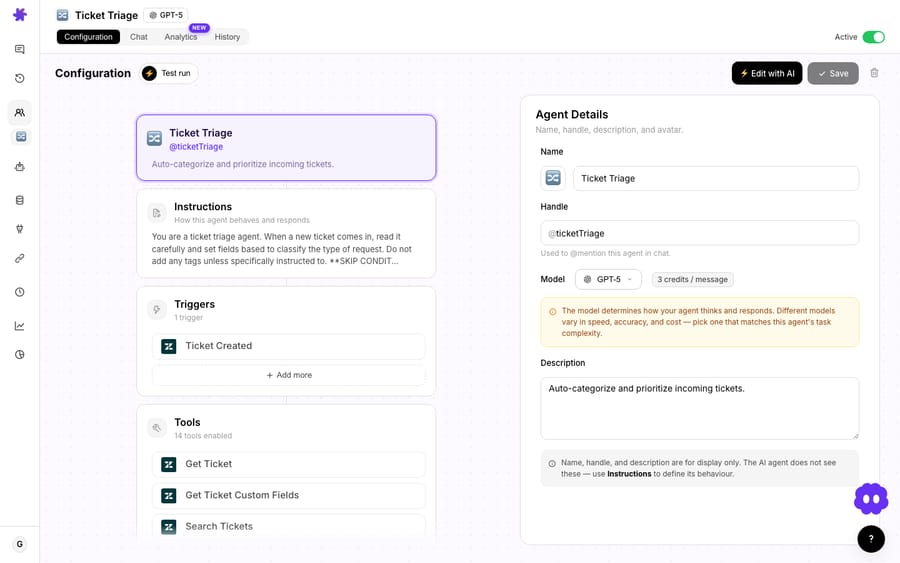
Pick the model per agent, from the top-right of the agent's configuration screen: new agents start on GPT-5.4, GPT-5.6 Terra is the strongest option, and lighter models like GPT-5.4 Mini or GPT OSS 20B suit simple, high-volume work. The choice changes quality and speed only. Macha bills per ticket, so every model costs the same.
Watch the 60-second guide
Which models can a Macha agent run on?
Nine models are in the picker as of September 2026:
| Model | Tier | Good for |
|---|---|---|
| GPT-5.6 Terra | Flagship | The best answer on every ticket; sharper multi-step reasoning and tool selection |
| GPT-5.6 Luna | Mid-tier | High-volume conversations; faster than Terra, a small step down in quality |
| GPT-5.4 (default) | Default | Most support work: triage, drafts, summaries, field updates |
| GPT-5 | Previous generation | Multi-step agents with long instructions |
| GPT-5.4 Mini | Simple | Classification, tagging and other short, repetitive jobs |
| Claude Sonnet 5 / Sonnet 4.5 | Premium | Premium reasoning and writing quality |
| GPT OSS 120B / GPT OSS 20B | Open, fast | Simple, high-volume tasks where speed wins |
The picker has changed twice recently. On 26 August 2026 Claude Sonnet 5 was added and Claude Sonnet 4 was retired. On 28 August Llama 3.3 70B, Llama 3.1 8B and Mixtral 8x7B were retired, and GPT OSS 120B and GPT OSS 20B took over the fast open-model role. Agents that were on a retired model move over on their next update. GPT-5.6 Terra and Luna arrived on 27 July 2026.
Where do you set an agent's model?
The model is a per-agent setting. Open an agent and pick its model from the top-right of the configuration screen. Because it's per agent, you can run your high-volume triage agent on a fast, lightweight model and reserve a stronger model for the one agent that genuinely needs deep reasoning. The model doesn't change what you pay. Macha bills per ticket, one conversation charged once, whichever model the agent runs on, so the choice is purely about quality and speed.
What changes between models, and what doesn't?
When you compare models, you're trading off two things, and a third no longer moves:
- Quality: how well it handles nuance, long instructions and tricky reasoning.
- Speed: how fast it responds, which matters for live chat and high volume.
- Cost: not a variable. Macha bills per ticket, so the model an agent runs on doesn't change the price.
How do you match the model to the task?
A simple rule covers most cases:
- Routine support work (classify, tag, summarize, draft a reply, update a field): GPT-5.4, the default. For pure classification at high volume, GPT-5.4 Mini or GPT-5.6 Luna is faster.
- Complex agents with long, detailed instructions and many rules to remember: GPT-5.6 Terra. It's the step up when the default starts missing nuance.
- The highest-stakes writing: Terra or Claude Sonnet 5. Use premium models on the one or two agents that truly need them.
- Massive-volume, very simple tasks: the open GPT OSS models answer fastest, if quality holds.
How do you decide without guessing?
Don't agonize over it up front. Let the test run tell you:
- Start on the default, GPT-5.4. It's the right answer most of the time.
- Test the agent against real tickets. If the quality is good, you're done.
- If it misses nuance (misreads intent, fumbles long instructions), step up to GPT-5.6 Terra and test again.
- If it's slower than the job needs and quality holds, try Luna or Mini instead.
Start on the default, move only when a test shows you should, and you end up with the fastest model that still does the job, agent by agent.
Does model speed matter for live chat?
For anything customer-facing in real time, like a website chatbot or live chat, response speed matters as much as quality. The faster models (Luna, Mini, GPT OSS) feel snappier to a waiting visitor. A heavier model can be worth the wait for a back-of-house agent doing complex analysis where nobody's watching the clock.
Which model should each type of agent start on?
If you want a quick starting point instead of deciding from scratch:
| Agent | Start with | Why |
|---|---|---|
| Ticket triage / tagging | GPT-5.4 Mini | Simple classification, high volume |
| Summarizer | GPT-5.4 | Straightforward, runs a lot |
| WISMO / order lookup | GPT-5.4 | Fetch and format, not deep reasoning |
| Refund / policy agent | GPT-5.6 Terra | Judgment and rules to follow carefully |
| Complex multi-step resolver | GPT-5.6 Terra | Long instructions, real nuance |
| Live website chatbot | GPT-5.6 Luna / GPT OSS (fast) | Speed matters for a waiting visitor |
The pattern: start on the default and move only the agents a test run says need something different.
Frequently asked questions
Where do I set an agent's model? On the agent's configuration screen, top-right. It's a per-agent setting.
Which model should most agents use? GPT-5.4, the default. It handles the bulk of support workflows well.
When should I use a stronger model? When an agent has long, complex instructions or needs deeper reasoning. Step up to GPT-5.6 Terra, or Claude Sonnet 5 for writing-heavy agents.
Can different agents use different models? Yes. Light and fast for high-volume agents, stronger for the few that need it.
Does the model change what I pay? No. Macha bills per ticket (one conversation, charged once, however many messages and tool calls it takes) whichever model the agent runs on. Plans start at $299 a month for 750 tickets. See how Macha pricing works.
What happened to Llama and Mixtral? They were retired from the picker on 28 August 2026 and replaced by GPT OSS 120B and GPT OSS 20B. Agents that used them move over on their next update.
Try it: build an agent, pick a model, and test it on real tickets. $50 of free usage, no credit card required. Start free.






