





 Shopify
 Stripe
 Slack
Slack Notion
 Google Workspace
 Confluence

Can AI Read Image Attachments on Zendesk Tickets? How Macha's Vision Works


Many support tickets carry the real information in a screenshot, a product photo or a receipt, and a text-only AI agent sees only a filename. Macha agents read those images on Zendesk tickets with a vision model and then act on what they see.
Key takeaways
- Macha's Read Attachment tool reads JPEG, PNG, GIF and WebP attachments on Zendesk tickets by base64-encoding each image and sending it to a vision-capable model.
- Image vision shipped on the Zendesk connector on April 17, 2026, while PDF, DOCX, XLSX and CSV files go through text extraction instead of vision.
- GPT-5 Mini and GPT-4o Mini were retired on April 23, 2026, so image-reading agents should run on GPT-5.4 Mini or a Claude Sonnet model.
- Groq models return a not supported message on images instead of failing, and since August 28, 2026 the Groq options are GPT OSS 120B and GPT OSS 20B.
- Image vision adds no separate charge, because Macha bills per ticket however many images the agent reads, with plans from $299 a month for 750 tickets.
Yes: a Macha agent reads JPEG, PNG, GIF and WebP attachments on Zendesk tickets through its Read Attachment tool, which downloads the image, base64-encodes it and sends it to a vision-capable model. The feature shipped on April 17, 2026. The agent can describe a screenshot, read the text inside an image, identify a product or parse a receipt, and then do what it would do with any ticket: search your knowledge base, fill a field, reply, or change the status. It adds no separate charge, because Macha bills per ticket however many images the agent reads.
| Question | Answer |
|---|---|
| Image formats read with vision | JPEG, PNG, GIF, WebP |
| Files read by text extraction instead | PDF, DOCX, XLSX, CSV |
| Tool to add | Read Attachment |
| Help desk | Zendesk (shipped April 17, 2026) |
| Models at launch | GPT-5.4 Mini, GPT-5 Mini, GPT-4o Mini, Claude Sonnet 4.5, Claude Sonnet 4 (GPT-5 Mini and GPT-4o Mini retired April 23, 2026) |
| Extra cost | None; billed per ticket |
Macha isn't a Zendesk replacement — it's an AI agent layer that sits on top of the Zendesk you already run. Image vision is one of the tools those agents can use, alongside reading tickets and custom fields, posting replies, and updating ticket state.
What does "AI vision" mean for a Zendesk attachment?
There are two very different things people mean when they say an AI "reads an attachment," and it's worth being precise, because Macha's Read Attachment tool does both:
- Document text extraction — for PDFs, DOCX, XLSX, and CSV files, the tool pulls out the text content so the model can read it. This is closer to classic parsing.
- Image vision — for actual images (JPEG, PNG, GIF, WebP), the tool downloads the file, base64-encodes it, and passes it to the model as visual content. The model isn't just OCR-ing words; it's looking at the picture.
That second path is what shipped on April 17, 2026. The distinction matters because vision lets the agent reason about things OCR can't: what's broken in this photo, which product is this, does this screenshot show a payment-failed state or a network error. According to Macha's own connector capabilities, an agent with vision can:
- Describe a screenshot — "the customer's screenshot shows a 402 Payment Required error on the checkout page."
- Read text inside an image — pull the order number off a photographed invoice, or the error string from a screenshot.
- Identify a product — match a photo to a SKU or product line.
- Parse a receipt — extract date, total, and line items from a snapshot of a receipt.
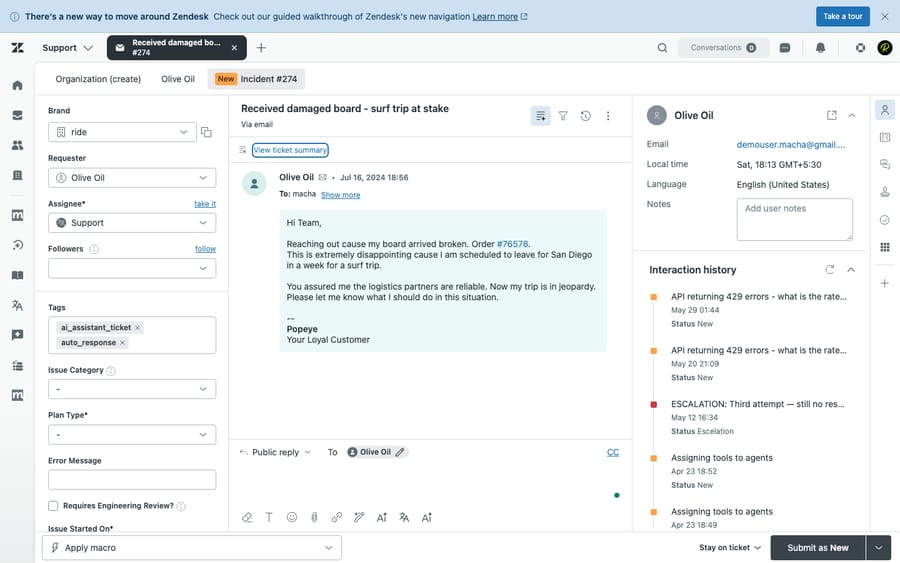
How does an agent read an image, step by step?
You don't configure vision as a separate feature — it rides on the Read Attachment tool. The flow looks like this:
- A trigger fires. An autonomous agent picks up a ticket — say, on New Ticket or Customer Reply. (Macha's Zendesk connector ships triggers for new tickets, customer replies, status and priority changes, assignment, and closes.)
- The agent notices an attachment. Reading the ticket surfaces the attached files.
- The agent calls Read Attachment. For an image, the tool downloads the file from Zendesk, base64-encodes it, and sends it to the model as visual content.
- The model "sees" the image and returns its analysis — a description, the extracted text, a product match — as part of the agent's reasoning.
- The agent acts. It uses what it saw the same way it'd use anything else: searching your Help Center, drafting a reply, setting a custom field, or routing the ticket.
To enable it, you add the Read Attachment tool to the agent from the tool picker — the same place you grant any other capability.

In the dashboard, the result is visible too: autonomous conversation tool cards render an image thumbnail preview of what the agent looked at (with a graceful broken-image fallback), so when you audit a conversation you can see the picture the model reasoned over — not just a line of text claiming it did.
Which models support image vision?
Vision is a model capability, not a universal one, so the model you pick for the agent matters. The April 17 release notes named five vision-capable models, and the line-up has changed twice since:
| Model | Vision at launch | Status in September 2026 |
|---|---|---|
| GPT-5.4 Mini | Yes | Available; 400K context window (3x GPT-5 Mini) |
| GPT-5 Mini | Yes | Retired April 23, 2026; agents moved to GPT-5.4 Mini |
| GPT-4o Mini | Yes | Retired April 23, 2026; agents moved to GPT-5.4 Mini |
| Claude Sonnet 4.5 | Yes | Listed in Macha's model line-up |
| Claude Sonnet 4 | Yes | Listed in Macha's model line-up |
| Groq models | No | Return a "not supported" message rather than failing. Since August 28, 2026 the Groq options are GPT OSS 120B and GPT OSS 20B |
The practical takeaway: if image reading matters to a given agent, point it at GPT-5.4 Mini or a Claude Sonnet model. The release notes don't list vision for the newer GPT-5.6 Terra and Luna models (added July 27, 2026), so test one with a screenshot ticket before relying on it. If you've put a Groq model on an agent for speed and it hits an image, it won't crash: it tells you vision isn't supported on that model, and you can swap.
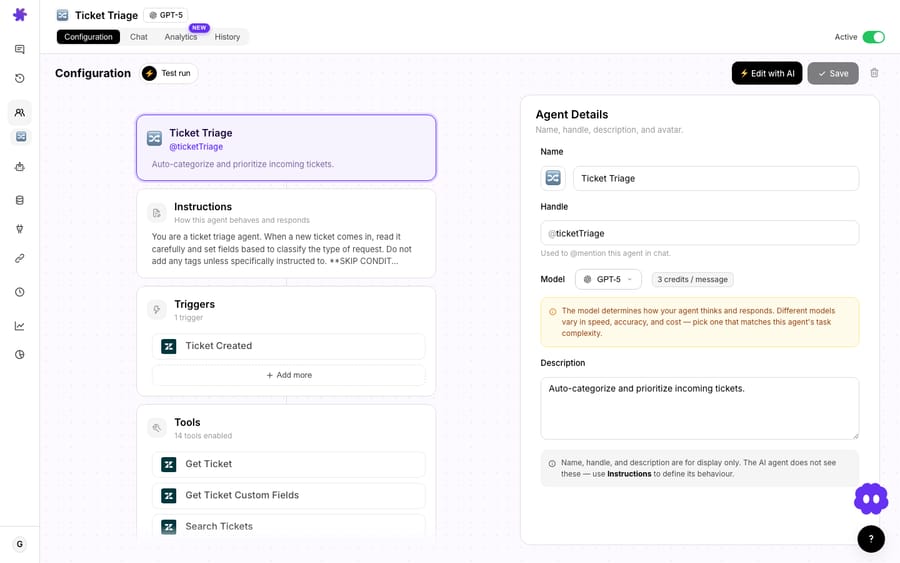
GPT-5.4 Mini shipped the same day as vision and is a sensible choice for this work: it has image-vision support and a 400K context window, which helps when an image lands alongside a long ticket thread and a stack of custom fields. It is also where agents on the retired GPT-5 Mini and GPT-4o Mini were moved.
What does vision look like on an "it arrived broken" ticket?
Picture a returns agent built on Macha, sitting on top of your Zendesk. A ticket comes in:
"My order arrived damaged — photo attached. Order #013724827106."
Here's what a vision-enabled agent can do that a text-only one can't. It reads the ticket and the custom fields (Macha's Get Ticket Custom Fields tool resolves field labels, so it sees Order number: 013724827106 instead of a raw field ID). It calls Read Attachment on the photo, and the model sees a cracked casing rather than taking the customer's word for it. With both the visual confirmation and the order number in hand, it can search your returns policy in the Help Center, draft a reply that references the specific damage, and tag the ticket for the returns queue — or, if you've gated actions, leave a draft for a human to approve.
The same shape applies to receipts ("parse the total and date, match it to the order"), error screenshots ("identify the error state, link the right troubleshooting article"), and product photos ("which model is this?"). The win isn't OCR for its own sake — it's that the agent already has the rest of the ticket context and the tools to act on what it sees.
How does this compare to OCR apps and DIY vision workflows?
If you search the Zendesk Marketplace, you'll find a healthy set of OCR apps — Knots' OCR Scanner (PDF, JPG, JPEG, PNG and HEIC, typed or handwritten, 150+ languages), "Extract Text From Image," and classification apps that OCR attachments. You'll also find DIY recipes — n8n and GrowwStacks-style workflows that wire GPT-4o Vision to Zendesk and Jira by hand.
Those tools are good at what they do, and for a pure "turn this scanned form into searchable text" job, a dedicated OCR app may be all you need. The difference is one of scope:
- OCR apps mostly extract text and drop it into the ticket. Reasoning and action are still on a human (or a separate automation).
- DIY vision workflows can reason, but you own the glue — the webhook, the image hand-off, the error handling, the prompt — and the result still has to be routed back into your support flow.
- A Macha agent treats vision as one tool inside an agent that already reads the ticket and custom fields, searches your knowledge, and takes Zendesk actions. The image is just another input to a decision the agent was already going to make.
In other words, OCR answers "what does this image say?" A Macha agent answers "what should we do about this ticket, given what the image shows?"
When should you not rely on image vision?
Image vision is genuinely useful, but it isn't magic, and a few honest caveats keep you out of trouble:
- Formats are specific. Image vision covers JPEG, PNG, GIF, and WebP. A PDF or DOCX goes through the text-extraction path instead, not vision — so a photographed receipt saved as a PDF behaves differently than the same receipt as a PNG.
- Model choice is load-bearing. Put image-reading agents on a vision-capable model. A Groq-powered agent will report "not supported" rather than read the picture, and an agent still pointed at a model that was later retired will have been moved to GPT-5.4 Mini.
- It isn't free, but it isn't a surcharge either. Vision runs against the model like any other step in an agent's run. Macha bills per ticket — one conversation, charged once however many images the agent reads, and the model you pick doesn't change the price — so what a high-volume trigger costs you is tickets, not calls. Plans start at $299 a month for 750 tickets (see pricing for the tiers).
- Vision is not verification. A model describing a receipt is not a fraud check, and "the photo looks damaged" is not a warranty adjudication. For anything with money or policy on the line, gate the agent's action behind a human, or have it draft rather than send.
- Hard or low-quality images degrade gracefully, not perfectly. Blurry photos, tiny text, or handwriting will sometimes be misread. Treat extracted values (order numbers, totals) as a strong hint to confirm, not gospel — especially when the agent will key off them automatically.
A reasonable rollout: start vision on a triage or drafting agent where a human still approves, watch the conversation tool cards and the thumbnails to see what the model actually saw, and only then promote it to autonomous replies for the narrow cases where it's clearly reliable.
Will image vision come to other help desks?
Vision shipped first on the Zendesk connector, but it's built on a shared image utility — a reusable download-and-encode helper. Per the release notes, future connectors like Freshdesk and Slack can add image reading "with a single function call." Macha now runs on Zendesk, Freshdesk, Gorgias, Front, HubSpot or Intercom, and its Freshdesk connector already extracts text from PDF, DOCX, XLSX, CSV and TXT attachments (March 15, 2026). Image vision itself is documented only for Zendesk so far, but the same capability is designed to extend to the rest of Macha's helpdesk and comms connectors without re-solving the plumbing each time.
FAQ
What image formats can a Macha agent read? JPEG, PNG, GIF, and WebP are handled through AI vision. PDF, DOCX, XLSX, and CSV are read through text extraction — the same Read Attachment tool, a different path.
Which models support image vision? The April 17, 2026 launch named GPT-5.4 Mini, GPT-5 Mini, GPT-4o Mini, Claude Sonnet 4.5 and Claude Sonnet 4. GPT-5 Mini and GPT-4o Mini were retired on April 23, 2026, so pick GPT-5.4 Mini or a Claude Sonnet model today. Groq models don't support vision and return a "not supported" message instead of failing.
Is this OCR? It's more than OCR. The agent can read text inside an image (OCR-style), but because it sends the image to a vision model, it can also describe a scene, identify a product, or interpret a screenshot's state — not just transcribe characters.
Does it cost extra? No. There's no separate "vision add-on" — it's part of the agent running, and Macha bills per ticket: one conversation, charged once however many images the agent reads. See the pricing page for current plans.
Do I need to turn vision on separately? No. Add the Read Attachment tool to the agent and pick a vision-capable model. When the agent meets an image attachment, it uses vision automatically.
Can I see what the agent looked at? Yes. Autonomous conversation tool cards show a thumbnail preview of the image the agent analyzed, so you can audit exactly what it saw.
How do you try image vision on your own Zendesk?
If a meaningful slice of your queue is screenshots, photos, and receipts, give one agent vision and watch it stop punting on "see attached." Start a free trial ($50 of usage, no credit card required), connect Zendesk, add the Read Attachment tool to an agent on GPT-5.4 Mini or a Claude Sonnet model, and send yourself a test ticket with a screenshot. The Zendesk integration page and the docs cover the rest of the connector's tools and triggers.
Written by Abbas (Customer Support & AI, Macha) · Reviewed by Ankeet Guha (Co-founder & CTO) · Published 2026-06-24 · Last updated 2026-09-24.






