





 Shopify
 Stripe
 Slack
Slack Notion
 Google Workspace
 Confluence

How Do You Run AI Agents on a Schedule? Macha Scheduled Triggers (Hourly, Daily, Cron)


Macha's Scheduled Run trigger fires one of your agents hourly, daily or on a custom cron expression, with a 1 hour minimum interval and a cap of 24 runs a day. It suits clock-driven support work like morning reports and backlog sweeps, not reactions to new tickets.
Key takeaways
- Macha's Scheduled Run trigger runs an agent automatically on an hourly, daily, or custom cron schedule, with no event or human needed to start it.
- Macha polls due schedules on a 60-second loop, so a scheduled run fires within about a minute of its scheduled time.
- Macha scheduled triggers have a 1 hour minimum interval, a cap of 24 runs per day, and a limit of 3 concurrent scheduled runs per organization.
- A Macha scheduled trigger auto-disables after 5 consecutive failures and emails the owner, and a hung run has its lock cleared after 30 minutes.
- Macha includes scheduled triggers on every plan and bills about $0.40 a ticket from $299 a month, with setup by the Macha team and a dedicated success manager included.

A Macha Scheduled Run trigger runs one of your agents automatically on a clock: hourly, daily, or a custom cron expression, with a 1 hour minimum interval and at most 24 runs a day. The agent does its full job on every tick (reads data, calls its tools, takes actions, posts wherever you told it to) with no human in the loop.
Most agent work is reactive: a ticket lands, a customer messages, a webhook fires. But plenty of support work is triggered by the clock instead. Someone has to post the morning queue report, sweep the backlog for tickets that went quiet, and check every hour whether the SLA breach list is growing. Those jobs have no inbound event. They just need to happen on a cadence.
| Cadence | Example | Typical job |
|---|---|---|
| Hourly | 0 * * * * (every hour) | SLA breach sweep, unassigned-urgent check |
| Daily | 0 9 * * * (every day at 09:00) | Morning metrics report to Slack |
| Custom cron | 0 9 * * 1-5 | Weekday-only briefing, monthly rollup |
What Macha is shapes how scheduled runs behave: Macha is an AI agent layer that sits on top of your existing help desk (Zendesk, Freshdesk, Gorgias, Front, HubSpot or Intercom) and connects your commerce, knowledge, and comms tools, like Stripe, Shopify, Slack, Notion, Confluence and Google Workspace. A scheduled run isn't a hosted script in a vacuum; it's one of your configured agents, with its instructions, tools, and knowledge, fired on a timer.
What is a scheduled trigger in Macha?
Every Macha agent has a Triggers panel: "webhooks that automatically run this agent when external events occur." Most triggers are event-driven: a new Zendesk ticket, a Slack mention, a custom webhook. The Scheduled Run is the one trigger driven by time instead of an event.
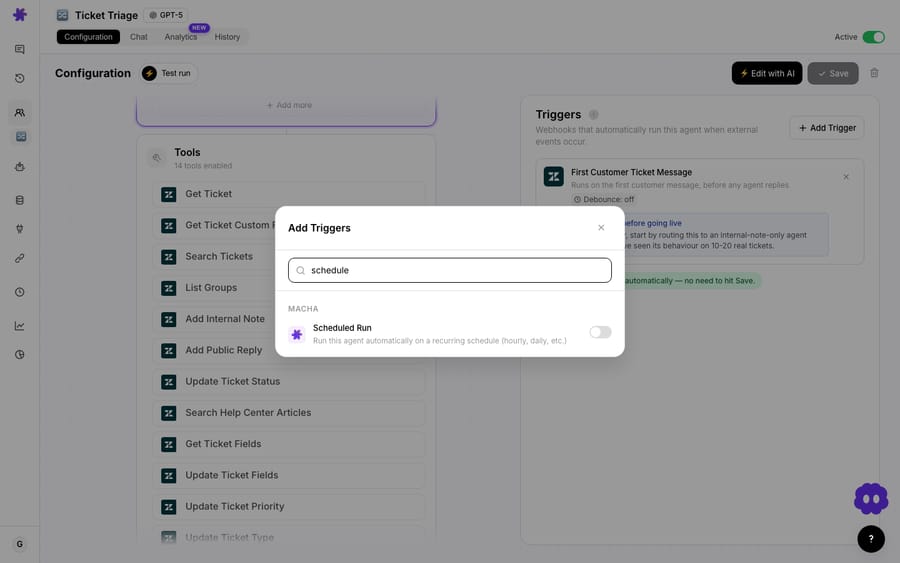
You add it the same way you add any trigger: open the agent's Triggers panel, click Add Trigger, and pick Scheduled Run from the Macha group. It then runs the agent on the cadence you set. There's no separate "scheduler agent" to build; any agent you've already configured can be put on a clock.
Scheduled runs also get their own home. The Schedules page collects every recurring run across your organization in one place, so you can see what's on autopilot without opening each agent.
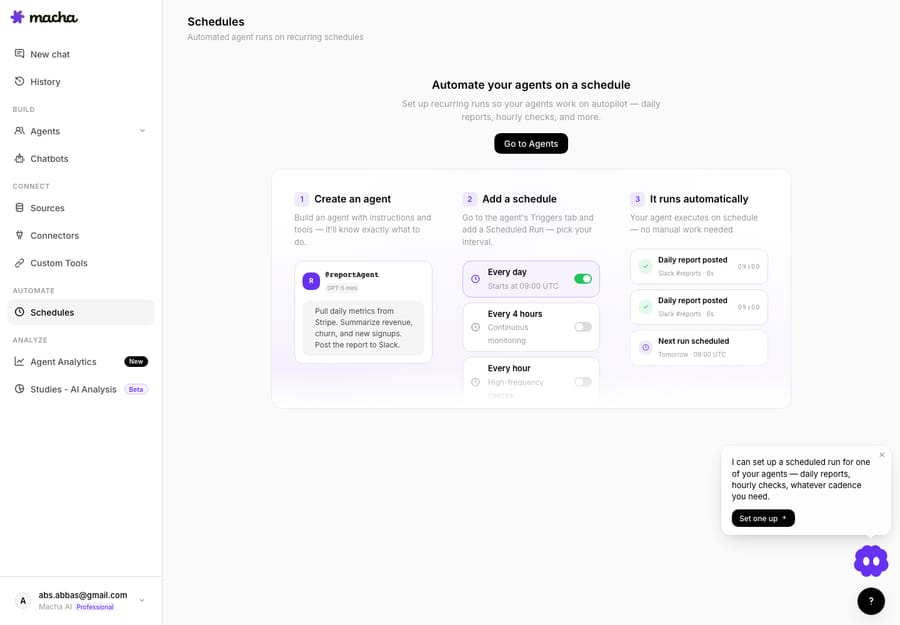
The model the page lays out is deliberately simple: create an agent → add a schedule → it runs automatically. You build the agent once with the instructions and tools that make it good at a job, attach a Scheduled Run with the cron expression you want, and from then on Macha executes it on schedule with no manual work.
Which cadences can you choose: hourly, daily, or custom cron?
The cadence options map to how people think about recurring work:
- Hourly (
0 * * * *): for high-frequency checks like SLA breach sweeps, "anything urgent sitting unassigned?" pulses, and queue-depth pings. - Daily (
0 9 * * *): the workhorse, for a morning metrics report, an end-of-day summary, or a stale-ticket cleanup. The example schedule on the page kicks off every day at 09:00 UTC. - Custom cron: when neither fits. Cron expressions give you weekday-only runs (
0 9 * * 1-5), every six hours (0 */6 * * *), or first-of-the-month rollups (0 1 1 * *). If you've written a crontab before, this is the same vocabulary.
Under the hood Macha runs a 60-second polling loop that checks which schedules are due and dispatches them, so a run fires within about a minute of its scheduled time, not on a slow batch cycle.
What jobs should you put on a schedule?
The point of a scheduled trigger is to automate a recurring output. A few patterns that earn their keep:
The daily report. An agent that, every morning, pulls yesterday's numbers from your connected tools (Stripe revenue, churn, new signups, or your help desk's ticket volume and CSAT), summarizes them, and posts the digest to a Slack channel. This is the canonical example, and it's exactly the @reportAgent shown on the Schedules page: "Pull daily metrics from Stripe. Summarize revenue, churn, and new signups. Post the report to Slack."
The backlog sweep. An hourly agent that searches your help desk for tickets that have waited too long, or are about to breach SLA, and flags them, re-prioritizes them, or pings the right channel. Because Macha lives on top of your help desk, the agent uses the same ticket tools it uses on live tickets.
The knowledge-freshness check. A weekly run that reads your help center or Confluence space, finds articles that reference outdated facts, and drafts updates, turning documentation upkeep from a thing nobody does into a thing that happens on a cron.
The stale-ticket cleanup. A daily pass that closes or follows up on tickets that have gone quiet past your policy window, with a templated check-in reply.
One detail that makes these useful: when an agent runs autonomously via a trigger, its sub-agents can perform write operations like replies and status updates, whereas in interactive chat they stay read-only. A scheduled run is autonomous, so a well-scoped agent can actually do the work, not just describe it.
What guardrails limit scheduled runs?
A recurring AI job that can take actions is exactly the kind of thing that goes wrong quietly: it runs too often, costs too much, or loops on an error at 3 a.m. with nobody watching. Macha ships scheduled triggers with hard limits to stop that.
| Guardrail | Limit | Why it exists |
|---|---|---|
| Minimum interval | 1 hour | Stops "every minute" runs that would chew through your tickets and hammer your tools |
| Daily run cap | 24 runs/day | Bounds the per-agent volume even on the tightest cadence |
| Org concurrency | 3 concurrent runs | Prevents a pile-up of scheduled jobs from saturating your account |
| Auto-disable | after 5 consecutive failures | A broken run can't loop forever; it shuts itself off |
| Stale-lock cleanup | 30 minutes | A run that hangs releases its lock so the schedule isn't stuck |
The auto-disable behavior is the safety net that matters most. If a scheduled trigger fails five times in a row (a tool credential expired, an API is down, the instructions hit an edge case), Macha disables the trigger and emails you, rather than letting it keep firing and failing. You fix the cause and re-enable it.
A small design choice: the debounce setting that exists on event-driven triggers is hidden on scheduled ones. Debounce delays a run to coalesce a burst of events; a clock-driven trigger has no burst to coalesce, so the control isn't shown.
Do scheduled triggers cost extra?
No. Scheduled triggers are included on every plan, as is every other feature. There's no scheduling fee either: Macha bills per ticket, one conversation charged once however many steps the agent takes inside it and whichever model it runs on, so putting an agent on a clock adds nothing to the unit price. Plans start at $299 a month for up to 750 tickets; see the pricing page for the full tiers.
When shouldn't you use a scheduled trigger?
Scheduling is easy to over-reach with.
Don't cron what should be event-driven. This is the most common mistake, and the wider automation community is blunt about it: "How soon does your agent need to know if data changed right now? If the answer is 'immediately', use a webhook, not a cron" (The Daily Agent). If you want an agent to respond to a new ticket, use the New Ticket trigger, not an hourly poll that scans for new tickets. The event trigger is faster, cheaper, and doesn't waste 23 empty runs a day. Reach for a schedule only when the work is time-based (a report, a periodic sweep) rather than reaction-based.
Don't expect minute-level precision. The 1-hour minimum interval is a real floor. If you need something every few minutes, scheduled triggers aren't the tool, and most "every few minutes" needs are event-driven in disguise.
Mind the limits before you design. The 24-runs-a-day cap and the org-wide limit of three concurrent runs go quickly if every nice-to-have report gets its own schedule. Consolidate where you can: one daily "morning briefing" agent that posts several sections beats three separate daily agents.
Test the agent on real data first. A scheduled run is autonomous, so a misconfigured agent makes its mistake unsupervised, and if it can write, it writes the mistake into your help desk. Use Macha's Test Run to fire the agent against a real ticket or record from its config page before you put it on a clock, and start any write-capable scheduled agent in a low-blast-radius mode (internal notes only, a test Slack channel) until you've watched a few runs.
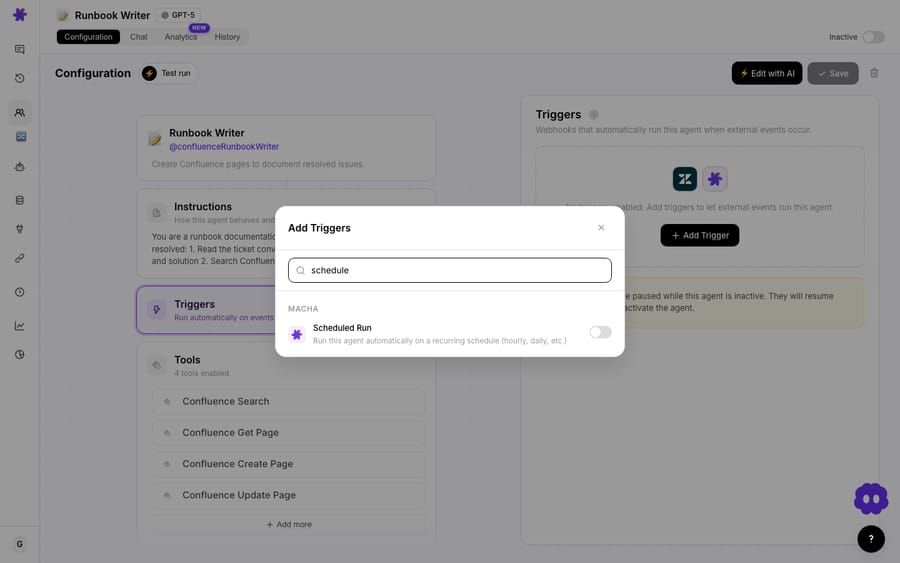
One more operational note: when you toggle an agent off, its triggers, scheduled ones included, are paused, not deleted. The schedule stops firing while the agent is inactive and resumes when you switch it back on, config intact.
How do Macha's scheduled triggers compare with other tools?
Scheduling agents on a cron isn't unique to Macha. Relevance AI, MindStudio, V7 Go, and others let you run agents on recurring schedules, and general-purpose tools like Claude Code can be put on a crontab too. What differs is what the agent is wired into. A scheduled Macha agent isn't a standalone script that has to be told how to reach your help desk; it's already connected to your help desk tickets, Stripe, Slack, and Confluence through the same connectors your live agents use, with the same instructions and knowledge. The cron is the easy part. The value is that the thing firing on the cron already knows how to do support work in your stack. It fits teams on Zendesk, Freshdesk, Gorgias, Front, HubSpot or Intercom who already run agents on live tickets and want the same agents doing recurring reports and sweeps. Macha also differs in who does the work: the Macha team builds and tests your agents on your existing help desk, on the trial and every plan, at about $0.40 a ticket, and a dedicated success manager handles your changes, such as a new scheduled job or an instruction edit. (See the full feature set and the triggers documentation for every trigger type.)
FAQ
What cadences can a scheduled trigger run on? Any cron expression that fires at most hourly: hourly (0 * * * *), daily (0 9 * * *) or custom (0 9 * * 1-5). The minimum interval is 1 hour, and a single trigger is capped at 24 runs per day.
How fast does a run fire after its scheduled time? Macha polls due schedules on a 60-second loop, so a run dispatches within about a minute of its scheduled time.
What happens if a scheduled run keeps failing? After 5 consecutive failures the trigger auto-disables and Macha emails you, so a broken job can't loop indefinitely. You fix the cause and re-enable it. A run that hangs has its lock cleared after 30 minutes.
Can a scheduled agent take real actions, or only read? It can take actions. Scheduled runs are autonomous, and sub-agents gain write permissions in autonomous mode, so a scoped agent can reply, update tickets, or post to Slack on schedule. Test it first.
How many scheduled triggers do I get? They're included on every plan. The limits that bite are operational: a one-hour minimum interval, 24 runs a day, and at most 3 scheduled runs at once across your org. Billing is per ticket, the same as any other agent activity. See the pricing page.
When should I use a webhook instead of a schedule? Whenever the work is a reaction to an event: a new ticket, a message, an external webhook. Use a schedule only for time-based work like reports and periodic sweeps.
How do you put your first agent on a clock?
Take an agent you already trust on live work, give it a Scheduled Run, and let it post your morning queue summary to Slack tomorrow at 9. Start a free trial ($50 of usage, roughly 125 tickets, no credit card and no time limit), connect your help desk, and read the triggers docs for the full walkthrough, or browse more capability deep-dives on the blog.
Written by Abbas (Customer Support & AI, Macha) · Reviewed by Ankeet Guha (Co-founder & CTO) · Published 2026-06-24 · Last updated 2026-09-24.






