





 Shopify
 Stripe
 Slack
Slack Notion
 Google Workspace
 Confluence

What Is Relevance AI? Pricing, Features and Alternatives (2026)


Relevance AI is a no-code platform for building teams of AI agents, with documented self-serve plans at $29 and $349 a month and custom Enterprise pricing. Support teams can use it for tickets, but native Zendesk triggers, agent evaluations and SSO all sit behind Enterprise.
Key takeaways
- Relevance AI is a no-code platform for building AI agent Workforces, and its pricing docs list Pro at $29 a month for 2,500 Actions and Team at $349 a month for 7,000 Actions.
- Relevance AI bills on two meters: Actions, counted each time an agent runs a tool at $80 per 1,000 extra, and Vendor Credits for model spend at $20 per 10,000.
- Relevance AI's public pricing page shows only Enterprise, the Free plan is closed to new signups, and native Zendesk triggers require the Enterprise plan.
- Relevance AI raised a $24M Series B in May 2025 led by Bessemer Venture Partners, taking total funding to $37M.
- At 3,000 tickets a month, Relevance AI's Team plan works out to about $0.27 a ticket in our model if your own team builds and tunes the agents; Macha's $1,199 plan, about $0.40 a ticket, includes the build by the Macha team and a dedicated success manager.

Relevance AI is a no-code platform for building teams of AI agents, sold mostly for sales and go-to-market work, and its pricing docs list Pro at $29 a month for 2,500 Actions, Team at $349 a month for 7,000 Actions, and custom Enterprise pricing (checked September 24, 2026). The public pricing page shows only Enterprise, the Free plan is closed to new signups, and native Zendesk triggers need Enterprise.
| Question | Short answer |
|---|---|
| What it is | No-code builder for AI agents and multi-agent Workforces |
| Company | OnSearch Pty Ltd, founded 2020 in Sydney; $37M raised, last round a $24M Series B in May 2025 |
| Self-serve plans | Pro $29/mo ($19 annual), Team $349/mo ($234 annual), per the pricing docs |
| Billing meters | Actions (tool runs) plus Vendor Credits (model spend at wholesale) |
| Free plan | Retired for new signups |
| Zendesk | 6 actions and 6 triggers; native triggers are Enterprise-only |
| Best fit | Ops and GTM teams with someone to build and tune agents |
People search for Relevance AI for two different reasons. Revenue and operations leaders want a general agent builder that can prospect, enrich accounts and prep meetings. Support leads have heard it can also resolve tickets and want to know whether a horizontal agent platform is a sensible way to automate a help desk. We build AI agents for customer service on top of existing help desks, so we read this product mostly from the second seat, and we'll say where that colors the verdict.
What is Relevance AI?
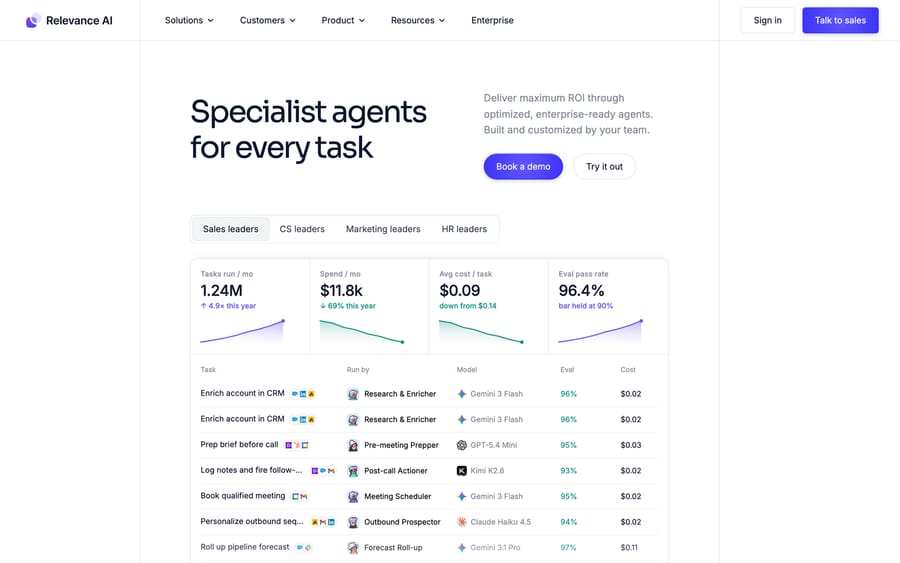
Relevance AI sells what it calls an "AI Workforce": teams of specialist agents that each own a narrow job and hand work to one another. The homepage headline is "Specialist agents for every task," and the example agents it leads with are almost all revenue roles: Research & Enricher, Pre-meeting Prepper, Post-call Actioner, Outbound Prospector, Deal Reviewer and Proposal Builder.
The company trades legally as OnSearch Pty Ltd, and some third-party profiles still describe it as an analytics platform for unstructured data, which is what it was before the pivot to agents. Tracxn lists a 2020 founding in Sydney. Bessemer, which led the last round, profiles the three founders as Daniel Vassilev, Jacky Koh and Daniel Palmer, with Vassilev and Koh as co-CEOs. In May 2025 the company raised a $24M Series B led by Bessemer Venture Partners, with King River Capital, Insight Partners and Peak XV participating, taking total funding to $37M. At the time it reported 40,000 agents created on the platform in January 2025 alone and a team of about 80 across San Francisco and Sydney. We found no later round announced as of September 2026, and Tracxn puts headcount at around 114.
How did we research this?
Everything about the product comes from Relevance AI's own documentation, integrations directory, changelog and customer pages, all read on September 15, 2026, and we captured the plan-comparison tables from the pricing docs the same day rather than retyping them. We checked the prices for every general builder in the comparison below against its live pricing page on that date, and rechecked the Relevance pricing docs, Chatbase, Gumloop, n8n, Lindy and Zapier on September 24, 2026, when none had changed. For user evidence we read Capterra, Product Hunt and the r/AI_Agents thread that ranks for this keyword; G2 blocks both automated fetching and a headless browser, so we report its rating without quoting the reviews behind it. The per-ticket cost model further down is our arithmetic, not a Relevance figure, and every assumption in it is stated.
Customer logos on relevanceai.com include Canva, Databricks, Confluent, Autodesk, Lightspeed Commerce, Rakuten Advertising, Freshworks, Qualified, ThoughtSpot, Send Payments and Zembl. The press around the Series B also named Activision and SafetyCulture. The Canva story describes agents for preparation, summarization, enrichment and scoring that surface in Slack and Salesforce. It's a go-to-market deployment, and it doesn't publish outcome numbers.
How do Relevance AI's agents work?
Four building blocks do almost all the work. Understanding them is the fastest way to judge whether a support use case will be easy or a project.
Agents are LLM-driven workers with a prompt, a set of tools and optional knowledge. Relevance's agent documentation describes two operating modes: autopilot, where the agent completes the task on its own, and human in the loop, where it asks for input or approval. Agents start work from integration triggers, scheduled triggers, custom webhooks, direct API calls or the chat interface.
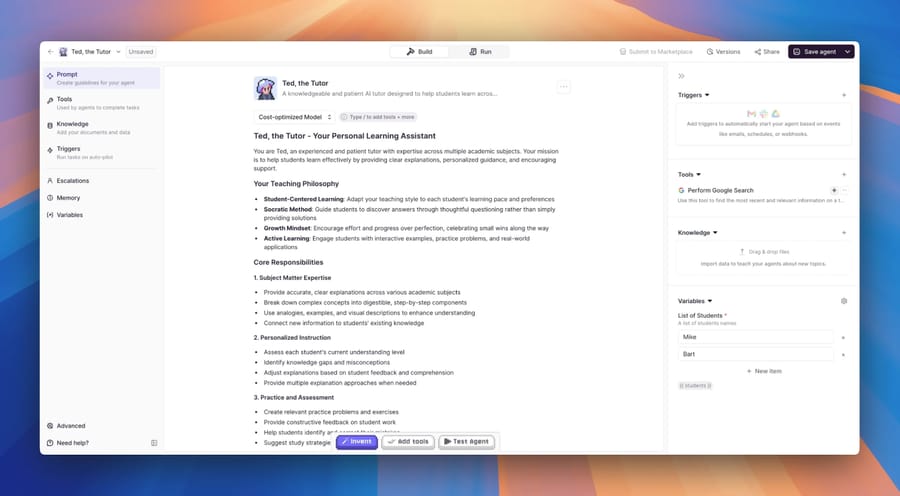
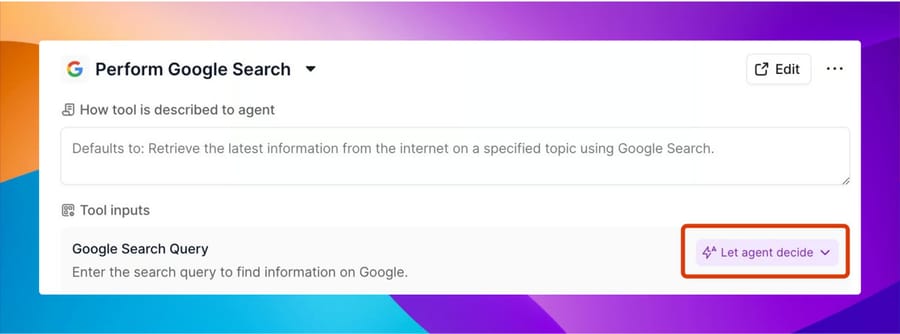
Tools are the actions an agent can take. Each one follows the same pattern of inputs, a chain of steps, and outputs. A step can be an LLM prompt, an API call, a pre-built integration step or a Python code block, built in a visual editor. The agent reads each tool's name and description to decide when to call it, so tool descriptions end up doing a lot of the routing. Relevance surfaces this directly: each tool attached to an agent has a "How tool is described to agent" box, and each input can be pinned to a fixed value or left as "Let agent decide." Tools are reusable, so you build a "look up order" tool once and give it to five agents.
Knowledge is Relevance's retrieval system. You upload CSV, PDF, Excel, JSON or audio files, crawl websites, or sync from Google Drive, SharePoint, Notion and, since May 2026, Confluence. When you attach a knowledge base to an agent you pick between "Add all to prompt," which stuffs the whole set into every run, and "Allow agent to search," which retrieves only the relevant chunks. The first is simple and expensive on large sets. The second is cheaper and depends on retrieval quality.
Workforces put several agents on a visual canvas so one can hand off to another. A support Workforce might route a ticket from a triage agent to a billing agent or an escalation agent, each with its own tools and knowledge.
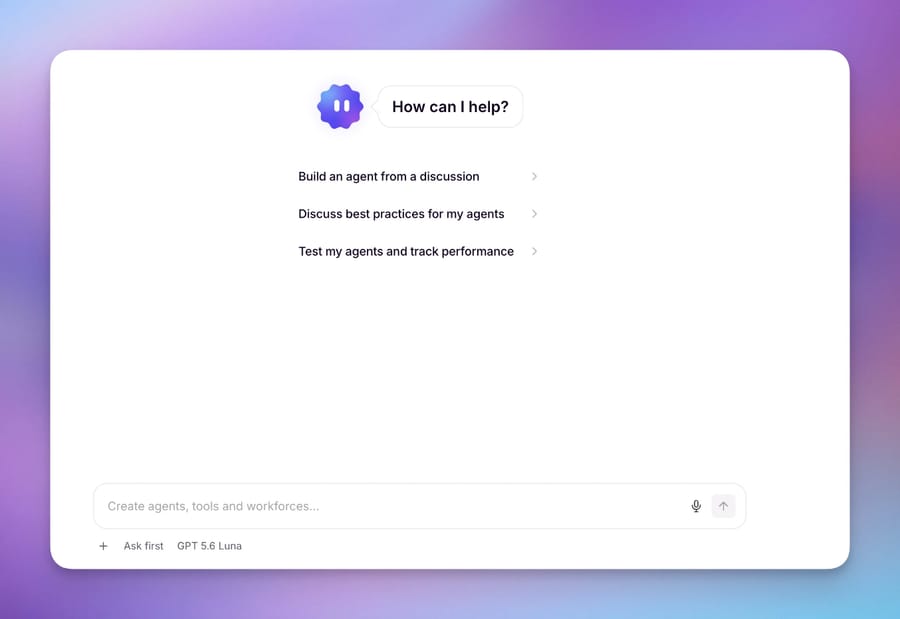
On top of those sits Invent, which Relevance describes as a "forward deployed agent." You describe a business process in plain language and Invent drafts the agents, tools, triggers and Workforces, defines the checks each agent must pass, then samples live runs and proposes fixes when quality drops. A September 3, 2026 changelog entry expanded it to create and edit knowledge tables and evals with project-wide context. Invent's own approval settings are granular: run actions default to Auto, create and edit actions to Ask, and destructive actions such as deleting or publishing to Always ask.
Relevance runs models from several providers. A June 12, 2026 changelog entry added Gemini 3.5 Flash with a 1M-token context and configurable reasoning levels, and the plan comparison shows bring-your-own-LLM on all three plans.
The API, webhooks and MCP
A support deployment usually lives or dies on how the platform connects to systems that aren't in the integrations directory, and this is the part most Relevance write-ups skip.
Four trigger types start an agent without a native integration. Webhook Triggers give you a unique URL that any system can POST to; you map payload fields into a message template using double-brace variables, map a field to a Thread ID so follow-ups land in the same conversation, and map another to a unique ID so the same event isn't processed twice. The docs list "trigger responses when new support tickets are created" as a named use case, which is how you'd wire Zendesk on Pro or Team without the Enterprise trigger. API Triggers do the same from your own code, with a POST /latest/agents/trigger endpoint whose host depends on your region. Scheduled triggers and tools-as-triggers cover the rest.
Two limits are worth knowing before you plan around the API. First, the API trigger doc carries an explicit warning that the Relevance AI API "is officially supported only for triggering Agents and Tools" and that all other usage is currently unsupported, so don't design a control plane on it. Second, the trigger call doesn't return the agent's answer: the result has to be routed to a destination you configure, such as a webhook or a Google Sheet. For a support agent that means the reply path back into your help desk is something you build, not something you receive.
MCP works in both directions. MCP & Plugins lets Claude Code, Cursor, VS Code or ChatGPT build and edit agents, tools and Workforces in your project from the outside, with viewers and chat-role users dropped into a read-and-run mode. The MCP client goes the other way, connecting remote MCP servers to an agent so it can call tools hosted elsewhere, with presets for Notion, Canva and Atlassian and a custom server URL option. Local MCP servers aren't supported. A May 13, 2026 changelog entry extended MCP access to the Member role in organizations using role-based access control.
What can Relevance AI do for customer support?
The customer support use case page lists eight template agents:
- Ticket Resolver resolves routine tickets and escalates the rest.
- Escalation Manager routes hard tickets to the team that owns them.
- Reply Drafter drafts on-brand responses for a human to send.
- Knowledge Base Writer turns repeated tickets into help-center articles.
- Bug Report Triager reproduces reports and files engineering bugs.
- SLA Watchdog reprioritizes the queue before an SLA breaks.
- CSAT Responder follows up on low scores and surfaces the drivers.
- Voice of Customer summarizes ticket themes weekly.
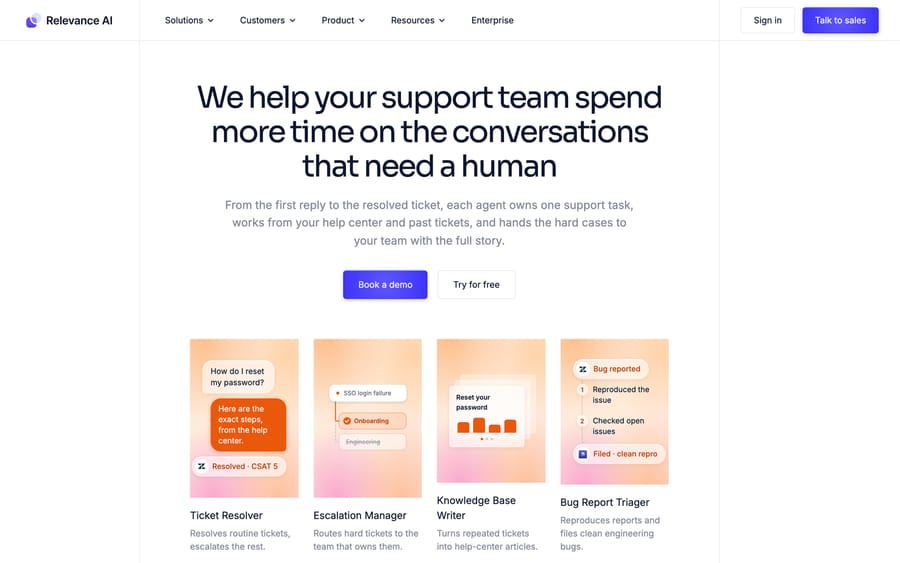
The page names Zendesk, Intercom, Slack, Notion, Jira and Google Docs as the systems those agents touch. The integrations directory has pages for Freshdesk, Gorgias, Front and Intercom too. Its headline says "2,000+ integrations" while the listing counter underneath reads "Showing 48 of 2,728 integrations," so 2,728 is the catalog size the site itself reports.
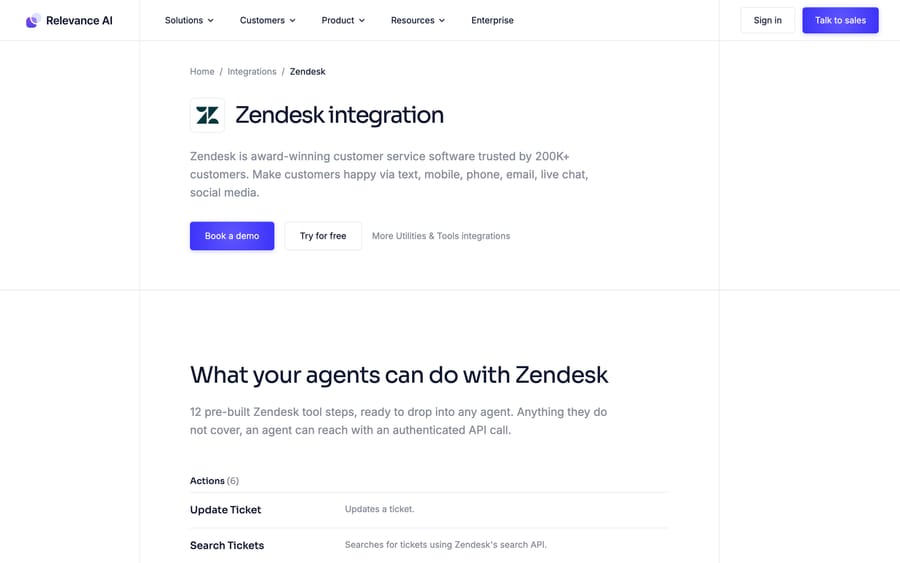
The Zendesk integration is the one most support buyers check first. The Zendesk integration page lists six actions (Create Ticket, Update Ticket, Get Ticket Info, Search Tickets, List Tickets, Delete Ticket) and six instant triggers (New Ticket, Ticket Updated, Ticket Pending, Ticket Solved, Ticket Closed, New Ticket Added to View), connected by signing in to Zendesk and approving access. Anything the pre-built steps miss, an agent can reach with an authenticated API call.
Other features that matter for a support deployment:
- Smart escalations to email and Slack on every plan, so an agent that can't answer can ask a human and store the answer for next time.
- Agent Evaluations, including continuous LLM-judge scoring of production runs since March 2026. This is Enterprise-only.
- Calling and meeting agents for voice, on Team and Enterprise.
- Alerts, version history and concurrency visibility, the last added in July 2026 so admins can see queued runs and capacity per project.
- Security: the plan comparison shows "SOC 2 & GDPR Compliance" on Pro, Team and Enterprise alike. SSO (SAML), role-based access control and audit logs are Enterprise-only.
How much does Relevance AI cost?
The public pricing page currently shows a single Enterprise plan with a "Talk to sales" button. The pricing documentation, fetched the same day, still lists three paid plans with published prices and says the Free plan is retired and closed to new signups. Treat the documented self-serve prices as current but check them at signup, because the marketing page has already moved on.
| Plan | Monthly billing | Annual billing | Actions / month | Vendor Credits / month | Users |
|---|---|---|---|---|---|
| Pro | $29 | $19/mo | 2,500 | $20 (10,000 credits) | 2 build users, 1 project |
| Team | $349 | $234/mo | 7,000 | $70 (35,000 credits) | 5 build users, 45 end users, 5 projects |
| Enterprise | Custom | Custom | Custom | Custom | Unlimited |
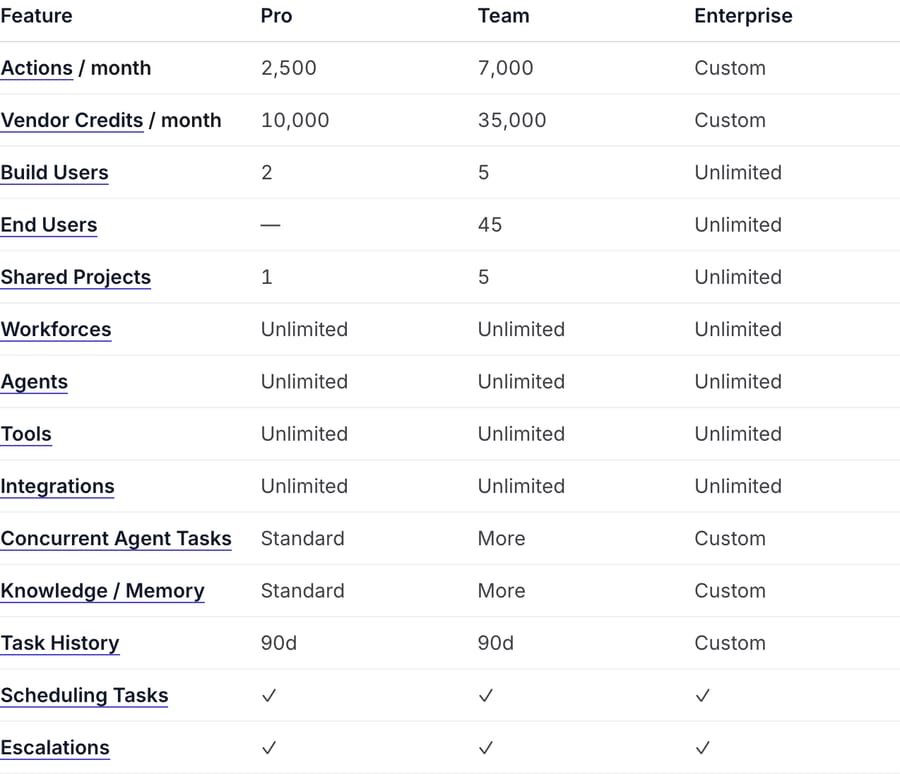
Billing has two meters, and you need both to estimate a bill.
Actions count work. The docs define an Action as "counted when an Agent runs a Tool," whether that tool sends one email or runs a long multi-step workflow. Plan Actions reset each renewal. Extra Actions cost $80 per 1,000, bought in blocks of 1,000, and purchased top-ups roll over.
Vendor Credits pay for the model and third-party tool usage underneath, which Relevance says it passes through "at wholesale, with no markup." Extra credits cost $20 per 10,000, so one credit is $0.002. Vendor Credits roll over indefinitely while you stay subscribed. If you bring your own API keys, you skip them entirely and pay the model provider directly.
What a support ticket might cost on Relevance AI
Relevance doesn't publish a per-ticket figure, so here's our own illustration, with assumptions you should replace with your own.
Assume a Ticket Resolver agent calls four tools on an average ticket: fetch the ticket, search knowledge, look up an order, update the ticket with a reply. That's 4 Actions per ticket.
- Pro includes 2,500 Actions, which covers about 625 tickets a month at 4 Actions each.
- Team includes 7,000 Actions, about 1,750 tickets.
- At 3,000 tickets a month on Team, you'd need 12,000 Actions. The extra 5,000 at $80 per 1,000 adds $400, so roughly $749 a month in Actions alone.
Now the second meter, which most write-ups leave as "it depends." Vendor Credits are model spend passed through at wholesale, and $20 buys 10,000 of them, so one credit is $0.002 and 500 credits is a dollar. That makes the estimate tractable once you assume a model and a token count.
Take a mid-range frontier model at roughly $2.50 per million input tokens and $10 per million output tokens, which is the going rate for the GPT-5 and Claude Sonnet class in 2026. A four-tool ticket run re-sends the thread and the tool results on each hop, so call it 12,000 input tokens and 1,200 output tokens across the whole ticket. That's $0.03 of input and $0.012 of output, about $0.042 a ticket, or roughly 21 Vendor Credits per ticket.
Run that through the plans:
| Pro | Team | |
|---|---|---|
| Actions included | 2,500 (≈625 tickets) | 7,000 (≈1,750 tickets) |
| Vendor Credits included | 10,000 (≈475 tickets) | 35,000 (≈1,660 tickets) |
| Plan fee, monthly billing | $29 | $349 |
The two meters run out at roughly the same point, which suggests the plans were sized against a workload something like this one. At 3,000 tickets a month on Team you'd need about 63,000 credits, so the extra 28,000 costs $56 on top of the $749 in plan fee and extra Actions. Call it $805 a month, about $0.27 a ticket.
Swap the assumptions and the number moves a lot. Attach a large knowledge base with "Add all to prompt" instead of "Allow agent to search" and the input tokens can multiply several times over, because the whole set is stuffed into every hop of every run. Use a small model and credits fall to a few cents a ticket. Bring your own API key and Vendor Credits disappear from the bill entirely, replaced by an invoice from OpenAI or Anthropic.
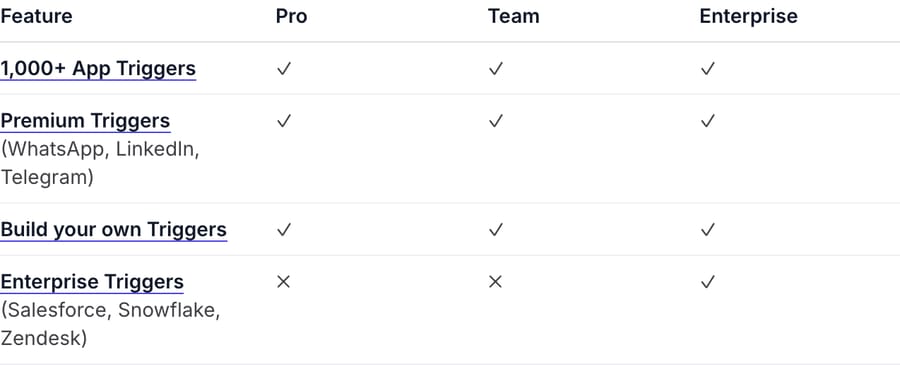
Two things change that picture for support specifically. First, Enterprise Triggers (Salesforce, Snowflake and Zendesk) are marked Enterprise-only in the plan comparison. On Pro or Team, the native "New Ticket" trigger from Zendesk isn't available, so you'd wire a Zendesk webhook to a custom webhook trigger yourself, which every plan supports. Second, Agent Evaluations, SSO and audit logs are Enterprise-only too, and most support leaders will want at least evaluations before an agent sends replies to customers unsupervised.
The incentive behind the pricing
Metering by tool run means Relevance earns more when agents take more steps. That's a fair way to price a general builder, because a prospecting agent and a ticket agent do very different amounts of work, but it pushes the cost of an inefficient design onto you. An agent that searches knowledge three times before answering costs three times the Actions of one that searches once. Passing model costs through at wholesale is honest, and it also means model choice is your budget decision, not theirs. The pricing page showing only Enterprise tells you where the company is optimizing for revenue: org-wide Workforces sold through a sales team, with self-serve plans kept in the docs as an on-ramp.
What do users say about Relevance AI?
Relevance AI has thin review coverage for a company its size, which is itself worth knowing before you plan a procurement around peer reviews.
G2's product page reports 4.3 out of 5 from 20 reviews (checked September 15, 2026). G2 returns a 403 to automated fetching and blocks a headless browser too, so we can report the score and not the reviews behind it. On Capterra the listing carries 4.0 from a single review (checked the same day): Matthew H., an analyst in the computer software industry, praised the retrieval side, writing that "we could make a lot of accurate and relevant summaries of the videos due to the vector database implementation and use of semantic search," with the only complaint being that "a few of the advanced features had some learning needed." That review is dated August 31, 2024, before the agent pivot took its current shape.
The most useful recent evidence is on Product Hunt, where Invent by Relevance AI scores 4.0 from 2 reviews. Reviewer Nolan Vu reports building "a video summarization pipeline in a few days that would've taken me weeks otherwise," then names the two limits that show up everywhere else: "Native app connections are limited. Had to build a few API bridges manually," and, on billing, "the credit model sounds fair until you're running multi-step agent chains on a lot of data and the burn rate surprises you." He still calls it "one of the more legit options out there right now."
The r/AI_Agents thread that ranks for this keyword is the least flattering source and the most consistent one. The original poster asks whether Relevance is as good as the YouTube demos suggest; most of the 39 replies steer toward n8n. One builder writes that Relevance is "solid if you're trying to build something quickly without much coding" but that "when you need more flexibility or want to connect it to real workflows, platforms like n8n can be a better fit." Another notes it "might require more technical know-how than advertised." A third, running an agency, argues multi-agent orchestration on any of these no-code platforms is still limited enough that serious builds end up hand-coded. The thread is from 2025 and predates Invent, Workforces evaluations and the current model line-up, so treat it as sentiment about the category rather than a review of today's product.
The recurring complaint across all four sources is the same one: fast to a first working agent, and harder than advertised once the workflow gets real, with a usage meter that surprises people on multi-step runs. That is the honest warning, and it maps exactly onto the two-meter pricing above.
What are Relevance AI's pros and cons?
Pros
- General-purpose. The same platform runs sales, operations, HR and support agents, so one team can own automation across departments.
- Transparent unit prices in the docs: $80 per 1,000 Actions, $20 per 10,000 Vendor Credits, with no markup on model costs.
- Bring-your-own-key on every plan, and a wide choice of current models.
- Visual tool builder with Python steps for the cases no-code doesn't cover.
- Invent can draft whole agent teams and keeps sampling live runs afterward.
- SOC 2 and GDPR compliance on every plan, not just Enterprise.
- MCP in both directions, plus webhook and API triggers on every plan.
Cons
- Two meters make cost hard to predict until you've run real volume.
- The Free plan is gone for new signups, and the public pricing page now shows only Enterprise.
- Native Zendesk triggers, agent evaluations, SSO and audit logs sit behind Enterprise.
- Support is one use case among many. Most of the site, templates and customer stories are about go-to-market.
- You design the ticket workflow yourself: which tools run, when to escalate, how replies are posted back. The API trigger doesn't return the agent's answer, so even the path back into your help desk is something you wire up.
- Review coverage is thin. Twenty G2 reviews and one Capterra review is not much peer evidence for a platform this broad.
Who is Relevance AI best for?
Relevance AI suits teams that already think in workflows, have someone comfortable wiring APIs and prompts, and want one agent platform across several departments. A revenue operations team replacing a stack of Make or n8n scenarios with reasoning agents is the clearest fit, and the customer list reflects that. It also suits companies with a platform or automation team that wants to own the logic end to end and is happy to pay by usage.
It's a weaker fit if you only want to automate your help desk. You'd be paying for breadth you won't use, designing the ticket workflow from tool blocks, and likely needing Enterprise to get the Zendesk trigger and evaluations a support lead would expect. It's the wrong choice if nobody on the team has time to build and maintain agents, because the platform assumes a builder.
How does Relevance AI compare with the alternatives?
Relevance AI gets compared against two different sets of products, and they answer different questions. Against the general builders, the question is what the usage meter counts. Against support tools, it's whether the product knows what a ticket is.
Against the general agent builders
Every platform in this group sells the same promise and meters it differently, which is the only part of the comparison that changes your bill. These are the published rates we read on each vendor's pricing page on September 15, 2026, and confirmed again on September 24.
| Meter | Entry price | What that buys | |
|---|---|---|---|
| Relevance AI | Tool runs (Actions), plus wholesale model spend (Vendor Credits) | $29/mo Pro | 2,500 Actions, 10,000 credits, 2 build users |
| Gumloop | Credits, plus an 8% orchestration fee on model spend | From $37/mo Pro | 20,000 credits, unlimited seats, 14-day trial |
| n8n | Workflow executions, "regardless of complexity" | €20/mo Starter, billed annually | 2,500 executions, unlimited users and workflows |
| Lindy | Credits, billed per user | $29.99/mo per user | 3,000 credits per user |
| Zapier | Tasks, with Agents sold as an add-on | Free, then from $19.99/mo | Multi-step Zaps, webhooks on paid tiers |
Three differences matter. n8n is the only one that charges by execution rather than by step, so a ten-step workflow and a one-step workflow cost the same, which is why the Reddit thread above keeps pointing people there when workflows get complicated. Lindy bills per seat as well as per credit, so a team of five starts at five times the base price before any agent runs. Zapier prices the automation platform and sells Agents alongside it, so the agent line is additive to whatever you already spend on Zaps. Relevance sits in the middle: no seat multiplier on usage, but two meters to watch instead of one.
None of these five is built around a ticket. For support specifically, the useful comparison is with tools built around answering customers.
| Relevance AI | Chatbase | Macha | |
|---|---|---|---|
| Model | General no-code agent builder with multi-agent Workforces | AI chat agent trained on your content, with help desk handoff | AI agent layer on your existing help desk |
| Best for | Ops and GTM teams automating across departments | Website and in-app chat deflection | Teams on Zendesk, Freshdesk, Gorgias, Front, HubSpot or Intercom automating tickets |
| Help desk connection | Zendesk, Intercom and others as tool steps; native Zendesk triggers on Enterprise | Zendesk, Intercom, Freshdesk, Gorgias and others on Standard and above | Agents act inside the ticket in your help desk |
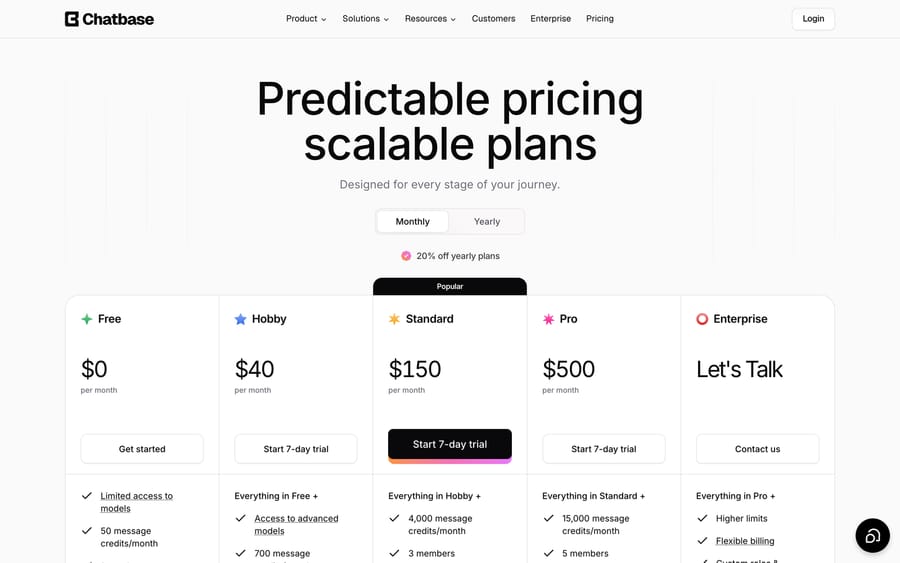
| Pricing | Pro $29/mo, Team $349/mo (monthly billing); Actions plus Vendor Credits; Enterprise custom | Free, then $40, $150 and $500/mo by message credits | From $299/mo for 750 tickets (~$0.40/ticket), published |
| Setup | Self-built, or with Invent; custom implementation on Enterprise | Self-serve | Done for you by the Macha team, with a dedicated success manager, included |
| Trial | Free plan retired for new signups | Free plan, 50 message credits | $50 free usage |
Chatbase is the lighter option if what you want is a chat widget that answers from your docs and hands off to a help desk. We cover it in our Chatbase complete guide. Its Hobby plan includes 700 message credits for $40 a month, and the help desk integrations start on the $150 Standard plan.
If your shortlist has moved past general builders entirely and you're comparing purpose-built support agents, our Decagon AI guide covers the enterprise end of that market.
Macha takes a narrower route than Relevance. It doesn't try to run your sales team. It runs AI agents on top of the help desk you already use, acting inside the ticket: reading the thread, calling your order or billing systems, replying or tagging, and escalating to a human. The pricing difference follows from that focus. Where Relevance meters every tool run, Macha charges per ticket, and one thread with one person is one charge however many tool calls or replies it takes, so a messy ticket costs the same as a simple one. Plans start at $299 a month for 750 tickets, about $0.40 a ticket at every tier, and it's done for you: the Macha team analyzes your past tickets, builds the knowledge base and the agents, and runs them in safe mode until the drafts are right, and a dedicated success manager handles your changes after go-live, all included in that price. See Macha pricing for the tiers.
On the illustration above, Relevance Team lands near $805 at 3,000 tickets against Macha's $1,199 at the same volume, so Relevance is cheaper on paper if your agents hold at four tool runs, your prompts stay lean, and you have someone to do the building and the tuning. Macha fits if you already run Zendesk, Freshdesk, Gorgias, Front, HubSpot or Intercom, want the number fixed before you start, and would rather not staff the agent build, since Macha's $1,199 includes the build and the success manager who tunes it. If you want one platform for support, sales and operations and have builders on staff, Relevance is the stronger pick.
FAQ
What is Relevance AI used for? Relevance AI is a no-code platform for building AI agents and multi-agent Workforces. Its most common uses are sales and go-to-market work such as research, enrichment, meeting prep and outbound, plus customer support, customer success, marketing, HR and operations.
How much does Relevance AI cost? Its pricing documentation lists Pro at $29 a month ($19 billed annually) with 2,500 Actions and $20 of Vendor Credits, Team at $349 a month ($234 annually) with 7,000 Actions and $70 of Vendor Credits, and custom Enterprise pricing. Extra Actions are $80 per 1,000 and extra Vendor Credits $20 per 10,000. The public pricing page currently shows only Enterprise.
Does Relevance AI have a free plan? Not for new signups. The docs say the Free plan is retired, and existing Free organizations keep their access.
What is the difference between Actions and Vendor Credits? An Action is counted each time an agent runs a tool. Vendor Credits pay for the underlying model and tool usage at wholesale cost. You can bring your own API keys to skip Vendor Credits.
Does Relevance AI integrate with Zendesk? Yes. The Zendesk integration offers six actions, including Create, Update and Search Tickets, and six instant triggers such as New Ticket and Ticket Solved. The plan comparison lists Zendesk among Enterprise Triggers, so native Zendesk triggers need an Enterprise plan. Custom webhook triggers are available on every plan.
Who owns Relevance AI? It's an independent venture-backed company, legally OnSearch Pty Ltd, founded by Daniel Vassilev, Jacky Koh and Daniel Palmer. Its investors include Bessemer Venture Partners, Insight Partners, King River Capital and Peak XV. We found no acquisition as of September 2026.
Is Relevance AI any good, according to reviews? G2 reports 4.3 out of 5 from 20 reviews and Capterra 4.0 from one, both checked in September 2026. Reviewers praise how quickly you get a first working agent and complain about two things: limited native connections, which pushes you into building API bridges, and credit consumption that climbs faster than expected on multi-step runs.
Does Relevance AI have an API and MCP support? Yes to both, with limits. Agents can be triggered over HTTP or a custom webhook on every plan, but the docs state the API is officially supported only for triggering agents and tools, and the trigger call doesn't return the result. MCP works in both directions: external clients such as Claude Code can build agents in your project, and agents can call tools on remote MCP servers.
What are the best Relevance AI alternatives? For a general agent builder, Gumloop, n8n, Lindy and Zapier Agents are the usual comparisons, and n8n is the one people recommend when workflows get complicated. For support chat on a website, Chatbase. For AI agents working tickets inside Zendesk, Freshdesk, Gorgias, Front, HubSpot or Intercom with per-ticket pricing, Macha, which the Macha team sets up and runs for you at about $0.40 a ticket, with a dedicated success manager included.
Is Relevance AI good for customer support? It can do it well if you have someone to build and tune the workflow, and if you're willing to budget for Enterprise features such as native Zendesk triggers and evaluations. Teams that only want help desk automation usually get there faster with a tool built for tickets.
If that second description is yours, the fastest way to find out what an agent would actually do on your tickets is to run one on them: start a free Macha trial with $50 of usage, no card, and the Macha team builds the first agent for you.
Sources: Relevance AI homepage, Relevance AI pricing page, Relevance AI pricing documentation, Agents documentation, Tools documentation, Knowledge documentation, Invent documentation, Customer support use case, Zendesk integration, Changelog, Canva customer story, TechCrunch on the Series B, Relevance AI Series B announcement, Tracxn company profile, Bessemer founder profile, Integrations directory, MCP & Plugins docs, MCP client docs, API Triggers docs, Webhook Triggers docs, Product Hunt reviews, r/AI_Agents discussion, Chatbase pricing, Gumloop pricing, n8n pricing, Lindy pricing, Zapier pricing. G2 (g2.com/products/relevance-ai/reviews) and Capterra (capterra.com/p/10019108/Relevance-AI) both return 403 to automated requests, so they are cited without hyperlinks.






