





 Shopify
 Stripe
 Slack
Slack Notion
 Google Workspace
 Confluence

What Is Support Ticket Automation? Auto-Triage and Auto-Resolve Explained (2026)


Support ticket automation comes down to two jobs: auto-triage, which classifies, tags and routes every new ticket, and auto-resolve, which answers and closes the ones that don't need a human. Triage is safe to run on every ticket from day one, while resolution should start as drafts a person approves.
Key takeaways
- Support ticket automation is built from two jobs: auto-triage, which classifies, tags and routes each incoming ticket, and auto-resolve, which answers and closes tickets without a human.
- Auto-triage is the lowest-risk place to start because it classifies topic, priority and sentiment, tags and routes tickets without ever sending anything to the customer.
- The recommended setup builds a Triage Agent triggered on Ticket Created first, then a separate Resolution Agent that starts on internal notes and is scoped to trusted ticket types.
- Macha bills per ticket rather than per resolution, starting at $299 a month for 750 tickets, about $0.40 each, with $50 of free usage and no credit card required.

Support ticket automation has two parts: auto-triage, which classifies, tags, prioritizes and routes every new ticket, and auto-resolve, which answers and closes the low-risk ones without a human. Start with triage on every ticket, because it never touches the customer, then add resolution one ticket type at a time behind a draft-first review step.
| Auto-triage | Auto-resolve | |
|---|---|---|
| What it does | Classify, tag, set priority, route | Reply, act, close the ticket |
| Touches the customer? | No | Yes |
| Risk | Low | Medium to high, depends on scope |
| When to turn on | Day one, on every new ticket | After a draft-first period, for trusted ticket types |
| Metric to watch | Triage accuracy, reassignments | Auto-resolution rate, CSAT |
What is support ticket automation?
It's using software, rules and AI, to handle the ticket lifecycle with little or no manual effort: classify the ticket, tag it, set priority, route it, respond, resolve it, and follow up. Older automation was purely rules-based (route by form field, send a canned reply). Modern automation adds AI agents that read a ticket in plain language and decide what to do. The two biggest wins are triage and resolution.
What does auto-triage do?
Auto-triage is automatically understanding and sorting each incoming ticket so it lands in the right hands, fast. That usually means:
- Classify the topic and intent (billing, shipping, bug, refund…).
- Detect priority and sentiment (an angry VIP vs. a routine question).
- Tag the ticket so reporting and workflows work downstream.
- Route and assign it to the right team or agent.
Rules vs. AI triage: rules can route by a form dropdown or a keyword, but they break on free-text messages. AI triage reads what the customer wrote and classifies it the way a human would, which is what makes it hold up across the messy reality of real tickets.
Why it matters: faster first response, the right agent on the first try, fewer reassignments, and better SLA compliance. It's also the lowest-risk thing to automate. Even if triage only tags and routes, it saves time without ever touching the customer.
What does auto-resolve mean, and what can it close?
Auto-resolve is the AI answering and closing a ticket end to end, with no human in the loop. The key distinction:
- Deflection points the customer at an article and hopes they self-serve.
- Resolution actually handles it: understands the request, pulls any data it needs, replies, and closes the ticket.
What's typically auto-resolvable: FAQs grounded in your help center, order-status ("where is my order") questions via a store lookup, simple account changes, and refunds (often with a confirmation step). What isn't: ambiguous, sensitive, or complex cases. Those should be triaged and escalated to a human with full context.
The honest rule: auto-resolve what's high-volume and low-risk; route everything else to a person.
How do triage and resolution work together?
The two stack into a simple pipeline:
- Triage every ticket: classify, tag, set priority, route.
- Auto-resolve where it's safe: let an agent close the common, low-risk cases.
- Escalate the rest: hand a human the ticket plus a summary and the triage context.
Done this way, automation handles the repetitive majority while your team focuses on the cases that actually need judgment.
How do you set up auto-triage and auto-resolve?
Using an AI agent platform like Macha, which runs on top of Zendesk, Freshdesk, Gorgias, Front, HubSpot or Intercom:
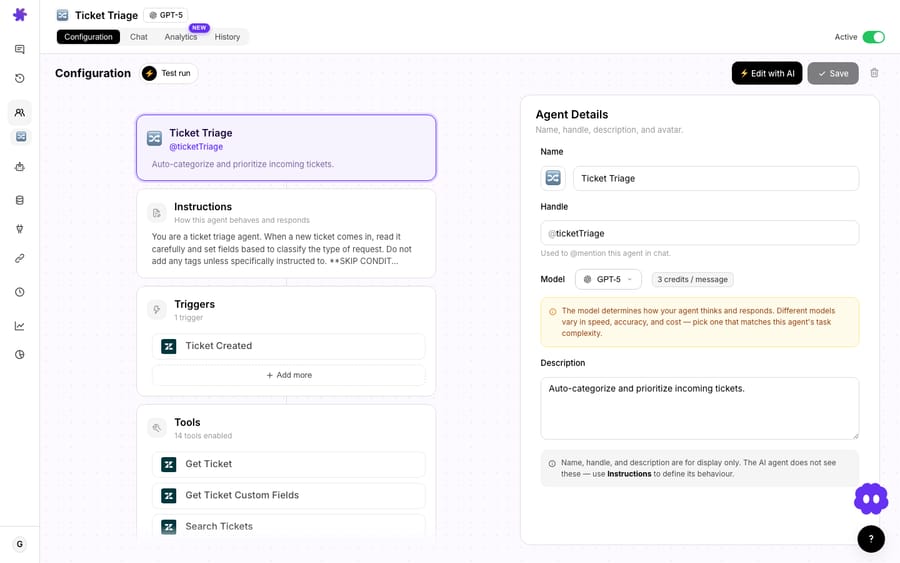
- Build a Triage Agent. Start from the Triage template. Instructions like "classify by topic, set priority from sentiment, tag accordingly, and assign to the right group." Trigger it on Ticket Created so it runs on every new ticket. Triage is safe to run autonomously from day one.
- Build a Resolution Agent. Give it your knowledge (your Help Center auto-syncs) and the tools to act (reply, update status, look up an order). Scope it to the ticket types you trust it with.
- Start the resolver safely. Run it on internal notes or with confirmation first, so it drafts the answer for a human to approve, then let it reply and close on its own once you trust it.
- Set the escalation path. When the resolver isn't confident, it should hand off to a human and attach a summary.
- Measure and expand. Track triage accuracy and auto-resolution rate; widen scope where it's working.
On Macha you don't have to do these steps alone: setup and monitoring by the Macha team are included in the plan, so they build, test and watch the agents with you. (For the broader automation playbook, see how to automate Zendesk with AI.)
What triage categories should you start with?
Auto-triage is only as useful as the categories behind it. A starter taxonomy most teams can adapt:
- Topic: Billing · Shipping/Delivery · Returns/Refunds · Technical/Bug · Account · Sales/Pre-sales · Other
- Priority: Urgent (outage, payment failure, angry VIP) · Normal · Low
- Type: Question · Problem · Request
Have the Triage Agent set these on every ticket, then build your views, SLAs, and routing on top. Start coarse, with a handful of clear categories the agent can apply reliably, and split them only when volume justifies it. Over-granular taxonomies are where triage accuracy goes to die.
Which guardrails keep ticket automation safe?
- Automate triage first. It's low-risk and immediately useful.
- Keep your knowledge current. Auto-resolve is only as good as what the agent can read.
- Scope tools tightly and start resolving on internal notes/confirmation.
- Always leave a clean escalation path with context.
- Watch the metrics: triage accuracy, auto-resolution rate, time-to-first-response, CSAT.
What does support ticket automation cost?
A single ticket might take a triage decision, a tag, a lookup and a reply, and Macha bills per ticket: one conversation, charged once, however many steps that takes, rather than on a per-resolution meter. Pricing starts at $299 a month for 750 tickets, about $0.40 each, and the model the agent runs on doesn't change the figure. Higher tiers keep the same rate: $599 for 1,500 tickets, $1,199 for 3,000 and $3,999 for 10,000. $50 of free usage, no credit card required.
The incentive is worth naming. A per-resolution meter earns the vendor more when the AI closes more tickets, which nudges toward counting borderline closes as wins. A per-ticket price is the same whether the agent triages, drafts or resolves, so the decision about what to automate stays yours.
Frequently asked questions
What is support ticket automation? Using rules and AI to handle the ticket lifecycle automatically: classifying, tagging, prioritizing, routing, responding, and resolving tickets with little or no manual effort.
What is auto-triage? Automatically reading and sorting each incoming ticket (classifying the topic, detecting priority and sentiment, tagging, and routing it to the right team) so it reaches the right person fast.
Can AI resolve support tickets automatically? Yes, for high-volume, low-risk cases (FAQs, order status, simple changes) when grounded in good knowledge and given the right tools. Complex or sensitive tickets should be escalated to a human.
Is automating tickets safe? Yes, when scoped. Automate triage first (it never touches the customer), start auto-resolve on internal notes or with confirmation, and keep a clear escalation path.
Should triage and resolution be one agent or two? Two is easier to control. A Triage Agent can run on every ticket from day one, while a separate Resolution Agent stays scoped to the ticket types you've already checked it on.
Automate triage and resolution on your tickets: build a Triage Agent and a Resolution Agent with the Macha team's help. $50 of free usage, no credit card required. Start a free trial.






