





 Shopify
 Stripe
 Slack
Slack Notion
 Google Workspace
 Confluence

How do you test an AI support agent on real tickets before it goes live?


Macha's Test Run runs an agent once on a real ticket, email or document you pick, streaming every tool call and the reply, and it takes real actions. For a batch rehearsal with every write stubbed, Agent Simulations replays past Zendesk tickets instead.
Key takeaways
- Test Run runs a Macha agent once on a real ticket, email or document you search for, and it takes real actions, including sending messages and updating records.
- Agent Simulations replays a batch of past Zendesk tickets with write tools stubbed, so it is the Macha surface for a write-free rehearsal across many tickets.
- Supportbench recommends testing an AI agent on 25 to 50 recent real tickets, including typos, missing context and frustrated customers, before judging it ready.
- A Test Run bills like a live run, one ticket charged once however many steps it takes, at about $0.40 on Macha's volume-priced plan.
- Macha Studies is not an agent test: Studies extracts structured fields from up to 20,000 records per run with no agent and no tool calls.

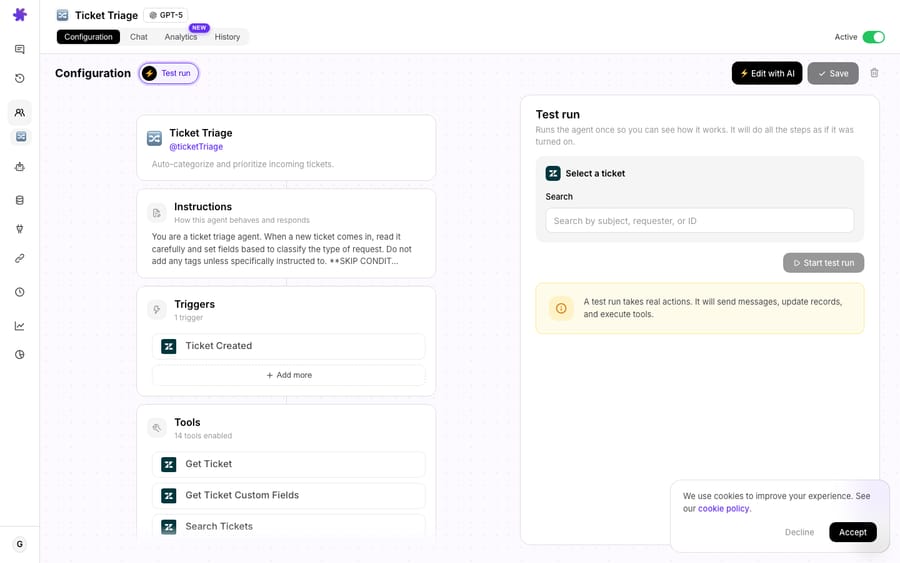
Test Run lets you pick a real Zendesk ticket, email or document from an agent's configuration page and run the agent on it once, so you can watch every tool call and the reply before you turn the trigger on. It is not a dry run: the Test Run panel warns that "a test run takes real actions. It will send messages, update records, and execute tools." You get production behavior on one record you chose, which is exactly why you should choose that record carefully.
Macha has three ways to rehearse an agent before go-live, and they differ in what actually fires:
| Surface | What it runs on | Read tools | Write tools | Best for |
|---|---|---|---|---|
| Test Run | One real record you search for | Execute for real | Execute for real | Watching the full path on one ticket |
| Try it | Messages you type | Execute for real | Execute, unless the tool requires confirmation | Quick checks while building |
| Agent Simulations | A batch of past Zendesk tickets | Execute for real | Stubbed, nothing lands on the ticket | Previewing behavior across a realistic pool |
Macha is an AI agent layer that sits on top of the help desk you already run, Zendesk, Freshdesk, Gorgias, Front, HubSpot or Intercom, so Test Run is about validating the agent's behavior inside your existing stack, not migrating to a new one.
Why isn't typing a test question enough?
Most builders let you chat with your agent in a sandbox. You type "Where is my order?", the agent answers, it looks great, you ship it. Then a real ticket arrives that reads: "hey so i ordered the blue one like 2 wks ago (order maybe #10432?) and my wife says it showed up damaged?? do i return it or do u just resend, also the tracking link is dead." Typos, two questions stacked into one, a half-remembered order number, an implicit refund-vs-reship decision. That is the input your agent has to survive, and a clean hand-typed prompt never tested any of it.
Supportbench's guidance on vendor evaluation says the same thing: pull 25–50 recent, real tickets that reflect your actual workload, "including everything: typos, missing context, frustrated customers, and tricky edge cases", and aim for high accuracy on those before going live, not on a tidy demo script (Supportbench). StackAI recommends a golden set of historical tickets for offline regression (StackAI). The broader pre-production pattern is offline evaluation on real, labeled tickets plus a shadow phase where the agent proposes and a human compares, before any staged rollout. Test Run is the first rung of that ladder: it lets you replay reality through the agent in seconds.
How does Test Run work?
Test Run lives on the agent configuration page, next to the instructions, tools, model, and triggers you have set up. There is no separate "test environment" to provision and no fixtures to write.
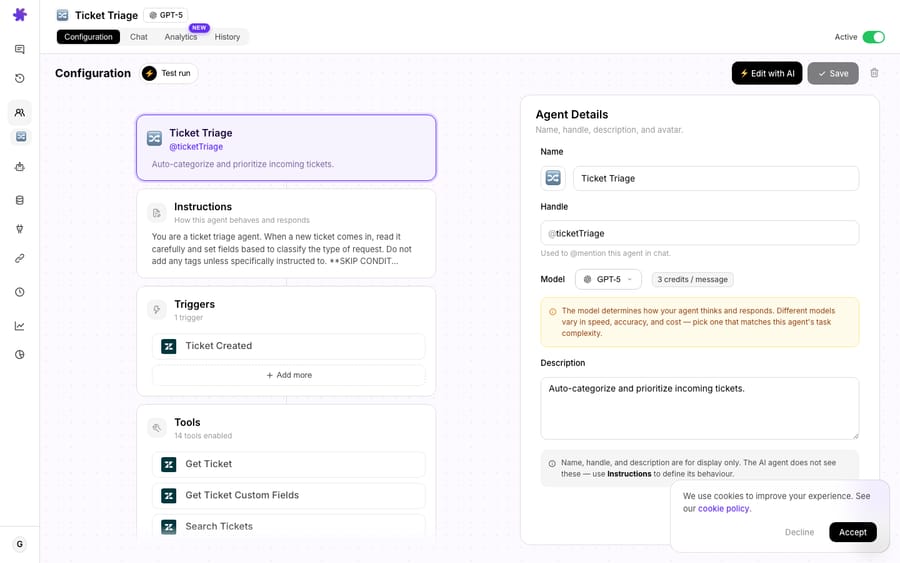
The flow is three steps:
- Search for a real record. Test Run gives you a search box that queries your connected systems for an actual entity: a Zendesk ticket by subject or ID, an email, a document. This works because of Macha's simulation schema: every tool and trigger across Macha's connectors defines a simulation property that tells the picker how to search for and format that entity. So whether the agent is triggered by a Zendesk ticket, a Slack mention, or a Shopify order event, the search-and-select experience is the same.
- Select one and run. Pick a record and the agent processes it as if it had just been triggered for real: same instructions, same tools, same model, and the same writes.
- Watch it think, live. The conversation streams over SSE (server-sent events), so the agent's reasoning, each tool call, and the final drafted reply appear in real time rather than as a single delayed block.
That live stream is the part that earns trust. You are not just grading the answer; you are watching the path to the answer. Did the agent call Get Order in Shopify before promising a delivery date, or did it hallucinate one? Did it look up the payment in Stripe before talking about a refund? Did it pick the right sub-agent to delegate to? On a real ticket, with real tool calls, you can see every decision.
Are the tool calls real or mocked?
This is the distinction that matters most. Macha agents do not just write text. They take actions: get an order, fetch a payment, search a Notion space, add a comment, update a ticket. Take the common "auto-resolve order status" pattern. On a live ticket the agent runs Get Ticket → Get Order (Shopify) → Add Comment → Update Ticket. In Test Run you exercise that whole chain against a real order, so you find out before go-live whether the agent reads fulfillment correctly, formats the tracking link properly, and writes a reply you would actually be happy to send. Those calls are all real, including Add Comment and Update Ticket. Run it on a test ticket you raised yourself, or on a closed ticket where an extra comment does no harm, and the writes become something you can inspect rather than something a customer receives.
Where does Test Run fit in a go-live sequence?
Test Run is one tool in a rollout, not the whole rollout. Here is the sequence I would run for any new agent:
| Stage | What you do | What you're checking |
|---|---|---|
| 1. Build | Configure the agent (or describe it to the AI Agent Builder): instructions, tools, model, sub-agents. | The agent exists and is wired to the right tools. |
| 2. Test Run: happy path | Replay 5–10 typical real tickets. | Does it call the right tools in the right order and draft a good reply? |
| 3. Test Run: edge cases | Deliberately pick your ugliest real tickets: typos, multi-question, angry, ambiguous, out-of-scope. | Does it stay in scope, ask for clarification, or escalate instead of guessing? |
| 4. Simulate, then shadow | Replay a batch of past tickets in Agent Simulations (writes stubbed), then let it draft on live tickets while a human sends. | Accuracy and tone at real volume, with a human in the loop. |
| 5. Go live, narrow | Enable auto-reply on one ticket type or a fraction of traffic. | Real-world outcomes before you widen the blast radius. |
Test Run owns stages 2 and 3, the fast loop where most of your fixes happen. Tighten an instruction, re-run the same ticket, watch the behavior change. Because you build and edit agents through conversation in Macha, the build → Test Run → tweak loop is tight enough to run a dozen times in an afternoon.
What are Test Run's limits?
Honesty matters more than hype here, so a few limits worth naming:
- It is a single-record rehearsal, not a benchmark. Test Run shows you how the agent handles one ticket at a time, in depth. It is not a bulk evaluation harness. For behavior across a pool of historical tickets, use Agent Simulations, which replays past Zendesk tickets with write tools stubbed and has an AI judge grade each conversation. (Macha Studies is a different tool: it extracts structured fields from records with no agent involved.) Use Test Run to understand behavior, Simulations to measure it.
- It runs the real tools, writes included. The panel says so: a test run will send messages, update records and execute tools. Treat every Test Run as a real run. If the agent's job is to post a public reply, the customer on that ticket gets it.
- Garbage tickets in, garbage confidence out. If you only Test Run on three clean tickets, you have tested almost nothing. The value is proportional to how representative and how nasty your chosen tickets are. Pick the ones that scare you.
- It costs money, like any agent run. Each Test Run executes the real model and tools, so it bills the same way a live run does. Macha charges per ticket, one rehearsal charged once however many steps it takes, about $0.40. This is rounding-error money against the cost of a bad live reply, but it is not free.
How does Test Run fit with the rest of Macha?
Test Run shipped alongside the AI Agent Builder and Sub-agents, and the three are designed to work as a loop: describe an agent in plain language and let the builder configure it, delegate specialist work to sub-agents, then Test Run the whole thing on real data before a single customer sees it. It is the validation step that makes "build an agent in five minutes" responsible rather than reckless.
Because Macha is a layer on top of your helpdesk, everything you validate in Test Run is the behavior you will get in Zendesk or any of Zendesk, Freshdesk, Gorgias, Front, HubSpot or Intercom: the same tickets, the same tools, the same actions. You are not testing a toy; you are rehearsing production. Browse the use-case library for agent patterns worth rehearsing, or the docs for the full configuration reference.
FAQ
What can I run a Test Run on? A real record from your connected systems: a Zendesk ticket, an email, or a document. You search for it from the agent's config page and select one; the agent then processes it exactly as it would on a live trigger.
Does Test Run send anything to the customer or post back to my helpdesk? It can. Test Run executes the agent's real tools, and the panel warns that it will send messages, update records and execute tools. If the agent is set up to post a public reply, that reply goes out. Use a ticket you created yourself, or use Agent Simulations, which stubs every write.
How is this different from just chatting with my agent in a sandbox? A sandbox tests hand-typed prompts. Test Run replays real tickets, with the typos, missing context, and stacked questions that actual customers send, and runs the agent's real tool calls against real data, with the reasoning streamed live so you can see how it got there.
How is Test Run different from Studies? Test Run runs your agent on one record you watch live. Studies runs an AI extractor across up to 20,000 records and fills a structured grid, with no agent and no tool calls. To test an agent across many past tickets, use Agent Simulations instead.
Does Test Run cost anything? Yes. It runs the real model and tools, so it bills like any agent run: per ticket, one rehearsal charged once however many steps it takes, about $0.40. See the pricing page for details.
How do you run your first Test Run?
If you have ever shipped an agent and then refreshed the ticket queue with your stomach in a knot, Test Run is for you. Start a free trial ($50 of usage, no credit card required), build an agent, raise a copy of your ugliest real ticket in your own help desk, and run the agent on it before it ever sees a customer. Then replay a week of past tickets in Agent Simulations before you turn the trigger on.
Written by Abbas (Customer Support & AI, Macha) · Reviewed by Ankeet Guha (Co-founder & CTO) · Published 2026-06-24 · Last updated 2026-06-24.






