





 Shopify
 Stripe
 Slack
Slack Notion
 Google Workspace
 Confluence

What Is Stack AI? Features, Pricing, Asana Deal and Alternatives (2026)


Stack AI (the company writes it StackAI) is a no-code platform for building AI agents across enterprise back-office work, and Asana bought it in May 2026 for a reported $75 million. It has a free plan with 500 runs a month and a custom-priced Enterprise plan, and its help desk coverage stops at a Zendesk app.
Key takeaways
- Stack AI is a no-code platform for building and governing AI agents across enterprise workflows, and Asana acquired the company for a reported $75 million on May 28, 2026.
- Stack AI's Free plan is $0/month with 500 runs, 2 projects and 1 seat, while the Enterprise plan has custom pricing and unlimited projects.
- Stack AI offers multi-tenant cloud, customer VPC and on-premises deployment, and lists SOC 2 Type II, ISO 27001, HIPAA and GDPR compliance on its homepage.
- Stack AI's docs list a Zendesk app that can create, update and list tickets and add comments, but no app for Freshdesk, Gorgias, Front or Intercom.
- Macha is the done-for-you alternative for support tickets: the Macha team builds and runs the agent inside the help desk, at about $0.40 a ticket including a dedicated success manager.

Stack AI (written StackAI by the company) is a no-code platform for building and governing AI agents across enterprise back-office work, and Asana bought it for a reported $75 million on May 28, 2026. It sells two plans: a Free plan with 500 runs a month, 2 projects and 1 seat, and a custom-priced Enterprise plan with VPC and on-premises deployment. Its docs list a Zendesk connector for ticket actions, but no Freshdesk, Gorgias, Front or Intercom app (checked 24 September 2026).
| Stack AI at a glance | Detail |
|---|---|
| What it is | No-code enterprise agent builder, owned by Asana since May 2026 |
| Plans | Free ($0, 500 runs/month) or Enterprise (custom) |
| Deployment | Multi-tenant cloud, customer VPC, on-premises |
| Compliance | SOC 2 Type II, ISO 27001, HIPAA, GDPR |
| Help desk apps in docs | Zendesk (tickets, comments, Help Center search) and ServiceNow |
| Best for | IT-led automation across many departments |
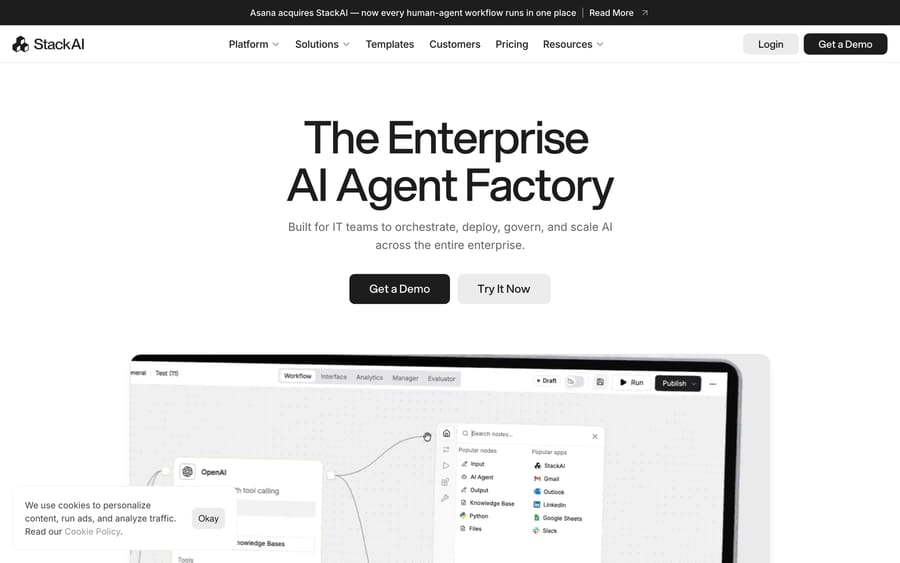
Most people researching Stack AI are one of two buyers. The first is an IT or enterprise architecture lead who wants one governed place for the whole company to build agents: document review in legal, audit testing in finance, intake in HR. That's the buyer StackAI's homepage addresses directly, with the line "Built for IT teams to orchestrate, deploy, govern, and scale AI across the entire enterprise." The second is a support or operations lead who has seen the drag-and-drop builder and wonders whether it could answer tickets. The answer for that second buyer is "yes, with work", and much of what follows is about how much work.
What is Stack AI?
StackAI was founded in 2023 by Toni Rosinol and Bernard Aceituno and went through Y Combinator's Winter 2023 batch, according to its YC company page. It raised "just under $20 million", including a $16 million Series A, before Asana acquired it for $75 million on May 28, 2026. Both founders joined Asana.
The acquisition explains the product's direction. Asana had been pitching itself as the "operating system for human-agent teams", and its own agents could plan and track work but couldn't execute steps inside Salesforce, SharePoint or a bank's document store. StackAI is the execution layer that fills that gap. TechCrunch reports Asana will "incorporate StackAI into its growing suite of AI workflow tools." As of September 2026 stackai.com still sells the product on its own, with its own pricing page and demo flow. If you're signing a multi-year contract, ask how the roadmap and packaging will change under Asana; nothing public answers that yet.
The customers on its customer page lean regulated and back-office heavy: LifeMD (475,000+ hours saved, per StackAI), MIT (24 agents in two weeks), Ducker Carlisle ($1M in savings), Middlesex Federal Savings, YMCA Retirement Fund, Diné Development Corporation, Varos and Nova Talent. The pricing page's logo strip adds BAE Systems, Mayo Clinic, Nubank, Live Oak Bank, Raiffeisen Bank International and the City of Santa Monica. YMCA Retirement Fund's "24/7 member support" is the one customer-service story in the set. The rest are audits, diligence, claims, recruiting and data requests.
How do Stack AI's agents work?
A StackAI project is a directed graph on a canvas. You drag nodes in, wire them together, and publish. Per the workflow builder docs, the node families are:
- Inputs: a text input, files, URLs, audio, images, and trigger nodes that start a run from an outside event (Typeform has its own).
- AI Agent node: the model call. You write the prompt, attach tools, and attach knowledge sources. StackAI is model-agnostic, so the same node can run Anthropic's Claude, models on AWS Bedrock, or OpenAI, and admins can restrict which providers the organization is allowed to send data to.
- Knowledge bases: uploaded or synced documents the agent retrieves from, either as a node wired into the graph or as a tool the agent calls when it decides it needs to.
- Logic: If/Else routing, AI routing (a model picks the branch), loops, and Code or Python nodes.
- Apps: connectors that read and write in outside systems. The docs call out Salesforce, SharePoint, Google Sheets, Slack, HubSpot, Zendesk and ServiceNow, where the action is "Create and update tickets and records."
- Outputs: text, images, audio, templates, and action nodes.
The same workflow then gets an interface. The end-user interfaces docs list a web form, a chat assistant with message history, a REST API, an embeddable website chatbot, a batch run over a dataset, and a Slack app, with Microsoft Teams referenced as well. The builder's top bar in the homepage screenshot shows the rest of the lifecycle: Workflow, Interface, Analytics, Manager and Evaluator tabs, plus Draft, Run and Publish controls.
Under the hood this is the same shape as every visual agent builder: a graph of deterministic steps with one or more model calls inside it. The design choice StackAI makes is to put governance around the graph (which models, which data, who can publish, audit logs) rather than to ship prebuilt agents for a function. You get a factory and a set of templates, and your team builds the product.
What features does Stack AI include?
- Deployment options. Multi-tenant cloud, a customer VPC, or on-premises. The last two are Enterprise-only and are the main reason banks and defense contractors appear in the logo strip.
- Compliance. SOC 2 Type II, ISO 27001, HIPAA and GDPR, per the homepage.
- Governance. Feature controls, audit logs, human-in-the-loop steps, SSO and access control, and LLM provider governance.
- Integrations. The count depends on which page you read. We checked three: the homepage says 300+, the integrations directory says 100+, and the docs apps page says 70+ (we counted 76 app pages there on 24 September 2026). Treat the number as marketing and ask for the specific connectors you need.
- Templates. A template library for common workflows, from document extraction to research agents.
- Skills. Reusable instruction packs an AI Agent node loads on demand, so a policy written once can be shared across agents.
How much does Stack AI cost?
StackAI publishes two plans on its pricing page, unchanged when we re-checked on 24 September 2026.
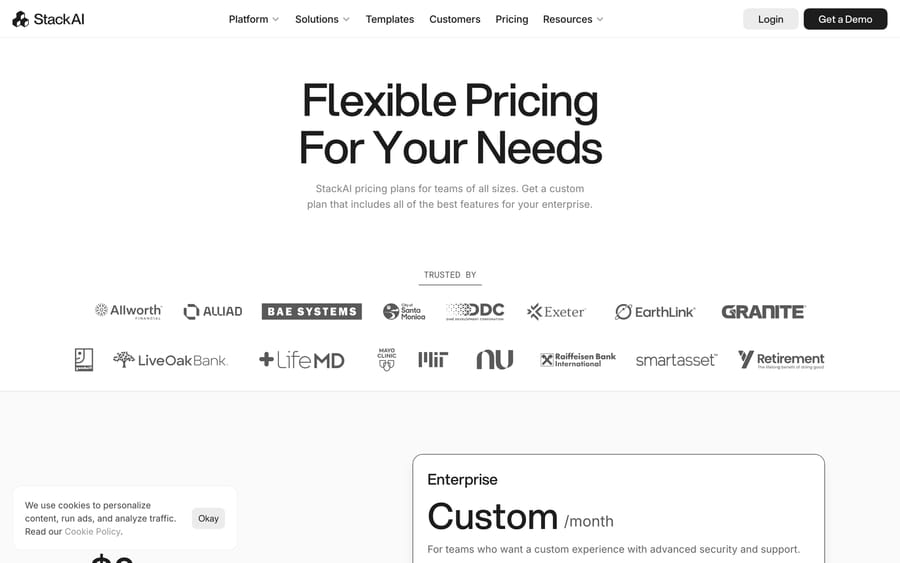
| Plan | Price | Runs | Projects | Seats | Notable inclusions |
|---|---|---|---|---|---|
| Free | $0/month | 500 per month | 2 | 1 | Community support on Discord, Google Drive and Notion loaders, REST API, Slack bot, Chrome extension |
| Enterprise | Custom | Custom | Unlimited | Custom | Dedicated infrastructure and solution engineers, VPC and on-prem deployment, SSO, SOC 2 / HIPAA / GDPR |
There's nothing in between. The free plan is a sandbox: 500 runs a month is about 16 a day, which is enough to prove a workflow and nowhere near enough to run one against a live queue. Everything production-shaped sits behind a sales call.
StackAI doesn't publish an Enterprise price. The only public figure we found is a third-party estimate from Voiceflow's Stack AI write-up, which tells buyers to "plan for a 5- to 6-figure annual minimum" and a 60-to-90-day procurement cycle. Voiceflow sells a competing product, so read that as an estimate with an interest attached, not a quote.
The pricing structure tells you who StackAI is optimizing for. A free tier with one seat and a custom tier with dedicated solution engineers is a land-and-expand design: a builder in one department proves a use case for free, and IT then buys a governed platform for the whole company. The incentive is to sell breadth, many departments and many workflows under one contract. That's good value if you have ten use cases and an IT team to run the platform. It's poor value if you have one use case, because you'd be paying for a factory to make a single product.
What reviewers say: Stack AI's review record is hard to pin down. Its G2 product page listed 35 reviews when we checked on 21 September 2026, while G2's Stack AI seller profile showed none at all, and we could not read a star rating we were confident in from either. It has no Capterra listing. Treat the scores quoted elsewhere with caution and ask Stack AI for references instead.
What are Stack AI's pros and cons?
Pros
- Real deployment flexibility: VPC and on-prem are rare in no-code agent builders.
- A strong compliance set for regulated industries.
- Model-agnostic, with admin control over which providers see your data.
- A usable free plan to test the builder before talking to sales.
- A visual graph that non-engineers can read, with code nodes when they can't express something.
Cons
- No self-serve paid tier; the jump from $0 to a custom contract is steep.
- Product direction is now tied to Asana's roadmap, and the post-acquisition packaging hasn't been published.
- Integration counts vary between 70+ and 300+ depending on the page, so connector coverage needs checking line by line.
- You build every agent yourself. Templates help, but prompt design, knowledge curation, testing and monitoring are your team's job.
- Help desk coverage is narrow: the docs list a Zendesk app, but nothing for Freshdesk, Gorgias, Front or Intercom.
Who is Stack AI best for?
StackAI fits enterprises with an IT or architecture team that wants one governed platform for agents across many departments, especially in finance, insurance, healthcare, legal and government, where VPC or on-prem deployment and a compliance checklist decide the purchase. It also suits a company already standardizing on Asana that wants its work management and its agents under one vendor.
It's a harder fit if your problem is a support queue. StackAI's docs do include a Zendesk app, authenticated by API token or OAuth, with actions to create, show, update and list tickets, add a comment, search Help Center articles, and create or list users. So a Zendesk team can build a ticket workflow on it. What you still build yourself is everything around those actions: the logic that decides when to reply or add an internal note, tagging and routing rules, escalation, and the prompt and knowledge work behind each answer, then the testing and monitoring. The page lists actions, not a Zendesk trigger, so confirm with StackAI how a new ticket would start a run. For Freshdesk, Gorgias, Front and Intercom there's no app page in the docs; you'd call their REST APIs from a Python or code node.
How does Stack AI compare with Relevance AI, Voiceflow and Macha?
| Stack AI | Relevance AI | Voiceflow | Macha | |
|---|---|---|---|---|
| Model | No-code enterprise agent builder (Asana-owned) | Platform for "specialist agents" across go-to-market and ops | Conversational agent builder for chat and voice | AI agent layer on your existing help desk |
| Best for | IT-led, multi-department automation in regulated industries | Sales, marketing and customer success teams | Teams designing customer-facing chat and voice agents | Support teams on Zendesk, Freshdesk, Gorgias, Front, HubSpot or Intercom |
| Help desk tickets | Zendesk app for ticket actions; other desks via API or code nodes | General-purpose; check connectors | Built for chat and voice; check connectors for your help desk | Acts inside the ticket in your help desk |
| Pricing | Free (500 runs/mo) or custom Enterprise | Enterprise only on its pricing page, custom via sales | Custom for businesses; usage-based for agencies | From $299/mo for 750 tickets (~$0.40/ticket), published |
| Setup | Your team builds; solution engineers on Enterprise | Embedded deployment team, live "within 6 weeks" per its site | Your team builds | Done for you by the Macha team, with a dedicated success manager, included |
| Trial | Free plan | Talk to sales | Free trial for agencies | $50 free usage |
Relevance AI is the closest match in shape: a general agent platform sold to the enterprise, with a deployment team attached. Voiceflow is narrower and more conversational, and it's the better choice if the agent's whole job is a polished customer-facing chat or voice experience. If you're weighing a simpler chatbot trained on your docs instead, our Chatbase guide covers that end of the market, and our Decagon AI guide covers the purpose-built enterprise support agents that a general platform like StackAI is usually shortlisted against.
Macha is a different kind of product. It doesn't give you a factory; it runs AI agents for customer service inside the help desk your team already uses, so the agent reads the ticket, checks the order in Shopify or the account in Stripe, writes the reply or an internal note, and tags and routes the ticket where your agents already work. Macha on your help desk covers Zendesk, Freshdesk, Gorgias, Front, HubSpot or Intercom. Pricing is one plan set by monthly ticket volume, and one thread with one person is one charge however many replies it takes; the full table is on the pricing page. It's the done-for-you option, so you don't staff a builder: the Macha team analyzes your past tickets, builds the knowledge base and the agent, and runs it in safe mode until the drafts are right. It costs about $0.40 a ticket from $299/month for 750 tickets, which includes setup and a dedicated success manager who handles your changes.
Macha is for teams that already run Zendesk, Freshdesk, Gorgias, Front, HubSpot or Intercom and want tickets handled this quarter. StackAI is for an IT team that wants a governed platform for fifty workflows, of which support might be one.
How we researched this: The features, pricing and customer figures above come from Stack AI's own public pages and the third-party sources linked inline. On 24 September 2026 we re-checked the pricing page, the homepage claims (300+ integrations, compliance list, deployment options), the docs apps list and its Zendesk page, the TechCrunch acquisition report, and the Relevance AI and Voiceflow pricing pages. The G2 figures were read on 21 September 2026 and not re-checked; because the two G2 pages disagreed, no rating is claimed here.
FAQ
What is Stack AI? StackAI is a no-code platform for building, deploying and governing AI agents across enterprise workflows. You connect inputs, AI Agent nodes, knowledge bases, apps and logic on a visual canvas, then publish the result as a form, chat assistant, website chatbot, API, batch job or Slack app.
Who owns Stack AI? Asana. It announced the acquisition on May 28, 2026, for a reported $75 million, and StackAI's founders joined Asana.
How much does Stack AI cost? There's a free plan with 500 runs a month, 2 projects and 1 seat, and a custom-priced Enterprise plan. StackAI doesn't publish Enterprise pricing; one competitor's estimate puts the annual minimum in the five-to-six-figure range.
Is Stack AI good for customer support? It can power a support chatbot or an internal agent that drafts answers from a knowledge base, and YMCA Retirement Fund uses it for 24/7 member support. For ticket work, its docs list a Zendesk app that can create, update and comment on tickets, but no Freshdesk, Gorgias, Front or Intercom app, and you build the reply and routing logic yourself.
Does Stack AI work with on-premises infrastructure? Yes, on the Enterprise plan. It also offers VPC deployment and a multi-tenant cloud.
Which LLMs does Stack AI support? It's model-agnostic. Its integrations include Anthropic's Claude models and models hosted on AWS Bedrock, and admins can control which providers the organization uses.
What are the best Stack AI alternatives? Relevance AI for a general enterprise agent platform, Voiceflow for customer-facing chat and voice agents, and Macha if the job is tickets inside Zendesk, Freshdesk, Gorgias, Front, HubSpot or Intercom and you want the agent set up and run for you, at about $0.40 a ticket including a dedicated success manager.
Sources: StackAI homepage, StackAI pricing, StackAI customers, StackAI workflow builder docs, StackAI end-user interfaces docs, StackAI Zendesk app docs, Y Combinator: StackAI, TechCrunch: Asana acquires StackAI, Voiceflow: Stack AI, Relevance AI pricing, Voiceflow pricing.






