





 Shopify
 Stripe
 Slack
Slack Notion
 Google Workspace
 Confluence

How Do You Turn a Macha Study Into a Knowledge Base AI Agents Can Search?


A finished Macha Study can become a knowledge source in one step: choose Use as knowledge source on the run, and every result row is indexed as one document your agents search on live tickets. The source is a frozen snapshot, so refreshing it means re-running the Study and pushing again.
Key takeaways
- Macha turns a completed Study run into a knowledge source with one action, Use as knowledge source, indexing every result row as one searchable document.
- Before a Macha Study pushes to knowledge, the modal shows how many rows become documents, where the new source lands, and how selected columns merge into each article body.
- A knowledge source built from a Macha Study is a frozen snapshot that does not update as new tickets arrive, so refreshing it means re-running the Study and pushing again.
- Long text columns that pair a customer's problem with the resolution steps make the best Study-derived knowledge documents, while Yes/No and Number columns retrieve almost nothing useful.
- Macha shows a Review screen with the record count and estimated total before any Study run starts, then asks for a second confirmation when you click Run study.

To turn a Study into a knowledge base your AI agents can search, open a completed Study run in Macha, choose Use as knowledge source, pick which columns go into each document and which one becomes the title, and confirm: every result row becomes one indexed document that agents retrieve by semantic search on live tickets. Then attach the new source to the agents that need it.
| Step | What happens |
|---|---|
| 1. Run a Study | An AI model reads your tickets and fills a grid of columns you defined |
| 2. Use as knowledge source | Selected columns merge into one document per row; one field becomes the title |
| 3. Source appears in Sources | Listed next to your help center, uploaded files and connected docs |
| 4. Attach to an agent | The agent's retrieval step can now pull those documents into context |
| Refresh | Manual: re-run the Study and push again |
Most Studies end as a CSV export and a chart in a QBR deck. The more valuable output is a structured, AI-read summary of how your team actually resolves problems, which is exactly the material an agent needs to answer the next version of those tickets. Below: what the push does, how to design a Study for it, and where it falls down.
Macha sells one plan priced by ticket volume, with every feature included, so Studies and this push aren't reserved for a higher tier. Studies also run on the free trial.
Why doesn't a Study report help agents on its own?
There's a difference between knowing something about your queue and your agents being able to use it.
A Studies report tells you that 40% of last month's tickets touched billing, or that "shipping delay" is your single biggest cluster. Useful for staffing and roadmap decisions. But none of that reaches the agent resolving ticket #48213 at 2 a.m., unless the insight is sitting somewhere the agent can retrieve it at answer time.
That "somewhere" in Macha is a knowledge source. It's the same mechanism that powers grounded answers across the platform: you give agents knowledge by uploading documents, crawling websites, or connecting live data, and Macha indexes it so agents can pull the right passage on demand. Small content is injected straight into the prompt; larger content is chunked, embedded, and searched semantically: retrieval-augmented generation, in plain terms. (The mechanics live in the Data Sources docs.)
So the question becomes: how do you get the output of a Study into that retrieval layer without re-typing it into articles by hand? You don't. You push it.
What does "Use as knowledge source" do?
Open any completed Study run and you'll find a Use as knowledge source action. Confirm it, and Macha turns the run into a knowledge source where each result row becomes one document, indexed through the same embeddings pipeline every other Macha knowledge source uses.
Before it commits, the modal is deliberately honest about what's about to happen:
- How many records become articles: the exact count of rows that will be turned into documents, so a 4,000-row run doesn't surprise you.
- Where the new source lands: the modal names the knowledge source it will create and shows it alongside the ones you already have, before you create it.
- How fields are combined: the columns you select are merged into a single article body per record, and you choose which field is used as each document's title. One row in, one searchable document out.
That "fields merged into a single article body" detail is the part worth slowing down on, because it's where a good knowledge source is won or lost, more on that below.
How do you push a Study into a knowledge source, step by step?
Here's the shape of it end to end, using a Study scoped to recent resolved tickets.
1. Run the analysis. The Study produces its grid: summaries, a category, a root-cause note, and a short resolution write-up per ticket. This is the report view you'd normally stop at.
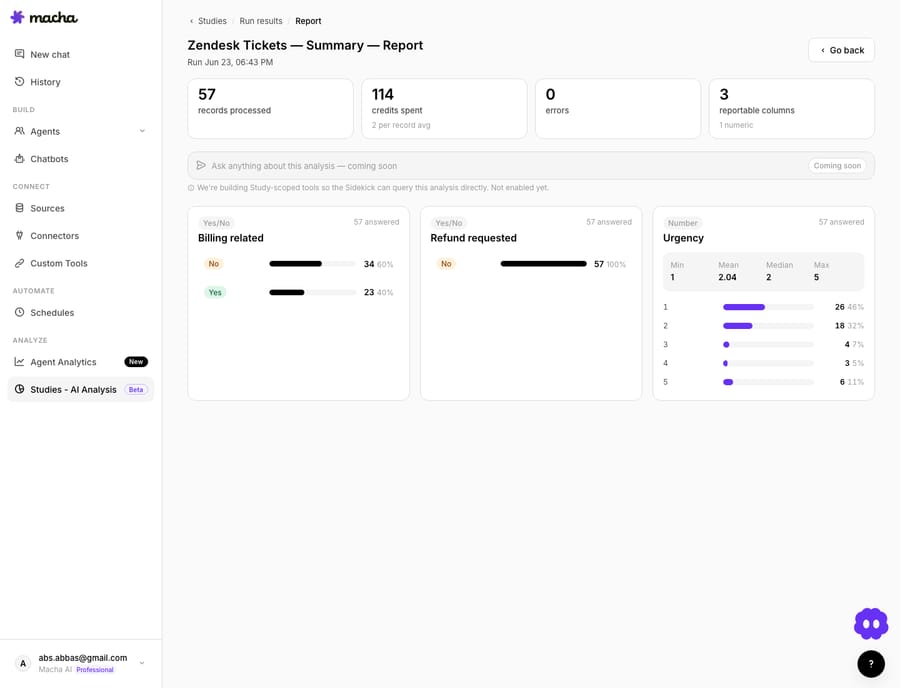
2. Push it. From the run, choose Use as knowledge source, confirm the modal, and Macha indexes every row. A frozen run never changes after this, the source is a snapshot of that analysis at that moment.
3. It appears in your sources. The new knowledge source shows up in the same list as your uploaded PDFs, crawled help center, and connected docs, no separate silo.

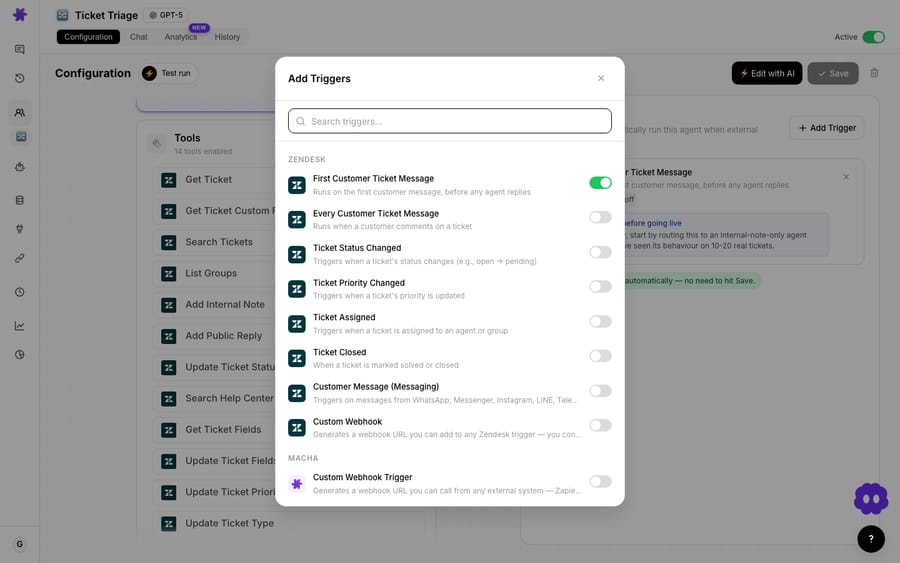
4. Attach it to the agents that need it. Open an agent, add the source to its knowledge, and from that point the agent can retrieve those documents when a relevant ticket comes in.
That's the whole loop: analyse the past, index it, point present-day agents at it.
Which Study columns make good knowledge documents?
This is the part the generic "turn tickets into a knowledge base" guides miss. A Study built to make a chart and a Study built to make a good knowledge source are not the same Study. Because every selected column is flattened into one document body per row, the columns you choose become the searchable text an agent reads.
Favour rich text columns over flags. A Yes/No: Billing related column makes a beautiful bar chart and a useless knowledge document ("Billing related: Yes" retrieves nothing helpful). For knowledge, you want Short text / Long text columns that carry real substance:
| Column type | Great for a report | Great for a knowledge source |
|---|---|---|
| Yes/No, Single/Multiple choice | ✅ aggregatable charts | ⚠️ thin as document text |
| Number (e.g. urgency 1–5) | ✅ histograms | ⚠️ no semantic value alone |
| Short text (one-line issue) | ↔️ | ✅ retrievable title-like context |
| Long text (problem + resolution) | ↔️ | ✅✅ the substance agents search |
Write the schema like you're writing knowledge. A column such as "Summarise the customer's problem and the exact steps the agent took to resolve it", with per-column guidance, produces a body that reads like a mini runbook. Add a root cause column and a resolution column and each indexed document becomes a self-contained problem/solution pair, which is precisely the shape semantic retrieval rewards.
Scope to resolved, representative tickets. Knowledge built from solved tickets teaches agents what worked. Pointing the same Study at open or escalated tickets indexes confusion, not answers. Use the Zendesk search query and date range in the Study's scope to keep it to closed, on-topic tickets.
The pragmatic move: run two columns for two jobs in the same Study, your Yes/No and Number columns for the report, plus one or two Long text columns for the eventual knowledge source. One run, both outputs.
How do agents use a Study-derived source on a live ticket?
Once the source is attached, nothing about the agent's runtime is special-cased. When a new ticket arrives, the agent's retrieval step searches all its knowledge, your help center, your uploaded policies, and now your Study-derived documents, and pulls the most relevant passages into context before it drafts. A ticket that rhymes with a problem your team solved last quarter now surfaces that resolution, in your team's own words, because a row from the Study captured it.
This is why the push matters more than the export. A CSV is read by a human, once. An indexed knowledge source is read by every agent, on every matching ticket, until you replace it.
How is this different from real-time ticket-to-knowledge tools?
Macha used to ship a Zendesk-marketplace app, Past Tickets AI, that continuously ingested tickets as they were resolved and surfaced suggestions in the agent sidebar in real time. That was the always-on, incremental path; the app has since been retired.
The Studies push is the deliberate, batch, structured path. The differences are real and you'll often want both:
| Studies → Knowledge Source | Real-time ticket-to-knowledge | |
|---|---|---|
| Trigger | You run a Study, then push | Continuous, on resolution |
| Shape | You define the schema/columns | Auto-extracted problem/solution |
| Best for | Backfilling years of history; a curated, reviewable snapshot | Keeping knowledge fresh going forward |
| Freshness | Frozen at push time | Always current |
| Control | High: you choose scope + columns | Lower: automatic |
Run a Study once to backfill your archive into agent knowledge, then let an always-on flow keep it current. Most external guides treat this as one feature; in practice they're two complementary motions.
When should you not push a Study into knowledge?
This is genuinely useful, but it is not magic, and a few things will bite teams that skip the fine print:
- The source is a frozen snapshot. Pushing a run indexes that run's data as it stood. If your product changes and old resolutions go stale, the documents won't update themselves, you re-run the Study and push again. Treat it as a versioned artifact, not a live feed.
- Don't create five of them. Every source you attach is more surface for retrieval to wander through, and overlapping snapshots of the same history compete with each other. One well-scoped Study-derived source beats five near-duplicates, keep the set small and deliberate.
- Garbage columns make garbage knowledge. As covered above, a source built only from Yes/No and Number columns is near-useless to retrieve. If the run was designed purely for charts, build a second run for knowledge.
- Mind the data you're indexing. You're turning real ticket content into searchable documents. Scope to the fields and tickets you actually want agents quoting, and keep sensitive PII out of the columns you select to merge.
- It's analysis-derived, not a help-center substitute. This makes internal agent knowledge from your own history. It is not a replacement for customer-facing help-center articles.
If your tickets are mostly unresolved, wildly inconsistent, or you only need a one-off number for a slide, skip the push and just read the report.
FAQ
What is a knowledge source in Macha? It's any content your agents can retrieve at answer time, uploaded documents, a crawled website, connected live docs (Notion, Confluence, Google), or, here, a pushed Study run. Larger content is chunked, embedded, and searched semantically, so agents pull the most relevant passage into context. See the Data Sources docs.
What happens to each ticket when I push a Study? Each result row becomes one indexed document. The columns you select are merged into a single article body per record, then embedded into the source so agents can search it.
Does pushing change my original tickets or the Study? No. The run is a frozen snapshot; the push reads from it. Your Zendesk tickets are untouched, and editing the parent Study later doesn't rewrite a source you already created.
Will the knowledge update automatically as new tickets come in? No, a pushed source is point-in-time. To refresh it, re-run the Study over a newer date range and push again. For always-current knowledge, pair it with a real-time ticket-to-knowledge flow.
Which plans include this? Macha has one plan, priced by ticket volume from $299 a month for 750 tickets, and every feature is included at every volume, so Studies and the knowledge-source push aren't a higher-tier add-on. Studies also run on the free trial. See the pricing page for current tiers.
What does a Study run cost, and do I see it first? Yes, you see it first. Before any run starts, Macha shows a Review screen with the number of records, the per-record cost, the estimated total and what your account has left, and clicking Run study opens a second confirmation. Macha's docs don't state a separate charge for indexing the pushed documents; check with the Macha team if that matters for your budget.
How do I get started?
If you've already run a Study, you're one button away: open the run, choose Use as knowledge source, and attach it to an agent. If you haven't, the free trial ($50 of usage, no credit card required) lets you connect Zendesk, run a Study and get agents running; on the trial and every plan the Macha team builds and monitors your agents for you. Read the Studies docs for the full builder walkthrough. Then point your agents on Zendesk at what they learn.
Written by Abbas (Customer Support & AI, Macha) · Reviewed by Ankeet Guha (Co-founder & CTO) · Published 2026-06-24 · Last updated 2026-06-24.






