





 Shopify
 Stripe
 Slack
Slack Notion
 Google Workspace
 Confluence

What's New in Macha, June 2026: Studies Reports, Agent Evaluation, Gorgias and Front


In June 2026 Macha shipped a Report view for Studies, agent testing and automatic evaluation, Gorgias and Front connectors, lower model credit costs and a 30-day Trash for deleted agents. Most of the rest was reliability work for teams running agents at volume.
Key takeaways
- Macha's June 2026 releases included a Studies Report view on June 5, Gorgias and Front connectors on June 23, and Agent Auto-Eval on June 30.
- LangChain's State of Agent Engineering report found 57% of organizations run agents in production, with quality the top blocker for 32% of respondents.
- Macha's Gorgias and Front connectors each ship 15 tools, connect via API key under Connectors → Support, and come with built-in agent templates.
- On June 17 Macha cut GPT-5 from 3 to 2 credits per response, but Macha now bills per ticket, so the model an agent runs on no longer changes the price.
- Deleted Macha agents sit in a Trash tab for 30 days with one-click restore that brings back triggers, instructions, sub-agent links and tool configuration.
Macha's June 2026 releases were a Studies Report view (June 5), visible sub-agent runs and a Zendesk tagging fix (June 10), lower GPT-5 and GPT-5.4 credit costs plus a 30-day agent Trash (June 17), Gorgias and Front connectors with 15 tools each (June 23), Sidekick test runs (June 26) and free Agent Auto-Eval (June 30). As a reminder of where Macha sits: it's the AI agent layer on top of the helpdesk you already run (Zendesk, Freshdesk, Gorgias, Front, HubSpot or Intercom), wired into your commerce, knowledge, and comms tools. None of what follows replaces your helpdesk; it makes the agents on top of it more capable and easier to trust.
| Date (2026) | Release | What it does |
|---|---|---|
| June 5 | Studies Report view | Bar charts and histograms over a completed Study run |
| June 5 | Debounce on event triggers | Delay per trigger; force-fire at 25 events or 10× the window |
| June 10 | Sub-agent runs in chat | Expandable trace of each sub-agent run, kept 45 days |
| June 10 | Zendesk tag fix | Tags now apply, and existing tags are preserved |
| June 17 | Model credit cuts | GPT-5 from 3 to 2 credits per response; GPT-5.4 from 5 to 3 |
| June 17 | Agent Trash | Deleted agents restorable for 30 days |
| June 23 | Gorgias and Front connectors | 15 tools each, API key, under Connectors → Support |
| June 26 | Sidekick test runs | Creates a real ticket and runs the agent against it |
| June 30 | Agent Auto-Eval | Grades every conversation against the agent's own instructions |
What does the Studies Report view show?
Studies launched on May 30 as batch AI extraction: point it at a batch of Zendesk tickets, define the columns you want, and a model fills the grid, one row per ticket and one column per question. The June 5 release added the part that turns that grid into a decision: a Report view, available on every completed run.
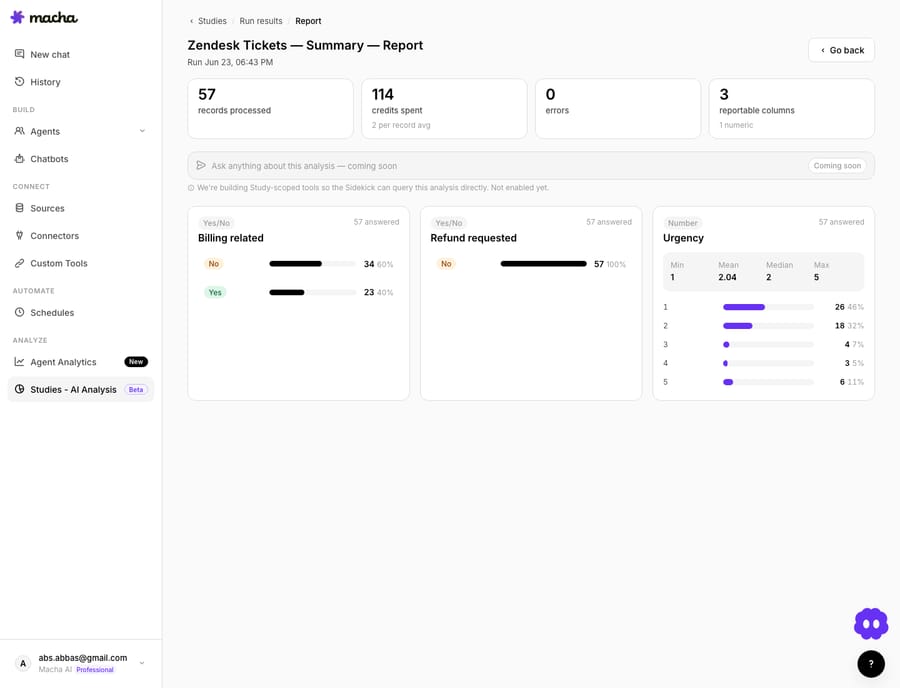
Open the report from a run's toolbar and Studies aggregates each reportable column into a visual:
- Yes/No, single-choice, and multiple-choice columns become bar charts, each bar labeled with its bucket, count, and percentage. Click any bar to drill straight into the matching records in a modal that uses the same results table as the run page, so moving from a chart into the underlying rows feels continuous.
- Number columns become histograms with min / mean / median / max summary stats on top. With ten or fewer distinct values each gets its own bin; otherwise Macha bins automatically into roughly ten equal-width ranges.
There's also an Ask Sidekick bar at the top of the report, shipped as a disabled "coming soon" preview. Once study-scoped query tools land, you'll ask free-form questions about a run's data and get answers grounded in that run's results. Until then it stays inert by design, so it can't return a confident-but-wrong answer over data it can't yet read.
Alongside the report, the Studies editor got a polish pass: tag-style pills for choice options, a cost-per-record badge next to the model selector (and again at the top of every run page), a run-confirmation modal that shows record count, estimated cost, and model before anything starts, and an Excel-like results table with click-to-sort headers and a live search filter.
Plan note: in June the Report view, like Studies itself, was limited to the Professional and Enterprise plans. Those plan names are gone. Since September 10, 2026 Macha sells one plan with every feature included, priced only by ticket volume, so the June gating no longer applies.
How does Agent Evaluation test an agent before it ships?
The harder problem with support agents isn't building one. It's trusting it. LangChain's State of Agent Engineering report (June 2026, 1,340 respondents) found that 57% of organizations now run agents in production, and quality is the top blocker for the rest, named by 32% of respondents. Agents are non-deterministic, so the same ticket can take a different path on two runs, and "it looked fine when I tested it once" isn't a deployment standard.
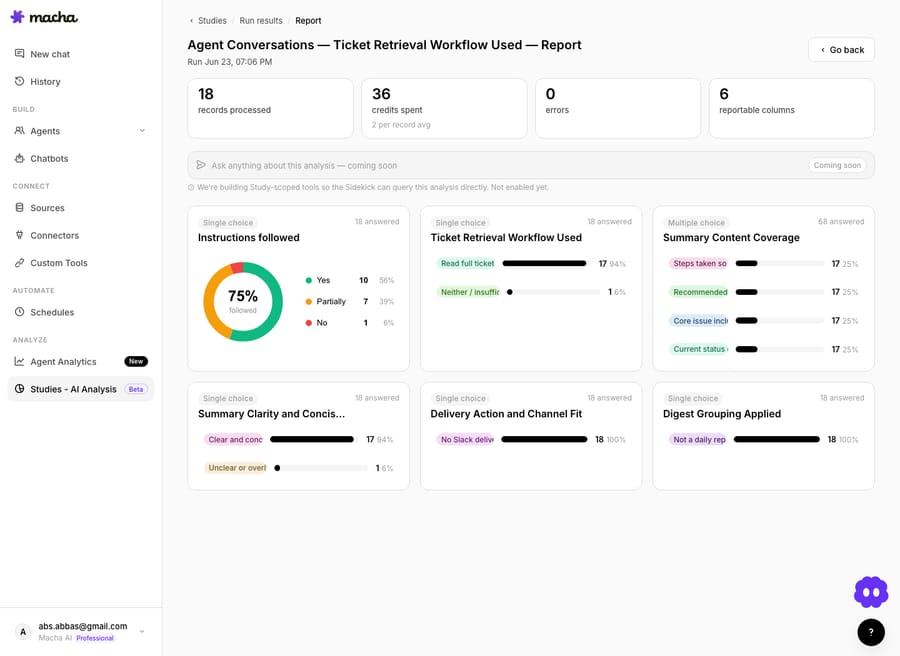
Agent Evaluation is Macha's answer: grade an agent's output against its own instructions, before it goes near a live customer and while it runs. Manual Evaluations follow the same pattern as Studies, build, estimate, run, report, so if you've used one, the other is immediately familiar.
The flow:
- Build the evaluation: define the conversations you want graded. You can draft these with AI help rather than hand-writing every row.
- Estimate the cost: like Studies, a manual evaluation run is metered, so you see the projected cost before you commit. Nothing runs until you confirm.
- Run and review: Macha grades the agent across the set and returns a results grid, then a report that summarizes how it did.
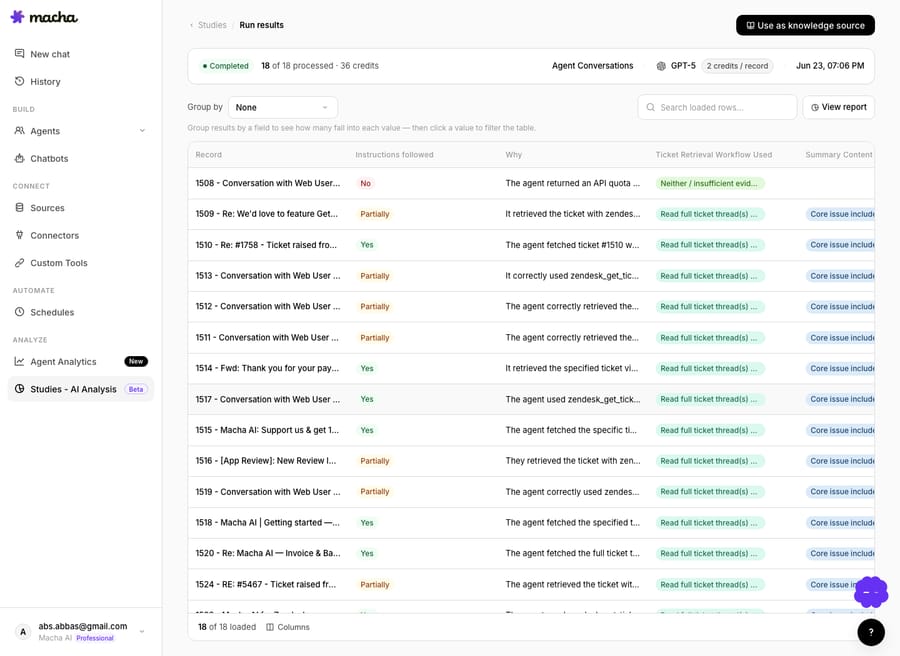
Two late-June releases filled in the rest. On June 26, Sidekick learned to test an agent end to end: it drafts realistic scenarios from the agent's instructions, creates a real entity on the connected workspace (a Zendesk, Freshdesk or Gorgias ticket, a Front conversation, or a Slack message), and dispatches the agent against it on the same code path it uses in production. On June 30, Agent Auto-Eval started grading every conversation an agent finishes against its live instructions, using a GPT-5 judge that fills in "Instructions followed" (Yes / Partially / No) and a short "Why." The adherence score is Yes plus half of Partially, divided by the total. Auto-Eval launched capped at 50 conversations per agent; on July 21 the cap went away, and on September 9 it became rubric-driven Continuous Agent Evaluation.
This is the missing half of the agent lifecycle. Studies tells you what's in your queue so you know which agent to build; Agent Evaluation tells you whether the agent you built actually handles it. It's the same instinct the broader eval ecosystem (LangSmith, Braintrust and others) has been formalizing this year, but kept inside the tool where you build and run the agents, against your real helpdesk data, instead of a separate testing stack you have to wire up.
Watch-out: an evaluation is only as honest as its cases. A passing report on ten happy-path tickets tells you the agent handles ten happy-path tickets, not that it's safe on the angry refund edge case you forgot to include. Build the awkward cases in deliberately, and re-run after every instruction change.
What do the Gorgias and Front connectors do?
On June 23 Macha added Gorgias and Front, joining Zendesk and Freshdesk. Both connect via API key and live under Connectors → Support, each with built-in agent templates to get moving fast. HubSpot and Intercom (September 17) have joined the help-desk list since.
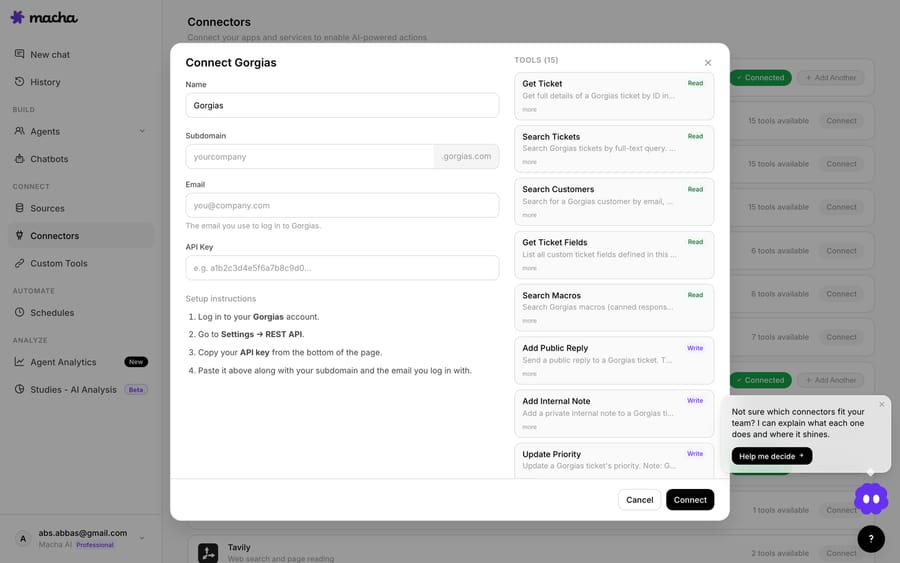
Gorgias is the helpdesk built for Shopify-native ecommerce teams. Order data sits inside the helpdesk, which is exactly the context an agent needs to answer "where's my order?" or process a return without tab-switching. The connector ships 15 tools spanning tickets, messages, customers, macros, tags, and team assignment, plus custom-webhook triggers for ticket created, ticket updated, and message added. Pair it with Macha's Shopify integration and you've got an agent that reads the ticket and the order in one move.
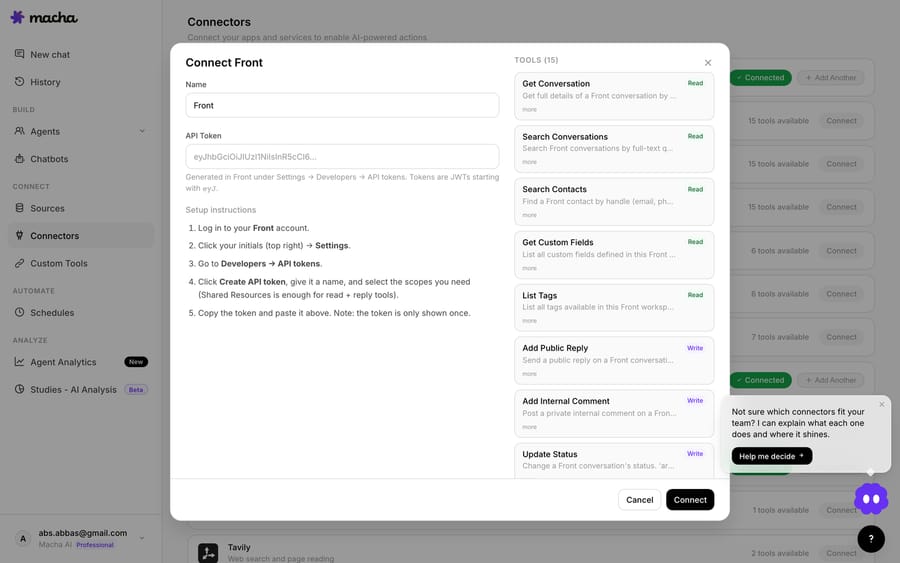
Front is the shared-inbox, customer-operations platform, more common in B2B and ops-heavy teams. Its connector also ships 15 tools, covering conversations, contacts, custom fields, inboxes, and teammate routing. Internal comments support @mentions, so an agent can loop in a specific human teammate inside a Front conversation rather than dropping a note nobody reads.
If you're weighing the two as helpdesks, the trade is well understood: Gorgias is purpose-built for high-volume B2C ecommerce with deep Shopify order data, while Front suits B2B and complex internal workflows on a seat-based model (eesel's Gorgias-vs-Front breakdown is a fair summary). Macha sits on top of either, and you don't switch helpdesks to use it.
Did the June model price cut change what customers pay?
On June 17, under the credit pricing Macha used then, GPT-5 dropped from 3 credits per response to 2 and GPT-5.4 from 5 to 3, while GPT-5.4 Mini stayed at 1 credit as the default. That pricing has since been replaced. Since September 10, 2026 Macha bills per ticket on one plan priced by volume, from $299 a month for 750 tickets, and the model an agent runs on doesn't change what you pay at all. Here's what the three June models were for:
| Model | Notes |
|---|---|
| GPT-5.4 Mini | Fast and cheap; fine for triage, tagging and FAQ work (the default in June) |
| GPT-5 | The balanced workhorse: capable, and fine to run at volume |
| GPT-5.4 | Best instruction-following for strict "do this once" rules and complex branching; now the default |
Because Macha charges one ticket per thread, however many replies it takes and whichever model answers it, the model dial is now purely a quality decision. If you'd been defaulting agents to GPT-5.4 Mini to keep costs down, there's no longer a reason to: step up on the agents that need sharper reasoning and your bill doesn't move. The lineup has also grown since June, with GPT-5.6 Terra, GPT-5.6 Luna and Claude Sonnet 5 among the options.
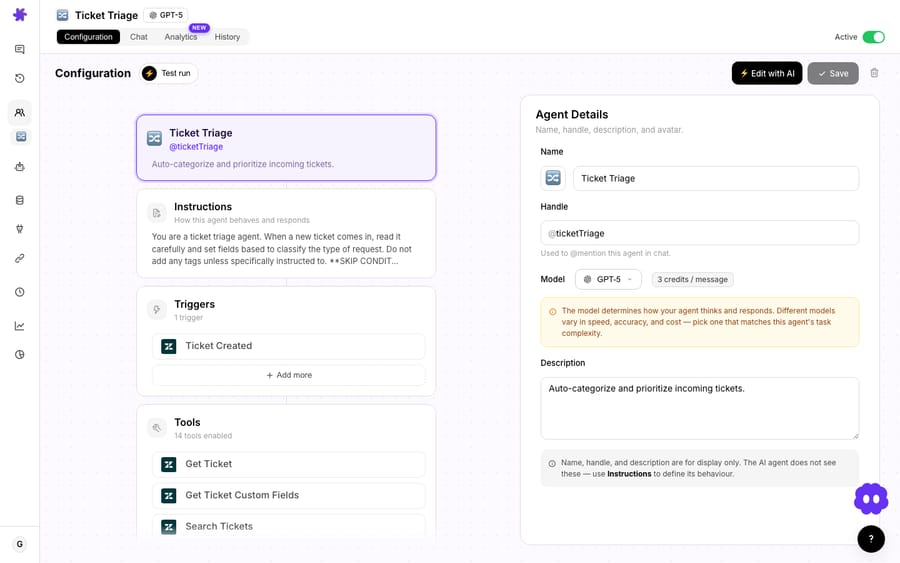
A small related fix: changing the model from the top-right dropdown now shows a toast clarifying that the choice applies only to the current conversation, and pointing you to Settings if you meant to change the org-wide default. It's the kind of scoping confusion that quietly catches people out, now caught.
For what the plan includes at each volume, see the pricing page.
Which reliability fixes shipped in June?
The headline features get the screenshots, but if you run agents in production these are the changes you'll feel day to day.
Sub-agent runs are now visible in chat
When an agent hands off to a sub-agent, you can now see what the sub-agent did. Each invocation gets its own conversation record, surfaced as an expandable card under the delegated message: avatar, handle, model, connector logos, tool count, and a green "Handed off" badge. Expand it for the full nested run: system prompt, every tool call with arguments, every result, and the final reply, styled like the main chat.
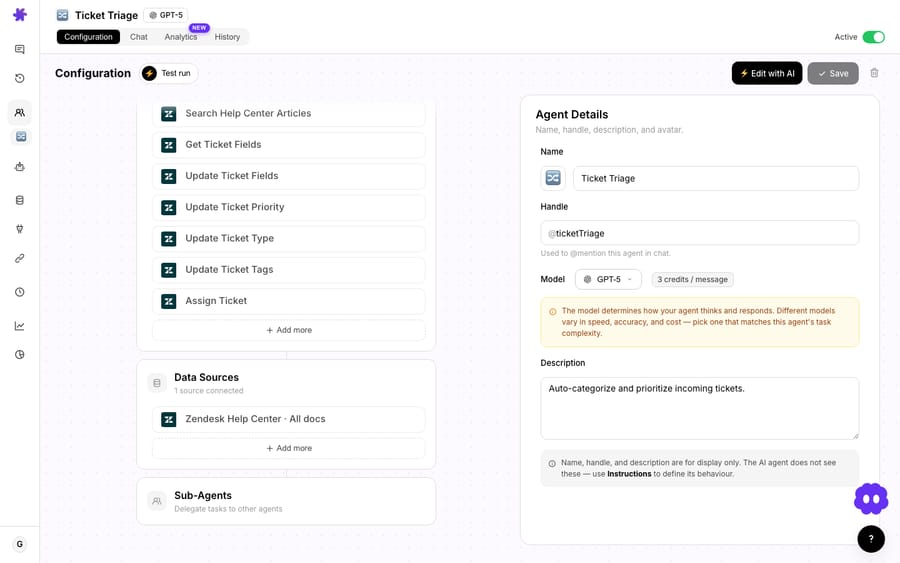
It works automatically for every new sub-agent run, in both chat and autonomous (trigger-fired) flows, and the records stay out of your main conversation counter while remaining available for 45 days. For anyone debugging a multi-agent workflow, this turns a black box into a trace.
Soft-delete agents: 30-day trash with restore
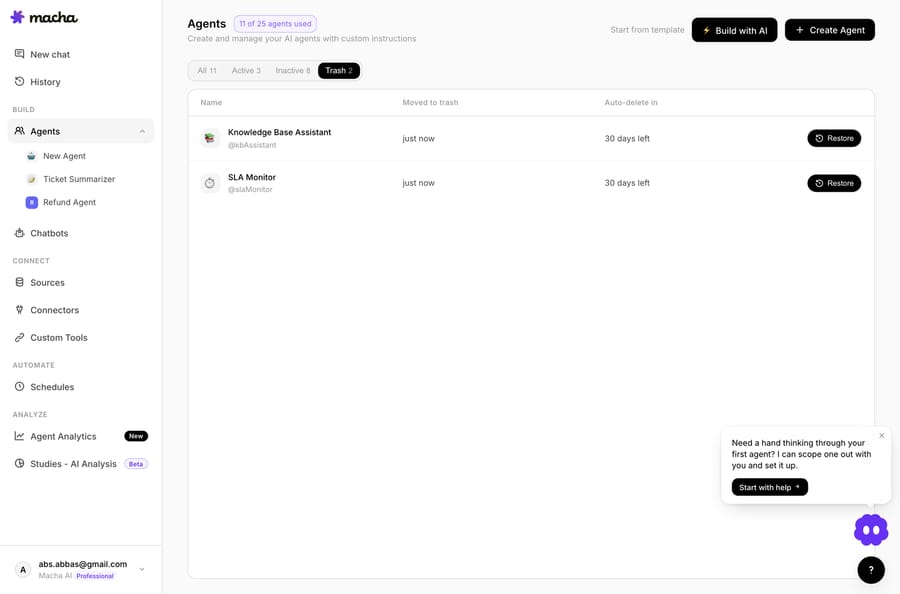
Deleting an agent is now reversible. It moves to a Trash tab on the Agents page for 30 days; restore it any time in that window and its triggers, instructions, sub-agent links, and tool config all come back intact. Triggers are deactivated, not deleted, so they stop firing but keep their webhook secrets. Restore brings the config back, and you re-enable when ready. The AI sidekick respects the same path, so "delete this agent" from the dashboard assistant is just as recoverable.
A long-standing Zendesk tagging bug, fixed
If you've ever had an agent report it tagged a ticket while the tag never appeared, that was a real bug, and June 10 fixed it. zendesk_update_ticket_tags now actually applies the tag across all Zendesk account configurations, preserves existing tags instead of wiping the set, and reports the verified final tag list back so the agent sees the truth rather than its own intent. If your routing or reporting leans on tags, this one matters.
Debounce on every event-driven trigger
Previously only messaging triggers could be debounced. Now any Zendesk or Freshdesk ticket event, Slack mention or DM, or messaging event can carry a debounce delay, which helps when a flurry of rapid updates would otherwise fire your agent five times for one logical change. Safeguards force-fire a debounce bucket once it hits 25 events, or after 10× the window (capped at 2 minutes), so a malformed event source can't hold an agent hostage.
A friendlier first run
New orgs that finish onboarding with at least one connector now land in a welcome conversation instead of a static "you're all set" screen. Macha pulls a few real items from the tools you just connected (recent tickets, recent payments, recent conversations) and the first message streams in referencing what it actually found, with three tailored suggestion chips below. The whole chat is free, flagged by a badge next to the model picker. One per organization.
There were also smaller wins: new Model / Tools & Triggers / Sub-agents columns on the Agents listing, a top-up balance chip on the Billing usage card, and subscription recovery so a successful retry after a declined card flips an org back to active automatically instead of getting stuck in past_due.
When don't these updates change anything for you?
A roundup should be honest about scope:
- If you don't run Studies or evaluations, the reporting work stays out of your way. It only appears on completed runs.
- If you don't use sub-agents, the visible-sub-agent-runs feature is invisible (by design). It only appears when delegation happens.
- Model choice is a quality decision, not a budget one. Stepping an agent up to GPT-5 or GPT-5.4 costs nothing extra, so pick the smallest model that clearly clears the work, and step up the moment it doesn't.
- Gorgias and Front don't replace your current helpdesk. They're additional connectors. If you're happily on Zendesk or Freshdesk, nothing here asks you to migrate.
FAQ
Where do I find the Studies Report view? On any completed Study run, open the Report from the run's toolbar. At launch it was limited to the Professional and Enterprise plans; since September 10, 2026 Macha has one plan with every feature included.
How is Agent Evaluation different from Studies? Studies analyzes your existing tickets to tell you what's in your queue. Agent Evaluation grades an agent's conversations against its own instructions to tell you whether it handles them. Manual Evaluations follow the same build → estimate → run → report flow as Studies, and Auto-Eval grades every conversation automatically.
Do Gorgias and Front replace Zendesk or Freshdesk? No. Macha is the AI agent layer on top of your helpdesk. Gorgias and Front are two more helpdesks it can sit on, alongside Zendesk and Freshdesk, and HubSpot and Intercom have been added since. Gorgias and Front connect via API key under Connectors → Support.
Does the model I choose change what I pay? No. Macha bills per ticket, one thread charged once, whichever model the agent runs on. No action needed on existing agents.
Can I undo deleting an agent now? Yes. Deleted agents sit in a Trash tab for 30 days with one-click restore; their triggers, instructions, sub-agent links, and tools all return intact. After 30 days they're permanently removed.
How do you try these features?
If you've been waiting for a reason to look at Studies reporting or test an agent properly before shipping it, start a free trial ($50 of usage, no credit card required, no time limit), connect your helpdesk (Zendesk, Freshdesk, Gorgias, Front, HubSpot or Intercom), and run a Study or an evaluation. The full feature history lives in the changelog and the docs; the integrations directory lists every tool Macha connects to.
Written by Abbas (Customer Support & AI, Macha) · Reviewed by Ankeet Guha (Co-founder & CTO) · Published 2026-06-24 · Last updated 2026-09-24.






