





 Shopify
 Stripe
 Slack
Slack Notion
 Google Workspace
 Confluence

What Did Macha Ship in May 2026? Zendesk Group Routing, Studies and Top-Ups


Macha shipped Zendesk group routing and a ticket-type tool on May 2, 2026, then Studies, one-time top-ups and a rebuilt billing Usage card on May 30. Below is what each release does and where its limits are.
Key takeaways
- Macha shipped four changes in May 2026: Zendesk group routing and an Update Ticket Type tool on May 2, then Studies, top-ups and a new billing Usage card on May 30.
- Since May 2, 2026, Macha's Assign Ticket tool accepts a Zendesk group, an agent, or both, and the List Groups tool resolves a group name to its ID first.
- Macha Studies caps each run at 20,000 records and lets a team test on a sample of 10 to 50 records before paying for the full batch.
- Macha top-up packs never expire and are spent automatically only after the monthly allowance runs out, and agents pause rather than charge overages.
- Macha's free trial includes $50 of usage, about 125 tickets, with no credit card and no time limit, and Studies, which launched on paid plans only, now run on the trial too.

Macha shipped four things in May 2026: Zendesk group routing and a ticket-type tool on May 2, then Studies (batch AI analysis capped at 20,000 records a run), one-time top-up packs and a rebuilt billing Usage card on May 30. If you run Macha as an AI agent layer on top of Zendesk, the routing tools and Studies change day-to-day work the most. Here's what shipped, why it matters, and the edges we'd warn you about.
| Release | Date | What it does |
|---|---|---|
| Assign Ticket to a group | May 2, 2026 | Route a ticket to a Zendesk group, an agent, or both |
| List Groups | May 2, 2026 | Read tool that resolves a group name to its Zendesk ID |
| Update Ticket Type | May 2, 2026 | Sets problem, incident, question or task |
| Studies | May 30, 2026 | Typed AI columns across up to 20,000 Zendesk tickets per run |
| Top-ups | May 30, 2026 | One-time packs that never expire, spent after the monthly allowance |
| Billing Usage card | May 30, 2026 | Splits monthly usage from top-up balance |
Quick orientation, in case you're new here: Macha doesn't replace your help desk. It sits on top of Zendesk, Freshdesk, Gorgias, Front, HubSpot or Intercom and gives AI agents real tools: read a ticket, classify it, reply, tag it, route it, look something up in Stripe or Notion. May's releases added tools to that toolbox and a new way to analyze your ticket history in bulk.
Can a Macha agent assign a Zendesk ticket to a group? (May 2)
Yes, since May 2. Before that, triage agents had a frustrating gap. The Assign Ticket tool could hand a ticket to a named agent, but most real support orgs don't route to people, they route to queues: Billing, Tier 2, Refunds, Onboarding. Picking a specific human at triage time is brittle (they go on PTO, they get overloaded) and it's not how Zendesk's own routing model thinks.
So we fixed it. Three changes landed on May 2:
- Assign Ticket now accepts a group, an agent, or both. An agent can route an incoming ticket straight to the Billing group or Tier 2 Support queue and let Zendesk's normal assignment logic take it from there, instead of always pinning it to one person.
- List Groups, a new read tool that returns every active Zendesk group. This is the unglamorous-but-essential piece: an agent resolves a group name ("Billing") to its Zendesk group ID before it routes, so assignment doesn't fail on a guessed ID.
- Update Ticket Type, a new write tool that sets a ticket's type to problem, incident, question, or task. Triage agents can now categorize tickets the way Zendesk natively models them, without you having to wire up a custom field for it.

Why route to a group instead of a person
This is the difference between automation that survives contact with a real team and automation that doesn't. Zendesk's own routing guidance is built around groups and assignees as trigger actions, and omnichannel routing distributes from group queues, so when Macha assigns to a group, the ticket drops into Zendesk's existing distribution rather than fighting them.
Where this beats a plain Zendesk trigger: a trigger routes on fixed conditions (this support address, this tag, this form). A Macha agent reads the ticket and decides: it can tell a billing dispute from a how-do-I question from a bug report, set the right type, and pick the matching group, even when no tag or address tells it where to go. That's the triage-and-route use case most teams want and can't get from static rules alone.
A worked example, the way you'd configure it:
| Step | What the agent does | Tool |
|---|---|---|
| 1 | New ticket arrives, agent reads subject + body | Get Ticket |
| 2 | Classifies: "billing dispute, high urgency" | (model reasoning) |
| 3 | Sets the ticket type to problem | Update Ticket Type |
| 4 | Looks up the right queue's ID | List Groups |
| 5 | Routes to the Billing group | Assign Ticket (group) |
Watch-out: routing to a group is only as good as your group structure. If your Zendesk has one catch-all group, there's nothing to route to. Set up real groups first. And give the agent guidance on which group maps to which topic; "use your judgment" produces inconsistent routing.
What is Macha Studies, and what does a run look like? (May 30)
This is the headline. Studies lets you point an AI model at a whole batch of records, define the columns you want filled in, and get back a structured grid, one row per record, one column per question. It's the analysis counterpart to Macha's live agents: agents act on tickets in real time; Studies reads your history in bulk.
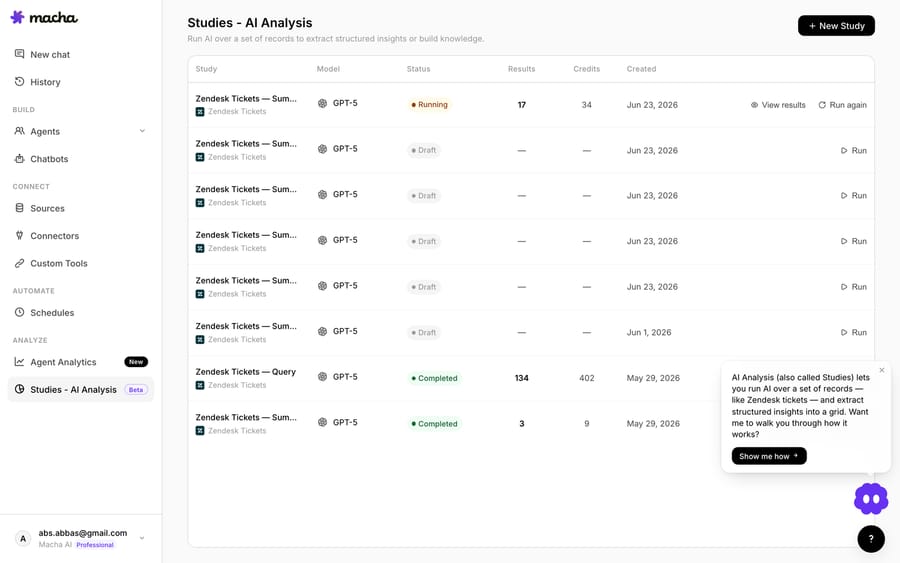
The shape of a Study is three decisions:
- Source & scope. The first input source is Zendesk Tickets. You pick them with a Zendesk search query and an optional date range, then choose which fields the AI sees, subject, description, status, priority, tags, custom fields, and the full comment thread. Narrowing the fields keeps the model focused and the cost down.
- Typed columns. Each output column is a typed question: boolean (is this billing-related?), single / multi select (category from a fixed list), number (urgency 1–5), or short / long text (a one-line summary). Add per-column guidance so the model decides the way you would. Typed columns are what make the results aggregatable into charts later.
- Run & review. Before anything runs, Studies shows you the exact record count, the cost per record, and the total, and nothing kicks off until you confirm. You're billed per successful record; cancelled and errored rows cost nothing.
Two guardrails worth calling out:
- Test runs sample 10–50 records so you can validate your schema and guidance before committing to the full batch. Test runs are flagged so they don't clutter your real history.
- A 20,000-record cap per run keeps cost predictable. For bigger jobs, split by date range. Every run also keeps a frozen snapshot of its config, schema, and model, so editing the Study later never rewrites past runs.
The payoff step: a completed run can be pushed to a Knowledge Source. Each result row becomes a document indexed through Macha's existing embeddings pipeline, so the structured insights from your analysis become searchable context your live agents can use. Analyze the past, then let the present agents draw on it.
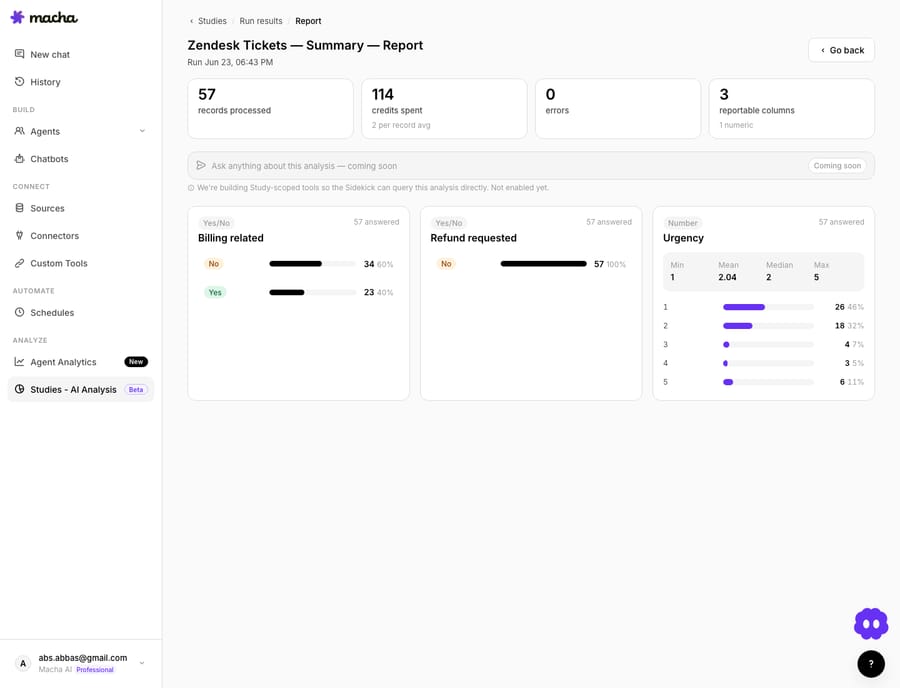
We wrote a full first-party walkthrough, a real 57-ticket run and the actual findings, in Studies: run an AI analysis across thousands of support tickets. If you've ever argued about "what percentage of our queue is really billing," that post settles it with data.
Watch-outs, honestly:
- It costs real money. A big batch is a real bill, and that's exactly why the estimate-and-confirm gate exists. Test on 10–50 first, narrow the date range, and only feed the fields the question needs.
- Not on the trial at launch. Studies shipped on the Professional and Enterprise plans, not on the free trial or Starter. Studies now run on the free trial too, and Macha has since (10 September 2026) moved to one plan priced by ticket volume, so check the pricing page for what your plan includes today.
- One source today. Zendesk Tickets is the first and only input source so far; more record types are on the roadmap. If your data lives elsewhere, Studies can't reach it yet.
How do Macha top-ups work? (May 30)
Macha bills per ticket, one thread with one person, charged once, whichever model the agent runs on, against a monthly allowance. Until May, if a busy month or a large Study drained your balance, your only lever was upgrading the whole plan. Now there's a lighter one: one-time top-up packs.
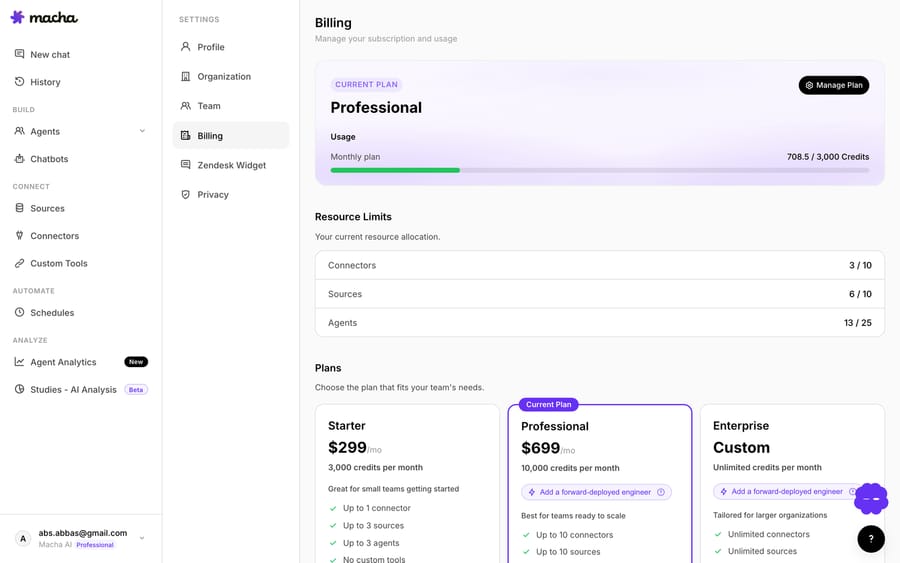
Top-ups are bought from the billing page through an in-page Chargebee checkout, in three sizes at launch. Macha doesn't publish top-up prices on its current pricing page, so check the billing page for today's packs. The mechanics that matter:
- A top-up never expires. Unlike your monthly allowance, it rolls over month to month and is spent automatically after the monthly allowance is used up, so you never have to think about which bucket you're drawing from.
- For active paid subscribers. The top-up section shows for any live paid subscription. Trial users move onto a plan first.
- Safe to click twice. Purchases are recorded idempotently against the Chargebee invoice ID, so a duplicated webhook can't double-credit (or double-charge) an account.
There's also a "Need more? Buy a top-up" deep link right on the Studies Review screen, so if a Study's estimate is bigger than your remaining balance, you can top up without losing your place.
Watch-out: top-ups are a buffer for spikes, not a pricing strategy. If you're buying one every month, move up a tier instead. Every tier on the pricing page works out at about $0.40 a ticket, from $299 a month for 750 tickets to $3,999 for 10,000, and there are no overages: agents pause when the month's tickets run out.
What changed on the billing page? (May 30)
Small but overdue. The billing Usage card now splits monthly plan usage from your top-up balance: a bar that resets each cycle for the monthly allowance, and a separate, persistent figure for the top-up balance, with a note that top-ups are spent after the monthly bucket. The top-up cards got cleaner too: price, effective rate, and savings badge sit on one row, and the "Most popular" ribbon is now Macha purple to line up with the plan cards above it.
Should you change anything after these updates?
A quick triage of May's Macha product updates by who they're for:
- Running triage agents on Zendesk? Revisit your routing instructions: you can now send tickets to groups and set ticket type, which usually means simpler, more reliable triage than tag-based hacks. Worth a config pass. See the Zendesk product page for how agents act on tickets.
- Curious what's actually in your queue? Run a Study on the last 30 days before you build or change an agent. It tells you what's worth automating and what's rare.
- Bumping into your monthly ceiling? Top-ups are the no-replan release valve. If you hit them every month, look at a tier with a bigger allowance instead.
FAQ
Can a Macha agent route a Zendesk ticket to a group, not a person? Yes, as of May 2, 2026, the Assign Ticket tool accepts a group, an agent, or both. Use the List Groups tool so the agent resolves a group name to its ID before routing.
What is Macha Studies? A batch AI-analysis tool: define typed columns, run them across a batch of Zendesk tickets in parallel, and get a structured grid plus a report with charts. You can export it or push it back as agent knowledge. It launched on paid plans only; today it also runs on the free trial.
How much does a Study cost? It's priced per record, and you see the exact total before you confirm. You're billed only for records that process successfully; cancelled and errored rows cost nothing.
What are top-ups? One-time purchases you make on top of your monthly allowance. They never expire and are spent automatically after the month's tickets run out. Available to any active paid subscription.
How many records can one Study process? Up to 20,000 per run. For a bigger job, split it by date range. Test runs sample 10 to 50 records first.
Is Macha replacing my Zendesk? No. Macha is an AI agent layer that runs on top of Zendesk. It reads, replies to, tags, types, and routes tickets using Zendesk's own model. Your helpdesk stays your helpdesk.
How do you try these features?
Start a free trial ($50 of usage, about 125 tickets, no credit card and no time limit), connect Zendesk, and point a triage agent at the new routing tools. You can run a Study on the trial too. The full feature reference lives in the docs, and every shipped change is logged on the changelog.
Written by Abbas (Customer Support & AI, Macha) · Reviewed by Ankeet Guha (Co-founder & CTO) · Published 2026-06-24 · Last updated 2026-09-24.






