Intercom
 Shopify
 Stripe
 Slack
Slack Notion
 Google Workspace
 Confluence

How Do You Create a Zendesk API Token in 2026, and When Should You Switch to OAuth?


To create a Zendesk API token, go to Admin Center, Apps and integrations, APIs, API tokens, click Add API token, add a description, click Save and copy the token at once, because it is never shown in full again. Zendesk stops new token creation on October 27, 2026 and deactivates every remaining token on April 30, 2027, so anything long-lived should move to OAuth.
Key takeaways
- Creating a Zendesk API token happens in Admin Center under APIs > API tokens, with Allow API token access enabled and the account under its 256-token limit.
- Zendesk stops all new API token creation on October 27, 2026, and deactivates every remaining API token permanently on April 30, 2027.
- A Zendesk API token unused for 30 days auto-deactivates and is deleted 60 days later, and the first tokens were deleted on September 26, 2026.
- Zendesk API token authentication uses HTTP basic auth: the account email address with /token appended as the username, and the token itself as the password.
- OAuth clients created in Zendesk since April 30, 2026 carry default access-token and refresh-token expiry, unlike the permanent API tokens they replace.

You create a Zendesk API token in Admin Center under Apps and integrations > APIs > API tokens > Add API token, then authenticate with your email address plus /token as the username and the token as the password. The part that matters more in 2026 is when you can still do it. Zendesk is removing API tokens: from October 27, 2026 nobody can create new ones, and on April 30, 2027 every remaining token stops working.
What do you need before creating a Zendesk API token?
Three things have to be true.
You have to be an admin. Agents can't generate tokens.
API token access has to be switched on. It lives at Admin Center, Apps and integrations, APIs > API configuration, as the checkbox Allow API token access. If it's off, the Add API token button won't help you.
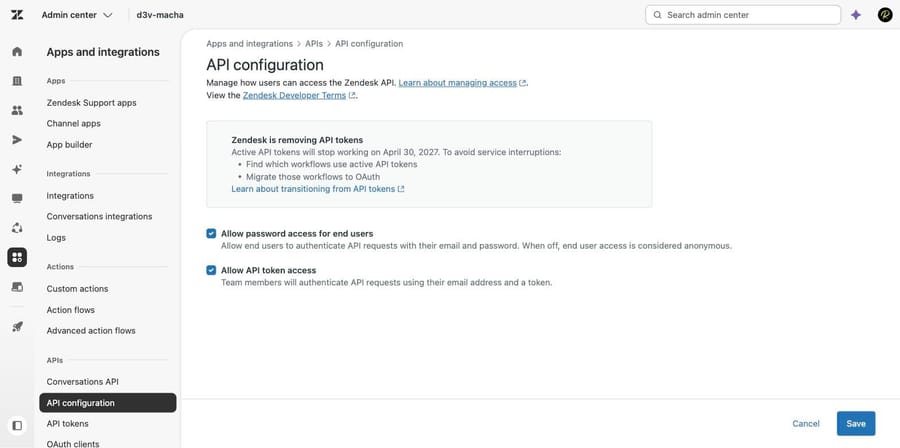
You have to be under the limit. An account can hold up to 256 tokens, and accounts that already had more than that are capped at 2,048. At the limit, you delete one to add one.
How do you create a Zendesk API token?
- In Admin Center, click Apps and integrations in the sidebar, then select APIs > API tokens.
- Click Add API token.
- Enter a Description. Zendesk's help center article still describes this as optional; the live screen labels it "Description* (required)", so write something useful. It is the only thing that will tell you later what this token is for.
- Click Save. The token is generated and displayed.
- Copy it now and store it somewhere safe. The screen says it plainly: copy and store this token, it won't be shown in full again after you click Save or leave this page.
- Click Save again to return to the list. Reopening the token from the list shows a truncated version only.
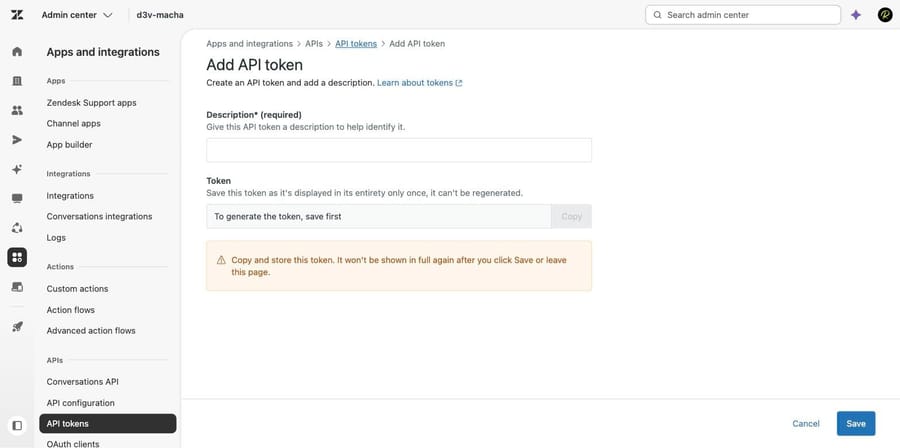
A token isn't tied to the person who made it. Any verified user on the account can use it, paired with their own email address, and more than one token can be active at once. That is the single most important thing to understand about them, and it is also the reason they are being removed.
How do you authenticate a request with an API token?
Authentication is HTTP basic auth with a modified username. The username is your email address with /token on the end, and the password is the token:
curl https://{subdomain}.zendesk.com/api/v2/tickets.json \
  -u {email_address}/token:{api_token}
Whatever you are calling from, the two fields map the same way: username [email protected]/token, password the token string. Get a 401 back and it is almost always the /token suffix missing, the wrong email, or a token that has been deactivated. Our guide to Zendesk API errors 401, 422 and 429 covers what each code is telling you.
The permissions you get are the permissions of the email address you paired with the token, not of the token. A token used with an admin's address has admin access.
When is Zendesk removing API tokens?
This is the part that changes what you should do next. Zendesk announced the removal of API tokens on June 1, 2026, and it is happening in three phases, with the first deletions landing between the first two.
| Date | What happens |
|---|---|
| July 28, 2026 | Already in effect. Tokens unused for 30 days auto-deactivate; deactivated tokens are deleted after a further 60 days. Accounts created on or after this date cannot create API tokens at all. |
| September 26, 2026 | First permanent deletions. Tokens that were deactivated on July 28 reach the 60-day mark; Zendesk sent the first deletion warning emails on September 21. |
| October 27, 2026 | No one can create a new API token, through the UI or the API. Existing active tokens keep working. |
| April 30, 2027 | Every remaining token is deactivated permanently. No reactivation, and the API token pages are removed from Admin Center. |
The rolling 30-day rule is the one that catches people, because it is quiet. A token that runs a quarterly export is unused for 90 days by definition, and it will be gone before the job next runs.
Your API tokens page now has a Deactivates on column that tells you exactly when. On our own instance, the one active token had last been used on September 18 and showed a deactivation date of October 19. Using a token resets that clock, so a token you call daily never reaches it.
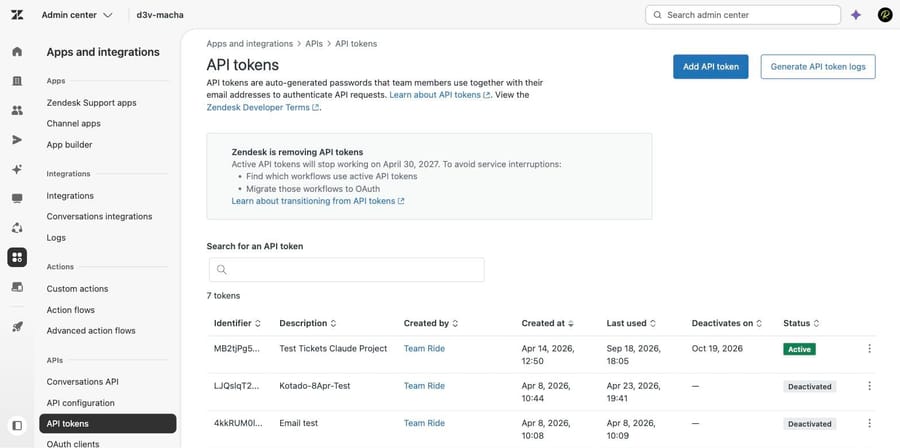
If a token has already gone, you have 60 days: find it in the list with status Deactivated, open its options menu and select Reactivate, and it works again immediately. After 60 days it is deleted and unrecoverable. After April 30, 2027 nothing can be reactivated.
There's also a Generate API token logs button on that page, which produces the previous seven days of requests made with API tokens. Zendesk's own advice is to run it daily to build a rolling history, because seven days is all you get. That report is how you answer the question this whole migration turns on: which workflows are actually using a token.
How do you edit, deactivate or reactivate an existing token?
Edit changes the description and nothing else. Deactivate parks a token without deleting it, which is the right move when you suspect a token is compromised or you want to find out what breaks. Reactivate brings it back. Delete is permanent.
On Enterprise plans each token also has an audit log, which is where you go when you need to know who created or changed one.
When should you switch from API tokens to OAuth?
The honest answer in late 2026 is: now, for anything you expect to still be running in May 2027.
OAuth replaces a permanent, account-wide password with a short-lived, scoped credential. Zendesk's stated reasons for the removal are worth repeating because they are the reasons to migrate, not marketing: API tokens have no rotation mechanism, no granular permissions, and no expiration. A token can impersonate any user on the account including admins, and an actively used stolen token never expires on its own.
You can't create an OAuth access token directly in Admin Center the way you create an API token. You create an OAuth client first, then use that client in an authorization flow to mint access tokens.
- In Admin Center, click Apps and integrations, then select APIs > OAuth clients.
- Click Add OAuth client.
- Fill in Name, Description and Company, which are what a user sees when asked to grant access, plus an optional Logo.
- Set the Identifier, the name used in code.
- Choose the client type. Public is for apps that can't store a secret, like a mobile or browser app, and must use PKCE. Confidential is for anything running on your own server, which can use PKCE, a client secret, or both.
- Add Redirect URLs, absolute and HTTPS, except for localhost.
- Pick Scopes.
- Save, and copy the Secret. Like the API token, it is shown in full once.
Step 7 is the one to slow down on, and it is new. Since August 10, 2026 the client form carries an allowed-scopes picker, described on screen as restricting the permissions that tokens for this client can request, with an empty selection meaning any scope. Leave it empty and you have recreated the API token problem with extra steps.
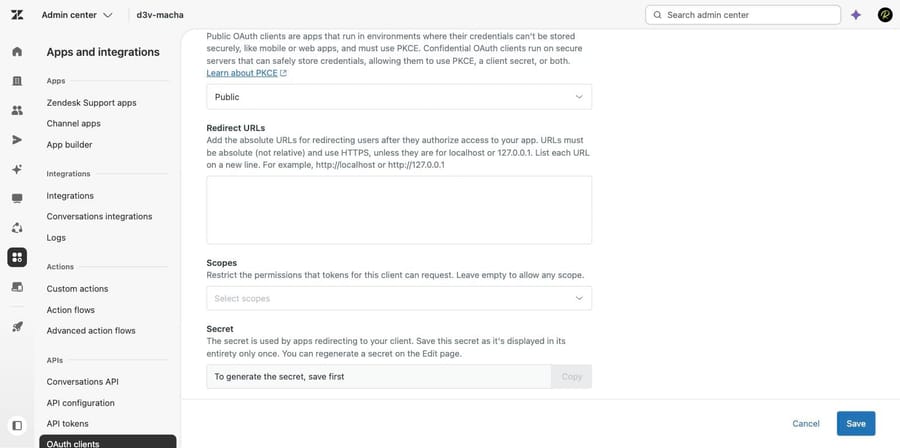
The scope list is genuinely granular now: read and write for everything, then pairs like tickets:read and tickets:write, users:read and users:write, organizations:read and more. A client asking for a scope outside its allowed list fails with a 400 and an invalid_scope error, which is a much better failure than a script quietly doing something you never intended.
One thing to design around: local OAuth clients created on or after April 30, 2026 come with default access-token and refresh-token expiry. Whatever you build has to refresh. If you are porting a script that has used the same static string since 2019, that is the actual work.
For why Zendesk made this change and what it means beyond the mechanics, our post on OAuth becoming the default covers the argument. For everything the API itself can do, start with the Zendesk API explained.
In what order should you migrate integrations to OAuth?
- Generate the API token log and run it daily for a week or two. You cannot migrate what you cannot see.
- Match each token to a workflow using its description and the log. Webhooks, custom scripts, data syncs, contractor-built integrations and middleware are the usual list.
- Delete the ones nobody claims. If nothing has used a token in 30 days, the platform is going to delete it anyway.
- Create one OAuth client per integration, not one for everything, and scope each to what it actually needs.
- Migrate the noisiest integration first, because it will surface the refresh-token handling you need everywhere else.
- Keep the old token active until the new path is proven, then deactivate rather than delete for a couple of weeks.
What does the token removal mean if you run AI on Zendesk?
Any tool sitting on your Zendesk authenticates through one of these two doors, including ours. If a vendor's setup guide still asks you to paste an API token, that is now a dated integration and their migration deadline becomes your outage risk in April 2027. Worth asking before you renew.
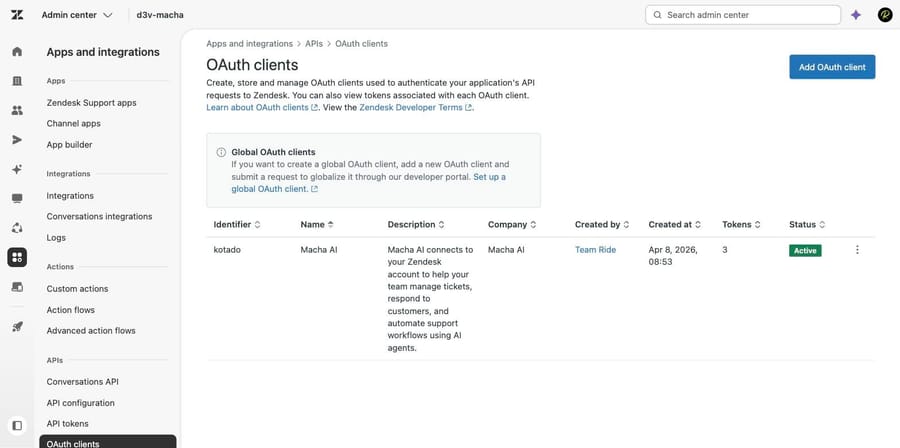
Macha on Zendesk connects as an OAuth client, which is the same picture as the screenshot above: a named client, its own scopes, and tokens you can view and revoke from Admin Center without touching anything else. It suits teams already running Zendesk who want agents acting inside the ticket rather than another tool holding an account-wide credential, and it's the wrong fit if what you need is a raw data pipe, where a scoped OAuth client and your own code is the better answer.
The incentive behind the billing unit is worth naming: a vendor charging per automated resolution earns more the more tickets arrive. Macha bills per ticket, one thread with one person as one charge however many replies it takes, from $299 a month for 750 tickets on published pricing, with setup and monitoring by our team included and $50 of free usage to start.
How we researched this
We checked every screen on our own instance. On September 21, 2026 we walked the API tokens, API configuration and OAuth clients pages in d3v-macha, our Zendesk sandbox on Support Enterprise, opened both the Add API token and Add OAuth client forms, and canceled out of each without creating anything. All five screenshots are that session, including the live removal banner and the Deactivates on column. The three-phase timeline, the 30-day and 60-day rules, the 256-token limit, the scope list and the OAuth client expiry default are quoted from Zendesk's own documentation read the same day: the removal announcement (edited September 16, 2026), "Managing API token access to the Zendesk API" (July 14, 2026), "Managing OAuth token access to the API" (August 21, 2026) and the granular scopes announcement (August 6, 2026). We rechecked the announcement, including its notification and first-deletion dates, and the token limit on September 24, 2026. We did not generate a token, run an authenticated request or complete an OAuth flow, so the curl shape is Zendesk's rather than ours.
Frequently asked questions
Where do I create a Zendesk API token? Admin Center, then Apps and integrations in the sidebar, then APIs > API tokens, then Add API token. You must be an admin, and Allow API token access must be switched on under APIs > API configuration.
Can I see a Zendesk API token again after creating it? No. The full token is displayed once, when you click Save. Reopening it from the list shows a truncated version. If you lost it, delete the token and create a new one, then update whatever was using it.
How do I authenticate with a Zendesk API token? Basic auth, where the username is your email address with /token appended and the password is the token itself: -u [email protected]/token:{api_token}. A 401 usually means the /token suffix is missing or the token has been deactivated.
Is Zendesk getting rid of API tokens? Yes. From October 27, 2026 no new API tokens can be created, and on April 30, 2027 all remaining tokens stop working permanently. Since July 28, 2026 any token unused for 30 days deactivates automatically and is deleted 60 days after that, and the first tokens were deleted on September 26, 2026.
Why did my Zendesk API token stop working on its own? Most likely the 30-day rule. Since July 28, 2026, a token that goes 30 days without being used is deactivated automatically. Check the Deactivates on column on the API tokens page; using a token resets that date.
Can I reactivate a deactivated Zendesk API token? Yes, within 60 days. Find it in the list with status Deactivated, open its options menu and select Reactivate, and it works immediately. After 60 days it is deleted permanently, and after April 30, 2027 nothing can be reactivated.
How many API tokens can a Zendesk account have? Up to 256. Accounts that already held more than that have a limit of 2,048. At the limit you have to delete an existing token before creating another, which stops being relevant after October 27, 2026.
What's the difference between an API token and an OAuth access token? An API token is a permanent password that any verified user on the account can pair with their email address, with no scoping and no expiry. An OAuth access token is issued to a specific client through an authorization flow, can be restricted to particular scopes, and expires.
How do I find which integrations use my API tokens? Use the Generate API token logs button on the API tokens page, which returns the previous seven days of requests made with API tokens. Run it daily to build a rolling history, since seven days is the whole window. The Last used column and each token's description fill in the rest.
Sources: Announcing the removal of API tokens as an authentication method for API requests · Managing API token access to the Zendesk API · Managing OAuth token access to the API · Announcing more granular OAuth client scopes · How can I authenticate API requests?
Add AI agents to your Zendesk
Macha reads the ticket, drafts the reply and takes the action, inside the Zendesk you already run.