





 Shopify
 Stripe
 Slack
Slack Notion
 Google Workspace
 Confluence

Can You Report on Zendesk Custom Objects in Explore? What Works in 2026


Zendesk Explore has no dataset for custom objects, and lookup fields that sit on a custom object can't be reported on at all. A lookup field on a ticket, user or organization that points at a custom object gives Explore that record's ID and name, and nothing else about it.
Key takeaways
- Zendesk Explore has no dataset for custom objects, and lookup relationship fields that sit on a custom object cannot be reported on at all.
- A Zendesk lookup field on a ticket, user or organization that points at a custom object returns only that record's ID and name to Explore.
- Zendesk Explore synchronizes custom field data every hour, and a newly created field can take 1 to 2 hours to appear as a metric or attribute.
- Relationship lookup data tied to Zendesk custom objects is available in Explore only from September 18, 2023 onward, later than the April 6, 2023 general date.
- The practical way to chart a custom object field in Zendesk Explore is to mirror that one value onto the ticket as a drop-down custom field.

You cannot report on a Zendesk custom object in Explore directly: Explore has no custom object dataset, and the only custom object data it returns is the ID and name of a record linked from a lookup field on a ticket, user or organization. Zendesk's Reporting with custom fields article (last updated August 31, 2026, checked September 24, 2026) says so, and adds that lookup relationship fields on custom objects cannot be reported on at all. The practical workaround is to copy the one value you need onto the ticket as a custom field.
| What you want to report on | In Explore? |
|---|---|
| Custom fields on tickets, users and organizations | Yes, as attributes (drop-down, text, date, lookup and so on) or metrics (numeric, decimal) |
| A lookup field on a ticket, user or organization that points at a custom object | Only the related record's ID and name, from September 18, 2023 onward |
| Fields on the custom object itself (for example, product category) | No dataset; mirror the field onto the ticket |
| Lookup relationship fields that sit on a custom object | No |
| Plans | Suite Professional, Enterprise, Enterprise Plus, or Support with Explore Professional or Enterprise |
A disclosure first, because it shapes what this post can show. Explore isn't activated on our developer instance, so there are no screenshots of the dataset picker here and every claim about Explore's behavior is cited to Zendesk's documentation rather than photographed. What we could establish first-hand is the other half of the picture: that the data is sitting there, reachable, in an account where it cannot be charted.
What can Explore report on for custom objects?
Custom fields report natively. Per Zendesk's reporting with custom fields documentation, drop-down, multi-select, single-line text, multi-line, checkbox, credit card, regex, date and lookup relationship fields (the lookup only when it sits on a ticket, user or organization) arrive in Explore as attributes, while numeric and decimal fields arrive as metrics. That distinction matters when you build: attributes slice a report, metrics get aggregated.
Custom objects are a different story. Explore's default datasets are enumerated in Zendesk's own table, and no custom object dataset appears among them. The reporting documentation states the consequence plainly:
"Lookup relationship fields present on custom objects cannot be reported on."
Put those two facts side by side and the boundary is clear. Explore reports on the standard objects, tickets, users and organizations, plus the custom fields attached to them. A custom object is not one of those, so it has no dataset, no attributes and no metrics of its own.
Agents see the data perfectly well, which is what makes the gap jarring. This is the records page on our instance:
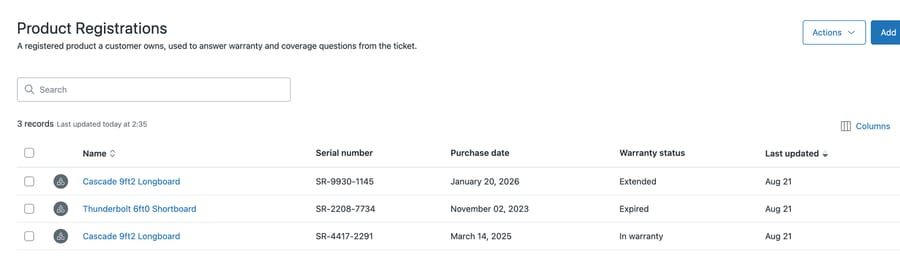
A Warranty status column with three distinct values, sitting in a sortable table. Counting those three values is the first report anyone would ask for, and it is the report Explore has no dataset to build.
What you get instead is a single hop. A lookup field on a ticket pointing at a product record returns that record's ID and name to Explore. So "tickets by product" is buildable. "Tickets by product category", where category is a field on the product object, is not, because reaching category means following a second relationship that lives on the custom object.
One caveat on that. In July 2025 a Zendesk product manager posted in the community that "reporting with custom object fields is available now", and Zendesk's 2025 recap lists "enhanced reporting for custom objects" on custom object fields related to standard objects. The announcement article he linked now returns a 404, a June 2026 commenter in the same thread couldn't find any documentation for it, and the reporting article still describes ID and name only. Check the lookup field's folder in your own Explore account before you plan around either answer.
Which Explore limits apply before you touch custom objects?
Before the custom object question, four properties of Explore reporting on custom fields decide what you can expect from it at all. All four are in the same documentation.
It is not live. Explore synchronizes on a schedule: "this synchronization occurs every hour", and a newly created field's metric or attribute appears "at the next data sync (which can take between 1-2 hours)". A field you added this morning and a report you built this afternoon can disagree for reasons that have nothing to do with your model.
A value has to have been used. "The custom field values must have been used in tickets, users, or organizations for them to appear under the corresponding metric or attribute in Explore." So a freshly built drop-down looks broken in Explore until real tickets carry its options, which is exactly when you are most likely to be testing it.
Only the latest value is kept in the standard datasets. "Only the latest field value is recorded in the standard Explore metrics and attributes." If you need the history of a field rather than its current state, the Updates history dataset and its Changes attributes are where that lives.
It is plan-gated. Custom field reporting sits on Suite Professional, Enterprise and Enterprise Plus, or Support with Explore Professional or Enterprise.
Why do lookup reports come back incomplete?
Both are easy to trip over because they produce reports that look correct and are incomplete.
Nothing before September 18, 2023. The same documentation gives two dates one sentence apart, and the one that applies here is the later of them: relationship lookup data generally is available from April 6, 2023 onward, but "relationship lookup data related to custom objects is available only from September 18, 2023 onward". Take the general date and your history starts five and a half months earlier than it really does.
Users with no tickets vanish. For lookup fields whose related object is a user, Zendesk documents that if a user has no tickets as either requester or submitter, that user record isn't returned in Explore. If your lookup points at an account manager or an engineer, the people who happen to have no tickets go missing from the report entirely.
The second one is the more dangerous of the pair, because a zero and an absence look identical in a bar chart and only one of them is true.
How do you report on a custom object field, and what does it cost?
There's one reliable way to report on custom object data, and it is not elegant: mirror the value you need onto a standard object as a custom field.
The shape is straightforward. Alongside the lookup field pointing at the product, add a plain drop-down ticket field carrying the product's category. Populate it when the ticket is created, then report on the drop-down.
The cost is that you now maintain the same fact in two places, and they will disagree. A product's category changes on the object; every historical ticket keeps the value it was stamped with. That's sometimes exactly right, because a report about what was true when the ticket was raised is often the report you wanted. It is sometimes wrong, and the failure is quiet either way.
Do the arithmetic before committing. A mirrored field needs a value set at ticket creation, which usually means a ticket trigger, plus a decision about what happens on the tickets that already exist. If you have 40,000 open and recently-solved tickets and you want them included, that's a backfill through the API, not a setting. Our Zendesk API guide covers the update calls; expect to work in batches and to rate-limit yourself.
The narrower version is often better. Mirror one field, not the object. Most teams want a single slice, usually a category or a tier, and mirroring one drop-down is a small ongoing cost. Mirroring five fields to reconstruct the object inside the ticket is rebuilding your data model in the place you were trying to avoid.
Why doesn't Explore report on custom objects?
The reason explains why the documented behavior has barely moved in three years, and why treating it as an oversight due for a fix is a mistake.
Explore is a reporting product built over a fixed schema. Tickets, users and organizations have known shapes, so their datasets can be modeled, indexed and maintained. Custom objects have shapes each customer invents, and supporting them as first-class reporting entities means generating datasets dynamically per account and keeping them correct as the schema changes underneath.
The incentive there points away from building it. Custom objects sell on the agent experience, which is where the demo happens, and reporting parity would be a large, ongoing engineering cost against a feature that already closes deals without it. So the honest read is that this is a considered boundary, and you should plan a data model around what Explore can see today. When a vendor's economics point away from a gap, the gap tends to stay.
How should you design custom objects so they can be reported on?
The decision belongs at modeling time, which is the whole practical point of knowing this.
- Before you create the object, write down the three reports somebody will ask for. If any of them slices by an attribute of the object instead of by which record was chosen, that attribute needs to be a custom field somewhere too.
- Prefer a drop-down on the ticket for anything that's primarily a reporting dimension. Our comparison of custom objects and custom fields works through the trade-off in full.
- Keep the object for the things a drop-down genuinely can't hold: many records, records with their own lifecycle, records agents need to open and read.
- If you need real analysis over the object itself, plan on exporting. The records are reachable through the API, and a warehouse handles the joins Explore won't.
Point 4 is the honest answer for anyone whose custom object is central to the analysis. Explore isn't going to be the tool, and discovering that after building 12 reports around a mirrored field is worse than deciding it up front.
The export path is straightforward, which is what makes the reporting gap frustrating rather than fatal. We checked this on our own instance: GET /api/v2/custom_objects/product_registration/fields returns the object's schema, and the records endpoint returns the rows underneath it.
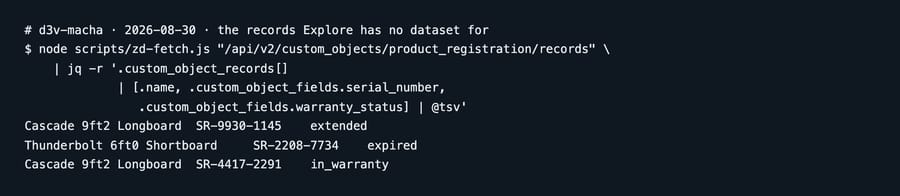
Three rows, each with a warranty status you would obviously want to count. That query takes one authenticated request, and the same values have no route into an Explore report. Everything Explore won't chart is sitting there, one authenticated request away, in a shape a warehouse can join. One trap when you run the fields call: it hides Zendesk's predefined name and external_id unless you pass include_standard_fields=true, so an object can look emptier than it is. We tested it the wrong way first.
Common questions
Can I report on custom objects in Explore? Not directly. Custom objects have no Explore dataset, and Zendesk documents that lookup relationship fields present on custom objects cannot be reported on. A lookup field on a ticket, user or organization that points at a custom object returns that record's ID and name, which is the full extent of what Explore sees.
Can I chart tickets by a field on the related custom object? Not natively. Reaching a field on the object means following a relationship Explore doesn't traverse. The workaround is to mirror that field onto the ticket as a custom field and report on the copy.
Why is my lookup-based report missing data before 2023? For custom objects the cutoff is September 18, 2023. Relationship lookup data generally starts on April 6, 2023, but Zendesk documents a separate, later date for custom object relationships, so anything before September 2023 has no history to report on.
Why are some users missing from my lookup report? For lookup fields with a related object of User, a user with no tickets as either requester or submitter isn't returned in Explore. They go missing entirely, which is easy to misread as a genuine zero.
Should I mirror custom object fields onto tickets? Mirror one field if you need one slice, and accept that the copy freezes at ticket creation while the object keeps changing. Mirroring several fields to reconstruct the object on the ticket usually means the data should have been ticket fields from the start.
Can I get custom object data out of Zendesk another way? Yes. Records are readable through the custom objects API, so exporting to a warehouse is the route when the object sits at the center of your analysis.
Can an AI agent use custom object data that Explore can't chart?
"Reporting" and "reading" are different problems here, and only one of them is constrained.
Explore can't traverse from a ticket into a custom object's fields. An integration reading the same data through the API can, because the relationship is right there in the record and following it is one more request. So the data isn't unreachable. It's unreportable, and those are separate limitations that get conflated because both feel like "Zendesk can't see my custom objects."
That matters for what you ask an automation to do. Answering a customer's question using a field on a related product record is well within reach, and doesn't need any of the mirroring described above. Producing a monthly chart of tickets by product category still does.
Macha reads your Zendesk through its API, follows lookup relationships to the records behind them, and answers inside the ticket. It fits teams whose custom object data is operationally useful, a plan tier or a warranty state that changes how you reply, and who've been frustrated that the data is visible to agents but invisible to reports. It fits poorly as a reporting substitute, because an agent answering tickets isn't an analytics layer and shouldn't be sold as one. Our Zendesk integration page covers what it reads.
Decide what has to be charted before you decide what becomes an object. Start a free trial once the model is settled.






