





 Shopify
 Stripe
 Slack
Slack Notion
 Google Workspace
 Confluence

Zendesk Custom Objects vs Custom Fields: Which Should You Use? (2026)


Use a Zendesk custom field for a single value that belongs to a ticket, and a custom object for things like products or subscriptions that exist before and after the ticket. Check reporting before you choose, because Explore can't see most of what a custom object model holds.
Key takeaways
- A Zendesk custom field holds one value on a record you already have, while a custom object is an independent record type with its own key, fields and permissions.
- Zendesk custom object allowances scale by plan: 3 on Suite Team, 5 on Suite Growth, 30 on Suite Professional and Support Enterprise, and 50 on Suite Enterprise and Enterprise Plus.
- Zendesk Explore cannot report on lookup relationship fields that sit on custom objects, so a value you mainly need to chart often belongs in a custom field.
- Since 27 August 2026, eligible Zendesk accounts running multiple ticket forms can create up to 40 lookup relationship fields and assign up to 10 of them to any one form.
- Zendesk sandboxes copy custom object definitions but not their records, lookup fields related to custom objects, or business rules that reference custom objects.

Use a Zendesk custom field when each ticket needs one value about itself, such as a refund reason, and a custom object when the thing exists before and after the ticket and many tickets point at it, such as a product or a subscription. Two limits usually settle it: Suite Team allows only 3 custom objects, and Explore can't report on lookup fields that sit on custom objects. The question that actually decides it is how many of the thing there are per ticket, and whether the thing outlives the ticket.
| Custom field | Custom object | |
|---|---|---|
| What it is | One value on an existing record | A new record type with its own key, fields and permissions |
| Example | Refund reason, escalation tier | Product, subscription, device, store |
| Plan cap | No comparable per-plan cap | 3 (Suite Team) to 50 (Suite Enterprise) |
| Explore reporting | Native, as attributes or metrics | No dataset; ticket lookups return only ID and name |
| Sandbox | Copies with configuration | Definition copies; records, lookups and triggers don't |
| Permissions | None to set | Per-role access to each object |
What is the difference between a custom field and a custom object?
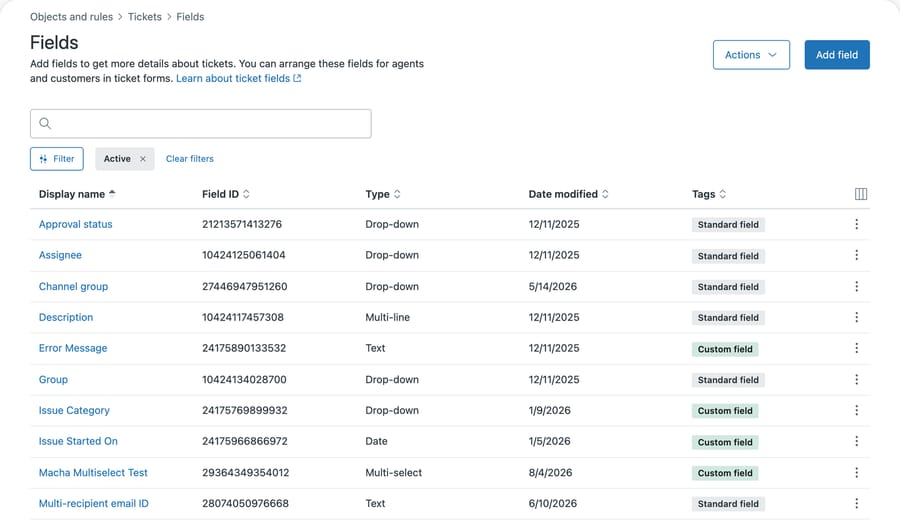
A custom field is a column. You attach it to tickets, users, organizations or custom objects, and it holds one value per record. Zendesk offers checkbox, credit card, currency, date, decimal, drop-down, multi-line, multi-select, numeric, regex, roll-up summary and text, plus three relationship types: lookup, multi-lookup and parent-child. Our custom fields explainer covers the types in detail.
Here is that list on our instance, where every row is a column the ticket carries and Zendesk labels each one Standard or Custom:
A custom object is a table. It has a key, a set of fields you define, and records that exist independently of any ticket. A ticket reaches a record through a lookup relationship field, and the same record can be referenced by a hundred tickets without being copied into any of them.
The object's fields look almost identical in the admin interface, which is part of why the two get confused:
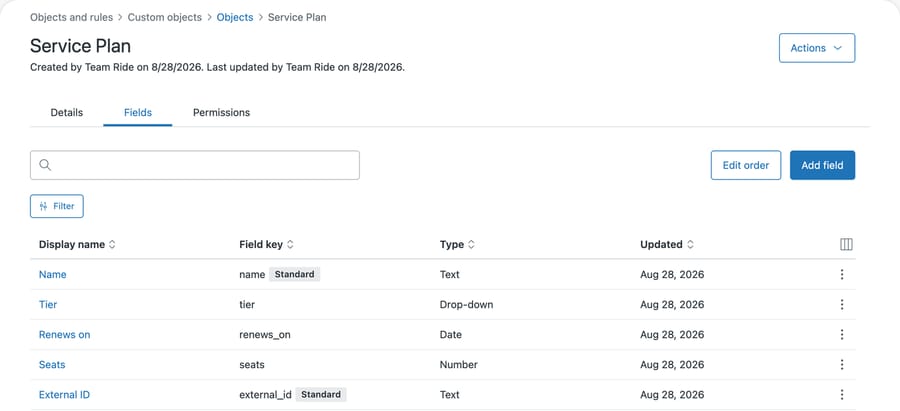
Same columns, same types, same editor. The difference is not the fields; it's what they hang off. Those rows belong to a Service Plan record that exists whether or not a ticket mentions it. Note that name and external_id carry a Standard badge: Zendesk predefines those on every object, and only Tier, Renews on and Seats were added by us.
The distinction sounds academic until you write it as a sentence about your own data. "Every ticket has a refund reason" is a field. "We sell 400 products, and a ticket is about one of them" is an object, because the product exists whether or not anyone writes in about it, and because you'd otherwise be maintaining a 400-value drop-down list by hand.
How do you decide which one to use?
Ask two questions about the thing you want to store.
Does it exist before the ticket does? A refund reason comes into being when an agent classifies the ticket. A product, a subscription, a device, a policy and a store location all existed already, and will still exist when the ticket closes. Things with a life of their own are objects.
Would you ever want to look at one and see all its tickets? If the answer is yes, you want an object, because that view is what the relationship gives you. Zendesk puts it on a Related tab on the user and organization profile, grouped by source object and lookup field name. A drop-down value cannot do this. You can search for tickets carrying a tag, but you cannot open the tag and read its history.
Both answers point the same way most of the time. When they disagree, the second one wins, because it describes what somebody'll ask you for in three months.
How many custom objects does each Zendesk plan allow?
Custom objects are gated by plan, and the ceilings arrive sooner than most models expect. Per Zendesk's overview of custom objects:
| Plan | Custom objects |
|---|---|
| Suite Team | 3 |
| Suite Growth | 5 |
| Suite Professional, Support Enterprise | 30 |
| Suite Enterprise and Enterprise Plus | 50 |
Objects live on their own page, each with the key you can never change:
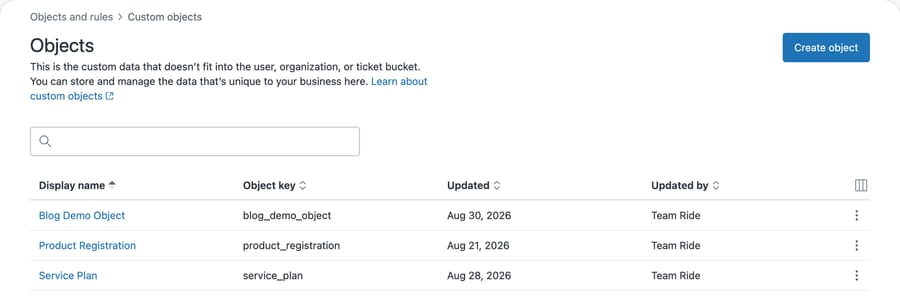
Then the per-object ceilings. Each object holds a maximum of 100 fields. Each record has a maximum size of 32 KB, and an account cannot exceed 50 million records. Lookup relationship fields are capped at 5 per object on Team and Growth and 10 on Professional and above. Tickets are scoped differently. Since 27 August 2026, eligible accounts running multiple ticket forms can create up to 40 lookup relationship fields on the Ticket fields page and assign up to 10 of them to any one form.
Three custom objects on Suite Team is the number that changes plans. A support desk modeling products, orders and subscriptions has used its entire allowance on the first three nouns anyone would pick, and the fourth noun forces an upgrade. Custom fields don't have a comparable per-plan cap.
The gate's placement tells you what it's optimizing for. Zendesk caps the count, not the capability, so custom objects demo identically on every plan. You build one, watch it work, and meet the ceiling later, at the point where the model starts being useful. The incentive is an upsell timed to arrive after you've already committed to the design, which is the moment a plan upgrade is easiest to justify and hardest to refuse. Design with the count in mind and it's a constraint. Design without it and it's a migration.
Can Explore report on custom objects?
This is the constraint that reverses the decision for a lot of teams.
Custom fields report natively in Explore. Drop-down, multi-select, text, multi-line, checkbox, credit card, regex, date and lookup relationship all arrive as attributes; numeric and decimal arrive as metrics.
Custom objects don't have a dataset. Zendesk's reporting with custom fields documentation states it directly:
"Lookup relationship fields present on custom objects cannot be reported on."
Read that against the model you were about to build. If you put products in a custom object and give the object a lookup field pointing at a category object, the category isn't reportable. What you get instead is narrower: a lookup field on a standard object can return the related custom object's ID and name, so a ticket-level lookup to a product will tell Explore which product record a ticket points at. Anything hanging off that record is invisible.
A second constraint sits in the same documentation, and it has two dates one sentence apart. Relationship lookup data generally starts on April 6, 2023, but data related to custom objects starts on September 18, 2023. Take the first date on a custom object model and you will believe you have five months of history you don't have. Separately, for lookup fields targeting a user, a user with no tickets as requester or submitter is not returned at all.
One partial workaround lives inside the object model. Roll-up summary fields aggregate child records onto a parent through a parent-child relationship, so a count or a sum is computed and stored as an ordinary field value. Per Zendesk's relationship fields documentation they work only where the parent is a custom object and cap at 10,000 child records per field, and they need Suite Professional or above, or Support Enterprise. Be clear about what that buys you: the number lands on a custom object, so it inherits whatever Explore can and cannot see there. It precomputes a figure for agents to read in the ticket; it is not a route around the reporting boundary.
The practical consequence is a rule most advice gets backwards. If the thing you are storing exists primarily so you can report on it, a custom field is often the better choice even when the data is object-shaped. A drop-down with 40 values is uglier than a clean object model, and it slices in Explore. The object model doesn't.
Teams discover this after the build, when someone asks for tickets by product category and the answer is that the data is in Zendesk and cannot be charted. At that point you are adding a redundant ticket field to carry the same value in a reportable form, which is the model you were avoiding.
Do custom objects copy into a Zendesk sandbox?
One more operational cost, and it lands on exactly the teams who are careful.
Zendesk's documentation states that sandboxes replicate custom object definitions but not custom object records, lookup relationship fields related to custom objects, or business rules that reference custom objects. A premium sandbox will copy the object and its fields. The parts that make the object useful, its data, the ticket lookups pointing at it and the triggers that act on it, don't come with it.
So the standard safe practice of building in a sandbox and promoting to production does not apply here in the usual way. You reload the records and rebuild the lookups and object triggers by hand in production, or you script the creation so it runs identically in both. We took the second route on our own instance, which is why the objects there were created through the API rather than the admin interface.
That's a real argument for keeping a model simple. Every lookup and every object trigger is a thing you will build twice.
What does a new custom object come with?
Two things about custom objects are true on our developer instance, and both bear on the shape you commit to.
A new object arrives with two fields and no more. We created service_plan through the API with no options, and it came with the standard name and external_id that Zendesk predefines and requires for every object. Every field you actually intend to store is one you add afterward. Compare that with the product_registration object on the same instance, which carries four of its own: serial_number, purchase_date, warranty_status and owner.
Watch how you check this, because the obvious call misreports it. GET /api/v2/custom_objects/{key}/fields takes an include_standard_fields parameter that defaults to excluding them, so a fresh object answers 0 and looks emptier than it is. Pass include_standard_fields=true and the two standard fields appear. We got this wrong on our own instance first, which is the only reason we know to warn about it.
A new object is also closed. On our instance the permissions tab showed full access for Admin and Billing admin and no access, on all four operations, for every other role:
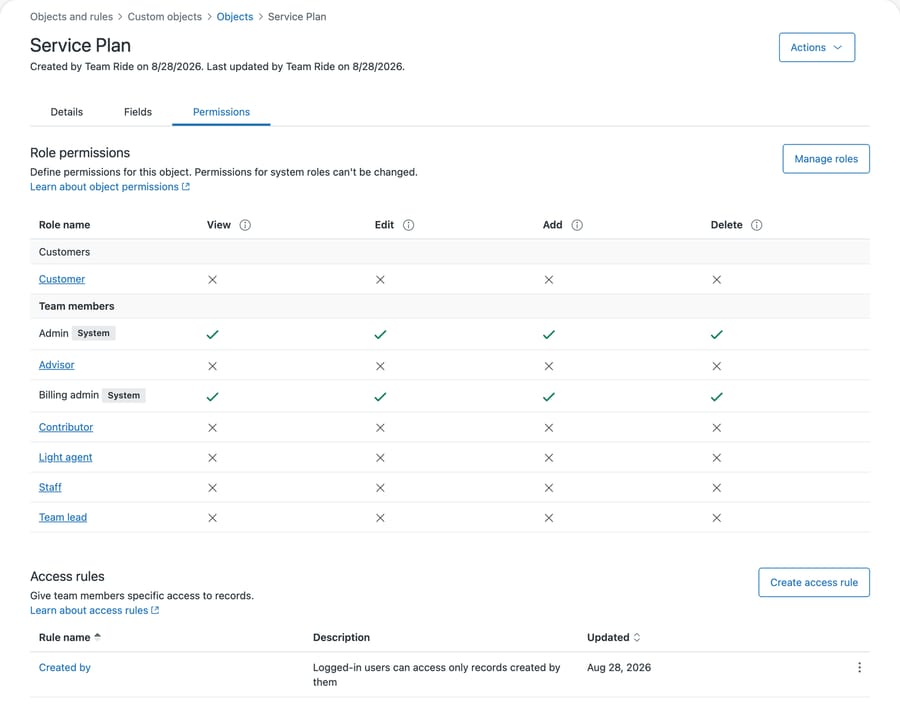
We did not configure that; it is what the object came with.
Be careful about generalizing our second observation, because the reason that table looks closed is not the obvious one. Zendesk's permissions documentation says permissions are predefined for the standard admin and agent roles on every plan; what changes by tier is which roles you can configure. Our instance runs Enterprise custom roles and has no standard Agent row at all, so what the screenshot shows is custom roles starting closed. It also notes that objects created before August 2026 may behave differently for light agents and contributors. So check your own instance rather than trusting either our screenshot or a general statement, including this one. Custom fields carry nothing equivalent to this, which is a genuine simplicity advantage and the kind of thing that never appears in a feature comparison. The full walkthrough is in creating your first custom object.
What is the step-by-step decision?
- Write the thing down as a sentence. "A ticket has one X" points at a field. "We have many Xs and a ticket is about one" points at an object.
- Ask whether anyone will want to chart it. If yes, and the answer needs more than the related record's ID and name, put the reportable value in a custom field even if you also model the object.
- Count your objects against your plan before you design, not after.
- Check whether you can maintain the values by hand. A 40-value drop-down is fine. A 4,000-value one is an object that has not been built yet.
- Assume you will build the lookups and triggers twice, because the sandbox carries the object definition but not those.
Steps 2 and 5 are the ones that get skipped, and between them they account for most of the custom object models we have seen teams regret.
Common questions
Can I convert a custom field into a custom object later? Not as a single operation. You create the object, import the records, add a lookup relationship field to the ticket and then backfill it, which means writing to every historical ticket you care about. Nothing migrates the values for you, so treat the first choice as expensive to reverse.
How many custom objects can I have? It depends on plan: 3 on Suite Team, 5 on Suite Growth, 30 on Suite Professional and Support Enterprise, and 50 on Suite Enterprise and Enterprise Plus. Each object holds up to 100 fields.
Can I report on custom objects in Explore? Not directly. Zendesk documents that lookup relationship fields present on custom objects cannot be reported on, and custom objects have no dataset of their own. A lookup field on a standard object pointing at a custom object returns that record's ID and name, which is the extent of it.
Do custom objects copy into a sandbox? Partly. The object definitions replicate, but Zendesk documents that custom object records, lookup fields related to custom objects and business rules that reference custom objects do not, so plan on reloading records and rebuilding or scripting the lookups and triggers in each environment.
Is a lookup relationship field a custom field or a custom object? It's a custom field, of a relationship type. It lives on the source record and points at a target record, which can be a ticket, user, organization or custom object. It's the mechanism that connects the two models rather than a third option.
When is a drop-down better than an object? When the values are few, stable, maintained by an admin, and mainly there to be reported on. Refund reasons, ticket categories and escalation tiers are usually better as drop-downs, and they slice in Explore without any extra work.
How does the choice affect an AI agent?
The modeling decision changes what an AI agent can do with your data, in a way that is easy to miss because both models look the same from a ticket.
A value in a ticket field is on the ticket. Anything reading the ticket sees it without asking for anything else. A custom object record is one hop away through a lookup field, and reaching it means a second read against an object the integration must have permission to view. That permission is the thing to check, because an agent denied access to an object doesn't get an error worth surfacing. It sees an absence, and an absence looks exactly like a customer with no subscription. The answer comes back fluent and wrong, and traces back to a checkbox on a permissions tab rather than to anything in the agent's configuration.
None of that argues against custom objects. It argues instead for knowing which shape your data is in before you evaluate what an automation can do with it, and for testing the automation as the role it will actually run as.
Macha reads your Zendesk under the permissions you give it, so a custom object it cannot see is one it will never mention. It fits teams who already model something Zendesk has no native place for, a product or a plan or a device, and who want an agent to answer with that data inside the ticket rather than in a separate tool. It fits poorly if the data changes faster than you can import it, because an agent quoting a stale warranty date is worse than one that says nothing. Our Zendesk integration page sets out what it reads, and the API guide covers reading objects yourself.
Model the data first, then decide what should read it. Start a free trial once the shape is settled.






