





 Shopify
 Stripe
 Slack
Slack Notion
 Google Workspace
 Confluence

How Do You Link Incidents to Problem Tickets Automatically in Zendesk?


Solving a Zendesk problem ticket solves every incident linked to it, but nothing in Zendesk makes the link for you. We found 165 unlinked incidents on our own instance and tested the API route that automates the linking step.
Key takeaways
- Zendesk has no trigger that links incidents to problem tickets, but setting problem_id through the API links them, and the solve cascade fires on those API links.
- On our test Zendesk instance, 165 tickets were typed as incidents and 0 as problems, and a sample of twenty found none with a problem_id set.
- Linking three incidents to one problem ticket through the Zendesk API and solving the problem set all three to solved and copied the closing comment to each.
- Zendesk AI agent tickets can't be linked to problem and incident tickets, according to Zendesk's documentation, so they never take part in the solve cascade.
- Solving a Zendesk problem ticket failed with a 422 error naming two required fields, Plan Type and Issue Started On, which a bulk-solve script must supply.

Zendesk has no trigger or setting that links incidents to problem tickets automatically; the one route that automates it is the API, where a PUT /api/v2/tickets/{id}.json call that sets problem_id links the incident exactly as the manual menu does. We tested it on our own instance: three incidents linked through the API all flipped to solved when we solved the problem. On that same instance, 165 tickets were typed incident and none of a sampled twenty was linked to anything.
| Method | Links the incident? | Notes |
|---|---|---|
| Set the ticket type to Incident | No | The type is a label; a second menu picks the problem |
| Pick the problem in the agent interface | Yes | Zendesk's documented method, one ticket at a time |
| Triggers and automations | No | Zendesk's workflow guide uses them to notify, not to link |
API: set problem_id | Yes | Tested: the solve cascade fires on API links |
Problem and incident ticket types are available on every Zendesk Suite plan, Team through Enterprise Plus, per Zendesk's documentation (checked 24 September 2026).
What are problem and incident tickets for?
A problem ticket represents the underlying fault. An incident ticket is one customer's report of that fault. Ten people writing in about the same outage is one problem and ten incidents.
The payoff is the cascade. Per Zendesk's documentation on problem and incident tickets, "when you solve the problem ticket, the status of all the incident tickets is automatically set to solved", and "the comment added to the problem ticket when solved is added to all incident tickets that aren't already solved."
That documentation also carries a warning worth repeating, because it is the one people trip over: "Refrain from solving any of the incident tickets directly. Solving an incident ticket still leaves the other tickets unsolved." Work the problem, not the reports.
How many incidents are actually linked on a real instance?
We went looking for how much of this was actually in use on our developer instance. The answer was none of it.
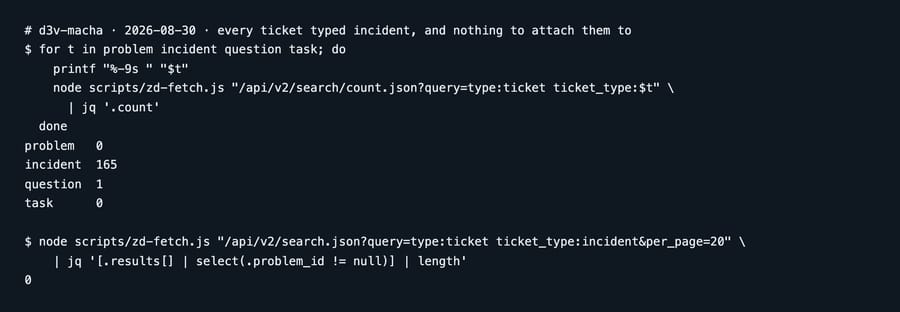
A hundred and sixty-five tickets typed incident, and nothing to attach them to. We then sampled twenty of those incidents and checked the field that carries the link: zero of twenty had a problem_id set.
So every incident on the instance is orphaned. The type had been set, presumably because it described the ticket accurately, and the cascade those tickets exist to enable could never fire. That is not a misconfiguration anyone would notice, because a labeled incident looks exactly like a linked one until the day you solve the problem and nothing happens.
Why doesn't Zendesk link incidents automatically?
The reason those 165 tickets are orphaned is that linking is a person's job. You open the incident, set its type, and a second menu appears letting you pick the problem ticket to attach it to.
Zendesk's own workflow guide for tracking problems and incidents recommends a view for open problems and a trigger to notify a group when one is raised, and for the link itself it says to "be advised and link any related tickets as incidents." The automation it offers covers noticing the problem. The linking stays with the agent. The same documentation adds one hard limit: "AI agent tickets can't be linked to problem and incident tickets," so conversations handled by Zendesk's own AI agents sit outside the cascade entirely.
It is worth being clear about the incentive there, because it explains why this has not changed. Automatic linking means deciding that two tickets describe the same fault, and a wrong guess merges a customer's unrelated problem into someone else's outage and then silently solves it on their behalf. The cost of a false positive is a customer told their issue is fixed when nobody looked at it. Zendesk has left the judgment with the human, which is the defensible call, and it does mean the feature only works as well as the discipline around it.
How do you link incidents to a problem through the API?
The link is a plain field on the ticket, and the API will set it. That is the part the interface does not advertise.
We tested it on the instance described above. Create a problem ticket, then PUT the incident with the problem's id:
PUT /api/v2/tickets/570.json
{"ticket": {"problem_id": 1028}}
The response came back with type=incident and problem_id=1028. We linked three incidents to one problem this way, then solved the problem and read the incidents back:
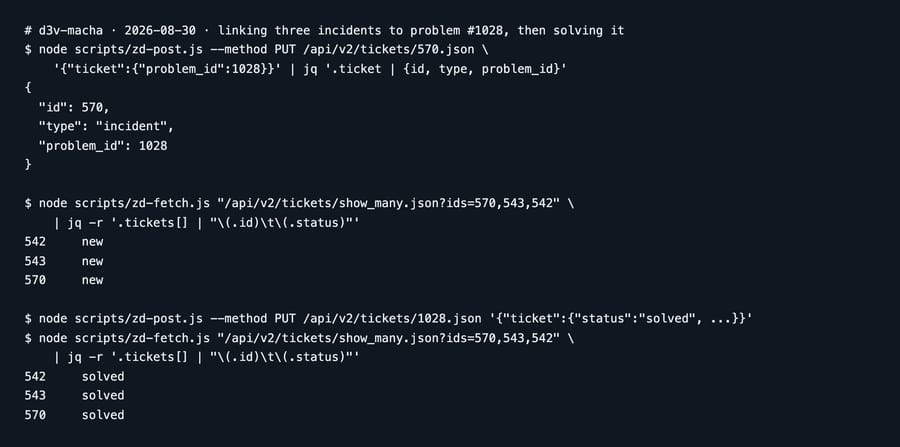
All three flipped, and the closing comment we put on the problem appeared verbatim as a public comment on each incident. The cascade works exactly as documented, and it fires on links made through the API, not just links made by hand.
That turns the orphaned-incident problem into an ordinary scripting job. Our Zendesk API guide covers authenticating the calls; the update itself is one field.
Why did solving the problem ticket return a 422?
Our first attempt to solve the problem ticket returned a 422 rather than solving anything:
Plan Type: is required when solving a ticket
Issue Started On: is required when solving a ticket
Two fields on this instance are marked required-on-solve, and the API enforces them the same way the agent interface does. Nothing about the problem-and-incident feature is involved; the ticket simply cannot reach solved without them.
That matters here more than it usually would, because the whole point of the cascade is that solving one ticket solves many. A script that solves problem tickets in bulk will stop dead on the first one missing a required field, and the incidents behind it stay open while everything looks like it ran. Check the required fields on the form your problem tickets use before you automate anything that solves them.
How do you find the orphaned incidents you already have?
Before automating anything, it is worth knowing the size of the backlog. Two counts tell you most of it: how many tickets are typed incident, and how many are typed problem. If the first is large and the second is near zero, you have the situation we found.
The precise check is the problem_id field. An incident with a null problem_id is not attached to anything, whatever its type says. Reading that across your open incidents gives you the list to work through, and it is the same field you would then be setting.
Deciding which problem each orphan belongs to is the part that stays human, for the reason in the section above. What the API removes is the clicking, not the judgment.
Common questions
Does setting a ticket's type to Incident link it to anything? No. The type is a label. The link lives in the ticket's problem_id field, and on our instance 165 tickets were typed incident with none of the sampled ones carrying a problem_id.
What happens when I solve a problem ticket? Zendesk sets every linked incident to solved and copies the problem's closing comment onto each incident that was not already solved. We confirmed both behaviors on three linked incidents.
Should I solve incident tickets directly? No. Zendesk's documentation says to refrain from it, because solving one incident leaves the rest unsolved and you lose the cascade that made the linking worthwhile.
Can I link incidents to a problem automatically? Not through triggers, and Zendesk's own workflow guide does the linking by hand. You can set problem_id through the API, which we tested, so the mechanical step is automatable even though the decision is not.
Why did my bulk solve fail with a 422? Almost certainly a field marked required when solving. Ours reported two by name. The API enforces the same requirements as the agent interface, so a script solving problem tickets needs to supply them.
Can Zendesk AI agent tickets be linked as incidents? No. Zendesk's documentation states that AI agent tickets can't be linked to problem and incident tickets, so they never take part in the cascade.
Can an incident exist without a problem? Yes, and that is exactly the failure mode. Zendesk does not require the link, so nothing stops an instance accumulating incidents that point at nothing.
Where does an AI layer fit in problem and incident linking?
The step that stays human is a matching problem: this new ticket describes the same fault as that existing one. That is recognizably the kind of judgment people now ask automation to make, so it is worth being precise about where the risk sits.
The cost of a wrong link here is unusually high. A mislinked incident does not sit there looking wrong; it gets silently solved when somebody resolves an unrelated outage, and the customer is told their problem is fixed. So the useful shape is an agent that surfaces the candidate problem and the evidence for it while a person keeps the decision, rather than one that writes problem_id on its own judgment.
Macha reads tickets in your Zendesk and can act inside them under the permissions you grant it. It fits teams who already run the problem-and-incident model and keep finding the link never got made during the rush that created the incidents. It fits poorly as an unsupervised linker, for the reason above, and we would rather say that than sell the cascade as something safe to hand over entirely. Our Zendesk integration page covers what it reads, and the triggers guide covers the notification side Zendesk does automate.
Count your orphaned incidents first. Start a free trial once you know how big the backlog is.






