





 Shopify
 Stripe
 Slack
Slack Notion
 Google Workspace
 Confluence

How Do You Answer Policy Questions from a Notion Wiki on the Ticket?


Most policy questions already have an answer in your Notion wiki, but an agent still has to find the page, copy the right part and rewrite it into the ticket. A Macha agent does that lookup itself, replies on the ticket with the page cited, and updates the ticket status in the same run.
Key takeaways
- A Macha agent answers policy questions from a Notion wiki by running Search Pages and Get Page, posting a cited reply on the ticket, and setting the ticket to Pending.
- Macha's Notion connector, connected over OAuth, gives an agent read tools such as Search Pages, Get Page and Sync to Knowledge, plus Create Page and Update Page for writing.
- Notion's own Q&A now sits inside Notion Agent, with full access on the Business plan at $20 a member a month, and it answers staff inside Notion rather than customers on a ticket.
- HelpKit AI turns Notion pages into a help-center chatbot for a $49/month add-on, which gives customers a separate widget instead of an answer in the help desk conversation.
- A Notion policy answer takes five steps, reading the ticket, searching Notion, reading the page, replying and setting status, yet Macha bills it as one ticket at about $0.40, with setup by the Macha team and a dedicated success manager included.

A Macha agent answers policy questions from a Notion wiki by searching it with Search Pages, reading the matching page with Get Page, posting a cited reply on the ticket and setting the ticket to Pending, all for one ticket charge of about $0.40. Macha is an AI agent layer that sits on top of the help desk you already use (Zendesk, Freshdesk, Gorgias, Front, HubSpot or Intercom) and connects to your Notion workspace over OAuth. There's no widget to embed, no second knowledge base to maintain and no copy-paste.
Here is how the main ways to "answer from Notion" compare:
| Option | Where the answer appears | Can it act on the ticket? |
|---|---|---|
| Notion AI (Notion Agent, formerly Q&A) | Inside Notion, for your own team | No |
| HelpKit AI ($49/month add-on) | A public help-center chat widget built on Notion | No |
| ClearFeed, eesel | Suggested replies, with Notion indexed as a knowledge source | Varies by tool |
| Macha | A reply on the help desk ticket | Yes: status, internal notes, routing, escalation |
Why don't Notion's own tools answer customer tickets?
Search the keyword and the options fall into two camps. The first is Notion's own AI. The Q&A feature (Notion's launch post) now lives inside Notion Agent, and Notion's pricing page gives full access only on the Business plan ($20 a member a month) and above; Free and Plus get a trial. It's good for asking "what's our work-from-home policy?" from inside your workspace. But it answers you, inside Notion. It does nothing for a customer waiting on a Zendesk ticket. The second camp, tools like HelpKit AI, turns your Notion pages into a chatbot on a public help center. HelpKit sells it as a $49/month add-on. Useful, but it's a separate surface your customer has to find, and it doesn't touch the conversation already happening in your help desk.
What most teams want is narrower: when a question comes in through the channel they already run, answer it there, from the source of truth they already maintain. That's the job Macha is built for. A couple of competitors work here too. ClearFeed indexes selected Notion pages as Knowledge Sources so an agent can suggest replies, and eesel indexes Notion too, so this is a real, contested workflow. Where Macha differs is that the agent that answers can also act: set status, add internal notes, route or escalate, in one pass.
Is Notion a good knowledge base for customer support?
Yes for the authoring side, with caveats on the delivery side, and that split is the whole reason this workflow exists.
Where Notion shines. It's a fast, flexible place for a team to write and maintain policy. Databases with properties (status, owner, last-reviewed date) make it easy to keep a returns or warranty page current. Nested pages keep a messy domain organized, and everyone on the team can edit without a CMS gatekeeper. As the internal Notion knowledge base for customer support, the canonical place your policies live, it's genuinely good, and Notion's own AI search makes it searchable for staff.
Where it falls short on its own. Notion was built to be read by your team, not to serve answers to customers inside a ticket. Out of the box it has no ticket integration and no way to push an answer into Zendesk or Freshdesk. Permissions are page-scoped, so "share the whole wiki publicly" is rarely what you want. And plain keyword search misses paraphrases: a customer who asks "can I send it back?" won't reliably hit a page titled Returns Policy. Tools like HelpKit AI bolt a public widget onto Notion to fix the delivery gap, but that's still a separate surface.
So Notion is an excellent source of truth and a mediocre answer-delivery channel. The pattern below keeps Notion as the authoritative wiki and lets an AI agent handle delivery: search it, read it, and post the answer where the customer already is. If you also run Confluence or Google Docs, the same approach applies; see how to connect knowledge sources to an AI agent for the cross-source version.
What does the agent need?
One agent with one trigger and a short tool list:
- Trigger: a new Zendesk ticket is created (or updated) where the customer asks about a policy or procedure.
- Tools:
Get Ticket(Zendesk) to read the question,Search PagesandGet Page(Notion) to find and read the right wiki page,Add Comment(Zendesk) to reply, andUpdate Ticket(Zendesk) to set status. - Instructions: answer only from the wiki, cite the page used, and hand off to a human when there's no confident match.
This is the exact shape of Macha's published Answer policy questions from Notion wiki use case. Here's how to build it.
How do you connect Notion to Macha?
In the dashboard, go to Connectors and connect Notion. Macha uses OAuth, so you authorize it against your real workspace and pick which content it can see. There are no API keys to paste, and access is scoped to the pages you share with the integration. (For the Zendesk-side mechanics of this pairing, see how to connect Notion with Zendesk.)
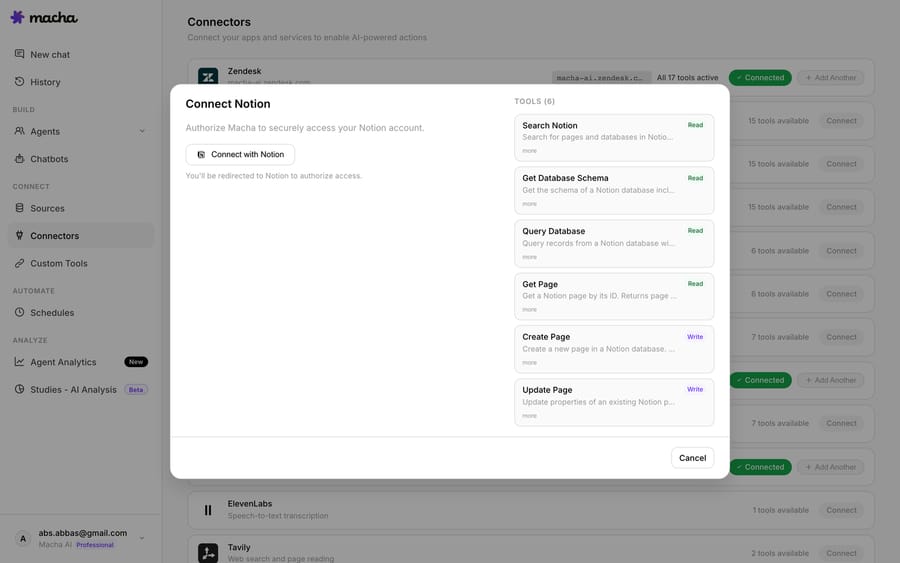
Once connected, the agent has these Notion read tools:
| Tool | What it does | Access |
|---|---|---|
| Search Pages | Find pages by title or content keyword across the workspace | Read |
| Get Page | Pull the full content of a page, including nested blocks | Read |
| Search Databases | Query a Notion database with filters on status, date, tags | Read |
| Get Database Entry | Retrieve one database row with all its properties | Read |
| Sync to Knowledge | Index Notion pages as a live knowledge source | Read |
The connector also has two write tools, Create Page and Update Page. A policy-answering agent doesn't need them, so leave them off this one.
For policy answers you mostly need the first two: Search Pages to locate the right doc, and Get Page to read it in full so the agent quotes the current wording, not a stale cache.
Should the agent search Notion live or sync it as knowledge?
There are two retrieval styles, and the right one depends on your wiki.
Live tool calls (Search, then Get). The agent searches Notion the moment a ticket arrives and reads the matching page on the spot. The upside is freshness: edit the warranty page at 9am and the 9:05am ticket gets the new terms, with no re-index. Best when policies change often or your wiki is small enough to search reliably.
Sync to Knowledge. You sync the relevant Notion pages into Macha as a knowledge source, where they're indexed (embedded) for semantic retrieval. This fits a large wiki where keyword search misses paraphrased questions: "can I send it back?" should still find the Returns Policy page. Synced sources live alongside your other knowledge in the dashboard.

Many teams use both: sync the wiki for broad semantic recall, and keep Get Page available so the agent can pull the live, full text of the one page it's about to quote. Macha's Notion connector supports live sync, so the indexed copy stays current.
How do you build the agent?
Create an agent and give it the trigger, tools and instructions. The Configuration view is where this comes together: a name, a model, the Instructions that define behavior, the Trigger that wakes it up, and the Tools it's allowed to call.
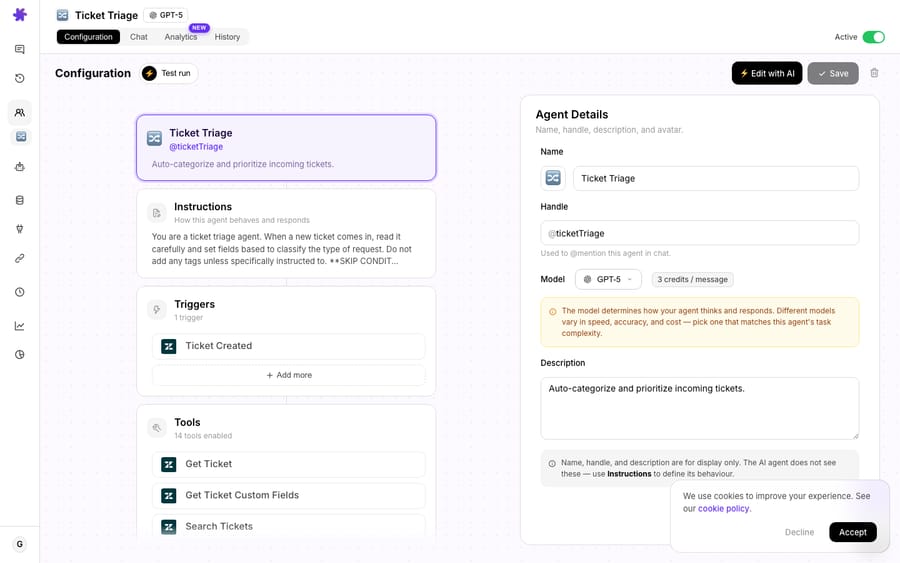
The instructions are where you earn trust. A solid starting prompt:
You answer customer policy and procedure questions for [Company]. When a ticket asks about a policy, use Search Pages to find the relevant Notion page, then Get Page to read it in full. Answer only from what the wiki says. Never invent terms, dates, or exceptions. Quote the specific policy and cite the page name you used (e.g. "Source: Product Warranty Policy"). If you can't find a confident match, do not guess: add an internal note and leave the ticket for a human. Keep the tone warm and concise, and end with a clear next step.
That last clause matters more than any other. A policy answer that's confidently wrong is worse than no answer. Grounding the agent in Get Page output and telling it to abstain when unsure is what keeps it honest.
What does a real run look like?
Here's the flow from Macha's use case, end to end. A ticket comes in:
"What's your warranty policy? I bought a product 6 months ago and it stopped working."
The agent calls Search Pages, finds "Product Warranty Policy" in Notion, reads it with Get Page, and posts this on the ticket via Add Comment:
Our products come with a 1-year warranty that covers manufacturing defects. Since your purchase is within the warranty period, you're fully covered. Here's how to proceed: 1. Contact us with your order number and a description of the issue 2. We'll send you a prepaid return label 3. Once we receive the item, we'll ship a replacement within 2–3 business days Would you like to start the warranty claim now?
Then it calls Update Ticket to set the status to Pending (awaiting the customer's reply). The customer gets an accurate answer in seconds, sourced from the team's own documentation, and the ticket is already in the right state for the next step. Answering and acting is the part a Notion-only Q&A tool can't do.
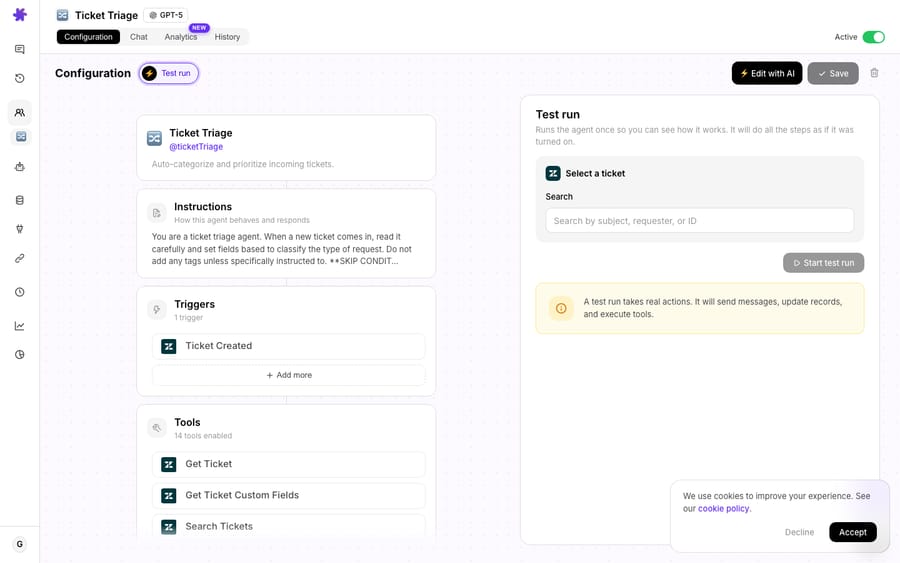
How do you test it before turning it on?
Macha's Test run runs the agent once against a real ticket so you can watch every step: which page it searched, what it read, the reply it drafted. A test run takes real actions, so use a safe ticket. Once it behaves, flip the agent to Active and it handles policy questions as they arrive.
Start with a tight scope. Point it at one well-documented area (returns, warranty or shipping), confirm the answers match the wiki exactly, then widen. A narrow agent that's right every time beats a broad one that occasionally improvises.
When shouldn't you rely on a Notion policy agent?
The pattern has edges worth naming.
- Your wiki is the ceiling. The agent can only be as accurate, current and complete as Notion is. Contradictory pages, an outdated returns window, or a policy that "everyone just knows" but nobody wrote down will produce confident but wrong answers. Tidy the source first.
- Pages the integration can't see don't exist. OAuth access is scoped: if a policy page isn't shared with the connected integration, the agent won't find it. Audit what you've granted.
- Judgment calls still need a human. "What's the return window?" is a lookup. "I'm three days past the window, can you make an exception?" is a decision. Instruct the agent to recognize the difference and escalate the second kind rather than inventing leniency.
- Dynamic facts belong elsewhere. Order status, account balance and shipment tracking aren't wiki content. Pair this agent with your commerce tools (a Shopify or Stripe connector) for order-specific questions; Notion is for policy, not per-customer state.
- High freshness needs the live path. If a policy changed this morning, a stale synced index could answer with yesterday's terms. Use
Get Page(or re-sync) when same-day correctness matters.
Used within those limits (policy and procedure questions, answered from a maintained wiki, with abstention when unsure) it's one of the most useful automations a support team can stand up.
What does a Notion policy agent cost?
Macha bills per ticket: one conversation, charged once however many steps the agent takes, never per "deflection." A typical answer here is five steps (read the ticket, search Notion, read the page, reply, set status) and it's still one ticket, about $0.40. The per-resolution vendors earn more the more outcomes they can count; a per-ticket price doesn't care how many tool calls the answer needed. The model you pick changes how good and how fast the answer is, not what you pay. Pricing is one plan with every feature, starting at $299 a month for 750 tickets, and setup is done for you: the Macha team builds the agent on your help desk and Notion, tests it on a sample of your past tickets, and runs it in safe mode, with drafts as internal notes, until the answers are right. The price also covers a dedicated success manager who handles your changes afterwards: new categories, instruction changes, new tools.
You can try it on a free trial: $50 of usage (about 125 tickets), no credit card and no time limit. See the pricing page for the higher ticket tiers. Notion is one of the integrations available on every tier.
FAQ
Does this replace my Notion wiki or my help desk? Neither. Macha sits on top of your help desk (Zendesk, Freshdesk, Gorgias, Front, HubSpot or Intercom) and reads from your Notion wiki. You keep writing docs in Notion and running support in your help desk. Macha is the agent layer that connects the two and answers on the ticket.
Live search or synced knowledge: which should I use? Use live Search Pages + Get Page when policies change often or the wiki is small. Use Sync to Knowledge for a large wiki where semantic retrieval beats keyword search. Many teams run both. See the Notion integration page for the full tool list.
How does it avoid making up policy terms? You instruct it to answer only from the page it read via Get Page, to cite the page name, and to abstain (hand off to a human) when it can't find a confident match. Grounding plus an abstention rule is what keeps it accurate.
Can it do more than reply? Yes. The same agent can set ticket status, add internal notes, tag, route or escalate. In the worked example it sets the ticket to Pending after answering.
Which help desks does this work with? Any help desk Macha connects to: Zendesk, Freshdesk, Gorgias, Front, HubSpot or Intercom. The Notion side is identical regardless; only the ticket actions change. See Macha on Zendesk for the Zendesk-specific setup.
Can't Notion AI answer customers directly? Not on a ticket. Notion Agent answers questions for people inside your workspace, with full access on the Business plan and above. It has no way to post a reply into Zendesk or change a ticket's status.
How do you get started?
Your policies are already written. What's left is the lookup-and-rewrite work your agents do on every policy ticket, and that's the part an AI agent should own. Connect Notion, point an agent at one well-documented area, test it, and let it answer on the ticket.
Start a free trial ($50 of usage, no credit card required), or read the docs for the full agent walkthrough. For more patterns like this, browse the Macha blog.
Written by Abbas (Customer Support & AI, Macha) · Reviewed by Ankeet Guha (Co-founder & CTO) · Published 2026-06-24 · Last updated 2026-09-24.






