Intercom
 Shopify
 Stripe
 Slack
Slack Notion
 Google Workspace
 Confluence

How Do You Connect Notion with Zendesk? 3 Methods Compared (2026)


Notion and Zendesk connect through Notion's own link-preview integration, a sync tool such as Zapier, Make or Unito, or an AI agent that reads Notion as a knowledge source. None of these is a Zendesk-built app, and only the AI agent route puts your Notion knowledge to work on live tickets.
Key takeaways
- Notion and Zendesk connect three ways: Notion's own link-preview integration, a connector such as Zapier, Make or Unito, or an AI agent that reads Notion as a knowledge source.
- The official Notion Zendesk integration is built by Notion and only adds live ticket link previews and a Zendesk Ticket database property; it shows nothing from Notion inside the Zendesk agent workspace.
- Zapier's Free plan gives 100 tasks a month, and multi-step Notion and Zendesk automations need the Professional plan starting at $19.99 a month billed annually.
- Make's Free plan covers up to 1,000 credits a month, while Unito offers true two-way Zendesk and Notion sync of comments, assignees and attachments after a 14-day free trial.
- Macha reads Notion as a knowledge source to draft or send Zendesk replies grounded in your docs, billed per ticket from $299 a month for up to 750 tickets.

You connect Notion with Zendesk in one of three ways: Notion's own Zendesk integration (live ticket link previews inside Notion, set up from Notion's Settings in five steps), a connector such as Zapier, Make or Unito that moves ticket data between the two, or an AI agent that reads Notion as a knowledge source and answers tickets in Zendesk. There is no Zendesk-built Notion app comparable to Zendesk's official Jira or Salesforce integrations, and nothing that puts your Notion docs inside the Zendesk agent workspace out of the box.
Each option works, at a different depth. The official piece is built by Notion; the no-code connectors move records into Notion databases and back; and connecting Notion as a knowledge source to an AI agent is the most useful path for most support teams, because it's the only one that answers tickets. Each method is checked against the vendors' own pages (24 September 2026); UIs change, so confirm labels in your own accounts.
Which Notion and Zendesk method fits your goal?
"Connect Notion with Zendesk" usually means one of three different goals:
| Your goal | Best method | What it does | What it won't do |
|---|---|---|---|
| Reference Zendesk tickets inside Notion docs | Official Notion integration | Live link previews + a "Zendesk Ticket" database property | Doesn't show Notion docs to agents in Zendesk |
| Pipe ticket data into a Notion database (or vice versa) | Zapier / Make / Unito | Creates/updates Notion pages from tickets and back | Doesn't answer anything; it moves data |
| Let support answer tickets from your Notion docs | AI agent (e.g. Macha) | Reads Notion as a knowledge source, drafts/resolves in Zendesk | Quality depends on how good your Notion content is |
The mistake teams make is reaching for a sync tool when what they really wanted was for agents to use the knowledge in Notion. Pick the row that matches your goal, then follow the matching section below. If you're newer to how tickets work in the first place, our Zendesk ticketing system explained guide is good background.
What does the official Notion Zendesk integration do?
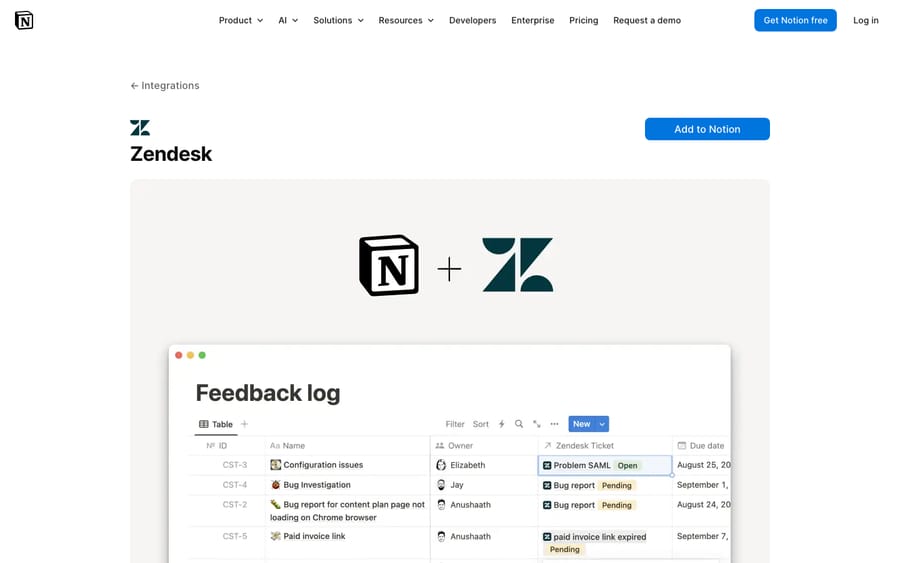
This is the only first-party piece, and it's worth being precise: it's made by Notion, not Zendesk, and it lives on the Notion side. According to Notion's own integration page, it gives you two things:
- Live link previews. Paste a Zendesk ticket URL into any Notion page and choose Paste as preview. Notion renders the ticket's live status and key properties inline, so a project doc or runbook can show the real-time state of related tickets.
- A "Zendesk Ticket" database property. Add a property of type Zendesk Ticket to a Notion database so you can link tickets to items, then use Notion's normal filters, views, rollups, and relations to build custom views of the work.
How to set it up
- In Notion, open Settings & members from the workspace sidebar.
- Go to My connections → Discover new connections, find Zendesk, and click Connect.
- Enter your Zendesk subdomain (the
yourcompanyinyourcompany.zendesk.com). - Complete Zendesk's sign-in and authentication prompts to authorize the connection.
- Test it: copy any ticket link, paste it into a Notion page, and pick Paste as preview.
The honest limit
This integration is built for referencing tickets within Notion. It's a documentation-and-tracking convenience, not a support-workflow tool. It does the reverse of what most agents want: it brings tickets into Notion, but it does not surface your Notion docs inside the Zendesk agent workspace, and it doesn't answer or deflect anything. There's a "Notion" listing on the Zendesk Marketplace too, but the actual setup still happens from the Notion side. If your goal is "agents see the right doc while solving a ticket," this isn't it.
How do Zapier, Make and Unito compare for syncing tickets to Notion?
When you want ticket data to physically land in Notion (a support log, a bug-triage database, a content backlog fed by tickets), reach for an iPaaS connector. None of these are AI; they move records between the two systems on rules you define. Here's how the three common ones compare:
| Zapier | Make | Unito | |
|---|---|---|---|
| Best for | Simple one-way automations | Multi-step / branching flows | Continuous two-way sync |
| Direction | One-way per Zap (build two for both) | One-way per scenario (chainable) | True two-way, no duplicates |
| Syncs comments/assignees/attachments | Field-by-field, manual | Field-by-field, manual | Yes, built-in |
| Historical backfill | No (forward-only) | Limited (manual) | Yes (one click) |
| Learning curve | Lowest | Medium (visual builder) | Low, but sync-config heavy |
| Pricing | Free 100 tasks/mo; Pro from $19.99/mo billed annually | Free up to 1,000 credits/mo; paid from $9/mo | Paid plans after a 14-day free trial |
A quick rule of thumb: Zapier for a quick one-way pipe, Make when you need logic and branching, Unito when both databases must stay mirrored.
Zapier: easiest for one-directional automations
Zapier's Notion + Zendesk directory lists dozens of prebuilt templates. The most common pattern is a single trigger and a single action.
Step by step: create a Notion page for every new Zendesk ticket
- In Zapier, click Create → Zap.
- Trigger: choose Zendesk → event New Ticket. Connect your Zendesk account and pick the view/brand to watch.
- Action: choose Notion → event Create Page (or Create Database Item if you're populating a database). Connect your Notion account and grant it access to the target database.
- Map the fields: ticket subject → page title; description, requester, status, priority, and ticket URL → Notion properties.
- Test the step, confirm a page appears in Notion, then Publish.
You can run it the other way too: trigger on a new Notion database item and Create Ticket in Zendesk, which is handy when Notion is where your team logs bugs or feature requests. One budgeting note: Zapier's Free plan gives you 100 tasks a month, and multi-step workflows (add a filter, then create and update) come with the paid Professional plan, which starts at $19.99/mo billed annually. Annual billing is 33% cheaper than monthly, per Zapier's pricing page; see also Zapier's plan limits.
Make.com: more control, visual builder
Make's Zendesk + Notion integration gives you a visual canvas with more granular modules:
- Zendesk triggers: Watch new tickets and Watch ticket audits (i.e. new activity on a ticket).
- Notion actions: Create a database item, Create an item in a data source, and Append page content.
- Zendesk actions: Create a ticket, Create a ticket comment, and Add/replace tags on a ticket, user, or organization.
Make is the better pick when you need branching, multiple steps, or to append running updates to an existing Notion page rather than spawning a new one each time. It's a steeper learning curve than Zapier. Its Free plan covers up to 1,000 credits a month with a 15-minute minimum between runs, and paid plans start at $9 a month (make.com/pricing).
Unito: true two-way sync
If you need both systems to stay mirrored, not just a one-time copy, Unito does live two-way sync: a ticket creates a Notion page and a Notion page creates a ticket, and edits flow both directions without duplicates or loops. It can sync related fields like comments, assignees, and attachments, backfill historical records in one click, and it's SOC 2 Type 2 certified. Unito's integration page offers a 14-day free trial before you pick a paid plan. Use it when keeping the two databases continuously aligned actually matters.
The honest limit (for all three)
These connectors are excellent at moving and mirroring data and useless at understanding it. They'll faithfully copy a ticket into Notion, but no Zap or sync ever reads a customer's question, finds the right answer in your Notion docs, and replies. For tracking, reporting, and cross-team visibility, an iPaaS connector is the right tool. For deflection and faster resolutions, it isn't.
Can an AI agent answer Zendesk tickets from your Notion docs?
Yes, and it's the path most support teams actually want when they search for a "Notion knowledge base Zendesk" setup. Your answers already live in Notion (onboarding docs, internal SOPs, product specs, troubleshooting runbooks), and you want agents or customers to get those answers inside Zendesk without copy-pasting or tab-hopping.
That's a different job from previews or syncing. It needs something that can read your Notion content and apply it to a live ticket. This is exactly where an AI agent layer fits.
Where Macha fits in
Macha is an AI agent that runs on top of your existing Zendesk. It is not a help desk and not a Zendesk replacement. You connect Notion as a knowledge source, and Macha's agent reads your Notion docs to answer Zendesk tickets directly: it drafts or sends replies grounded in your documentation, tags and routes the ticket, and escalates to a human, with context attached, whenever it isn't confident. For most teams that's the cleanest "Notion + Zendesk" outcome, because it skips the copy-paste entirely: the knowledge you already maintain in Notion becomes the knowledge your support answers from.
Roughly how you'd set it up:
- In Macha, add a knowledge source and select Notion, then authorize access to the workspace or specific pages/databases you want it to read.
- Let it index your selected Notion content.
- Connect Macha to your Zendesk account so it can read tickets and post replies.
- Configure the agent's behavior: auto-draft vs. auto-send, when to escalate, tags to apply.
- Test with real past tickets and tune which Notion docs are in scope. (We walk through the source side in detail in how to connect knowledge sources to an AI agent.)
The honest limit
This is still an integration, and it's only as good as your Notion content. If your docs are thin, contradictory, or out of date, the agent will reflect that. Cleaning up your knowledge base first pays off here more than anywhere else; our guide on building a Zendesk knowledge base applies just as well to the Notion docs you point an agent at. On cost, Macha bills per ticket: one conversation, charged once however many drafts, tags or lookups it takes, from $299 a month for up to 750 tickets, with setup and monitoring by the Macha team included. It's not billed per "resolution," so the bill never hangs on an outcome definition you don't control. You can try it free: $50 of free usage, no credit card required.
Which method should you choose?
- You want tickets visible inside Notion docs/project boards → the official Notion link-preview integration. Free, fast, shallow.
- You want a Notion database that logs or mirrors tickets → Zapier (simple, one-way), Make (more control), or Unito (true two-way sync).
- You want support to actually answer tickets from your Notion knowledge → an AI agent that connects Notion as a knowledge source.
These aren't mutually exclusive. A common stack is link previews so PMs see ticket state in Notion, a Zap that logs tickets to a Notion triage database, and an AI agent reading your Notion docs to deflect repetitive questions. Pick by goal.
What mistakes should you avoid?
- Don't expect a first-party deep app. There isn't one. Anyone promising a native, two-way Zendesk↔Notion app baked into the agent workspace is overstating it, so verify what you're actually buying.
- Match the tool to the job. Sync tools don't answer questions; AI agents aren't the right way to mirror a database. Using the wrong one is the most common waste of setup time.
- Mind Zapier's task math. The Free plan's 100 tasks a month disappear fast if every ticket fires a Zap. Estimate volume before you build.
- Clean your Notion content before pointing AI at it. Outdated or duplicated docs produce confident but wrong answers. Audit first.
- Scope what gets connected. Whether it's a Zap's database or an AI agent's sources, give it access to the right Notion pages, not the entire workspace by default.
- Test with real tickets. Every method "works" on a clean demo. Run your messiest real tickets through it before trusting it.
Frequently asked questions
Is there an official Zendesk Notion app? There's an official integration made by Notion (not Zendesk) that adds live link previews and a "Zendesk Ticket" database property, but it's configured from the Notion side and is meant for referencing tickets inside Notion. There is no deep first-party Zendesk-built Notion app comparable to the official Jira or Salesforce integrations, and nothing that surfaces Notion docs inside the Zendesk agent workspace out of the box.
How do I set up the official Notion–Zendesk integration? In Notion, go to Settings & members → My connections → Discover new connections, choose Zendesk, click Connect, enter your Zendesk subdomain, and complete the authentication flow. Then paste any ticket link into a page and select Paste as preview.
Can I automatically create a Notion page from a new Zendesk ticket? Yes, with Zapier or Make. In Zapier, use the New Ticket trigger (Zendesk) and the Create Page or Create Database Item action (Notion), map your fields, test, and publish. Make offers the same with more granular modules and branching.
Can I sync Zendesk and Notion two ways? Yes, with Unito, which keeps tickets and Notion pages mirrored in both directions (including comments, assignees, and attachments) without creating duplicates. Zapier and Make can simulate two-way flows with separate Zaps or scenarios, but Unito is purpose-built for continuous sync.
Can an AI agent answer Zendesk tickets using my Notion knowledge base? Yes. An AI agent layer like Macha connects Notion as a knowledge source, reads your docs, and drafts or resolves Zendesk tickets grounded in that content, escalating to a human with context when it's unsure. It runs on top of Zendesk and bills per ticket: one conversation, charged once. Answer quality depends on how good and current your Notion content is.
Does the integration cost extra? The official Notion link-preview integration has no separate fee. Zapier has a Free plan (100 tasks a month); multi-step automations need the Professional plan from $19.99/mo billed annually. Make is free up to 1,000 credits a month, then from $9 a month. Unito offers a 14-day free trial, then paid plans. AI agent tools price separately; Macha offers a free trial ($50 of usage, no credit card required).
Methods checked against vendor pages (Notion, Zapier, Make, Unito) on 24 September 2026. These products update frequently, so confirm current labels, features, and pricing in your own accounts before relying on them.
Add AI agents to your Zendesk
Macha reads the ticket, drafts the reply and takes the action, inside the Zendesk you already run.