Shopify
 Stripe
 Slack
Slack Notion
 Google Workspace
 Confluence

Best Front Competitors (2026): The Shared-Inbox Landscape


Front sits in an awkward spot on the map. It is more collaborative than a plain shared mailbox, lighter than a full ticketing help desk, and priced somewhere between the two. That in-between position is exactly why teams start shopping around — and why the list of "Front competitors" is such a mess. Some of the tools people compare it to are Gmail add-ons. Some are standalone email clients that happen to support teams. Some are full customer-service platforms that treat email as one channel among many. Lumping them into a single ranked list hides the one thing that actually decides your choice: which segment you belong to. This guide skips the leaderboard and draws the map instead — three neighbourhoods of Front rivals, with real pricing as of capture and a plain read on who each one fits.

At a glance
Here is the whole landscape in one table. Prices are per user (or per seat) per month and reflect each vendor's published pricing as of capture in July 2026; some geolocated to India and show INR, which is noted where it applies.
| Tool | Segment | Best for | Pricing entry (as of capture) | Shared-inbox depth | Automation | Channels | Standout strength |
|---|---|---|---|---|---|---|---|
| Front | Standalone inbox | Teams wanting collaboration + light help-desk | $25/seat (Starter) | High | Rules engine (plan-gated) | Email, SMS, chat, social | Clean shared inbox with comments + assignment |
| Missive | Standalone inbox | Collaboration-first teams on any email host | $14/user (Starter) | Very high | Rules + shared labels | Email, SMS, WhatsApp, social | Two-way sync + inline team chat |
| Hiver | Gmail-native | Google Workspace teams who want simple | $25/user (Growth) | Medium | Workflows + SLAs | Gmail, chat, WhatsApp | Lives inside Gmail, zero new UI |
| Gmelius | Gmail-native | Gmail teams wanting automation + Kanban | $19/user (Meli) | Medium | Multi-step workflows | Gmail, shared labels | Kanban boards + sequences in Gmail |
| Spark | Standalone inbox | Small teams wanting a fast, cheap client | $8.25/user (Plus) | Low–medium | Light rules | Speed + affordability | |
| Superhuman | Standalone inbox | Speed-obsessed individuals + sales | $25/user (Starter) | Low | AI drafting | Fastest keyboard-driven email | |
| Kustomer | Help desk | Enterprise omnichannel CX | Demo-gated (~$89/seat) | High (ticketing) | Deep workflows | Omnichannel + CRM | CRM-grade customer timeline |
| Tidio | Help desk | Ecommerce chat + support | $24.17/mo (Starter) | Medium | Bots + flows | Chat, email, social | Live chat + Lyro AI bot |
| Zoho Desk | Help desk | Budget ticketing at scale | Rs420/user (Express, INR) | High (ticketing) | Blueprints + macros | Omnichannel | Cheapest full help desk |
| Shared Gmail | Gmail-native | Tiny teams on a zero budget | Included in Workspace | Low | None native | Free with Google Workspace |
The three neighbourhoods
Before the head-to-head numbers, it helps to name the three segments, because they answer different questions.
Gmail-native tools — Hiver, Gmelius, and Google's own Collaborative Inbox — add team features inside Gmail. Nobody learns a new interface; the trade-off is that you inherit Gmail's ceiling. Standalone inbox clients — Missive, Spark, and Superhuman, alongside Front itself — are their own apps that connect to your email host and layer collaboration on top. Help-desk platforms — Kustomer, Tidio, and Zoho Desk — treat every message as a ticket with SLAs, reporting, and CRM depth Front deliberately keeps light. Front lives in the middle neighbourhood, which is why it feels heavier than the Gmail add-ons and lighter than the help desks.
Pricing: real numbers, as of capture
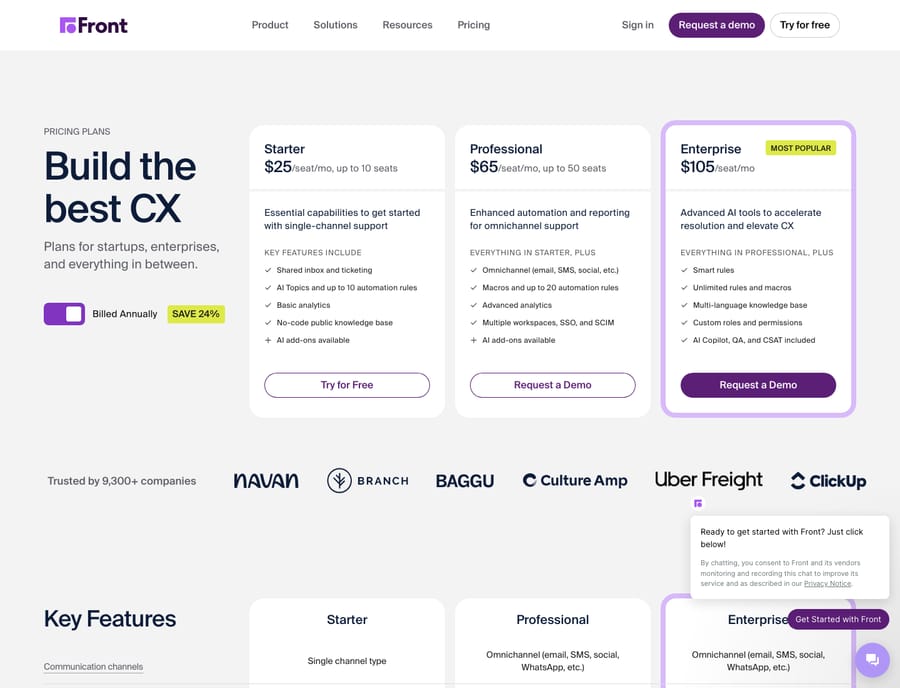
Front's own pricing is the reference anchor for this whole comparison. Per Front's pricing page, plans run Starter $25, Professional $65, and Enterprise $105 per seat per month billed annually (with a ~24% annual discount), and its AI Copilot, Smart QA, CSAT, and Autopilot capabilities are add-ons on the lower tiers.
Against that anchor, the field splits cleanly by segment. In the standalone neighbourhood, Missive undercuts Front sharply — Starter $14, Productive $24, Business $36 per user/month billed yearly per its published tiers — while Spark is cheaper still (Plus $8.25, Pro $16.58) and Superhuman lands near Front's floor (Starter $25, Business $33). Among the Gmail-native options, Gmelius opens at $19 (Meli) and Hiver at $25 (Growth), with a free Hiver tier for the smallest teams; Google's Collaborative Inbox is simply included in a Workspace subscription. The help-desk tier ranges from Zoho Desk's budget entry (Express, shown as Rs420/user/month on a page geolocated to India) up to Kustomer, which publishes no per-seat tiers at all — its pricing is demo-gated, and third-party review sites peg the Enterprise plan near $89/seat/month with an eight-seat minimum, per Capterra's Kustomer listing. Tidio sits between, with a Starter around $24.17/month plus a usage-based cost calculator. Treat every figure here as as of capture; SaaS pricing moves, and several of these pages localise currency by region.
The takeaway on cost: if per-seat price is your trigger for leaving Front, Missive and the Gmail-native tools are the obvious relief, while the help-desk tier trades higher spend for depth Front never tried to match.
Shared inbox and collaboration
Collaboration is Front's home turf, and it earns its reputation here. G2 and Capterra reviewers consistently praise the clean shared inbox, internal comments that keep the team aligned without CC-ing the customer, and clear assignment so conversations don't get dropped, per Front's G2 reviews. Our own Front app review and shared-inbox explainer go deeper on that model.
Missive is the competitor that meets Front head-on and, for pure collaboration, arguably exceeds it: it offers threaded team chat inside the email conversation and two-way sync back to Gmail, Outlook, or any IMAP host — a point Missive makes directly in its Hiver comparison. That two-way sync matters, because Front reviewers repeatedly flag that its Outlook sync is now one-directional. The Gmail-native pair (Hiver, Gmelius) deliver solid shared inboxes but cap out at Gmail's collaboration model, while help desks like Kustomer replace the inbox metaphor entirely with a CRM-style customer timeline.
Automation and rules
Front's rules engine is a real strength, though its power is plan-gated — more rules and advanced actions unlock as you climb tiers. Among competitors, Gmelius is the standout for automation inside Gmail, offering multi-step workflows, SLA tracking with breach alerts, and email sequences that go beyond what Hiver's simpler workflows provide, per Hiver's own Gmelius comparison. At the top end, help-desk platforms win on raw automation depth: Zoho Desk's Blueprints and macros and Kustomer's workflow builder are built for structured, SLA-driven operations that Front's lighter engine isn't aiming at. Missive splits the difference with rules plus shared labels — enough for most collaboration-first teams without help-desk overhead.
Channels
Front's pitch is omnichannel-in-one-inbox: email, SMS, chat, and social all land together. Missive matches the multichannel story (email, SMS, WhatsApp, social), which is why the two feel like direct rivals. The Gmail-native tools are, unsurprisingly, email-first — Hiver adds live chat and WhatsApp, but the centre of gravity stays in Gmail. The help-desk segment is where channels genuinely broaden: Tidio leads with live chat and its Lyro AI bot for ecommerce, while Kustomer and Zoho Desk offer full omnichannel routing with CRM context. If your support is chat-heavy or you need a public help centre, the help-desk neighbourhood is the honest answer, not Front.
Ease and onboarding
This is where segment matters most. Gmail-native tools win onboarding by default — there is no new interface, so Hiver, Gmelius, and Collaborative Inbox go live the day you install them. Front and Missive ask teams to adopt a new app, which is a bigger lift but pays back in a purpose-built collaboration surface; Front reviewers on G2 generally call the interface clean and the learning curve gentle for what it is. Superhuman is a special case: it is famously fast but keyboard-driven and built around individual power users, so it onboards a person quickly and a support team slowly. Help desks demand the most setup — SLAs, routing, CRM fields — which is the price of their depth.
Which should you choose?
Map your buyer profile to the neighbourhood, not the leaderboard:
- You live in Gmail and want simple, cheap collaboration → Hiver (or free Collaborative Inbox for a tiny team). No new UI, fast to adopt.
- You're in Gmail but need real automation and Kanban → Gmelius. Workflows and sequences the other add-ons lack.
- You want Front's collaboration for less, on any email host → Missive. Two-way sync and inline chat, at a fraction of the per-seat cost.
- You're a speed-obsessed individual or small sales team → Superhuman (power) or Spark (budget).
- You've outgrown the inbox metaphor and need tickets, SLAs, and CRM → Kustomer (enterprise CX), Zoho Desk (budget ticketing), or Tidio (ecommerce chat).
- You want exactly what Front does — collaboration plus light help-desk → honestly, Front. It's good at its own job; see our best Front alternatives breakdown if you still want to shop.
There is no single "best Front competitor" — there is a best competitor for your segment. Get the neighbourhood right and the shortlist writes itself.
Where Macha fits
One more thing worth naming, because it changes the calculation. Whichever inbox or help desk you pick, the ceiling everyone hits is the same: native AI that reviewers keep calling lightweight. That's the layer Macha adds — an AI agent that sits on top of the tool you already chose (including Front itself), reads your real conversations, and resolves the repetitive ones end to end. Macha isn't a shared inbox competing for a row in the table above; it's the automation layer that makes any of them resolve more. If deflection is the actual reason you're shopping, that's where to look next.
FAQ
Who are Front's biggest competitors in 2026? It depends on the segment. Missive is Front's closest standalone-inbox rival; Hiver and Gmelius compete on the Gmail-native side; and Kustomer, Tidio, and Zoho Desk compete from the help-desk side. There is no single dominant alternative — the right one tracks to how your team already works.
What's the cheapest Front alternative? Among captured pricing, Spark (Plus ~$8.25/user/month as of capture) and Missive (Starter $14) are the cheapest standalone options, while Google's Collaborative Inbox is effectively free with a Workspace plan. Prices are as of capture and may vary by region.
Is Missive better than Front? For collaboration-first teams, Missive is a strong match and cheaper per seat, with two-way email sync and inline team chat. Front wins if you want its specific blend of shared inbox plus light help-desk features and its more mature rules engine. Both are good; the choice is about fit.
Should I use a Gmail add-on or a standalone inbox? If your team is committed to staying inside Gmail, a Gmail-native tool (Hiver or Gmelius) is fastest to adopt. If you want a purpose-built collaboration surface or support multiple email hosts, a standalone inbox like Front or Missive is the better fit.
Can I add AI to whichever tool I choose? Yes. A layer like Macha connects on top of your existing inbox or help desk and handles repetitive conversations with AI agents, so you don't have to migrate to get automation. Read more in our guide to AI agents for customer service.
Ready to add an AI agent on top of your shared inbox? Start a free trial.
Add AI agents to your Front
Macha reads the conversation, drafts the reply and takes the action, inside the Front you already run.