





 Shopify
 Stripe
 Slack
Slack Notion
 Google Workspace
 Confluence

How Do You Build an AI Agent for Jira Service Management? (2026)


An AI agent for Jira Service Management needs three pieces: a trigger when a request is created, a read of the request through the API, and a reply posted as a comment. You can build those yourself, use Atlassian's own virtual service agent and Rovo agents, or connect Macha, whose Jira connector reads, comments on and transitions JSM requests.
Key takeaways
- An AI agent for Jira Service Management needs a request-created trigger, the servicedeskapi REST API to read requests, and a comment endpoint to post public replies.
- The Jira Service Management REST API posts a reply through the request/{issueIdOrKey}/comment endpoint, authenticated with OAuth or an Atlassian email and API token.
- Atlassian's own AI for Jira Service Management is the virtual service agent and Rovo agents, which run inside JSM rather than on a model you choose.
- Macha's Jira connector works on Jira Service Management requests because each request is a Jira issue, with tools to search, read, comment on and transition issues plus a New Issue Created trigger.
- Macha is one plan priced by ticket volume at about $0.40 a ticket, from $299 a month for up to 750 tickets, and the Macha team builds and tests the agent for you, with a dedicated success manager who handles your changes.

You build an AI agent for Jira Service Management by wiring three things to a model: a trigger when a request is created (a JSM automation rule or a Jira webhook), a read of the request through the /rest/servicedeskapi REST API, and a reply posted with POST /rest/servicedeskapi/request/{issueIdOrKey}/comment. You can write that yourself, use Atlassian's own virtual service agent and Rovo agents, or connect an agent platform such as Macha, whose Jira connector reads, comments on and transitions JSM requests because each request is a Jira issue.
| Route | How it connects to JSM | Best for |
|---|---|---|
| Atlassian's built-in AI | Virtual service agent and Rovo agents, inside JSM | Teams happy with Atlassian's model and billing |
| Build on the JSM API | Your code: webhook endpoint, REST client, agent loop | Fully custom runtimes, strict data residency |
| Macha's Jira connector | Native Jira connector (search, read, comment, transition) plus a New Issue Created trigger | Teams that want model choice without hosting the plumbing |
What does a Jira Service Management AI agent do?
The loop is the same as any support agent, wired to Jira Service Management: a new request arrives → the agent reads it and the reporter's history → it calls tools (look up the asset, search your knowledge base, check an SLA or approval policy) → it posts a reply as a public comment or transitions the request to the right queue or assignee. (New to agents generally? Start with AI agents for customer service.)
How do you build it against the Jira Service Management API?
Jira Service Management has a full REST API, so you can build the agent yourself. The pieces:
- Read requests: the Jira Service Management REST API to pull the request, its comments, and the reporter, plus the core Jira Cloud REST API for issue fields.
- Reply / act: add a public comment to a request, or transition the underlying issue. Creating a comment needs the
write:servicedesk-requestOAuth scope, or Basic auth with an Atlassian email and API token for a script. - Trigger on new requests: a JSM automation rule or a Jira webhook calls your endpoint when a request is created.
A reply tool against the Jira Service Management API looks like this:
import requests
JSM = "https://yourco.atlassian.net/rest/servicedeskapi"
AUTH = (EMAIL, API_TOKEN)          # Atlassian email + API token (Basic auth)

def reply_to_request(issue_key: str, body: str):
    r = requests.post(f"{JSM}/request/{issue_key}/comment",
        json={"body": body, "public": True},
        auth=AUTH, timeout=10)
    r.raise_for_status()           # handle 429 rate limits, token refresh
    return {"status": "sent"}
Wrap that and a knowledge-base search as tools in an agent loop on your chosen model. See how to build an AI agent: from scratch vs. platform.
What does the production part involve?
The API calls are the easy bit. A Jira Service Management agent you'd trust also needs a webhook endpoint (with signature verification and idempotency so a retried event doesn't double-reply), rate-limit handling (Atlassian Cloud returns 429s under load), grounding in your knowledge base and help center (embed the articles, keep them fresh), guardrails (escalate approvals, don't leak PII, respect SLAs), 24/7 hosting, observability, and an eval harness over real historical requests. That's weeks of work plus upkeep.
Can you run a Macha agent on Jira Service Management?
Yes, through Macha's live Jira connector. Every JSM request is a Jira issue, so the connector's tools work on service projects the same way they work on a board. The agent gets:
- Search & read issues: JQL search, and Get Issue with all fields, comments, attachments and transition history.
- Create & comment: reply on a request or open a linked issue for engineering.
- Status transitions: list the available transitions, then move the request; a field-update tool patches priority, labels and custom fields.
- New issue trigger: New Issue Created fires the agent when a request lands, filtered by project or issue type; Issue Updated fires on changes, scoped with a field filter so the agent's own writes don't retrigger it.
Test whether a comment the agent posts shows to the customer or stays internal on your service project before you let it run unattended. For JSM-specific endpoints the Jira connector doesn't cover, such as request types, SLA timers or approvals under /rest/servicedeskapi, describe the endpoint as a Custom Tool. Macha's native help desk connectors cover Zendesk, Freshdesk, Gorgias, Front, HubSpot or Intercom; Jira sits alongside them as a connected tool.
- Ground on your documentation: add your knowledge base as a Source; Confluence is one of the connected knowledge tools, so replies quote real articles instead of guessing.
- Runs and grades: Agent Analytics show every run, and evaluation and Studies score the agent's output against its instructions so you can tighten it before widening autonomy.

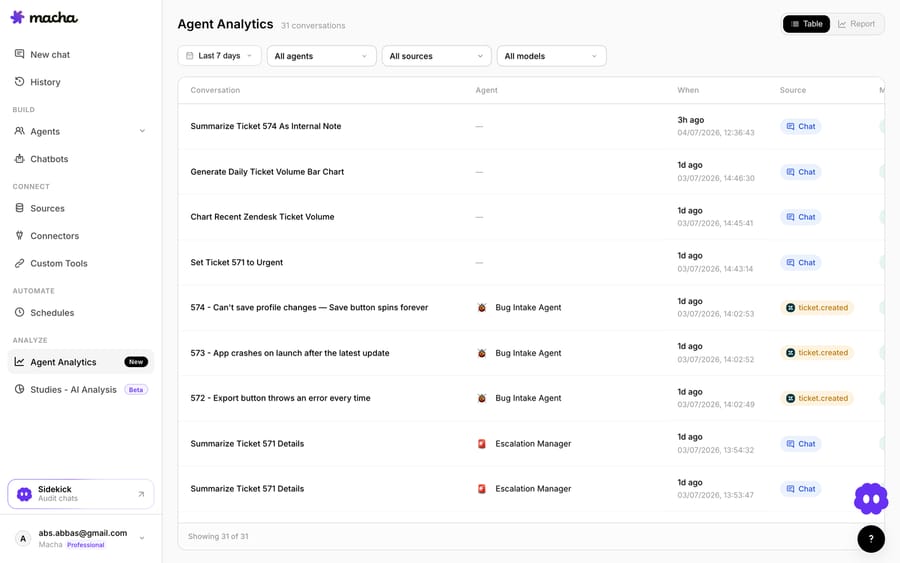
You don't build this part yourself. The Macha team sets up the agent on your Jira connection, writes any JSM-specific Custom Tools, and tests the agent on sample requests before it touches a live one, on the trial and every plan. Macha is one plan priced by ticket volume, about $0.40 a ticket from $299 a month for up to 750 tickets, billed per ticket rather than per message or resolution. That price includes setup and a dedicated success manager who handles your changes (see pricing).
How do building and Macha compare for Jira Service Management?
| Build on the JSM API | Macha's Jira connector | |
|---|---|---|
| Read/reply to requests | You write the API client | Search, read, comment and transition tools built in |
| Trigger on new requests | You build and host a webhook endpoint | New Issue Created trigger |
| Ground on knowledge base | You embed and host a vector store | Add it as a Source |
| Hosting, retries, observability | Your infrastructure | Built in |
| JSM-only endpoints (request types, SLAs) | Your code | Custom Tools |
| Evaluate before go-live | You build a harness | Evaluation and Studies |
| Ongoing upkeep | Yours | Done for you by the Macha team, with a dedicated success manager, included |
So which should you build?
Build on the API if you need a fully custom runtime, have strict data-residency needs, or the agent is your product. Stay with Atlassian's virtual service agent if its model and billing suit you. If you want model choice and custom tools without hosting the loop yourself, connect Macha's Jira connector and let the Macha team add Custom Tools for the JSM-specific calls it doesn't cover and build the agent for you. You can start free on Macha with $50 of usage and no card; after that it's about $0.40 a ticket, setup and a dedicated success manager included.
FAQ
Is a Jira Service Management AI agent the same as Atlassian's own AI? Not necessarily. Atlassian offers a virtual service agent and Rovo agents inside JSM, but you can also run a model-agnostic agent against Jira Service Management's API, yourself or through a platform like Macha.
Do I need to install a Jira Service Management Marketplace app? Not for either external route. A self-built agent talks to the REST API with an API token or OAuth. Macha isn't a Marketplace app either; you connect your Jira account to Macha's Jira connector, which reads, comments on and transitions JSM requests as Jira issues.
Can the agent take actions, not just answer? Yes: comment, transition and update fields, plus your own systems' APIs as tools, with guardrails on what it does unattended.
How do I make sure it's accurate before it replies to customers? Ground it in your knowledge base, score its runs before go-live (Macha's evaluation and Studies do this), start by posting internal comments for a human to approve, and widen autonomy per request type as it earns trust.






