





 Shopify
 Stripe
 Slack
Slack Notion
 Google Workspace
 Confluence

How Do You Build an AI Agent for Pylon? (2026)


An AI agent for Pylon reads a new issue, looks up the account, answers from your help center, and either replies or escalates. You can use Pylon's own Support Agent, build on the Pylon API and webhooks yourself, or run a platform like Macha against the same API.
Key takeaways
- An AI agent for Pylon can be Pylon's own Support Agent, your own agent built on the Pylon REST API and webhooks, or a platform like Macha calling the same API.
- The Pylon API sends customer-facing replies through POST /issues/{id}/reply, which requires the message_id of the customer-visible message being answered.
- Pylon publishes per-endpoint rate limits of 30 requests a minute for replies, notes and listing issues, 120 for issue updates and 300 for fetching one issue.
- Pylon webhooks are sent by a Trigger with a Send webhook action and custom headers, so a DIY endpoint should check a shared secret header and dedupe repeats itself.
- Macha has no native Pylon connector, so a Macha agent on Pylon runs on Custom Tools for the Pylon endpoints and a Pylon webhook; the Macha team builds and tests both for you, included at about $0.40 a ticket.

You build an AI agent for Pylon in one of three ways: turn on Pylon's own Support Agent, build your own agent on the Pylon REST API (a webhook fires on new issues and your code replies through POST /issues/{id}/reply), or run a model-agnostic platform such as Macha against the same API. Pylon documents the second route itself as "Bring Your Own Agent": webhooks listen for new issues and messages, and the API posts replies or changes metadata. The API calls take an afternoon; the webhook handling, grounding, hosting and evaluation around them are the real work.
| Route | What you get | What you own |
|---|---|---|
| Pylon Support Agent | Native agent that deflects with your content, gathers internal context and takes actions | Configuration only; Pylon's pricing is now behind a demo form |
| Build on the Pylon API | Any model, any tools, full control of the runtime | Webhook endpoint, retries, rate limits, hosting, evals, upkeep |
| Macha on the Pylon API | Model choice and custom tools without hosting your own runtime | The Pylon API token and a Pylon trigger that calls Macha's webhook; the Macha team builds the Custom Tools and the agent |
What does a Pylon AI agent do?
The loop is the same as any support agent, wired to Pylon: a new issue arrives → the agent reads it and the account's history → it calls tools (look up the account, search your help center, check a policy) → it posts a reply or routes the issue to a human. The hard part is doing that reliably against real issues. (New to agents generally? Start with AI agents for customer service.)
How do you build it on the Pylon API?
Pylon has a full REST API at https://api.usepylon.com (EU workspaces use https://api.eu.usepylon.com), so you can build the agent yourself. The pieces, per Pylon's API docs:
- Read issues:
GET /issuesandGET /issues/{id}pull the issue and its account;GET /issues/{id}/messagesreturns the conversation. - Reply and act:
POST /issues/{id}/replysends a customer-facing reply,POST /issues/{id}/noteleaves an internal note, andPATCH /issues/{id}changes state, assignee, tags or custom fields. - Trigger on new issues: in Pylon, you add your endpoint under Settings → Webhooks, then create a Trigger with the action "Send webhook" and conditions for when it fires.
A reply-and-update tool against the Pylon API looks like this. Note that the reply endpoint requires a message_id: the customer-visible message you're replying under, taken from GET /issues/{id}/messages.
import requests
PYLON = "https://api.usepylon.com"      # EU: https://api.eu.usepylon.com
HEADERS = {"Authorization": f"Bearer {PYLON_TOKEN}"}

def reply_to_issue(issue_id: str, body: str):
    # find the customer-visible message to reply under
    msgs = requests.get(f"{PYLON}/issues/{issue_id}/messages",
        headers=HEADERS, timeout=10)
    msgs.raise_for_status()
    visible = [m for m in msgs.json()["data"] if not m.get("is_private")]
    # post the customer-facing reply (message_id is required;
    # email conversations also need email_info recipients)
    r = requests.post(f"{PYLON}/issues/{issue_id}/reply",
        json={"body_html": body, "message_id": visible[-1]["id"]},
        headers=HEADERS, timeout=10)
    r.raise_for_status()          # back off and retry on 429
    # then move the issue to waiting on the customer
    requests.patch(f"{PYLON}/issues/{issue_id}",
        json={"state": "waiting_on_customer"}, headers=HEADERS, timeout=10)
    return {"status": "sent"}
Wrap that (and a get_account, a search_help_center) as tools in an agent loop on the model of your choice. Our from-scratch walkthrough is in how to build an AI agent: from scratch vs. platform. The standard issue states are new, waiting_on_you, waiting_on_customer, on_hold and closed, so an escalation is the same PATCH with waiting_on_you plus an assignee.
How do auth and rate limits work?
Pylon's API authenticates with a bearer token (Authorization: Bearer <token>), and only Admin users can create API tokens. It's a workspace credential, not per-user OAuth, so store it as a secret and rotate it. Pylon publishes a rate limit on every endpoint: 30 requests a minute for listing issues, creating issues, replying and adding notes; 120 a minute for updating an issue and reading its messages; and 300 a minute for fetching a single issue. Past the limit you get HTTP 429. The reply limit is the one that bites: an agent answering a spike of new issues can hit 30 replies a minute, so every call needs retry with backoff (honor Retry-After when present), and a bulk backfill, such as pulling a year of issues for evals, has to be paced so it doesn't stall mid-run.
What does the production webhook need?
The API calls are the easy bit; making the agent run on real issues is the work. Pylon's webhooks don't document a signature scheme. Instead you set the body with templated variables and add any custom headers you like, such as a shared secret. So your endpoint checks that header, dedupes, and acks fast:
import hmac, os
from fastapi import FastAPI, Request, HTTPException

app = FastAPI()
SECRET = os.environ["PYLON_WEBHOOK_SECRET"]
seen: set[str] = set()   # use Redis/DB with a TTL in prod, not an in-memory set

@app.post("/pylon-webhook")
async def on_issue(req: Request):
    # Pylon sends the custom headers you configured on the webhook
    sent = req.headers.get("X-Webhook-Secret", "")
    if not hmac.compare_digest(sent, SECRET):
        raise HTTPException(status_code=401, detail="bad secret")
    event = await req.json()          # shape comes from your trigger's template
    issue_id = event["issue_id"]
    key = f"{issue_id}:{event.get('event', 'created')}"
    if key in seen:                   # a re-fired trigger must not send a second reply
        return {"ok": True, "dedup": True}
    seen.add(key)
    run_agent(issue_id)               # ideally enqueue; ack fast
    return {"ok": True}
Two things earn their keep here. The secret check rejects anything that didn't come from your Pylon trigger, which matters because your endpoint is public and issue text is attacker-controllable input. And the idempotency key is yours to design: put the issue ID and the event type in the trigger's body template, so a repeat delivery of the same event is dropped while a genuinely new event on the same issue still runs. Ack quickly and do the model call in a queue, so a slow run never holds the request open.
Then the rest: rate-limit handling (the 30-a-minute reply ceiling above), grounding in your help center (embed the articles and re-index when they change), guardrails (escalate refunds, redact PII, treat issue text as untrusted input), hosting 24/7, observability so you can see what every run did, and an eval harness that replays real historical issues so you measure quality before customers do. That's weeks of work plus permanent upkeep, none of it specific to your product.
What about Pylon's own AI?
Pylon is a B2B support platform built for shared Slack channels and high-touch accounts, and it ships its own agents: a Support Agent that can deflect questions using your content, gather internal context and take actions, plus Background Agents that prepare investigations on incoming issues, an Assist Agent and a Slack Agent (Pylon agent docs). Pylon's public pricing page now redirects to a demo form, so its AI pricing has to come from sales. Be honest about which of three routes you want:
- Pylon's native agents: the fastest no-code path. You stay on Pylon's models and settings, and it's a fine fit if that covers your cases. Least control, least effort.
- Build on the Pylon API yourself: you need a specific model, custom tools wired to your own systems (accounts, billing, provisioning), or full control of the runtime, and you have the engineering to own it. Most control; weeks to build plus the upkeep above.
- Run a model-agnostic platform (Macha) against the API: model choice and custom tools, with hosting, observability and evaluation handled for you. Macha works as the AI layer on top of Pylon, not a replacement for it.
How do you connect Pylon to Macha?
Macha has native connectors for Zendesk, Freshdesk, Gorgias, Front, HubSpot or Intercom. Pylon isn't one of them, so a Pylon agent on Macha is built from two general-purpose pieces instead of a one-click connector:
- Custom Tools for the Pylon API: describe
GET /issues/{id},GET /issues/{id}/messages,POST /issues/{id}/reply,POST /issues/{id}/noteandPATCH /issues/{id}as Custom Tools with your Pylon bearer token, and the agent can read issues, reply, leave notes and change state. No glue code to host. - A Macha custom trigger: Macha generates a webhook URL; point a Pylon Trigger's "Send webhook" action at it, and each new issue starts an agent run with the payload as context.
- Ground on your knowledge: add your help center, Confluence, Google Workspace or website as a Source so replies quote real articles instead of guessing.
- Other systems as tools: the same Custom Tools approach turns your order, billing or CRM APIs into agent capabilities.
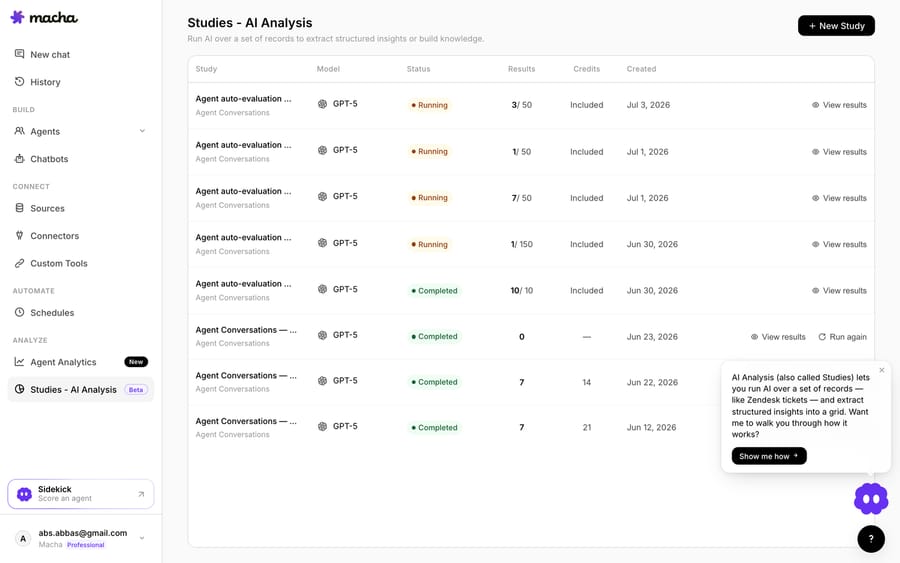
- Check it before go-live: run it on sample issues in the test panel, keep it on internal notes first, and use evaluation and Studies to score its runs against its instructions.
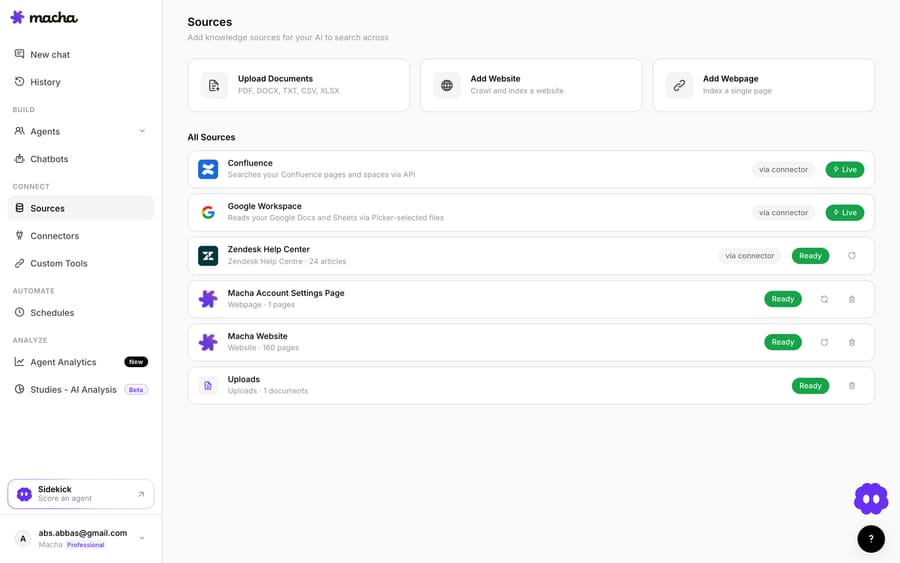
You still set up the Pylon side (the token and the trigger), but you skip hosting the webhook endpoint, the queue and the agent runtime, and you don't write the tools either. The Macha team describes the Pylon endpoints as Custom Tools, builds the agent and tests it on sample issues before it touches a live one, on the trial and every plan. Pricing is about $0.40 a ticket, from $299 a month for up to 750 tickets, and that includes setup and a dedicated success manager who handles your changes.
How does building compare with Macha for Pylon?
| Build on the Pylon API | Macha on the Pylon API | |
|---|---|---|
| Read/reply to issues | You write the API client | Pylon endpoints described as Custom Tools |
| Trigger on new issues | You build and host a webhook endpoint | Pylon trigger calls a Macha custom trigger URL |
| Ground on help center | You embed and host a vector store | Add it as a Source |
| Other systems as tools | You wire each integration | Custom Tools |
| Hosting, retries, observability | Your infrastructure | Built in |
| Evaluate before go-live | You build a harness | Test runs, evaluation and Studies |
| Upkeep | Yours, permanently | Done for you by the Macha team, with a dedicated success manager, included |
So which should you build?
Build on the API if you need a fully custom runtime, have strict data-residency needs, or the agent is your product. If Pylon's Support Agent covers your cases, use it. If you want your own model and your own tools without running the infrastructure, Macha on the Pylon API gets you there, built for you. You can start free on Macha with $50 of usage and no credit card; the Macha team adds the Pylon endpoints as Custom Tools and tests an agent on sample issues before it touches a customer. After the trial it's about $0.40 a ticket, setup and a dedicated success manager included.
FAQ
Is a Pylon AI agent the same as Pylon's built-in AI? Not necessarily. Pylon ships its own Support Agent, but Pylon also documents "Bring Your Own Agent": you can run a model-agnostic agent on top of Pylon through its webhooks, API or MCP server, which helps if you want a specific model, custom tools, or to grade the agent your own way.
Do I need to install a Pylon marketplace app? No. Macha doesn't have a native Pylon connector; it calls the Pylon API through Custom Tools and is started by a Pylon trigger that sends a webhook to Macha. Nothing is installed inside Pylon beyond the API token and the trigger.
Can the agent take actions, not just answer? Yes. Through the Pylon API it can reply, leave internal notes, and update state, tags, assignee or custom fields, and your own systems' APIs (account lookups, refunds) can be added as Custom Tools, with guardrails on what it does unattended.
How do I make sure it's accurate before it replies to customers? Ground it in your help center, run it on sample issues in the test panel, and start with internal notes (POST /issues/{id}/note) rather than customer replies. Widen autonomy per issue type as it earns trust, and keep evaluating its runs.






