





 Shopify
 Stripe
 Slack
Slack Notion
 Google Workspace
 Confluence

How Do You Build an AI Support Agent with Microsoft Copilot Studio? (2026)


You build a support agent in Microsoft Copilot Studio by describing it, adding knowledge and tools, testing it in the Test agent panel and publishing it to a website, Teams or WhatsApp. GitHub Copilot is the developer tool with the same name, and a help-desk-native platform is the better home when your support runs on a dedicated help desk.
Key takeaways
- Microsoft Copilot Studio builds a support agent in this order: describe it, add knowledge from SharePoint or files, add tools (connectors, flows, REST APIs or MCP servers, up to 128 per agent), test in the Test agent panel, then publish.
- Customer-facing Copilot Studio agents run on Copilot Credits, priced at $200 for a pack of 25,000 a month, with pay-as-you-go coverage once the pack runs out.
- Microsoft Agent 365 became generally available on 1 May 2026 and costs $15 per user per month standalone, or comes included in Microsoft 365 E7.
- On a dedicated help desk, Macha is the done-for-you option: the Macha team builds the knowledge base and the agent and runs it in safe mode, at about $0.40 a ticket with a dedicated success manager included.
- GitHub Copilot defines custom agents in .agent.md files with tools, a model and MCP servers, but it is a coding assistant and does not run live support tickets.

To build a customer support agent in Microsoft Copilot Studio, you create an agent, describe its role in plain language, add knowledge from SharePoint, websites or uploaded files, add tools such as Power Automate flows or REST APIs, test it in the Test agent panel, then publish it to a website, Teams or WhatsApp. Customer-facing agents run on Copilot Credits, sold at $200 for a pack of 25,000 a month (Copilot Studio pricing, checked 24 September 2026).
| Copilot Studio | GitHub Copilot | Help-desk-native (Macha) | |
|---|---|---|---|
| What it is | Low-code agent builder | Coding agents defined in .agent.md files | AI agents on top of your help desk |
| Where the agent answers | Website, Teams, M365 Copilot, WhatsApp, Facebook, Dynamics 365 Contact Center | Your repo and IDE | Tickets in your help desk, plus chat |
| Pricing | $200 per 25,000 Copilot Credits a month, or pay-as-you-go | GitHub Copilot plan | From $299/mo for 750 tickets |
| Runs live support tickets? | Yes, via connectors you maintain | No | Yes, via native connector |
How do you build a support agent in Copilot Studio?
The build is low-code, in a visual canvas. Walking our Acme support agent through it:
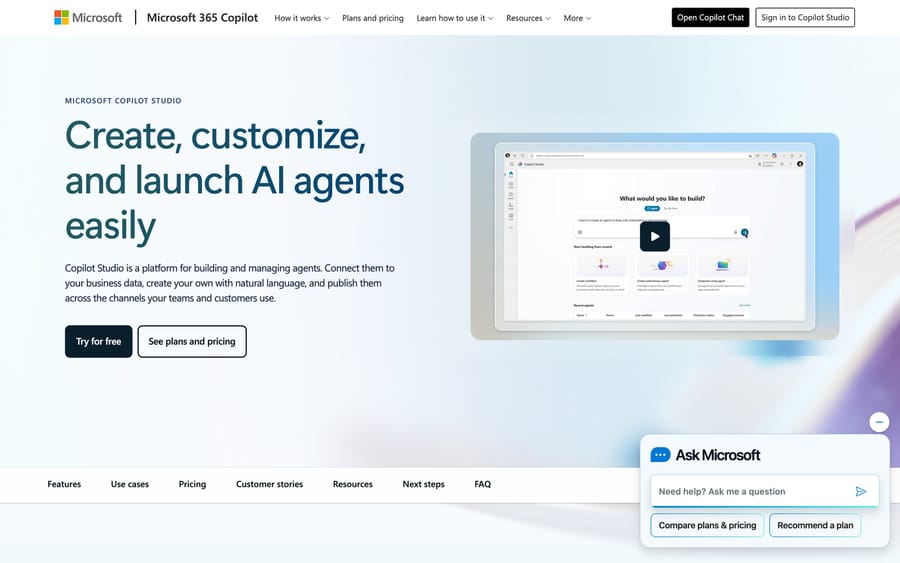
- Create and describe the agent. From the Copilot Studio home you create an agent and describe it in natural language: Acme's role, tone and rules ("answer from the help center; escalate refunds over $100"). Copilot Studio drafts a first version you refine.
- Add knowledge for generative answers. Point it at SharePoint, public websites or uploaded files. Copilot Studio's generative answers then respond from that content instead of only from scripted topics (its dialog-tree units), so Acme's agent quotes the help center instead of following a rigid flow. You can mix: topics for deterministic paths (a refund workflow), generative answers for the long tail.
- Add tools. Microsoft now calls these tools (older docs said actions). A tool can be a Power Platform connector, an agent flow, a REST API, an MCP server, a prompt or computer use, so the agent can look up an order or update a ticket. This is where the Acme agent gets its
get_orderandescalatecapabilities. Microsoft caps an agent at 128 tools. - Test in the Test agent panel. The side-by-side panel lets you chat with the draft agent as you build: send "where's my order #4471?", watch which topic, tool or knowledge source fires, and fix it before anyone sees it.
- Publish to channels. Publish to a website, Teams and Microsoft 365 Copilot, SharePoint, WhatsApp, Facebook, a mobile app, or Azure Bot Service channels such as Slack and email (channel list). Through Dynamics 365 Contact Center it can also run real-time voice agents that hand off to humans with context preserved.
- Govern with Agent 365. Microsoft Agent 365 is a central control plane for agent inventory, permissions and activity across your estate. It became generally available on 1 May 2026 and costs $15 per user per month standalone, or comes inside Microsoft 365 E7 (Microsoft Security blog).
Microsoft's Copilot Studio updates show where it's strong: agent-to-agent orchestration, voice and governance.
What about GitHub Copilot?
If you meant GitHub Copilot, that's the developer path: custom agents defined as .agent.md files in your repo. GitHub's configuration reference lists a required description plus optional name, tools, model and MCP servers:
---
name: support-triage
description: Triages support tickets and drafts replies from our docs.
tools: ["get_customer", "search_kb", "reply_to_ticket"]
model: claude-sonnet-4-6
---
You are Acme's support agent. Answer from the help center.
Escalate refunds over $100 to a human.
That's useful for scaffolding an agent you then run yourself, but it's a coding tool, not a support-agent runtime. It won't sit on your help desk and handle tickets unattended; that's Copilot Studio's job, or a platform's.
What does Copilot Studio cost for customer support?
Microsoft sells Copilot Studio three ways. A Microsoft 365 Copilot license at $30 per user per month (paid yearly) lets staff build and use agents for internal workflows. Agents that face customers on external channels run on Copilot Credits: a prepaid capacity pack is $200 for 25,000 credits, with automatic pay-as-you-go coverage when the pack runs out, or you can go pay-as-you-go from the start.
Credits burn at different rates per response and action, so Microsoft earns more as your agents call more tools. Model it against a month of real ticket volume before you commit.
What's the catch with Copilot Studio for support teams?
- It's a Microsoft-ecosystem bet. The value is highest when your stack is Teams, Dynamics 365, SharePoint and Power Platform. If your support actually runs on Zendesk, Freshdesk, Gorgias, Front or Intercom, not Dynamics, you're bridging Copilot Studio into a world it wasn't built for, via connectors you maintain.
- Licensing and governance are enterprise-shaped. Copilot Credits, Power Platform connectors and Agent 365 each carry their own licensing, and the three together take work to forecast.
- It isn't help-desk-native. A support agent's home is your help desk. Copilot Studio's home is Microsoft's cloud.
For a Microsoft-first enterprise it's often still the right call.
When does a help-desk-native platform fit better?
If your support doesn't live in Dynamics, Macha is the more natural home for a support agent. It sits on top of the help desk you already use and lets you pick the model per agent, GPT or Claude, instead of tying you to one vendor's cloud:
- Native to your help desk: connect Zendesk, Freshdesk, Gorgias, Front, HubSpot or Intercom so the agent reads and replies to tickets where your team works.
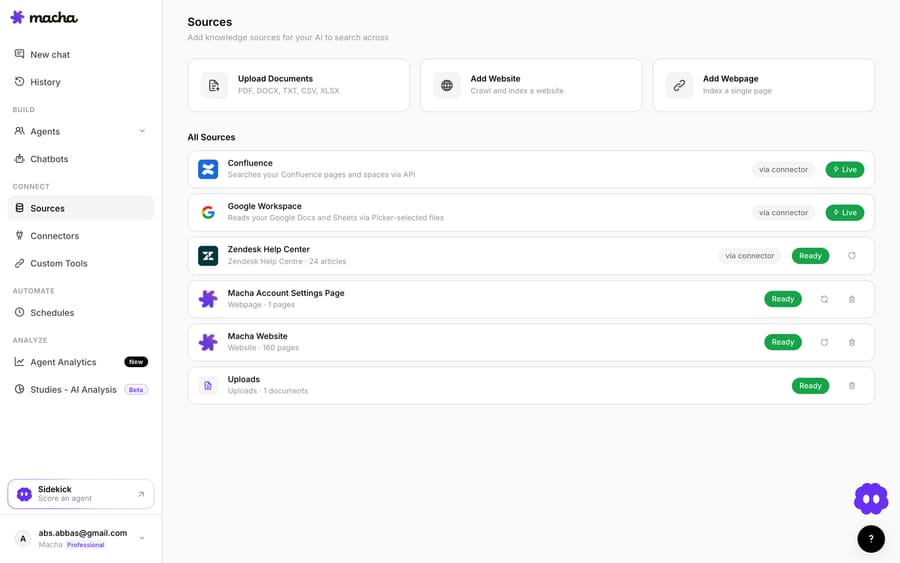
- Any API as a tool: Custom Tools turn a REST API into a capability the agent can call; ground the agent on your help center via Sources.
- Test and run: agent simulations replay past tickets against the agent before it goes live, Studies analyze its performance against its instructions.
- Built for you: the Macha team analyzes your past tickets, builds the knowledge base and the agent on your help desk, and runs it in safe mode, with drafts as internal notes, until the drafts are right. That's included on the trial and every plan.
- Priced per ticket: one plan by volume, $299 a month for up to 750 tickets, about $0.40 each, and that includes setup and a dedicated success manager who handles your changes.
How does Copilot Studio compare with a help-desk-native platform?
| Copilot Studio | Macha | |
|---|---|---|
| Best fit | Microsoft/Dynamics/M365 shops | Teams on a dedicated help desk |
| Help-desk home | Bridged via connectors | Native connector |
| Model | Microsoft-hosted | Chosen per agent (GPT or Claude) |
| Channels | Web, Teams, WhatsApp, Dynamics voice | Your help desk + chat |
| Governance | Agent 365, $15/user/month | Analytics, simulations and Studies |
| Setup | You build it in the low-code canvas | Done for you by the Macha team, with a dedicated success manager, included |
| Pricing | $200 per 25,000 Copilot Credits | About $0.40 a ticket, from $299/mo for 750 tickets |
So which should you build?
Build in Copilot Studio if you're a Microsoft-first enterprise, running Dynamics, Teams and Power Platform, and want agents governed alongside the rest of your Microsoft estate; the ecosystem integration is worth it there. (See our from-scratch vs. platform breakdown and the AI agents for customer service overview.) Choose a help-desk-native platform if your support runs on a dedicated help desk, and Macha if you want that agent built and run for you rather than assembled by your own team. You can start free on Macha with $50 of usage, about 125 tickets, and no credit card.
FAQ
Is "Copilot" for support the same as ChatGPT/Claude? No. Copilot Studio is Microsoft's builder for agents (it can use various models under the hood); ChatGPT and Claude are models you'd build an agent on.
Do I need Dynamics 365 to use Copilot Studio for support? Not strictly, but the biggest advantages (voice via Contact Center, deep CRM actions) assume Dynamics. Without it, you're using a Microsoft agent builder to reach a non-Microsoft help desk: workable, but not its sweet spot.
How much does a Copilot Studio support agent cost? Customer-facing agents consume Copilot Credits: $200 buys a pack of 25,000 a month, with pay-as-you-go coverage past it. A Microsoft 365 Copilot license at $30 per user per month covers internal agents only.
Can GitHub Copilot build the whole support agent? It'll scaffold one (.agent.md, tools, MCP wiring) fast, but it's a coding assistant, not a runtime. It won't host, monitor or run the agent against live tickets.
What if I'm on Zendesk or Freshdesk, not Microsoft? Then a help-desk-native platform is the more natural fit: the agent lives on your help desk instead of being bridged into Microsoft's cloud. On Macha you don't build it yourself either: the Macha team builds the agent and runs it in safe mode until the drafts are right, at about $0.40 a ticket with setup and a dedicated success manager included.






