





 Shopify
 Stripe
 Slack
Slack Notion
 Google Workspace
 Confluence

How Do You Connect Chargebee to Zendesk? 3 Options for Your AI Agent (2026)


Chargebee connects to Zendesk three ways: a sidebar app that shows billing context, Zendesk action flows that run fixed Chargebee steps, and a Custom Tool an AI agent calls mid-ticket. Which one fits depends on whether a human, a set workflow or an agent needs the data.
Key takeaways
- Chargebee connects to Zendesk three ways: Chargebee's sidebar app, Zendesk action flows with built-in Chargebee actions, and a Macha Custom Tool an AI agent calls mid-ticket.
- Chargebee's Zendesk app is gated by the Chargebee plan, not the Zendesk plan, works only with a LIVE Chargebee site, and needs the Tech support role.
- Zendesk action flows can look up, pause, resume or cancel a Chargebee subscription and create a credit note, on every Suite plan from Team up.
- A Macha Custom Tool lets an AI agent query Chargebee's REST API by email, with Read lookups running freely and Write actions like applying a credit needing confirmation.
- On the trial and every Macha plan, the Macha team builds and tests the Chargebee tools and the agent for you, at about $0.40 a ticket including setup and a dedicated success manager who handles your changes.

There are three ways to connect Chargebee to Zendesk: Chargebee's own sidebar app, which shows subscription details, payment methods and due invoices next to a ticket; Zendesk's built-in Chargebee actions for action flows, which can look up, pause, resume or cancel a subscription; and a Custom Tool that lets an AI agent call the Chargebee API mid-ticket. The first is gated by your Chargebee plan, not your Zendesk plan.
| Option | What it does | Gating | Who uses it |
|---|---|---|---|
| Chargebee app for Zendesk Support | Sidebar widget: subscription details, payment methods, number of due invoices | Specific Chargebee plans only (Chargebee's integration page names Scale); LIVE site only; "Tech support" role | Human agents reading context |
| Zendesk action flows with Chargebee actions | Fixed no-code flows: look up, create or update customers and subscriptions; pause, resume, cancel; retrieve invoice; create credit note | All Zendesk Suite plans from Team up, and Support Team, Professional and Enterprise | Admins building set workflows |
| Macha Custom Tool | An AI agent decides when to call the Chargebee API, passes parameters, reasons over the result | Included on every Macha plan, built for you by the Macha team | AI agents working the ticket |
Framing first. Macha runs on top of the Zendesk you already use. It's an AI-agent layer, not a Zendesk or Chargebee replacement. Your agents keep working in Zendesk; Macha reads the ticket, reasons, and reaches into Chargebee to answer or act.
What does the native Chargebee Zendesk app do, and where does it stop?
Chargebee offers a native Zendesk Support app in the Zendesk Marketplace. It adds a widget next to the ticket showing the customer's subscription details, payment methods, and the number of due invoices, so a human agent can see billing context at a glance. If the ticket's email isn't in Chargebee, the widget falls back to matching on the email domain (per Chargebee's docs, checked 24 September 2026). If all you need is passive subscription context on the screen, and you meet the requirements, that may be enough.
Where it stops:
- It's mostly display, not action. It shows subscription fields; it doesn't let an AI agent decide to look something up mid-conversation, pass the right parameters, and reason over the result.
- It's plan-gated on the Chargebee side. Chargebee's docs say the app is "available only on specific plans," and its integration page says the Zendesk integration is available only on the Scale plan. It works only with a Chargebee LIVE site, and access is limited to roles with the "Tech support" permission; Customer Support and Finance Executive roles don't get it.
- It's fixed. You get the fields the widget exposes, not the specific query or write your workflow needs (e.g. "is this subscription in dunning?" or "apply a credit to their account").
Can Zendesk take Chargebee actions without an app?
Yes. Zendesk now ships Chargebee as a connector for action flows, its no-code automation builder. You connect it with your Chargebee site name and an API key, and a flow can create, update or look up a customer; create, update, look up, pause, resume or cancel a subscription; retrieve an invoice; or create a credit note. It's available on every Zendesk Suite plan from Team up and on Support Team, Professional and Enterprise.
The catch is that an action flow is a fixed path an admin designs in advance. It runs the same steps every time it fires. It doesn't read an angry email, work out that the real question is a failed card, and pick the one lookup that answers it.
What should the AI agent actually do with Chargebee?
The high-value version of this integration is the agent doing the work. A customer emails Zendesk asking "why was my subscription paused?"; the agent recognizes them, looks up their live Chargebee subscription by email, and answers "your payment failed on the 2nd and you're in dunning. Want me to retry it?" That answer comes from Chargebee, not a stale copy. A Custom Tool is what makes it possible.
How do you connect Chargebee to a Zendesk AI agent with a Custom Tool?
A Custom Tool is a single action you define once and point at Chargebee's API. Custom API tools are included on every Macha plan, and there's no code to write.
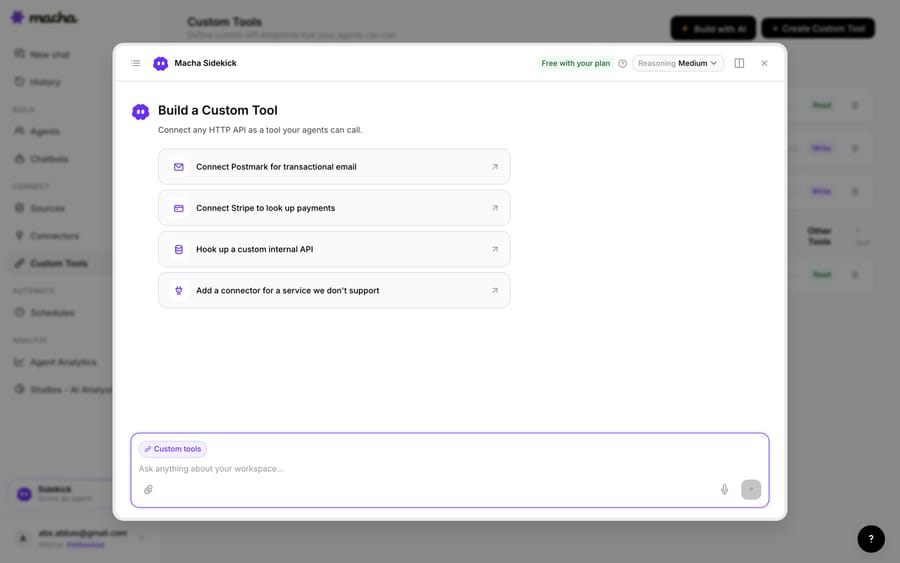
1. Point it at the Chargebee API. Chargebee exposes a REST API (with an API key over HTTPS, scoped to your site); you give Macha the endpoint and credentials. The built-in Sidekick can scaffold the request from a plain-English description if you'd rather not fill in the form.
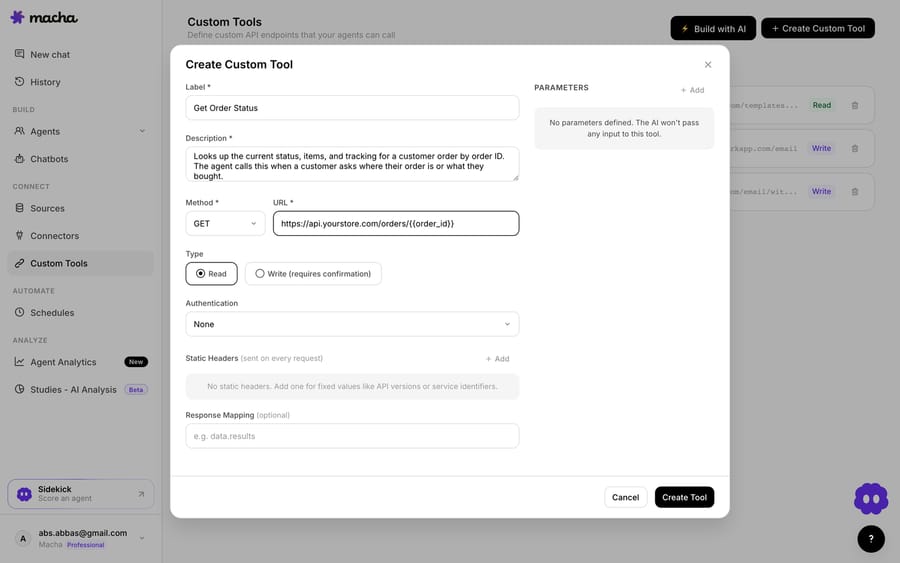
2. Define the action. Give it a label and a description the AI uses to decide when to call it, e.g. "Get the Chargebee subscription, dunning state, and due invoices for a customer by email." Set the method and URL (a query against the Chargebee REST API, with a {{email}} placeholder), and choose Read or Write. A lookup is a Read; applying a credit or pausing a subscription is a Write, which requires confirmation before it runs.
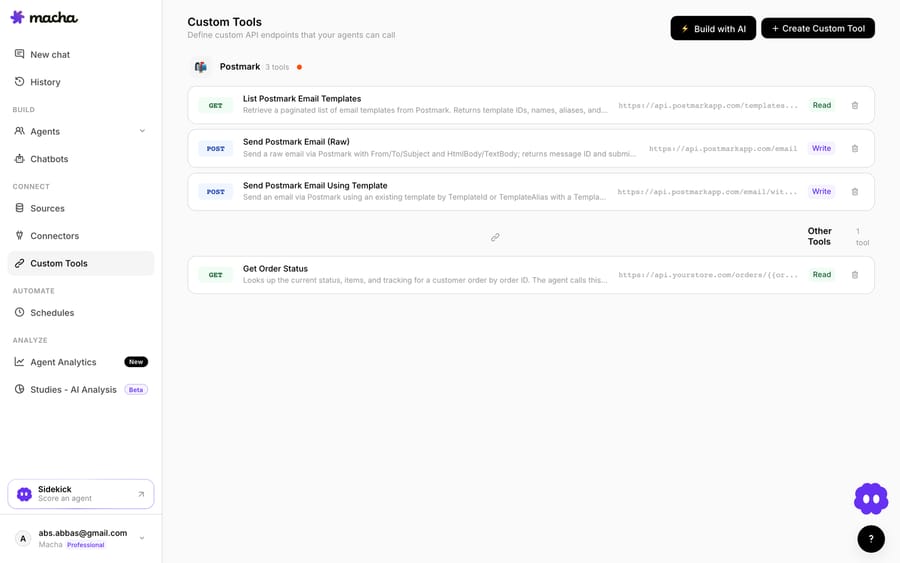
3. The agent uses it live. Once the tool exists, the agent calls it mid-ticket, passes the customer's email, and reasons over the Chargebee record it gets back, then answers the billing question or takes the next step.
How do Read and Write tools keep Chargebee safe?
Because a Custom Tool can reach into Chargebee, the guardrails matter: Read tools (lookups) are free to call; Write tools (apply a credit, pause a subscription, retry a charge) require confirmation. Each tool is scoped to one action, permissioned per agent, and every call is audited. The API key handles credentials, so secrets never live in the conversation.
Teams usually build a few Chargebee tools and group them (a "subscription lookup," a "check dunning," an "apply credit") alongside tools for their other systems.
Which option should you use?
- Use the native Chargebee Zendesk app if you just want subscription details visible in the sidebar for human agents and your Chargebee plan includes it.
- Use Zendesk action flows when the same Chargebee step should run the same way every time, like cancelling a subscription after an agent approves it.
- Use a Custom Tool when you want your AI agent to look up live Chargebee data or take an action from the ticket, or you need a specific query the other two don't expose. All three can coexist. Macha is the done-for-you option: the Macha team builds and tests the Chargebee tools and the agent on your Zendesk, then runs it in safe mode, with drafts as internal notes, until the drafts are right. That's included on the trial and every plan at about $0.40 a ticket, which covers setup and a dedicated success manager who handles your changes.
What else can the agent do once it reaches Chargebee?
The same pattern covers more: check a subscription's status before answering, read the dunning state to explain a failed charge, apply a credit, or verify an invoice. And because Custom Tools aren't Chargebee-specific, the same approach connects your CRM, accounting system, or internal API. See the Custom Tools integration directory for 200+ tools, or the full pillar on building custom Zendesk integrations.
Ready to try it? See how Custom Tools work, browse the integration directory, or start with $50 of free usage and wire up your first Chargebee tool.
Frequently asked questions
Does Zendesk have a native Chargebee integration? Two. Chargebee's Zendesk Support app shows subscription details, payment methods, and due invoices in a sidebar widget, on specific Chargebee plans with a live site. Separately, Zendesk action flows include Chargebee actions such as lookup, pause, resume and cancel subscription. A Custom Tool adds agent-driven lookups and actions decided in context.
Do I need an engineer to connect Chargebee to Zendesk this way? No. On the trial and every plan, the Macha team builds and tests the Chargebee tools for you. To build one yourself, you describe the action in plain English and Macha's Sidekick scaffolds the Chargebee request, auth, and parameters. Technical teams can go deeper with full control over the query, headers, and response mapping.
Can the agent update Chargebee, or only read it? Both. Reads (lookups) run freely; writes, such as applying a credit or pausing a subscription, require a confirmation step, and you control which agents can use them.
Is it secure? Yes. The tool is scoped to a single action, permissioned per agent, authenticated via your Chargebee API key, and every call is audited.






