





 Shopify
 Stripe
 Slack
Slack Notion
 Google Workspace
 Confluence

How Do You Connect ClickUp to Freshdesk for an AI Agent? (2026)


Support requests arrive in Freshdesk while the task, its owner and its status live in ClickUp, so agents keep switching tabs on every escalation. You can connect the two with a native app, ClickUp's own sync, or a Custom Tool that lets an AI agent use ClickUp directly.
Key takeaways
- ClickUp connects to Freshdesk natively through the ClickUp for Freshdesk app by effy, a paid Marketplace app with a 21-day free trial, or through ClickUp's own Freshdesk Sync.
- ClickUp's Freshdesk Sync is in beta for Business Plus and Enterprise plans and creates tasks in a dedicated "Freshdesk" Space with updates flowing both ways.
- A Macha Custom Tool connects to ClickUp's REST API with a personal token or OAuth, so an AI agent can check a task's live status or create one mid-ticket.
- Macha Custom Tools for ClickUp split into Read tools such as status lookups, which run freely, and Write tools that create or update tasks, which require confirmation first.

There are two native ways to connect ClickUp and Freshdesk: the paid ClickUp for Freshdesk Marketplace app by effy (21-day free trial), and ClickUp's own Freshdesk Sync, a beta limited to ClickUp Business Plus and Enterprise. Both move tasks between the two tools. Neither lets an AI agent check a task's status or create one on its own mid-ticket; for that you point a Macha Custom Tool at ClickUp's REST API.
| Option | Built by | What it does | Availability (checked 24 September 2026) |
|---|---|---|---|
| ClickUp for Freshdesk app | effy (third party) | Create or link a ClickUp task from a ticket; two-way sync of notes, comments, attachments and mapped fields | Paid Freshdesk Marketplace app, 21-day free trial |
| ClickUp Freshdesk Sync | ClickUp | Creates tasks in a dedicated "Freshdesk" Space; updates flow both ways; pause or resume from the App Center | Beta, ClickUp Business Plus and Enterprise |
| Macha Custom Tool | You, in Macha | AI agent reads task status or creates a task mid-ticket, with Read/Write guardrails | Included in Macha's plan |
Framing first. Macha runs on top of the Freshdesk you already use. It's an AI-agent layer, not a Freshdesk or ClickUp replacement (and it connects to Freshdesk, the ticketing product, not Freshchat, Freshservice, or Freshcaller). Your agents keep working in Freshdesk; Macha reads the ticket, reasons, and reaches into ClickUp to answer or act.
Does Freshdesk have a native ClickUp integration, and where does it stop?
Yes. Freshdesk lists a ClickUp for Freshdesk app in its Marketplace, built by the third-party developer effy rather than by Freshworks. It is a paid app with a 21-day free trial, and it runs on Freshdesk and Freshdesk Omni. Per effy's product page, an agent can create or link a ClickUp task without leaving the ticket, and notes, comments, attachments and mapped fields (priority, status, assignee, due date, custom fields) stay in sync both ways.
ClickUp also ships a Freshdesk Sync integration from its own side. Per ClickUp's integrations board, it is in beta for Business Plus and Enterprise plans: it creates tasks in a dedicated "Freshdesk" Space, updates flow both ways, and you can pause or resume the sync from the App Center. If all you need is a task that someone creates and keeps in step, either may be enough.
Where they stop:
- They sync records; they don't reason. Neither lets an AI agent decide to check a task's status mid-conversation, create the right task with the right details, and reason over the result.
- A person still drives them. Someone has to create or link the task and read the status back. The app surfaces the link, but a human works it.
- They're fixed. You get the fields and mappings the app decides on, not the specific query or write your workflow needs (e.g. "is the task for this request done yet?" or "create a task in the right List with the customer's details").
For a lot of teams, the app is fine. For anyone who wants their AI agent to actually use ClickUp, there's a lighter, more flexible path.
What should the integration actually do for an AI agent?
The high-value version of this integration isn't a hand-created task. It's the agent doing the work. A customer reports a snag or asks for something in Freshdesk; the agent recognizes it, checks ClickUp for a matching task, and answers "that's already being worked on, it's in progress" or creates a well-formed task with the customer's details and links it. The answer comes from ClickUp, not a manual note. That's what a Custom Tool enables.
How do you connect ClickUp to Freshdesk with a Custom Tool?
A Custom Tool is a single action you define once and point at ClickUp's REST API. No Marketplace app, no code.
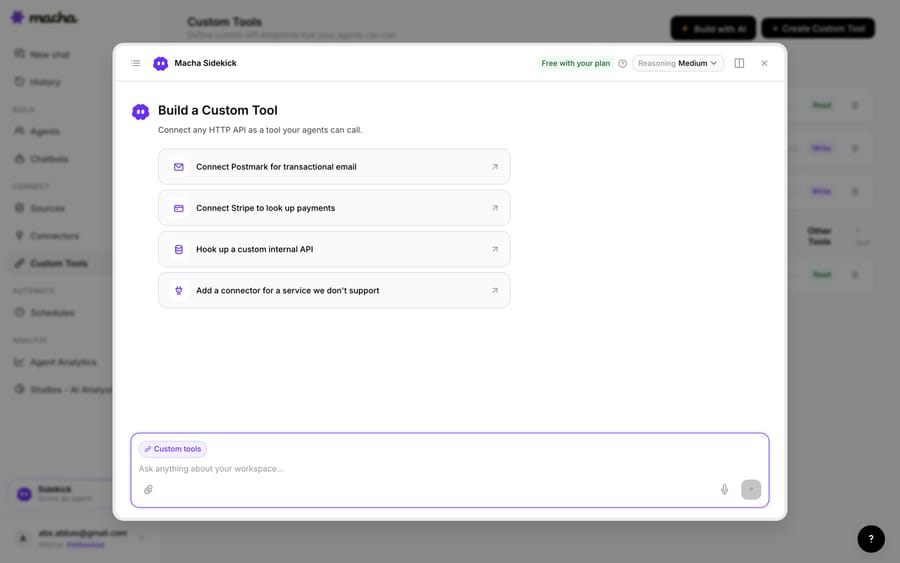
1. Point it at the ClickUp API. ClickUp exposes a REST API (with a personal token or OAuth); you give Macha the endpoint and credentials. The built-in Sidekick can scaffold the request from a plain-English description if you'd rather not fill in the form.
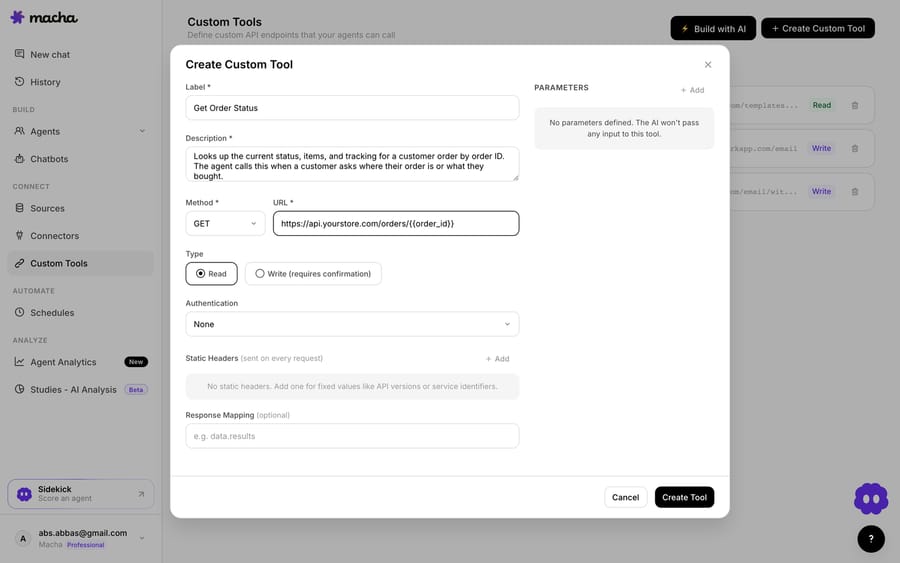
2. Define the action. Give it a label and a description the AI uses to decide when to call it, e.g. "Look up the status of a ClickUp task" or "Create a ClickUp task from a ticket". Set the method and URL (a call against the ClickUp API, with a {{task_id}} or {{name}} placeholder), and choose Read or Write. A status lookup is a Read; creating or updating a task is a Write, which requires confirmation before it runs.
3. The agent uses it live. Once the tool exists, the agent calls it mid-ticket, passes the task ID or the details it pulled from the conversation, and reasons over what ClickUp returns: it answers "your request is in progress" or files the task and links it back.
How do Read and Write tools keep ClickUp safe?
Because a Custom Tool can reach into ClickUp, the guardrails matter. Read tools (status lookups) are free to call; Write tools (create a task, update one, add a comment) require confirmation. Each tool is scoped to one action, permissioned per agent, and every call is audited. ClickUp's token or OAuth handles credentials, so secrets never live in the conversation.
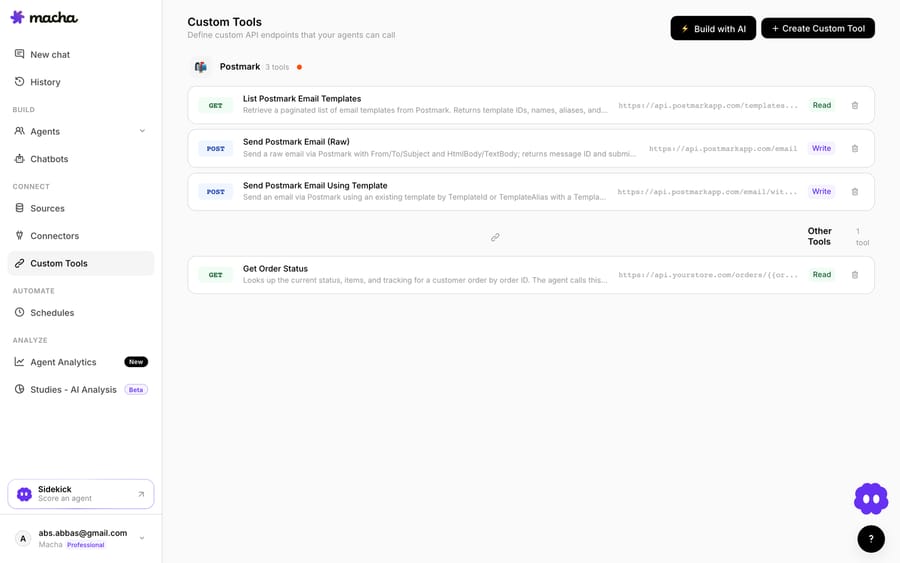
Teams usually build a few ClickUp tools and group them (a status lookup, a "create task," an "update status") alongside tools for their other systems.
Should you use the native app or a Custom Tool?
- Use the ClickUp for Freshdesk app (or ClickUp's Freshdesk Sync) if you want agents to create and link tasks by hand and keep the two tools in sync.
- Use a Custom Tool when you want your AI agent to look up a task's live status or create one from the ticket on its own, you need a specific query or write into the exact List the app doesn't target, or you want it to happen automatically. The two can coexist.
What else can the agent do once it reaches ClickUp?
The same pattern covers more: check whether work is done before replying, read the assignee and due date to set expectations, create a well-formed task with the customer's details, or post the ticket link into the task. And because Custom Tools aren't ClickUp-specific, the same approach connects your billing system, data warehouse, or internal API. See the Custom Tools integration directory for 200+ tools, or the full pillar on building custom Freshdesk integrations.
Ready to try it? See how Custom Tools work, browse the integration directory, or start a free trial and wire up your first ClickUp tool today.
Frequently asked questions
Does Freshdesk have a native ClickUp integration? Yes. The ClickUp for Freshdesk app by effy lets agents create or link ClickUp tasks from tickets with two-way sync, and ClickUp's own Freshdesk Sync (beta, Business Plus and Enterprise) creates tasks in a dedicated "Freshdesk" Space. Both are human-driven; a Custom Tool adds live, agent-driven status lookups and task creation.
Is the ClickUp for Freshdesk app free? No. The Freshdesk Marketplace lists it as a paid app with a 21-day free trial, and charges come from the developer, effy.
Do I need an engineer to connect ClickUp to Freshdesk this way? No. You describe the action in plain English and Macha's Sidekick scaffolds the ClickUp request, auth, and parameters. Technical teams can go deeper with full control over the endpoint, headers, and response mapping.
Can the agent create ClickUp tasks, or only read them? Both. Reads (status lookups) run freely; writes (creating a task, updating one, adding a comment) require a confirmation step, and you control which agents can use them.
Is it secure? Yes. The tool is scoped to a single action, permissioned per agent, authenticated via a ClickUp token or OAuth, and every call is audited.






