





 Shopify
 Stripe
 Slack
Slack Notion
 Google Workspace
 Confluence

How Do You Connect Shopify to Macha and Answer "Where Is My Order?" Automatically?


"Where is my order?" is the most common ecommerce support question, and Gorgias puts it at 18% of incoming requests on average. The answer already sits in Shopify, so a Macha agent connected over OAuth can read the order, fulfillment and tracking and reply on the ticket.
Key takeaways
- Connecting Shopify to Macha uses OAuth through the Macha AI app, so you approve access on Shopify's consent screen and never paste API keys into prompts or configs.
- A WISMO agent in Macha needs get_order and search_orders, plus get_customer_orders for email-only lookups, and should be left without the create_refund tool.
- Macha's create_refund and Cancel Order are the Shopify actions that move money, and both ask for human confirmation in chat.
- Gorgias estimates about $12 of labor for a human-answered WISMO request, while Macha's pricing starts at $299 a month for 750 tickets, about $0.40 each, with setup by the Macha team and a dedicated success manager included.
- Macha's Shopify connector shipped on March 22, 2026 with seven tools for orders, customers, products, discounts and refunds, plus a demo agent and store for testing.

To answer "where is my order?" automatically, connect Shopify to Macha over OAuth (Connectors → Shopify → approve on Shopify's consent screen), give a support agent the get_order and search_orders tools, and trigger it on new order-status tickets so it reads fulfillment and tracking and replies on the ticket. No API keys are pasted anywhere, and the two Shopify actions that move money, create_refund and Cancel Order, ask a human to confirm in chat.
WISMO is worth automating first because of its size. Gorgias puts it at 18% of incoming requests on average for ecommerce brands, and LateShipment estimates 20–40% of support tickets, rising to 50% or more at peak. Macha sits on top of the help desk you already use (Zendesk, Freshdesk, Gorgias, Front, HubSpot or Intercom); Shopify is a connector that hands your agents live order data. It isn't a new storefront or a help desk replacement.
The Shopify connector shipped on March 22, 2026 with OAuth and seven tools. Here's the full setup, end to end.
What can a Macha agent do with Shopify?
Connecting Shopify exposes eight tools your agents can call. Tool calls aren't billed separately (the whole conversation is one ticket, more on cost below), and the agent decides which to use based on the ticket:
| Tool | What it does |
|---|---|
get_order | Look up one order by ID or order number: line items, fulfillment, payment status |
search_orders | Find orders by email, fulfillment status, financial status, or date range |
lookup_customer | Pull a customer profile and contact details |
get_customer_orders | List a customer's full order history |
search_products | Search the catalog by title, SKU, vendor, or product type |
get_discounts | View active discounts and codes |
create_refund | Issue a refund, gated behind an explicit confirmation step |
| Cancel Order | Cancel an order (by default it refunds to the original payment method and restocks), gated behind the same confirmation step |
For WISMO specifically, the workhorses are get_order and search_orders. A customer who quotes an order number gets a direct get_order; one who only gives an email gets a search_orders (or get_customer_orders) to find the right one first. create_refund and cancel_order are the write actions. In chat they stop on a confirmation card; on a triggered run they execute directly if the agent's instructions say to, so the rules for when to refund belong in the instructions. Reads are always automatic. We'll come back to that in the watch-outs.
How do you connect Shopify to Macha over OAuth?
In the Macha dashboard, open Connectors and add Shopify. Shopify connects via OAuth through the Macha AI app, so you're not pasting API keys around: you authorize Macha against your store and Shopify issues the credentials.

You'll be redirected to Shopify's standard authorization screen, where you review the scopes Macha is requesting (read orders, customers, products; refund permissions) and approve. After approval you land back in Macha with Shopify showing as connected.
A couple of things worth knowing about the OAuth path:
- Tokens stay out of your prompts. Macha's connector layer holds the credentials, and agents call tools rather than handling keys. The same OAuth plumbing is used for Zendesk and Google.
- There's a demo store to practice on. The Shopify release ships with a pre-configured Shopify support agent and demo account, so you can build and test the flow before you point it at your real store.
Which Shopify tools should a WISMO agent get?
Macha agents only have the tools you grant them. Open the agent that handles your front-line support queue (or create a new one) and add the Shopify tools it needs. For a WISMO agent, grant get_order, search_orders, and get_customer_orders, and leave create_refund off unless this agent is also meant to handle cancellations.

This is the principle that keeps automation honest: scope tools to intent. A "where's my order" agent that can read orders but cannot issue refunds simply cannot do anything financially risky, no matter how a customer phrases their message.
What should the agent's instructions say?
Now tell the agent how to behave. The connector gives it access; the instructions give it judgment. A solid WISMO instruction set covers four things:
- Find the order. "If the customer gives an order number, call
get_order. If they give only an email, callsearch_ordersfiltered to their email and pick the most recent unfulfilled or recently-shipped order." - Read the real status. "Report the actual fulfillment status and, if shipped, the carrier, tracking number, and estimated delivery from the order's fulfillment data. Never invent a tracking number or a date."
- Answer in plain language. "Reply warmly and concisely. Lead with the status, then the tracking link, then offer further help."
- Know when to stop. "If the order is lost, returned, refunded, flagged for fraud, or you can't confidently identify it, do not guess; hand off to a human and explain why."
That handoff clause matters more than it looks. WISMO automation earns its keep on the clean majority: orders that are simply in transit. The exceptions (lost packages, address errors, chargebacks) are where a confidently wrong reply does damage, so the instructions route those to a person.
Which tickets should trigger the agent?
An agent needs a trigger. The standard WISMO pattern, drawn straight from Macha's auto-resolve order status inquiries use case, runs on the helpdesk:
- Trigger: a Ticket Created event on your help desk (Zendesk, Freshdesk, Gorgias, Front, HubSpot or Intercom), conditioned on the message being an order-status question.
- Steps: the agent reads the ticket, calls Shopify
get_orderchecks fulfillment and tracking, posts the reply as a comment, and sets the ticket to Solved.
Here's the kind of exchange that produces, end to end:
Customer: "Hi, I placed an order 3 days ago and haven't received any updates. Order #1847." Macha (looks up #1847 in Shopify, reads fulfillment): "Hi! Your order #1847 shipped on March 2nd via FedEx. Your tracking number is 7829401 and it's estimated to arrive tomorrow. Let me know if you need anything else!" (ticket → Solved)
The same connector works off other triggers, too. The handle "where is my order" from Slack pattern lets an internal team @-mention an agent and get the order read back in-thread, handy for ops and CX teams who'd otherwise tab over to Shopify a hundred times a day.
How do you test it before it touches real tickets?
Don't point this at a live queue cold. Use the test run to fire real prompts at the agent and watch which tools it calls and what it answers. Try the easy case ("order #1847"), the email-only case ("I ordered last week, my email is…"), and the deliberately hard case (a lost package, a number that doesn't exist) to confirm the handoff fires instead of a hallucinated answer.
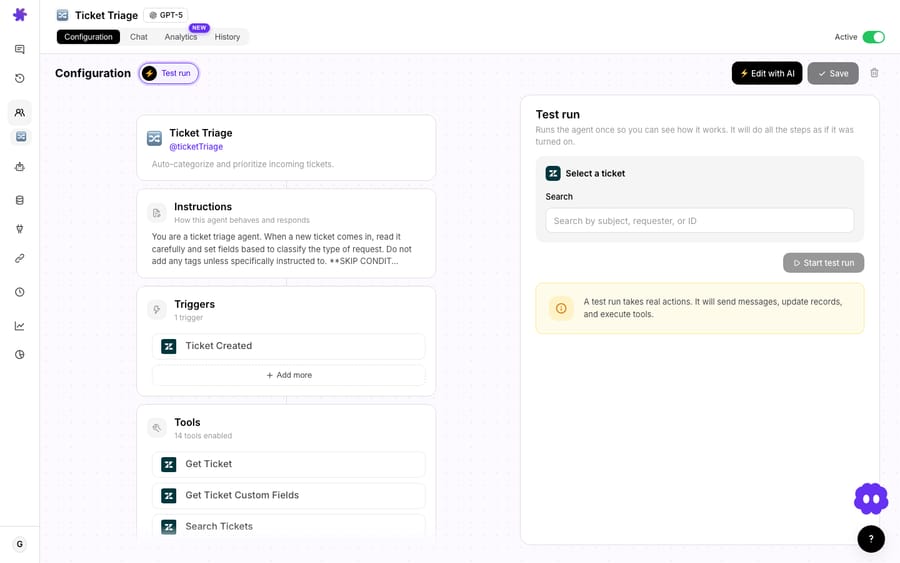
When the test transcript reads the way you'd want a great support rep to read, enable the trigger.
How much does an automated WISMO answer cost?
Macha bills per ticket: one conversation, charged once however many steps the agent takes, not per ticket "deflected" or "resolved." A typical WISMO thread (read the ticket, one get_order, compose the reply) is one ticket, whichever model it runs on.
| Who answers | Cost per WISMO ticket | Source |
|---|---|---|
| Human agent | About $12 in labor | Gorgias WISMO guide |
| Human agent | $22 ("conservative industry benchmark") | LateShipment WISMO guide |
| Macha agent | About $0.40 ($299 a month for 750 tickets), setup and a dedicated success manager included | Macha pricing |
The incentive is worth naming. A vendor that charges per resolution earns more the more tickets it closes, whatever they cost you to create; per-ticket billing prices the conversation the same whether the agent answers in one lookup or searches, disambiguates and reasons across several calls. The model doesn't change the price either. Every connector, Shopify included, is on every tier, with unlimited agents and seats. The price also includes the setup: the Macha team can connect the tools, write the WISMO instruction from how your team already answers order-status tickets, test it on a sample of your past tickets and run it in safe mode, with drafts as internal notes in your help desk, until the replies are right. After go-live, a dedicated success manager handles your changes: new carriers, instruction changes, new tools. Start with a free trial ($50 of usage, no credit card required).
When should you not fully automate WISMO?
WISMO is one of the safest things to automate, but it still needs guardrails:
- Keep
create_refundbehind confirmation, or off entirely on this agent. It ships gated for a reason. A pure WISMO agent should not have refund powers; build cancellations/refunds as a separate, human-in-the-loop flow. - Reads can still be wrong if the order is ambiguous. Email-only lookups can match multiple orders. Instruct the agent to confirm with the customer when
search_ordersreturns more than one plausible match rather than guessing. - Carrier "estimated delivery" is an estimate. The agent should report Shopify's tracking data, not promise a date. During carrier delays this is where overconfident replies erode trust; let the handoff clause catch known-bad shipments.
- Don't automate the angry exceptions. Lost packages, "this is the third time," and chargebacks are emotional and high-stakes. Route them to a person. The win is volume on the routine cases, not heroics on the hard ones.
- Garbage in, garbage out. If your Shopify fulfillment data is stale (manual fulfillments, missing tracking), the agent will faithfully report stale data. Clean fulfillment data is a prerequisite.
The teams that get the most out of this treat the agent as a first responder for routine status checks and keep humans firmly in the loop for anything involving money, exceptions, or an upset customer.
FAQ
Does connecting Shopify replace my helpdesk? No. Macha is an AI agent layer that sits on top of Zendesk, Freshdesk, Gorgias, Front, HubSpot or Intercom. Shopify is a connector that gives those agents live order data; your helpdesk stays exactly where it is. See Macha on Zendesk for how the layer fits a Zendesk stack.
Is the Shopify connection API keys or OAuth? OAuth. You authorize Macha against your store through Shopify's standard consent screen and Shopify issues the credentials. No API keys go into prompts or configs.
Can the agent issue refunds, not just look up orders? Yes. create_refund is one of the eight tools, but it's gated behind an explicit confirmation step, and you choose whether a given agent gets it at all. A WISMO agent should generally be read-only.
What if the customer only gives an email, not an order number? The agent uses search_orders or get_customer_orders to find their orders by email, then reads the relevant one. If several match, instruct it to confirm with the customer instead of guessing.
How much does each "where's my order" answer cost? Billing is per ticket (one conversation, charged once, however many lookups it takes) from $299 a month for 750 tickets, about $0.40 each, with setup by the Macha team and a dedicated success manager included. Gorgias estimates about $12 of labor for a human-answered WISMO request. See pricing.
Can I test it before it touches real tickets? Yes. Use the test run to fire prompts at the agent, and there's a pre-configured Shopify demo agent and store to practice on before connecting your live shop.
Does Macha need API keys for Shopify? No. Shopify connects via OAuth through the Macha AI app, and refunds ask for confirmation in chat; on a triggered run they follow the agent's instructions.
How do you get started?
If WISMO is a fifth or more of your queue, this is the first agent to build. Connect Shopify over OAuth, grant get_order and search_orders, write a tight instruction set with a clear handoff, and test it. Or connect Shopify and your help desk, which takes about 15 minutes, and let the Macha team build and test the agent for you; that's included on the trial and every plan. Start a free trial ($50 of usage, no credit card, no time limit), browse the Shopify integration, or read the docs for the full connector reference.
Written by Abbas (Customer Support & AI, Macha) · Reviewed by Ankeet Guha (Co-founder & CTO) · Published 2026-06-24 · Last updated 2026-09-24.






