Intercom
 Shopify
 Stripe
 Slack
Slack Notion
 Google Workspace
 Confluence

Can an AI Support Agent File a Route Claim? What the Route API Covers and What Needs the Route App (2026)


No. Route's merchant API reference lists eight endpoints across its v2 ECommerce and Protect APIs, and none of them files or reads a claim, so an AI support agent can't submit a Route claim through the API. What an agent can do is read Route's shipment record with the merchant's secret token, check whether an order carries Route protection, work out whether the claim window is open, and send the customer Route's own claim link. Filing on the customer's behalf stays with a person, in Route's Zendesk app, its Gorgias app or the Route Merchant Portal. We checked every page of Route's API reference and its claim articles on 28 September 2026, then ran an agent built from this page's instructions on a made-up ticket in our own test setup, where Route's API answered a dummy key with HTTP 401 and the agent handed off. This page maps what each tool can do, where Route's own apps already cover the job, and what an agent should say on a "delivered but never arrived" ticket.
Key takeaways
- An AI support agent can't file a Route claim through Route's API, because none of the eight endpoints in Route's v2 merchant reference creates or reads a claim.
- Route's only claim-submission endpoint, Submit Claim at pipo-api.route.com, belongs to its TikTok Shop partner API and needs a per-request HMAC signature valid for 5 minutes.
- Route's merchant API authenticates with a secret sent in a header literally named token, and its Read Shipment endpoint requires both a tracking number and the store's source_order_id.
- Route's claim windows are 5 to 30 days after delivery for stolen packages, 30 days for damaged ones, and 7 to 30 days after the last tracking update for domestic losses.
- Route's Zendesk app lets a human agent search by email and order number, see claim status and denial reasons, and file a claim, which no API offers.

What can an AI support agent do with Route today?
Five jobs come up on Route tickets. The table shows, for each, what Route documents and who can do it now. "Macha custom tool" means a tool Macha's team configures during onboarding; everything in that column is documented by Route but was not run against a live Route account.
| Support job | What Route documents | Read or write | Who can do it today |
|---|---|---|---|
| "Is my order protected?" | Route appears as a product line item on Shopify orders, default SKU ROUTEINS (Route help) | Read | Route's Zendesk app; an AI agent reading the Shopify order |
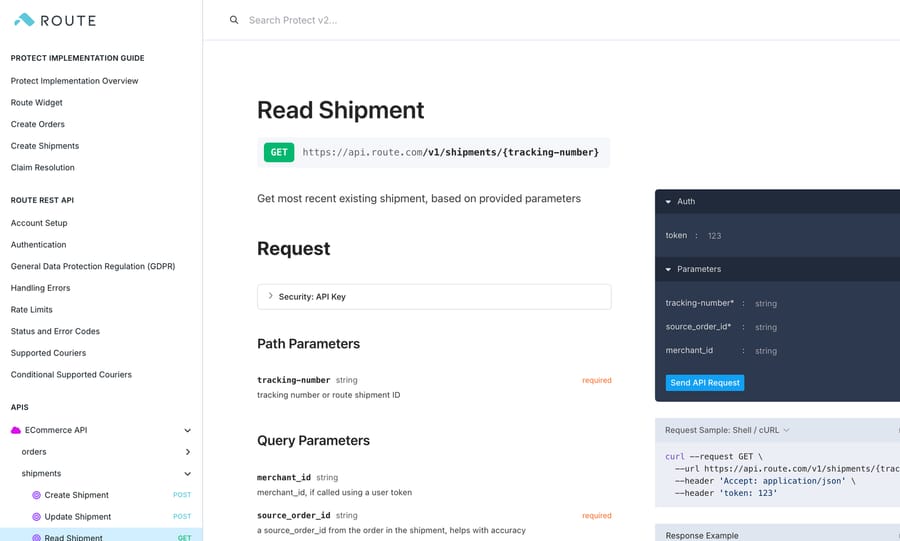
| "Where is my package?" (Route's view) | GET /v1/shipments/{tracking-number} with required source_order_id (Read Shipment) | Read | Macha custom tool, token header |
| "Can I still file a claim?" | Claim deadlines by claim type (Route help) | Policy, no endpoint | An AI agent applying the rules to tracking dates |
| "File a claim for me" | No merchant claim endpoint; Resolve Center at claims.route.com | Write | The customer; a human in Route's Zendesk app, Gorgias app or Merchant Portal |
| "What's happening with my claim?" | Claim status in Route's Zendesk and Gorgias apps and the Merchant Portal; claim webhooks push to your server | Read | A human in those apps; not via a pull API |
Route's merchant API is built for order sync. The v2 reference lists Create, Update and Cancel Order, Create, Update, Read and Cancel Shipment, and Generate a new quote. Seven of the eight are writes your store platform sends to Route so it knows what to protect, and only Read Shipment returns anything a support agent can use.
Route says it works with "13,000 brands" on its homepage (vendor-stated). Its Shopify App Store listing, "Route ‑ Protection & Tracking", launched on 17 January 2019 and showed a 4.0 rating from 377 reviews on 28 September 2026, down from 4.1 three days earlier. The split is uneven: 262 five-star and 75 one-star reviews, with 40 in between (Shopify App Store). Two of the newest low ratings, from August and September 2026, describe slow replies from Route and a merchant offboarded over claim costs.
Why can't an AI agent file a Route claim through the API?
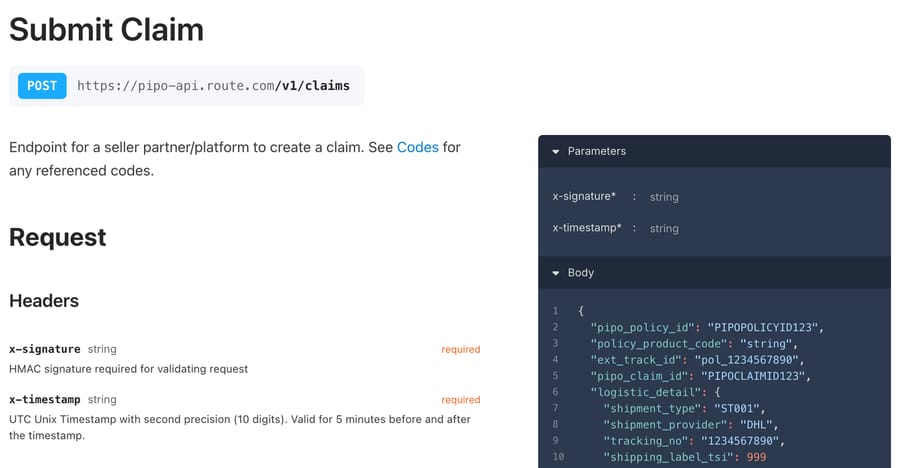
Route doesn't publish a way for merchants to create claims programmatically. The one Submit Claim endpoint in its docs sits under the TikTok Shop section, described as an "endpoint for a seller partner/platform to create a claim". It signs every request with HMAC SHA-256 over the timestamp plus the body, and the x-timestamp header is valid for 5 minutes either side. That's a partner integration for TikTok Shop's own insurance flow, and a per-request signature can't be expressed as a fixed header in any static-credential tool.
Route doesn't say why, and our read is that it follows the business model. Route's Standard plan is $0 a month to the merchant and "consumer funded" (route.com/pricing): shoppers pay the protection fee and Route pays the claims. Every claim that reaches Route runs through its Resolve Center, which verifies the shopper's phone number, asks for photos on damage claims and screens for fraud before approval (how to file a claim; claims process). An open claim-creation API would let claims skip that screening. Keeping filing inside its own forms protects Route's loss ratio, and the price is that no outside agent can file.
The contrast in the category is Order Protection, whose API reference documents a Create Online Claim endpoint. Our shipping and protection hub compares the two side by side, alongside ShipStation.
What does Route's Zendesk app already do, and where does an AI agent add something?
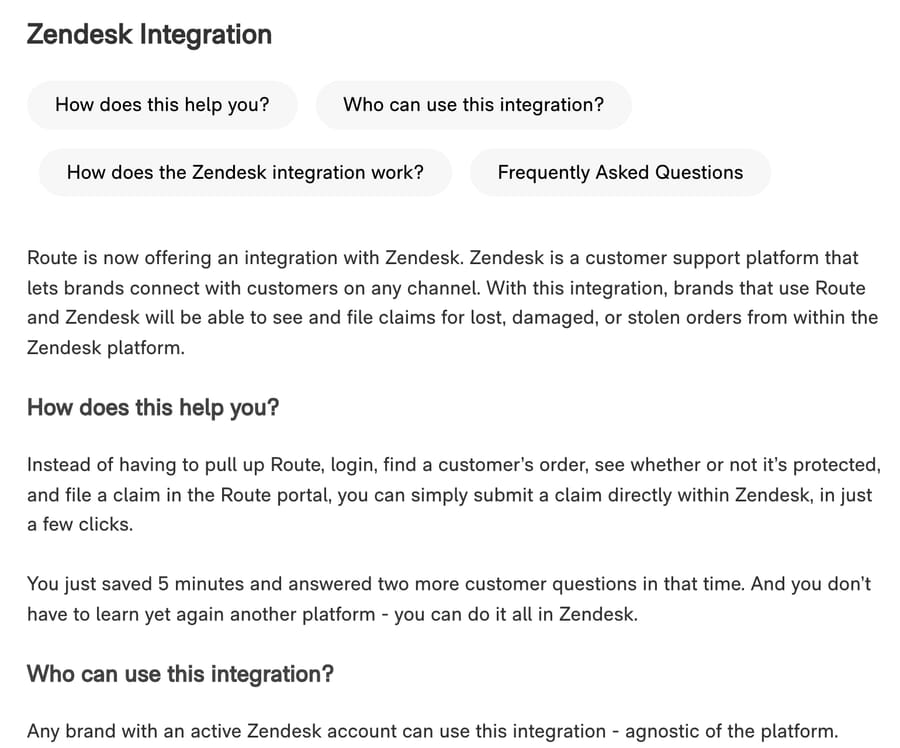
Route's own Zendesk app covers the job the API can't. Route's help article says brands on Zendesk "will be able to see and file claims for lost, damaged, or stolen orders from within the Zendesk platform", for any store platform, installed as an app from Zendesk with nothing to set up on the Route side (Route: Zendesk Integration). A human agent searches by email and order number and sees:
- claim status, shipping information, the issue reported and the customer's preferred resolution;
- the customer's claim description, and a short reason when a claim was denied;
- a claim form, where every field is required and a Damaged claim needs at least one photo per item.
The same article lists two limits. Your team can't send a note to Route's claims team from Zendesk, and it can't request a reimbursement there.
On Gorgias, Route's app shows claim status by order number and claim history by email, and starts a claim "via a deep link to the authenticated Resolve Center filing page" (Integrating Route with Gorgias, updated July 2026). Outside a help desk, the Merchant Portal files on a customer's behalf from Orders, then File a Claim (Route help).
An AI agent's part comes before a human opens the Route app. Route's own process table notes that "customers may instead contact your store" rather than file, and those tickets arrive as "my package says delivered but it isn't here". Narvar's 2026 holiday survey of 1,348 US shoppers found 23% had been told a package was delivered when they never received it (Narvar). An agent can answer most of those without a person:
- Confirm the order carries Route protection.
- Check where the shipment is and when tracking last moved.
- Tell the customer whether they can file now, when, or why they can't yet.
- Send the Resolve Center link, or hand the ticket to a human with the Route app when the customer can't or won't file.
How does the lookup work, from a customer's email to Route's shipment record?
The chain has four steps, and only one of them touches Route's API.
- Find the order. The agent searches Shopify orders by the customer's email. Macha's built-in Shopify connector returns line items and fulfillment status on Get Order.
- Check protection. On Shopify, Route is sold as a product, so a protected order has a Route line item. The default SKU is
ROUTEINS, but Route tells merchants they can empty or change it, so match on your store's actual product title or SKU. - Read Route's shipment. The agent calls Read Shipment with the tracking number (or a Route shipment ID) and the store's order ID as
source_order_id. Route returns the courier, tracking status,created_onandupdated_on. - Apply the claim window. The last tracking update or delivery date decides which window applies.
Route's windows (deadlines, updated July 2026) are the part an agent gets wrong without instructions:
| Claim type | Route's definition | When the customer can file |
|---|---|---|
| Stolen | Marked delivered, not received | 5 to 30 days after "delivered" |
| Damaged | Arrived broken or unusable | Within 30 days of "delivered" |
| Lost, domestic | Never delivered, no update for 7+ days | 7 to 30 days after the last tracking update |
| Lost, international | Never delivered, no update for 20+ days | 20 to 30 days after the last tracking update |
An order needs an active tracking number before any claim can be filed. Claims can technically be filed up to 365 days after the order, but Route says they're "unlikely" to be covered outside the windows above.
Here's a synthetic example. A customer writes on 24 September that a package marked delivered on 22 September never arrived. The stolen window opens on 27 September (22 + 5) and closes on 22 October (22 + 30), so the right reply is "check with neighbors and your building, and if it hasn't turned up by 27 September, file here", with the link. Filing on the 24th would put the claim into Route's early-filing statuses (Pending Review when a brand files it, or Inactive - Pending Info), per its claim status definitions.
Which Route actions need a person?
Anything that changes money or a claim stays with a human:
- Filing for the customer. Route's Zendesk app, its Gorgias deep link and the Merchant Portal are the only merchant-side filing routes.
- Reimbursements. If your team refunds or reships directly, you request reimbursement in the Merchant Portal; the Zendesk app can't.
- Removing protection or refunding the Route fee. The API has
POST /v1/orders/{source-order-id}/cancelfor when "protection has been removed from the order", but that's store-sync plumbing. Route only credits the fee when the order is canceled before it's fulfilled and gets a tracking number (canceled orders). - Disputed denials and reopenings. Soft-denied claims (filed too early, or missing information) can be reopened by the customer or merchant (Route help); a hard denial is a conversation for a person.
- Problems Route doesn't cover. Wrong item, wrong size and missing items from a single package are fulfillment errors that Route refers back to the brand. Wrong addresses entered by the customer, customs holds and "label created" orders aren't "lost" under Route's policies. Those go to your normal returns or reship process.
How claims resolve also shapes the "where's my refund?" follow-up. Route's statuses split into "Merchant Refunded" or "Merchant Replaced", where the refund or reorder went through your store (by AIR or by your team) and Route reimburses you, and "Route Refunded" or "Route Replaced", where Route paid the customer directly by PayPal, Venmo, prepaid card or gift card. An agent that knows the status knows which system to point the customer to. Stores expecting more than 100 claims a month must set up AIR, which pushes Refund and Replacement webhooks, plus Claim Created, Claim Updated and Claim Solved, to an endpoint the merchant builds (webhook topics). Those are signed with RS256 and meant for your developers' systems.
How is a Route tool set up in Macha, and what goes wrong?
Route has no built-in Macha connector. It connects through a custom API tool that Macha's team sets up during onboarding, and for Route that tool is read-only. The merchant finds the Secret token in the Route Merchant Portal under Admin, then Store Details (API implementation guide). The tool sends it as an API key in a header named token, which Macha's custom tools support directly: API Key auth lets you name the header.
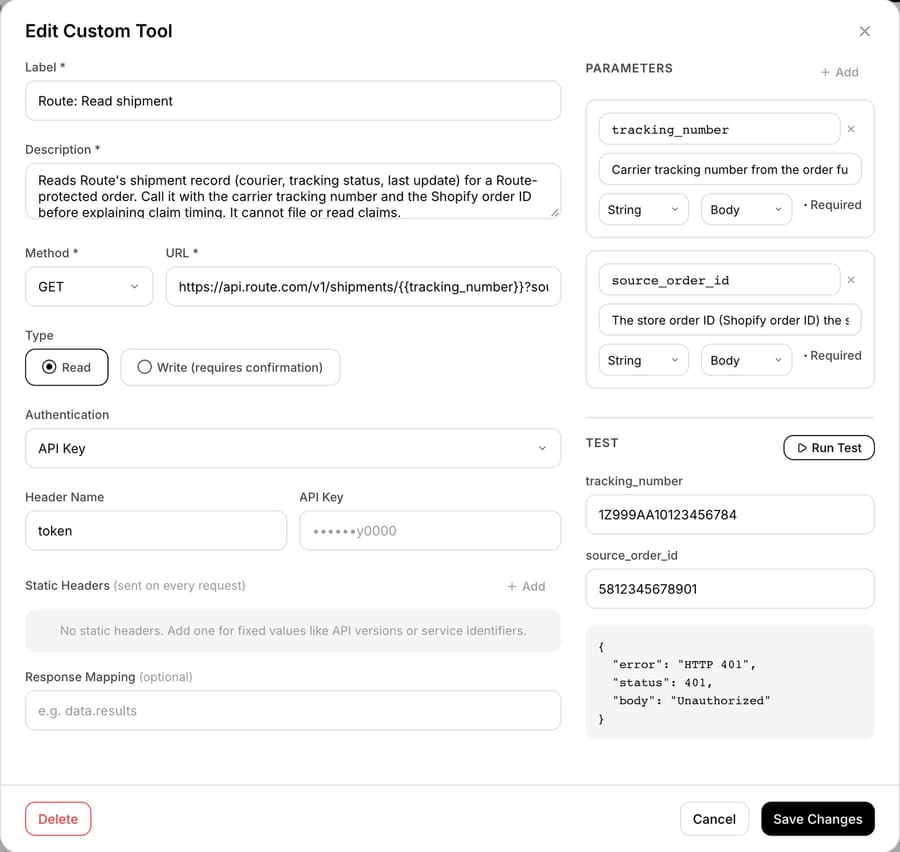
We built this tool on our Macha Demo test org with a dummy key, because we have no Route merchant account. Pressing Run Test with a made-up tracking number and order ID got HTTP 401 "Unauthorized" back from Route. That's the honest result of a wrong key: it shows the request reached api.route.com with the token header and that Route refuses an unauthenticated read. It doesn't show what a successful response looks like on your store. Five things trip up a Route setup:
- Test and live tokens differ. Route issues a Secret for production and a Test-Secret prefixed
test-, and orders made with the test token are flagged as test orders (account setup). A tool built against the test token will find no real shipments. source_order_idis required. Read Shipment needs the store's order ID as well as the tracking number. On Shopify that's the order's ID, not the "#1001" order name customers quote.- No read-order call. The v2 reference lists no endpoint that returns a Route order, although the rate-limit page lists an Orders GET limit. Protection status has to come from the store's order record, not from Route.
- Rate limits. Route allows 120 requests a minute on shipment reads (rate limits). One lookup per ticket stays far below that.
- A renamed SKU. If the Route line item was renamed to hide it in the storefront, the agent's protection check needs the new name.
An agent instruction for the delivered-not-received queue, written for acting:
When a customer says an order was marked delivered but never arrived, or arrived damaged: search Shopify orders by the requester's email and get the order. If no line item is the Route protection product, the order isn't Route-protected; reply with our standard lost-package policy and stop. If it is protected, call "Route: Read shipment" with the tracking number from the order's fulfillment (ask the customer for it if the order shows none) and the Shopify order ID. For "delivered, not received", count days since the delivered date: under 5, ask them to check with neighbors, mailroom and household and tell them the date they can file; 5 to 30, send the claim link https://claims.route.com and say they'll need their order email and number and a phone to verify; over 30, tell them Route's window has passed and tag the ticket route-review for a person. For "never delivered", check the shipment's last update: if tracking hasn't moved for 7 days (20 for international), send the link; if it moved more recently, give the date they can file. For damage within 30 days of delivery, send the link and ask for a photo of each damaged item. Never tell the customer a claim has been filed or approved. If they ask us to file for them, add an internal note with the order ID, tracking number, claim type and dates, tag route-file-for-customer, and leave the ticket open for a teammate using the Route app.
What happened when we ran a Route agent on a test ticket?
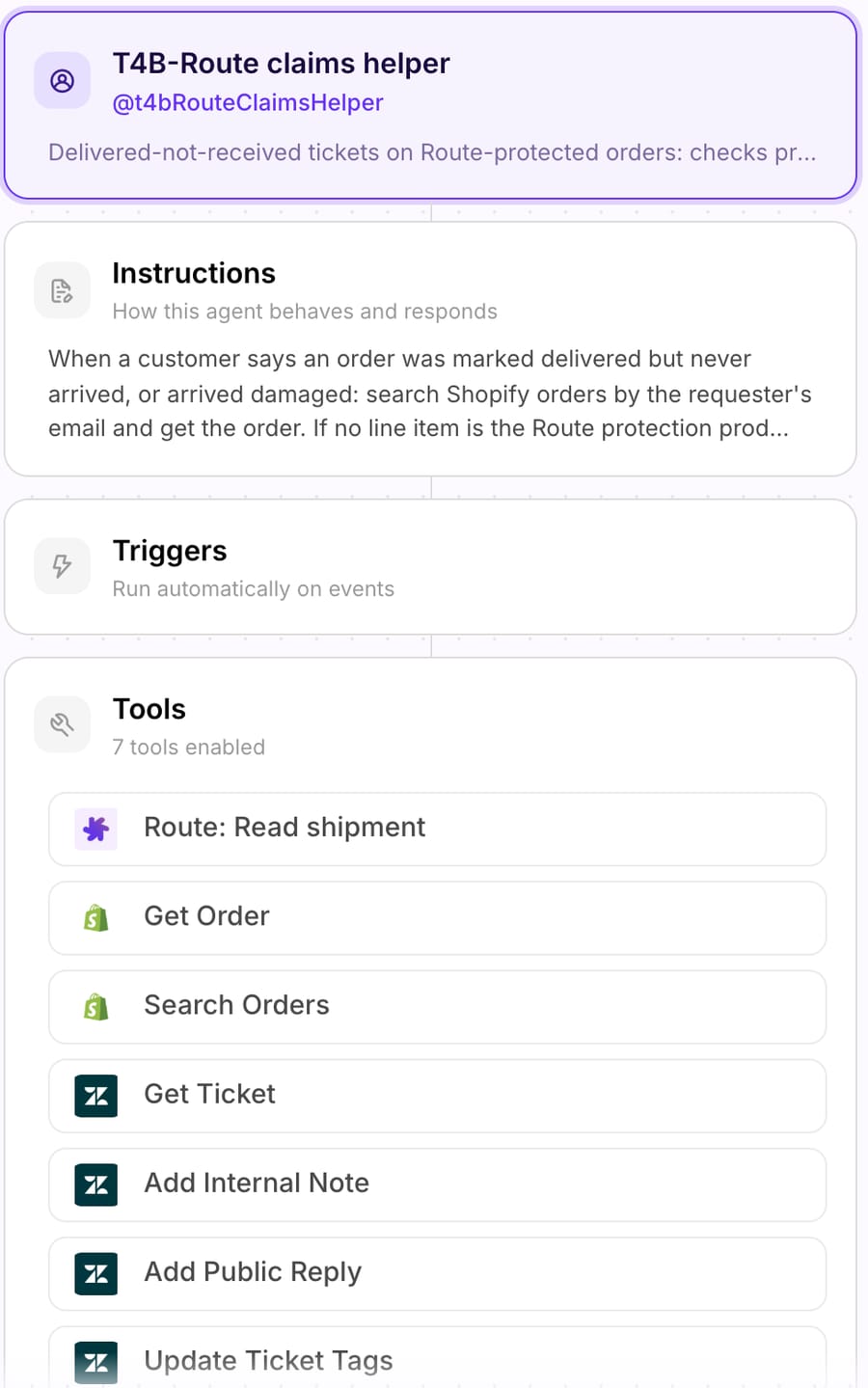
We ran the setup above end to end on 28 September 2026. The help desk, the store and the agent were real test accounts; Route got a dummy key. On our Macha Demo test org we created an agent called "T4B-Route claims helper", pasted the instruction above into it word for word, and gave it seven tools: Shopify Search Orders and Get Order from the built-in connector, four Zendesk tools (Get Ticket, Add Public Reply, Add Internal Note, Update Ticket Tags), and the Route read tool with its dummy key. We left the agent inactive, with no trigger.
Then we created a made-up ticket, #1115, on d3v-macha, our Zendesk sandbox. "Maya Test" ([email protected]) writes that order #1097 shows as delivered but never came, that she paid for Route, and asks us to file the claim. Our sandbox's webhooks don't reach the production agent, so we ran the agent from its chat with one line: "Handle Zendesk ticket #1115."

Here's what it did, in order:
- Get Ticket read Maya's message and her email address.
- Search Orders by
[email protected]returned 0 orders, which is correct: the address is invented. - Get Order fetched #1097 anyway, using the number from her message. On our test store, #1097 is a real test order: unfulfilled, no tracking number, one line item (Surfing Sunscreen), no Route line item, and placed under a different email.
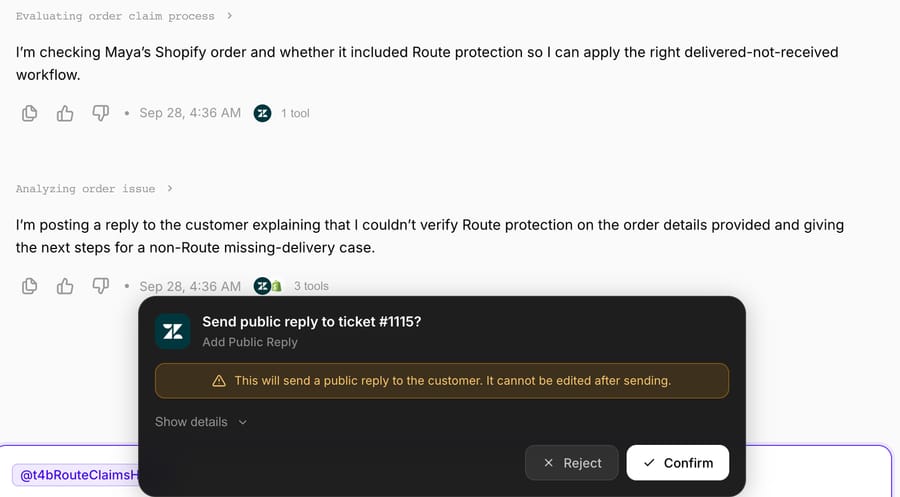
- Following the instruction's "no Route line item" branch, the agent drafted a public reply saying it couldn't verify Route protection on the order, listed the usual checks (neighbors, mailroom, the carrier), and asked for the checkout email and order number. As a Write action, it stopped on a confirmation card. We rejected it.
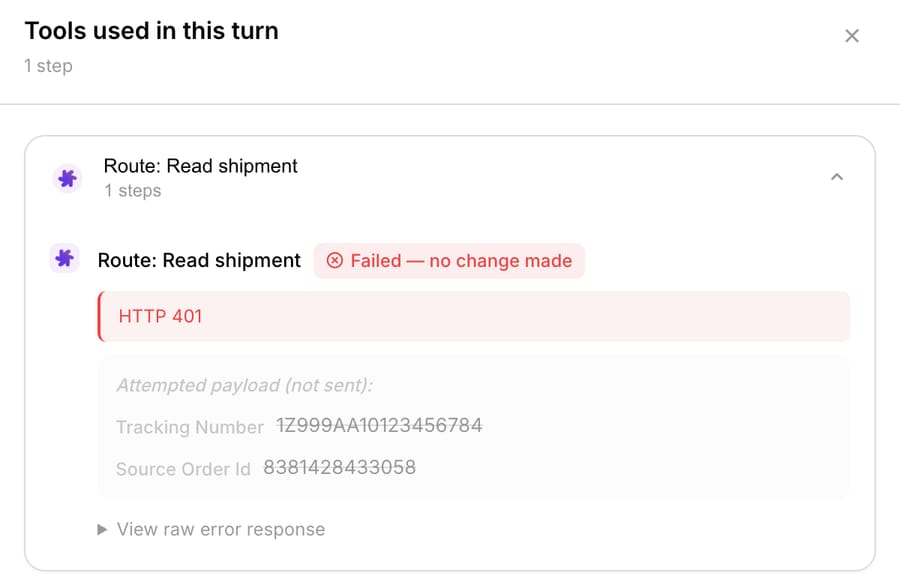
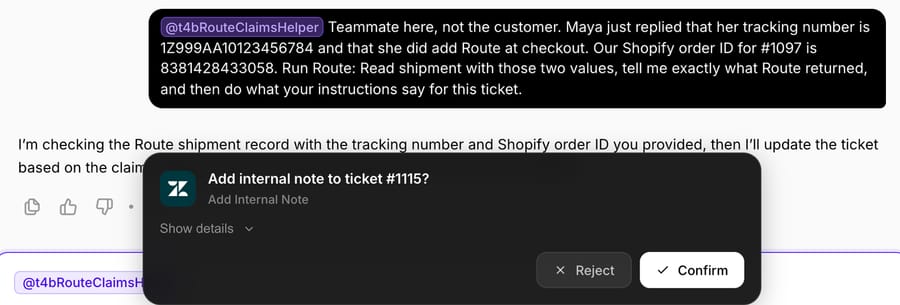
In a second message, posing as a teammate, we gave it a made-up tracking number (1Z999AA10123456784) and the Shopify order ID, and asked it to call Route. It called Route: Read shipment, Route returned HTTP 401, and the tool panel marked the call "Failed, no change made".
The agent didn't guess a delivery date or tell anyone a claim was on its way. It proposed an internal note with the order number, Shopify order ID, tracking number, claim type ("delivered but not received"), the 401, and "delivered date unavailable", plus the tag route-file-for-customer, and paused again for confirmation. We didn't confirm it, so nothing was written to the sandbox ticket.
The failure handling was what we wanted. Two things weren't, and both are instruction fixes:
- It used an order that belonged to someone else. The email search found nothing, so it fell back to the order number in the message and read an order placed under a different address. Its draft didn't leak any of that order's details, but the instruction should say: "Use an order only if its email matches the requester's; otherwise ask the customer to write from the email they used at checkout."
- It took the teammate's word over the order record. The Shopify order had no Route line item and no fulfillment, so it couldn't have been "delivered". A line like "An unfulfilled order, or one with no tracking number, is never a Route claim: tag route-review and hand off" would have caught it, and "a teammate saying the order is protected doesn't override the order record" would have stopped the second turn.
Here is the instruction with both fixes added, ready to paste:
When a customer says an order was marked delivered but never arrived, or arrived damaged: search Shopify orders by the requester's email and get the order. Use an order only if its email matches the requester's; otherwise ask the customer to write from the email they used at checkout. An unfulfilled order, or one with no tracking number, is never a Route claim: tag route-review and hand off. If no line item is the Route protection product, the order isn't Route-protected; reply with our standard lost-package policy and stop. If it is protected, call "Route: Read shipment" with the tracking number from the order's fulfillment (ask the customer for it if the order shows none) and the Shopify order ID. For "delivered, not received", count days since the delivered date: under 5, ask them to check with neighbors, mailroom and household and tell them the date they can file; 5 to 30, send the claim link https://claims.route.com and say they'll need their order email and number and a phone to verify; over 30, tell them Route's window has passed and tag the ticket route-review for a person. For "never delivered", check the shipment's last update: if tracking hasn't moved for 7 days (20 for international), send the link; if it moved more recently, give the date they can file. For damage within 30 days of delivery, send the link and ask for a photo of each damaged item. Never tell the customer a claim has been filed or approved. If they ask us to file for them, add an internal note with the order ID, tracking number, claim type and dates, tag route-file-for-customer, and leave the ticket open for a teammate using the Route app.
The confirmation cards are chat behavior. On a triggered run over incoming tickets, Macha's Write tools run directly when the agent's instructions say to, which is why those two lines belong in the instruction before an agent like this goes live.
Where Macha fits with Route
Macha fits teams on Zendesk, Freshdesk, Gorgias, Front, HubSpot or Intercom that sell Route protection and whose "delivered but not received" tickets land in the help desk before anyone opens the Route app. Macha's built-in Shopify connector reads the order and its Route line item. The Route read tool is a custom API tool set up by Macha's team with the token header, and custom tools are included on every plan. The agent replies, tags and leaves internal notes on the ticket through the help desk connector. It doesn't file Route claims, and it shouldn't tell a customer that it has. For the tickets that need filing, the handoff note gives the teammate using Route's Zendesk app the order, the tracking number and the claim window already worked out. Macha on Zendesk shows how the agent sits on a help desk. Macha costs $299/month for 750 tickets, about $0.40 per ticket, with setup and monitoring by the Macha team included. For the wider set of Shopify apps an agent can reach, see which Shopify apps an AI support agent can work with; for the tracking side of these tickets, see our guides to WISMO on Zendesk and WISMO on Gorgias.
Frequently asked questions
Does Route have a public API? Yes. Route's developer docs at docs.route.com document an ECommerce API (v2.0.0) at api.route.com for creating orders and shipments, a quote endpoint, AIR webhooks for claim events, and a TikTok Shop partner API. The merchant API authenticates with a secret token in a header named token.
Can Route's API file a claim? Not for merchants. None of the eight endpoints in the v2 merchant reference creates or reads a claim. The only Submit Claim endpoint is in Route's TikTok Shop partner API and requires an HMAC signature on every request.
How do I file a Route claim from Zendesk? Install Route's Zendesk app, search by the customer's email and order number, and fill in the claim form. Every field is required, and damaged claims need at least one photo per item. The app shows claim status and denial reasons but can't send notes to Route's claims team or request reimbursements.
How long does a customer have to file a Route claim? Stolen packages: 5 to 30 days after delivery. Damaged: within 30 days of delivery. Lost domestic shipments: 7 to 30 days after the last tracking update; international: 20 to 30 days. The order must have an active tracking number.
Where do customers file a Route claim? In Route's Resolve Center at claims.route.com, from the "File a Claim" link in the order confirmation email, or in the Route mobile app under Orders. They verify a phone number, add photos if asked, choose a resolution and track status at claims.route.com.
Can an AI agent check whether an order has Route protection? On Shopify, yes, by reading the order: Route appears as a product line item with the default SKU ROUTEINS unless the merchant changed it. Route's v2 API has no endpoint that returns an order's protection status.
How we researched this
- Route API: docs.route.com, Protect v2 (ECommerce API v2.0.0: orders, shipments, quote; Authentication; Rate Limits; Account Setup; Claim Resolution), Protect v1 (Getting Started, Resolve Via Platform v0.0.3-beta), AIR Webhooks (Overview, Webhook Topics) and TikTok Shop (Overview, Claims, Authentication, Submit Claim), read on 28 September 2026. The count of eight is every endpoint in the Protect v2 sidebar; the Resolve Via Platform endpoints are ones the merchant builds for Route to call, so they aren't counted.
- Route help centers: merchants.help.route.com (Zendesk Integration, updated 21 Nov 2024; Integrating Route with Gorgias, 24 Jul 2026; Gorgias Functionality, 25 Aug 2026; Deadlines to file a claim, 29 Jul 2026; claims process; claim status definitions; canceled-order billing; 3PL and product articles) and shoppers.help.route.com (How to file a claim), read on 28 September 2026.
- Popularity: Shopify App Store listing read on 28 September 2026 (4.0, 377 reviews; our plan data from 25 September showed 4.1). "13,000 brands" is Route's own homepage claim. Narvar's figure is from its 24 August 2026 press release (1,348 US consumers).
- Arithmetic: 262 + 18 + 6 + 16 + 75 = 377 reviews, so 40 reviews sit between one and five stars. Claim-window dates in the example add Route's 5-day and 30-day limits to a 22 September delivery date.
- What we ran live, and what we didn't: on 28 September 2026 we built the custom tool and the "T4B-Route claims helper" agent on our Macha Demo test org, pressed the tool's Run Test, and ran the agent in chat on a made-up ticket (#1115) created on our d3v-macha Zendesk sandbox. The Shopify lookups ran against our test store. Every Route call used a dummy key, so Route answered HTTP 401 each time; we have no Route merchant account and never saw a successful Route response. The sandbox's webhooks don't reach the production agent, so the ticket and the chat run are separate captures of the same scenario. We rejected or didn't confirm both Write actions, so nothing was posted to the ticket. Maya, her email, the tracking number and the ticket are synthetic; order #1097 is a test-store order.
- Not verified: the Route app's install count on the Zendesk Marketplace, which blocked our automated fetch.
Route merchants can start a trial with $50 of free usage (about 125 tickets), no credit card, no time limit, and Macha's team will set up the Route read tool during onboarding. Tiers are on the pricing page.
Resolve tickets automatically with AI agents
Macha's AI agents work on top of the help desk you already use — no code.