





 Shopify
 Stripe
 Slack
Slack Notion
 Google Workspace
 Confluence

How Do AI Credit Usage Alerts Prevent Surprise Bills? Macha's 50/80/90% Alerts Explained


Macha emails organization admins when monthly usage crosses 50%, 80% and 90% of the ticket allowance, and because there are no overages the agents pause at the limit rather than running up a bill. A Usage card, a pre-run estimate for Studies and top-ups that never expire cover the rest.
Key takeaways
- Macha automatically emails organization admins when monthly ticket usage crosses 50%, 80% and 90% of the plan's allowance, with no configuration required.
- Macha has no overages, so when the month's tickets are used the agents pause until the next billing date unless a top-up balance is available.
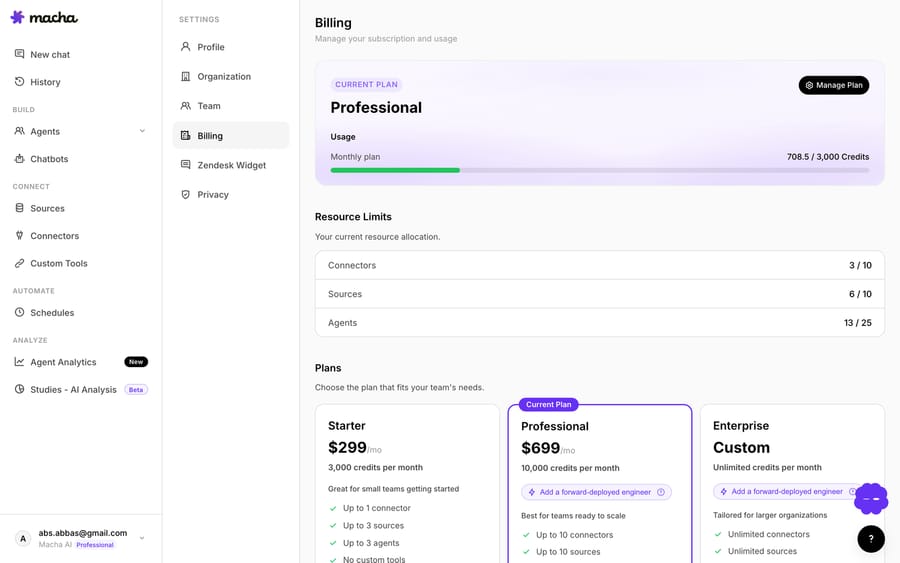
- The Macha Billing page's Usage card shows the monthly ticket allowance on a progress bar that resets each cycle, next to a separate top-up balance that never expires.
- Before a Macha Study runs, the pre-run gate shows the matching record count, cost per record and total estimate, and only processed records are charged.
- GitHub moved Copilot to usage-based AI credits on 1 June 2026 with budget alerts at 75%, 90% and 100%, and unlike Macha it allows a custom budget that stops usage.

Macha emails every organization admin automatically when monthly usage crosses 50%, 80% and 90% of the plan's ticket allowance, each threshold fires once per billing cycle, and because there are no overages the agents pause at 100% instead of running up a bill. Around those alerts sit three more guardrails: a Usage card on the Billing page, a cost estimate before any Study runs, and top-ups that never expire.
| Guardrail | What it does | Setup needed |
|---|---|---|
| Usage alerts | Emails admins at 50%, 80% and 90% of the monthly allowance, once per threshold per cycle | None, on by default |
| Usage card | Shows the monthly allowance and the top-up balance separately | None |
| Studies pre-run gate | Shows record count, cost per record and total before a batch run | Confirm in a modal |
| Top-ups | One-time purchase, never expires, spent after the monthly allowance | Active paid plan |
| No overages | Agents pause when the month's tickets are used | None |
Every AI product now runs on some flavour of consumption pricing (tokens, credits, or "agent runs"), and the defence against bill shock is the same everywhere: usage alerts that warn you before the meter does damage, not after. In May 2026 The Register reported AWS and Google Cloud customers finding out about AI spend from the invoice. Macha runs on a monthly ticket allowance, so the question we have to answer is how you never find out you're out the same way. The answer is a set of deliberately boring features, covered below: what fires, when, and what to do when an alert lands.
A quick framing note, because it matters for everything below: Macha is an AI agent layer on top of the helpdesk you already run (Zendesk, Freshdesk, Gorgias, Front, HubSpot or Intercom). You're billed per ticket: one thread with one person, charged once however many messages, tool calls or follow-ups it takes, and whichever model the agent runs on, not per ticket "resolved." Plans start at $299 a month for 750 tickets, about $0.40 each. That's the reason alerts exist: because spend tracks the conversations your agents handle, not a flat seat count, you want a tripwire well before the allowance runs dry.
When does Macha send usage alerts?
Every Macha organization gets automatic email notifications when monthly usage crosses 50%, 80%, and 90% of its ticket allowance. You don't configure anything; the alerts ship on by default. They're sent to your organization's admins.
Those three thresholds follow the staged soft-alert pattern that billing teams have converged on. Billing guidance from Dodo Payments, Stripe and Orb points the same way: warn in stages before any hard stop, and give the recipient room to act while there's still time. GitHub moved Copilot to usage-based AI credits on 1 June 2026, and its budget alerts fire at 75%, 90% and 100%. The exact numbers vary; the staging doesn't. The 50% note is informational ("you're on pace"), the 80% is the real nudge, and the 90% is the "decide now" signal: top up, move up a tier, or narrow which queues the agents take before the month closes.
The email names the threshold, shows current usage against the monthly allowance, and points at top-up and upgrade. The same numbers are always on the Usage card in Billing:

Here's the part that separates a trustworthy alert system from an annoying one: the alerts are deduplicated. We learned this the unglamorous way. The original implementation tracked "have we already sent the 80% email?" in memory, which meant every deploy reset it, and a customer sitting at 82% could get the same 80% email again. We moved that state into the database, so each threshold fires exactly once per billing cycle, deploys or no deploys. We fixed a second papercut in the same release: admin alerts now fire once per threshold crossing for the whole org, not once per admin. A five-admin team crossing 80% gets one notification event, not five copies of bill-shock anxiety.
Good alerting is as much about not sending noise as it is about sending the warning. An alert you've trained people to ignore is worse than no alert at all.
How do you check usage between alerts?
Alerts are the push. The Usage card on the Billing page is the pull: the place you go to check your balance any time, without waiting for an email. It splits your allowance into two clearly separated buckets:
- Your monthly tickets: the allowance for the cycle (750 on the entry tier, up through 10,000, with custom pricing above), shown with a progress bar that resets each billing cycle.
- Top-up balance: a persistent pool that doesn't reset, displayed as a green
+N top-upchip next to your monthly count.
Keeping those two visually distinct matters, because they behave differently. The monthly allowance is use-it-or-lose-it within the cycle; a top-up rolls over. Hover the chip and Macha spells out the rule: a top-up is spent automatically after your monthly allowance is used up, so you never have to think about which bucket you're drawing from. The card answers the two questions an admin actually has: how much of this month is gone, and do I have a reserve?
This is the principle the surprise-bill stories violate: the people who got burned didn't have a burn-down view they could check. Procurement found out at invoice time. A self-serve Usage card means the answer is one click away, not 30 days late.
How do you see the cost of a big job before it runs?
Alerts and the Usage card both watch spend after it happens. For the one place in Macha where you can intentionally kick off a large job, Studies (called AI Analysis in the sidebar: a batch analysis that runs the same questions across thousands of Zendesk tickets), we put a guardrail before the spend instead. Studies are available on paid plans and on the free trial.
Before any Study run, Macha shows you the matching record count, the cost per record, and the total estimate, calculated from the same query the run will use. Clicking Run opens a second modal that re-shows the count, the estimate and the model, and nothing starts until you confirm it.
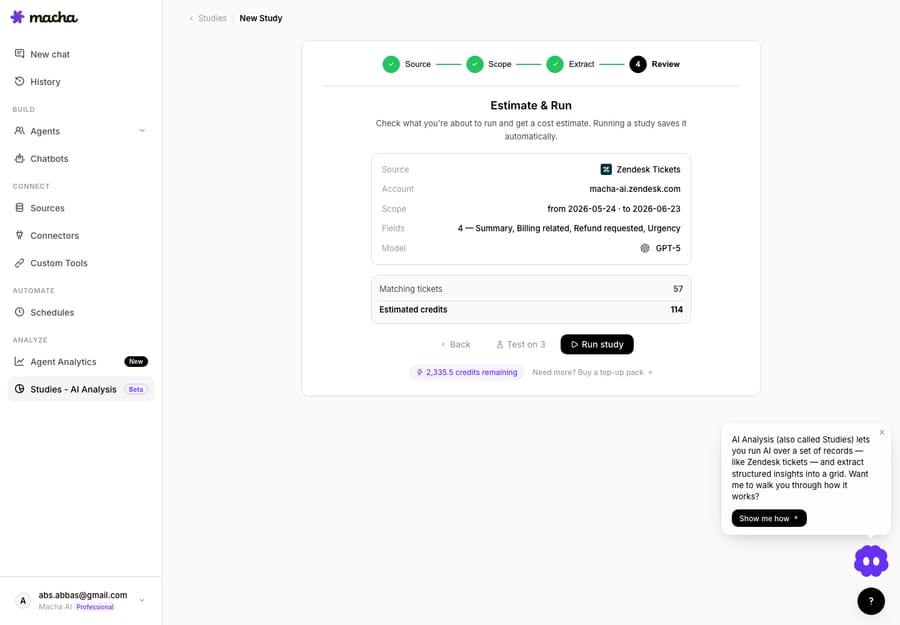
The billing is honest about partials: cancel a run midway and you pay only for records that were processed, never up front. Records that never ran cost nothing. This is the opposite of the credit-era cost trap that Schematic's guide to AI credit overages warns about, where one vague "agent run" silently retries for hours and bills you for all of it. You see the number, you approve the number, you pay for what actually completed. (For the full walkthrough of how Studies meters and runs, see the Studies docs.)
What should you do when an alert lands?
A warning is only useful if there's an easy action attached to it: an alert should suggest a fix, not just state the problem. When you hit 80% or 90% mid-cycle and you don't want to upgrade your whole plan over one busy week, the answer is a top-up.
A top-up is a one-time purchase (current prices live on the pricing page) bought through an in-page Chargebee checkout. Three things make it the right tool for a near-limit moment:
- It never expires. Unlike the monthly allowance, a top-up rolls over month to month, so buying one at 90% isn't a "use it this week or lose it" gamble.
- It's spent automatically after your monthly allowance runs out, with no toggling which balance to draw from.
- It can't be charged twice. Each purchase is recorded against its Chargebee invoice ID as a unique key, so a duplicate webhook delivery can't double-charge you.
Top-ups are available to any active paid subscription. Trial users move onto a plan first.
What does this look like in a busy month?
Picture an org on the 3,000-ticket tier running a few Zendesk agents. Volume spikes during a product launch and the ticket count climbs faster than usual. Here's the sequence the system runs without anyone babysitting it:
| Point in cycle | What happens |
|---|---|
| ~50% used | First email lands. Informational: "you're on pace." No action needed. |
| ~80% used | Second email. The real nudge: an admin opens the Usage card, sees the burn rate, and notes the cycle has 10 days left. |
| ~90% used | Third email. Admin buys a top-up in-app; it'll be spent automatically once the monthly allowance is exhausted. |
| Allowance exhausted | Top-up balance takes over. Agents keep responding. No interruption, no surprise invoice. |
Most months you won't need a top-up. The point is that the information arrived in time to make a calm decision, which is what the surprise-bill stories were missing.
What are the limits of Macha's usage alerts?
No feature is all upside. A few things to know:
- Alerts are email-only and admin-only today. There's no in-app banner, Slack alert, or per-user routing for the threshold notifications yet. Mature billing stacks let you pick channels and set custom thresholds; Macha's 50/80/90% set is fixed and goes to org admins. If your admin inbox is noisy, make sure these don't get filtered.
- Thresholds are percentages of your monthly allowance, not spend caps. They warn you; they don't stop spend on their own. What does stop it is the allowance itself: there are no overages, so when the month's tickets are used the agents pause until the next billing date rather than running up a bill. If you need a tighter ceiling than that, manage it by tier choice and by acting on the alerts.
- Usage is metered as work completes, not in true real time. Like every usage-based system, there can be a small lag between an agent acting and the meter reflecting it. A burst of activity can move the number between when you read the Usage card and when an alert computes. Treat the card as near-real-time.
- Custom plans are their own conversation. Above 10,000 tickets a month, pricing is quoted, and quoted plans bypass usage checks entirely so agents never stop mid-month. The alert and top-up defaults described here don't apply the same way.
None of these are dealbreakers; they're the shape of the feature. For most teams the default 50/80/90% alerts plus a glanceable Usage card are enough to make a runaway bill impossible to be surprised by.
What should good AI usage alerts include in any tool?
Set Macha aside for a second, because the principle is portable. If you're evaluating any usage-based AI product (a Copilot, an agent platform, your own metered API), here's the checklist the better billing teams (GitHub, Stripe, Schematic, Dodo Payments) have converged on. Use it to grade whatever you're buying:
| What to look for | Why it matters | Macha today |
|---|---|---|
| Staged soft alerts before any hard stop (≈50/80/90%) | One alert at 100% is too late to act on. GitHub uses 75/90/100%; the staging is what counts. | Yes: 50/80/90%, on by default |
| Alerts on by default, not opt-in | The surprise-bill stories are almost always an unconfigured threshold someone meant to set up. | Yes: ships on, no setup |
| Deduplicated, low-noise notifications | An alert you've trained people to ignore is worse than none. | Yes: DB-tracked, one fire per threshold per cycle |
| A pre-execution cost estimate | AI can spend faster than a human can react; show the number before the run. | Yes: Studies estimate gate |
| Honest partials | Charge for work that completed, not a worst-case guess. | Yes: charged per processed record |
| A self-serve usage dashboard | Procurement shouldn't first learn the number at invoice time. | Yes: Usage card |
| An action attached to the warning (top up / upgrade) | A good alert suggests the fix, it doesn't just state the problem. | Yes: in-app top-up packs |
| A custom hard cap that freezes usage | Some teams want a true ceiling. | Partly: no custom cap, but there are no overages, so agents pause when the allowance is used |
The recurring theme across those sources is worth stating plainly: as the metered-billing guides put it, bill shock is a product-design failure, not a finance problem. Thresholds that ship off, alerts that fire only at 100%, and "agent run" line items with no estimate are all design choices that push the surprise onto the customer. Macha's stance is that the safe default should be on, automatic, and deduplicated: you don't opt in to knowing your balance is running low.
The one gap: GitHub lets an admin set a budget that stops Copilot AI credit usage at any figure they choose. Macha's ceiling is your tier. There are no overages, but you can't set an arbitrary cap below it, and you should know that going in.
If you want the mechanics underneath all of this, two companion reads go deeper: How Macha billing works explains what counts as a ticket, and AI Agent Pricing Models, Explained covers why per-ticket billing behaves so differently from per-resolution or per-seat. If you're connecting Macha to Zendesk, see Macha on Zendesk. The full billing reference lives in the docs.
FAQ
At what points does Macha send usage alerts? Automatically at 50%, 80%, and 90% of your monthly ticket allowance. Each threshold emails your organization's admins once per billing cycle.
Do I have to turn alerts on or configure them? No. They ship on by default. The thresholds (50/80/90%) are fixed and the alerts go to org admins.
Will I get duplicate alert emails? No. Thresholds are tracked in the database, so each one fires exactly once per cycle, even across deploys, and a single notification fires per crossing for the whole org rather than one per admin.
What happens when I use up the month's tickets? Your top-up balance (if you have one) is spent automatically, and it never expires, so one you bought earlier is still there. Otherwise agents pause until the next billing date. There are no overages.
How do I avoid a surprise bill on a big Studies run? Studies shows the record count, per-record cost, and total before the run, and makes you confirm. You pay only for records that were processed; cancelled records that never ran cost nothing.
Can I set a hard spend cap that stops agents at a limit? Not a custom one, but your tier is the ceiling. There are no overages, so agents pause when the month's tickets are used rather than billing on. Manage tighter limits through tier choice and by acting on the alerts.
Can trial accounts use Studies or buy top-ups? Studies, yes; top-ups, no. The trial is a one-time $50 of usage with no credit card, and Studies run on it. Top-ups open up once you move onto a paid plan.
How do you start with visibility?
A surprise bill is almost never a pricing problem; it's a visibility problem. Macha's answer is to make your balance impossible to lose track of: automatic alerts at three thresholds, a Usage card that splits the monthly allowance from a rollover top-up, a cost estimate before any large job, and top-ups that wait until you need them. Start a free trial ($50 of usage, no credit card required), connect your helpdesk, and you'll see the Usage card before you've handled your first ticket.
Written by Abbas (Customer Support & AI, Macha) · Reviewed by Ankeet Guha (Co-founder & CTO) · Published 2026-06-24 · Last updated 2026-09-24.






