





 Shopify
 Stripe
 Slack
Slack Notion
 Google Workspace
 Confluence

How Does Macha Billing Work? One Charge per Ticket, Whatever the Model


Macha bills per ticket: one conversation with one person is one charge, however many messages, tool calls or follow-ups it takes, and the AI model you choose doesn't change the price. Plans run from $299 a month for 750 tickets, with top-ups that never expire and no overages.
Key takeaways
- Macha bills per ticket, one conversation with one person charged once regardless of messages, tool calls or follow-ups, rather than per resolution.
- The AI model behind a Macha agent, from GPT-5.6 Terra to Claude Sonnet 5 or the Groq models, does not change the price of a ticket.
- Macha's single plan runs from $299 a month for 750 tickets up to $3,999 a month for 10,000 tickets, about $0.40 a ticket, with custom pricing above.
- Macha top-ups never expire and roll over month to month, spent automatically only after the monthly ticket allowance runs out.
- Macha sends usage alerts at 50%, 80% and 90% of an organization's monthly allowance, deduplicated so a deploy cannot resend them.
Macha bills per ticket: one conversation with one person is one charge, whichever model answers it and however many messages, tool calls or follow-ups it takes, on one plan that runs from $299 a month for 750 tickets to $3,999 for 10,000 (about $0.40 a ticket). The model you pick changes quality and speed, not the price.
| Question | Answer |
|---|---|
| What is billed? | One ticket per conversation, charged once |
| Does the model change the price? | No |
| Plans | One plan, $299 to $3,999 a month by ticket volume, custom above 10,000 |
| Running out | No overages; agents pause, or you add a top-up or move up a tier |
| Top-ups | Never expire, spent after the monthly allowance |
| Alerts | At 50%, 80% and 90% of the monthly allowance |
That distinction matters more than it sounds, because most of the AI-support market prices the other way. Below: what a ticket is, why the model you pick doesn't change the price, how the plan and top-ups fit together, and how to forecast a monthly bill without guessing.
Macha is the AI agent layer on top of the helpdesk you already run (Zendesk, Freshdesk, Gorgias, Front, HubSpot or Intercom), so the meter counts the conversations your agents handle across your stack.
What counts as one Macha ticket?
Every thread between Macha and one person is one ticket, charged once. Drafting a reply, triaging, calling a tool, deciding a route, then handling the customer's follow-up two days later: all of it sits inside that one ticket. Three things count: an email ticket and every follow-up on it, a whole live chat, and a whole Copilot session. A ticket runs up to 50 messages under fair use. It is deliberately not a "resolution" or a "deflection."
Why does Macha refuse to bill per resolution? Because Macha is automation and orchestration, not a black box that promises a fixed success rate. An agent might read a ticket, check Stripe, post an internal note, and hand off to a human: genuine work that moved the ticket forward, and zero "resolutions" by a strict definition. Billing per ticket keeps the meter honest and, crucially, countable: the only lever that changes your bill is how many conversations you point the agents at, and that's a number your helpdesk already reports.

There's one free exception worth knowing: the welcome chat a new org lands in after onboarding is on the house, with a free-chat badge right next to the model picker. One per organization, so you can try it before the meter moves at all.
Does the AI model change what a ticket costs?
Here's the part people expect to be complicated, and isn't. The model behind an agent has no effect on what you pay. Neither does the number of tools it calls, nor how long the conversation runs. So you match the model to the job on quality and speed alone. The picker as of September 2026:
| Model | Best for |
|---|---|
| GPT-5.6 Terra | Macha's flagship since July 2026: multi-step reasoning and tool selection, roughly 1M-token context |
| GPT-5.6 Luna | The mid-tier: faster than Terra, a small step down in quality, for high-volume conversations |
| GPT-5.4 (default) | Strict "do this exactly once" rules and complex branching |
| GPT-5 and GPT-5.4 Mini | Previous-generation options, still in the picker for triage, routing and FAQ-style replies |
| Claude Sonnet 5 and Claude Sonnet 4.5 | Nuanced writing and following long, detailed instructions |
| GPT OSS 120B and GPT OSS 20B (Groq) | Very low latency for simple, high-volume tasks |
The same rule holds for every row: one charge per ticket, whichever model answers it. Pick Terra where answer quality matters most and a faster model where latency does; the invoice doesn't move either way.
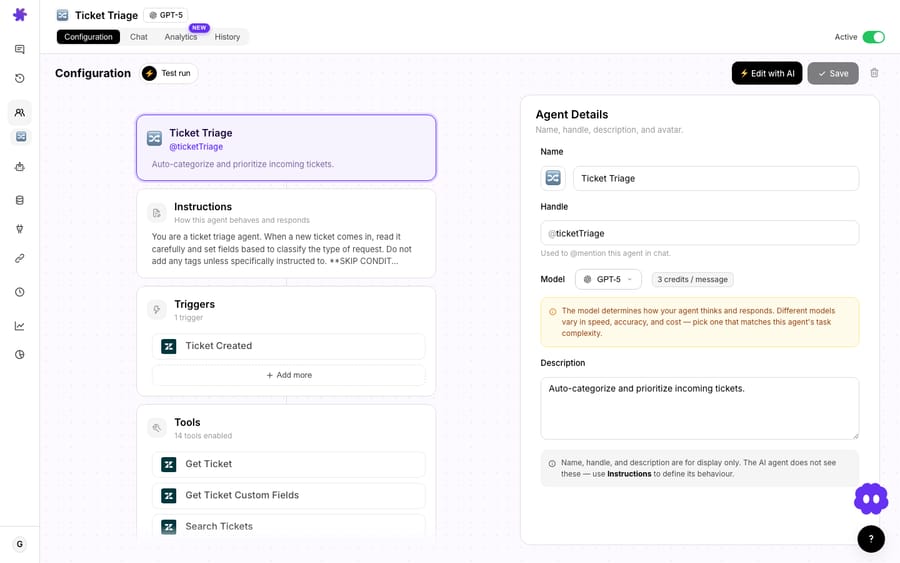
You set the model per agent, with an org-wide default for new agents in Settings. In a chat you can switch it from the top-right dropdown, and Macha shows a toast reminding you the switch applies only to the current conversation; to move the whole org, it points you to Settings. Existing agents keep their model until you change it. The agents table also shows each agent's model in its own column, so you can scan model selection across your full fleet at a glance and spot anywhere a high-volume queue is sitting on a slower model than it needs.
A quick worked estimate
Say a triage agent reads 4,000 tickets a month, and a resolution agent then answers 1,500 of those, some in one reply, some in five. That's 4,000 tickets, not 5,500: the same thread is one ticket however many agents touch it and however many messages it takes. 4,000 sits inside the 5,000-ticket tier at $1,999 a month. The point isn't the precise figures; it's that you can do this arithmetic before you commit, from a number your helpdesk already reports.
How do Macha's plan tiers work?
There's one plan, priced on the number of tickets a month, and the allowance resets every billing cycle:
| Monthly price | Tickets included |
|---|---|
| $299 | 750 |
| $599 | 1,500 |
| $1,199 | 3,000 |
| $1,999 | 5,000 |
| $2,999 | 7,500 |
| $3,999 | 10,000 |
| Custom | Above 10,000 |
That works out at about $0.40 a ticket. The tier is the only thing that changes between steps: every feature is on every one of them, including unlimited agents, unlimited seats, every channel, every integration and knowledge source, custom API tools, scheduled triggers and Studies, plus setup and monitoring by the Macha team. Billing is monthly only. The current numbers live on the pricing page.
What happens when you run out of tickets in a month?
Monthly allowances reset each cycle. So what happens on a spiky month, like a product launch, a holiday rush or Black Friday? There are no overages: agents pause until the next billing date rather than quietly running up a bill, and you either move up a tier or buy a top-up.
A top-up is a one-time purchase from the billing page, through an in-page Chargebee checkout. Two properties make it useful:
- A top-up doesn't expire. Unlike your monthly allowance, it rolls over month to month until you spend it.
- It's spent automatically, second. Macha always uses your monthly allowance first, then dips into the top-up, so you never have to think about which bucket you're spending from, and you never lose a top-up to a reset.
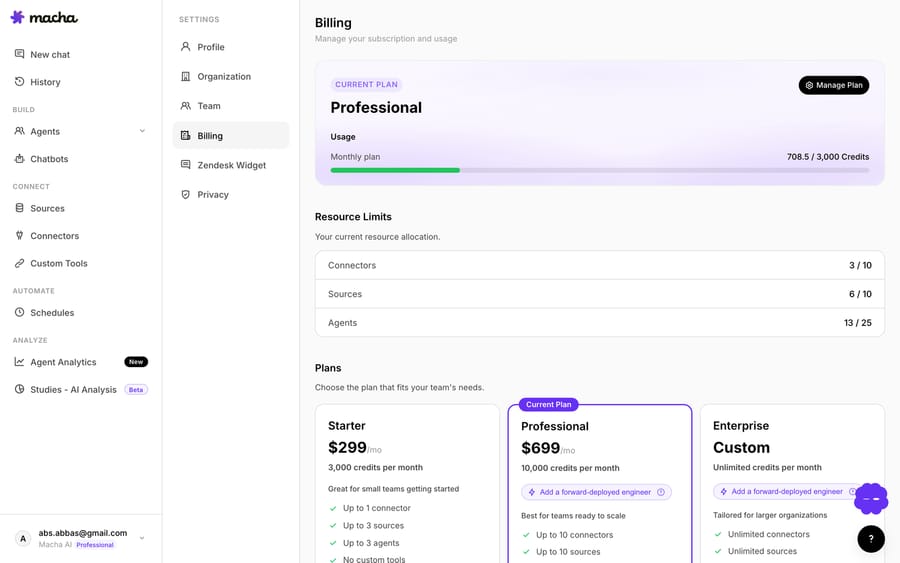
On the Billing Usage card, the two buckets are shown separately: monthly usage gets a bar that resets each cycle, and a green +N top-up chip sits above it when you're carrying a top-up balance, with a hover that explains the persistence rule. Top-ups are available to any active paid subscription; trial users move onto a plan first.
This is a real, quiet differentiator. Some credit-based competitors reset unused credits to zero each month: HubSpot's help center says unused credits "expire at the end of each usage period and do not roll over." Buy for a busy month that never comes and the credits are simply gone. A Macha top-up doesn't evaporate.
How does Macha warn you before the allowance runs out?
You shouldn't discover you've used the month's tickets from a stalled agent. Macha fires usage alerts at 50%, 80%, and 90% of your monthly allowance. The alerts are deduplicated in the database (so a deploy can't re-send them) and fire once per threshold crossing. When you cross 80%, that's your cue to narrow which queues the agents take, move up a tier, or buy a top-up before month-end.
How does per-ticket billing compare with per-resolution pricing?
It's worth being honest about the trade-off, because per-ticket billing isn't automatically "cheaper" than the alternatives. It's different, and the difference cuts both ways.
The rest of the market mostly meters per resolution: Fin (now owned by Salesforce) bills $0.99 per outcome; Zendesk's pricing page says AI agents are billed per automated resolution and lists $1.50 committed or $2.00 pay-as-you-go; Gorgias charges $0.90 per resolved interaction on most plans ($1 on Starter; $1.00 on monthly and $0.90 on annual billing, per its pricing FAQ in October 2026). You pay only when the AI "resolves" something. HubSpot bills in credits but still meters an outcome (50 credits, $0.50 at list, per resolved conversation) and resets unused credits monthly. (Figures checked 24 September 2026 and exclude platform and seat fees.)
When per-ticket billing is the better deal: when your conversations take more than one turn, or when your agents do a lot of non-resolution work (triage, routing, internal notes, tool calls, summarization) that a per-resolution vendor either can't bill for or bills as a full resolution anyway. And when you want a predictable, forecastable bill you can size from your own ticket volume, instead of one that floats with a "resolution rate" you can't know on day one.
Where it's less flattering, the honest watch-outs:
- A ticket is billed whether or not the agent resolves it. A conversation that ends in a human handoff still counts. Per-resolution pricing would charge nothing there. So the number to watch isn't your step count; it's your resolution rate.
- You have to choose which queues the agents take. Pointing an agent at a queue it can't actually help with spends tickets for nothing. The agents table and Agent Analytics exist precisely so you can catch this.
- Studies and bulk runs draw from the same allowance. A large Studies analysis is metered too, which is why Studies shows a cost estimate and a confirm gate before any run. Plan for it.
If your support is almost entirely simple, one-touch deflections with a high resolution rate, a flat per-resolution tool may work out cheaper. Macha's model rewards teams who want to know the number before the month starts.
FAQ
What is one Macha ticket? One thread between Macha and one person, charged once: an email ticket and its follow-ups, a whole live chat, or a whole Copilot session. It is billed per conversation, not per resolved or deflected ticket.
Does the model change what a ticket costs? No. GPT-5.6 Terra, GPT-5.4, Claude Sonnet 5 and the Groq models all cost the same per ticket. You choose the model per agent, with an org default in Settings, on quality and speed alone.
Does an unused allowance roll over? Your monthly allowance resets each billing cycle. A top-up doesn't expire: it rolls over until spent, and is used automatically after your monthly allowance runs out.
What happens if I use up the month's tickets? Agents pause until the next billing date; there are no overages. You'll have seen alerts at 50%, 80%, and 90% first. Buy a top-up from the billing page (it applies immediately) or move up a tier.
Does Macha charge per resolution like Intercom Fin? No. Macha bills per ticket, which keeps cost tied to a conversation you can count in your own helpdesk, rather than to a "resolution" definition the vendor sets.
How do I estimate my monthly usage? Count the conversations you want the agents to handle, not the steps they'll take, and pick the tier above that number. The pricing page and the Billing Usage card help you sanity-check against real usage.
How do you try Macha's billing on your own tickets?
The fastest way to understand Macha's billing is to watch the Usage card move on your own tickets. Start a free trial ($50 of usage, about 125 tickets, no credit card, no time limit), connect your helpdesk, and the welcome chat is free. See the billing docs for the full breakdown, or read how Studies draws on the same allowance to analyze your back-catalog of tickets.
Written by Abbas (Customer Support & AI, Macha) · Reviewed by Ankeet Guha (Co-founder & CTO) · Published 2026-06-24 · Last updated 2026-09-24.






