





 Shopify
 Stripe
 Slack
Slack Notion
 Google Workspace
 Confluence

How Does Front Collision Detection Work? Presence and Status Colors Explained (2026)


Front's collision detection tells everyone in a shared inbox when a teammate is already replying to a conversation and shares that draft live, so nobody sends a duplicate answer. It works on every Front plan with nothing to switch on, but it needs at least two teammates in the same inbox to show anything.
Key takeaways
- Front's collision detection shows teammates in a shared inbox when someone is already replying to a conversation and shares the draft live, so a duplicate reply is visible before it's sent.
- Front lists shared drafts and real-time agent availability on all three plans: Starter at $25 a seat billed annually, Professional at $65 and Enterprise at $105.
- Front's participants menu shows color avatars for teammates who are caught up on a conversation and black-and-white avatars marked Unread for those who haven't seen new activity.
- Front's Out of office status mutes notifications and unassigns conversations on new activity, while a Grey (disconnected) teammate can still be assigned by rules.
- Front collision detection needs at least two teammates in the same inbox, so a single-seat account never shows a live reply indicator.

Front's collision detection shows every teammate in a shared inbox when someone else is replying to the same conversation, and it shares the draft live so you can read what they're writing before you send your own. It's on every Front plan (Starter, Professional and Enterprise, per front.com/pricing, checked 24 September 2026), there's nothing to switch on, and it needs at least two teammates in the same inbox before it has anything to show.
Collision detection is one of four presence signals Front uses to stop two people answering the same customer:
| Signal | What it tells you | When it matters |
|---|---|---|
| Collision detection | A teammate is replying to this conversation right now | The live moment, before you hit send |
| Shared drafts | What that teammate is writing, updated as they type | Deciding whether to back off or add to their reply |
| Participants menu | Who has taken part and who is caught up (color) or behind (black and white, Unread) | Handoffs and follow-ups |
| Teammate status colors | Who is Available, Busy, Out of office or disconnected | Rule-based assignment and routing |
What does Front collision detection actually do?
Collision detection is the real-time signal that someone else is already on the conversation you just opened. Per Front's guide to real-time collision detection, when a teammate is working on a message in a shared inbox, the rest of the team sees indicators that they're replying. You don't enable anything; the moment a colleague starts drafting, the interface tells you.
The point is coordination without a side conversation. Nobody has to Slack "hey, are you taking the Acme ticket?" because the inbox already answers that question. A shared inbox invites two failure modes: two people answer the same email, or nobody answers because everyone assumed someone else would. These signals are aimed at both.
Two details make the signal trustworthy rather than decorative. First, it's real-time: the reply indicator appears as a teammate starts typing, not on a refresh. Second, per the same Front article, draft content is automatically shared and updated immediately. When a teammate is mid-reply, you're not only told that they're replying, you can see what they're writing. That shared-draft surface is where a live collision announces itself.
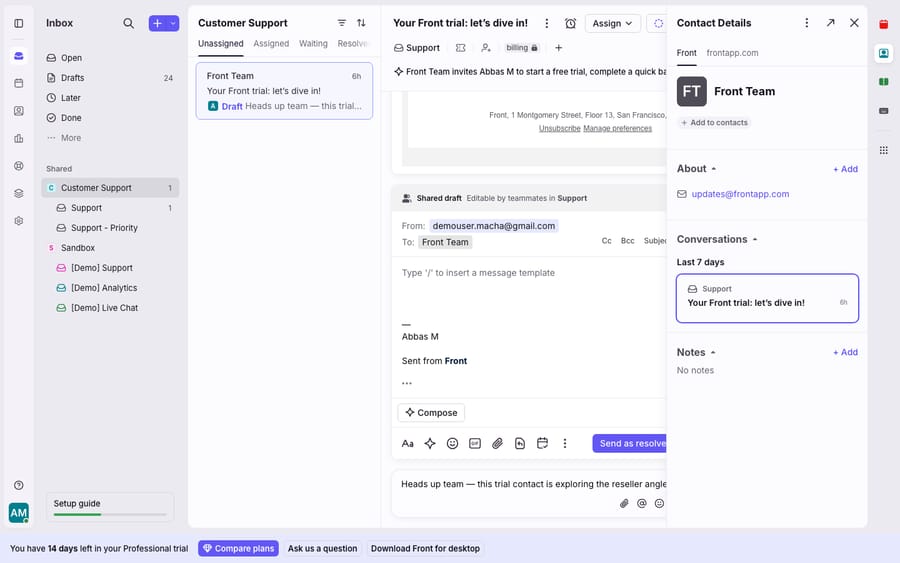
The screenshot above is the composer where a collision surfaces: the Shared draft, Editable by teammates indicator. We took it on a single-seat account, so no live "another teammate is replying" indicator could appear. Collision detection is a collaborative feature, and it needs at least two teammates in the same inbox before there's anything to collide. What you see is the presence surface itself, with the collision indicator described from Front's docs.
What does the participants menu show?
Beyond the live "someone is replying" alert, Front keeps a running record of who has touched a conversation. The participants menu lists a teammate once they take part in the conversation: when they comment, @mention a teammate, reply directly, or subscribe to it.
The avatars carry read state, which is the useful part:
- Color avatars mean that teammate is reading the conversation right now, or has already seen the latest message or comment. They're caught up.
- Black-and-white avatars mean there's new activity that person hasn't seen yet, and Front marks their status Unread.
So at a glance you can tell not just who cares about a conversation but who is current on it. If you're about to hand something off, the participants menu tells you whether the person taking it has seen the latest reply. It covers the whole life of a thread, not only the live moment.
What do Front's teammate status colors mean?
Collision detection tells you who's on this conversation. Teammate status tells you who's available at all, and Front wires the two together so routing respects reality. Per Front's teammate status colors article, each teammate carries a colored dot:
| Status | Color | Notifications | Rule assignments |
|---|---|---|---|
| Available | Green | Allowed (if enabled) | Can be assigned new conversations; conversations stay assigned on new activity |
| Busy | Yellow | Allowed (if enabled) | Pauses new assignments from rules; conversations stay assigned |
| Out of office | Red | Muted | Pauses new assignments; unassigns conversations on new activity |
| Disconnected | Grey | No device connected to Front's push system | Can still be assigned by rules unless set to Out of office |
Status matters for collision avoidance because it changes routing, not only an avatar. A teammate marked Busy stops receiving new rule-based assignments, and one marked Out of office has conversations unassigned when new activity arrives, so customer replies go back to the shared inbox for someone else to pick up. The Grey dot is the trap: it only means no device is connected, and rules can still assign that person work. If your team uses shifts, Front resets these statuses automatically at the start or end of a shift.
Front shows status wherever you'd act on it: when assigning a conversation, when @mentioning a teammate in a comment, and in the Analytics live dashboard. The sidebar teammates list also shows it, but Front calls that a legacy feature; companies created after 26 January 2023 use views for assignment queues instead.
How do assignment, collision detection and the participants menu work together?
None of these surfaces is meant to be used alone. A well-run Front inbox leans on three signals.
Assignment is the first line of defense: when a conversation is assigned to one teammate, it's clear who owns the reply, and status colors keep rules from assigning to someone who's away. Collision detection is the safety net for everything that isn't formally assigned. When two people happen to open the same unassigned conversation, the reply indicator and the shared draft make the overlap visible before either sends. The participants menu is the audit trail, showing afterward who saw what and who's caught up.
Together they're why a Front team can share one inbox without a spreadsheet of who's doing what. This is the shared inbox model working as designed, and it's the same collaborative fabric behind shared drafts and comments and @mentions, internal coordination the customer never sees. For teams splitting one platform across support, sales and ops, it scales through team inboxes, each with its own presence.
What can't collision detection do, and where does an AI agent fit?
Collision detection is one of Front's best features. It's built into the shared inbox, it's real-time, and it does the coordination job it claims to.
Its nature is also its ceiling. It's a collaborative feature by definition and needs 2+ teammates to do anything. On a solo account or a single-seat trial there's nobody to collide with, so the live indicator never appears (which is why the screenshot above shows the presence surface, not a live collision). More fundamentally, collision detection solves a human coordination problem: it stops two people answering the same email. It does nothing about the underlying cost, which is that a person has to answer the email in the first place. Presence tells you who is replying; it can't read the customer's question, look up their order and write the reply.
The core presence features aren't plan-gated. Front lists shared drafts and real-time agent availability on Starter ($25 a seat billed annually, up to 10 seats), Professional ($65, up to 50 seats) and Enterprise ($105, annual billing only). What changes by tier is the admin layer around them: SSO and SCIM start on Professional, and custom roles are Enterprise only. Front's pricing page has the full grid.
That's the gap an AI agent fills: not replacing collision detection, but cutting how often two humans need coordinating over the same routine reply. The broader category of AI agents for customer service exists for the work presence can't do: understanding the question and answering it. Macha is one such layer. It runs on top of the Front you already use through the live Macha–Front connector, and it doesn't replace Front, your shared inboxes, your assignments or collision detection. Macha's agent reads an incoming conversation, works out intent, and drafts or sends a grounded reply, pulling a real order or account detail through a custom tool that turns your REST API into something the agent can call. Collision detection means two teammates don't both answer a shipping question; an agent means that, for the routine ones, neither of them has to.
Macha bills per ticket: one conversation is charged once however many messages it takes, from $299 a month for 750 tickets. It never bills per resolution, so the invoice doesn't depend on an outcome definition you don't control. Front keeps your humans from tripping over each other; an agent on top means fewer conversations need a human at all.
FAQ
How does Front collision detection work? When a teammate is working on a message in a shared inbox, everyone else sees indicators that they're replying. Draft content is shared and updated immediately, so you can see that a colleague is mid-reply, and what they're writing, before you send your own.
Do I need multiple teammates for collision detection? Yes. It only has something to show when two or more teammates work in the same inbox. On a single-seat account there's no one to collide with, so no live reply indicator appears; you still see the shared-draft surface.
Which Front plans include collision detection? All of them. Front's pricing page lists shared drafts and real-time agent availability on Starter, Professional and Enterprise. SSO and SCIM start on Professional, and custom roles are Enterprise only.
What do the teammate status colors mean in Front? Green is Available (can receive new rule assignments), Yellow is Busy (pauses new rule assignments), Red is Out of office (mutes notifications and unassigns conversations on new activity), and Grey means no device is connected to Front's push system. A Grey teammate can still be assigned by rules unless they're set to Out of office.
What does the participants menu show? Avatars of every teammate who has commented, @mentioned someone, replied directly or subscribed to a conversation. Color avatars mean they're reading it now or have seen the latest message; black-and-white avatars mean there's new activity they haven't seen, marked Unread.
Can I add AI to Front without replacing collision detection? Yes. An AI agent layer like Macha connects to Front as a live connector and runs on top of your existing shared inboxes, so collision detection, presence and assignments keep working. The agent handles reading and answering routine conversations so fewer of them need a human to coordinate over.
Want fewer conversations that need a human at all? Start a free trial of Macha and connect it to your Front in minutes.






