





 Shopify
 Stripe
 Slack
Slack Notion
 Google Workspace
 Confluence

How Do Front Snooze, Reminders and Follow-Ups Work? (2026)


Front keeps follow-ups from slipping with snooze, Send and Snooze, custom snooze times and delayed rules that nudge a customer automatically when a message goes unreplied. Here is how each piece works, which plan the automatic rules need, and what still takes a human or an AI agent when a thread comes back.
Key takeaways
- Front's follow-up system combines snooze, Send and Snooze, up to 34 custom snooze times, and delayed rules that resurface or chase a conversation on schedule.
- Front's time-based delayed rules require the Professional plan or above, listed at $65 a seat a month billed annually and $85 billed monthly.
- Send and Snooze in Front reopens a conversation at a chosen time only if the recipient does not reply, and the snooze cancels automatically when they write back.
- A Front delayed rule can send a Follow up template when the oldest message is still unreplied after 2 days, with no one tracking the thread by hand.
- Front delayed-rule timers ignore snoozing, so an email received at 9:00 and snoozed until 9:30 still triggers a one-hour rule at 10:00.
Front stops follow-ups from slipping with four tools: snooze, Send & Snooze, up to 34 custom snooze times, and delayed (time-based) rules that chase a thread automatically, such as sending a "Follow up" template when a message is still unreplied after 2 days. Snooze and Send & Snooze work on every plan; delayed rules need Front's Professional plan or above. Here's which tool fits which job:
| Tool | Best for | Triggered by | Scope |
|---|---|---|---|
| Snooze | Clearing a thread now, seeing it later | You, manually (clock / quick action) | Just that conversation |
| Send & Snooze | Following up after you replied | You, at send time | Just that conversation |
| Custom snooze times | Reusing the same intervals | Setup once, reuse everywhere | Personal menu |
| Auto-follow-up rule | Team-wide "chase if unreplied" SLA | Time-based condition, automatically | Whole inbox / workspace (Professional plan and above) |
How do you snooze a conversation in Front?
Snooze is the foundation. It sets a time for a conversation to reopen in your inbox exactly when you want it back, so you can clear a message off your plate now without losing it. Per Front's guide on snoozing conversations for later or follow-up, there are three ways to snooze a conversation:
- Click the clock icon at the top of an open conversation.
- Use the snooze quick action that appears when you hover over a conversation in your list.
- Use Send & Snooze in the composer when you reply (more on that below).
Whichever route you take, Front offers a snooze menu where you either pick from a list of preset times or set a custom Day & Time. The presets cover the intervals most teams reach for (later today, this evening, tomorrow, next week) and the custom option handles anything specific ("reopen this Thursday at 9am").
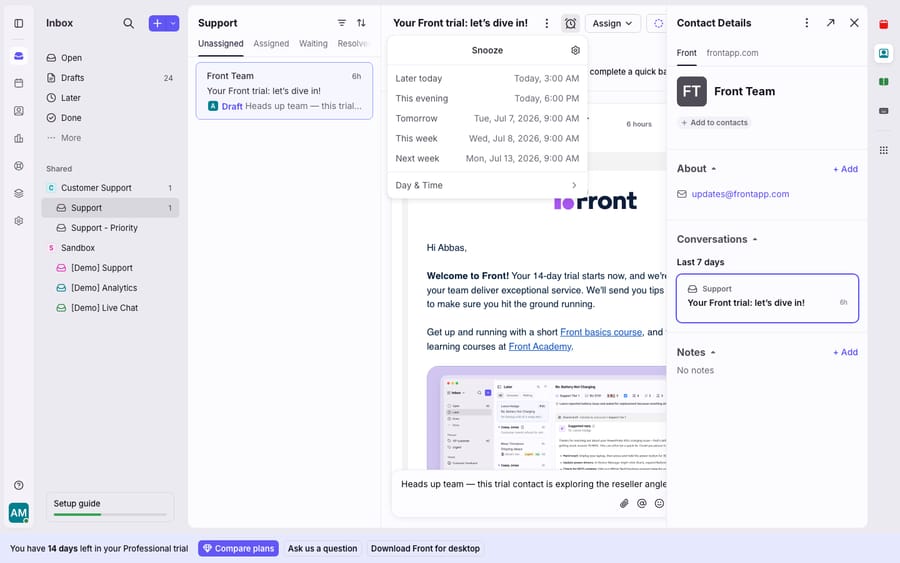
The behavior that makes snooze safe for follow-ups is the auto-cancel: if a recipient replies before your snooze expires, the conversation reopens in your inbox and the snooze automatically cancels. You don't get a stale reminder for something that already resolved itself. And if you still want to keep tracking a thread after it reopens, the Snooze again until… action re-applies the same timing with one click.
Front lists three places to find everything currently sleeping: the Later section in your sidebar, the Snoozed tab in shared inboxes or pinned tags, and a search for is:snoozed. To wake one manually, click the active (orange) clock icon and choose Unsnooze.
How many custom snooze times can you create in Front?
If your team keeps reaching for the same non-standard intervals ("in 3 business days," "start of next quarter"), you don't have to keep building them by hand. Front lets you curate your own snooze menu with up to 34 custom snooze times. You create them from the gear icon → personal settings → Snoozes → Create snooze, and edit any existing option by clicking it. Once saved, they show up in the snooze menu everywhere you snooze, so a whole workflow's worth of timings is one tap away.
Most teams skip this setup step and later wish they hadn't: a shared vocabulary of snooze intervals ("chase in 48h," "quarterly check-in") makes the follow-up habit stick because the right timing is always right there.
What does Send & Snooze do?
The most useful moment to schedule a follow-up is the moment you send a reply, because that's when you know you're now waiting on the other person. Front's composer handles this directly. Per Front's sending options guide, clicking the dropdown arrow next to the Send button exposes several sending modes, including Send Later (scheduled send), Send & Archive, and Send & Snooze.
Send & Snooze "allows you to set a time for the conversation to reopen if your recipient does not reply." So the flow is: you answer the customer, pick a follow-up time, and the conversation disappears until then. If they write back first, the snooze auto-cancels and the thread reopens naturally. If they go quiet, it resurfaces on your chosen date and prompts you to chase. That's the classic "never forget to follow up" pattern, built into the send action itself.
That single button covers most one-off follow-ups. For anything recurring or team-wide, you graduate to rules.
How do you set up an automatic follow-up rule in Front?
Snooze and Send & Snooze depend on a person remembering to set them. Rules remove that dependency. Front's automation engine supports delayed (time-based) rules that watch for conversations going stale and act automatically. That's the difference between a personal reminder and an inbox-wide SLA safety net. Front's help center says time-based rules are available on the Professional plan or above, which front.com/pricing lists at $65 a seat a month billed annually ($85 billed monthly, checked 24 September 2026). Starter, at $25 a seat billed annually, doesn't get them.
The key ingredient is a time-based condition. Per Front's guidance on time-based / delayed rules, you can build a rule around a condition like Oldest message is unreplied after a set duration. A common auto-follow-up rule looks like this:
- When: an outbound message is sent
- If: the oldest message is still unreplied after 2 days
- Then: reply with a "Follow up" template
Now every customer who goes quiet after your reply gets a polite nudge without anyone tracking it manually. Front evaluates the rule's conditions when the timer expires, not when the rule first applies, so a customer who replied on day one never gets the nudge. For a full breakdown of the When/If/Then model these rules are built on, see Front rules explained.
Does snoozing pause a delayed rule's timer?
No. Delayed-rule timers are not affected by snoozing. Front's docs give the example: if an email arrives at 9:00am and you snooze it for 30 minutes (so it reopens at 9:30), a one-hour delayed rule still fires at 10:00 if nobody has replied. The delay clock runs off the original event, not off when the conversation happens to be visible. That's usually what you want (an SLA shouldn't reset just because someone snoozed the thread), but it's a common source of "why did this rule fire early?" confusion.
Rule of thumb: use snooze / Send & Snooze for judgment-based, one-off follow-ups, and delayed rules for the guarantees you never want to depend on human memory. For scheduled multi-touch outreach (not just a single chase), Front's sequences are the dedicated tool.
How do you snooze a conversation through the Front API?
If you're automating follow-ups from an external system, Front exposes snooze directly. Per the Front developer docs, you snooze or unsnooze a conversation with:
PATCH https://api2.frontapp.com/conversations/{conversation_id}/reminders
Authorization: Bearer <API_TOKEN>
Content-Type: application/json

{
  "teammate_id": "tea_55c8c149",
  "scheduled_at": 1775577600
}
A few specifics from the reference: scheduled_at is a Unix timestamp in seconds, must be in the future and within 50 years, and you set it to null to cancel a reminder. For private conversations the teammate_id must be the owner; for shared conversations it can be any teammate with inbox access. The endpoint needs the conversations:write scope and returns HTTP 204 on success. If you're new to Front's API, how to use the Front API covers auth and tokens first.
What can't Front's follow-up tools do, and where does an AI layer help?
Front's follow-up system is good at what it does: snooze, Send & Snooze, custom timings, and delayed rules together mean a disciplined team really can stop dropping threads. That's a native strength, not a gap.
But every one of these tools is about timing, not answering. A snooze puts the conversation back in front of you; it doesn't know what to say. An auto-follow-up rule fires the same fixed template to everyone who trips the condition ("just checking in") regardless of what the customer actually asked. When the thread resurfaces, a human still has to read the history, figure out the state, and write the real reply. And the team-wide piece sits behind a plan tier: delayed rules start at Professional, and the collaborative benefits (a whole team seeing the same snoozed queue) assume you're on shared inboxes with teammates, not a solo seat.
An AI agent layer fills that seam, not by replacing Front's scheduler but by handling the reasoning a timer can't. The broader category of AI agents for customer service exists for the work a timer and a fixed template can't do. Macha is one such layer: it runs on top of the Front you already use through the live Macha–Front connector. It does not replace Front, your inboxes, your snoozes, or your rules. You keep Front doing the timing: snoozing, resurfacing, and enforcing the "chase after N days" safety net. Then when a follow-up reopens, Macha's agent reads the whole conversation, works out what's actually outstanding, and drafts or sends a grounded reply, pulling a real order or account status through a custom tool so the follow-up says something true, not "just checking in."
Macha bills per ticket: one conversation is charged once however many follow-ups it takes, never per resolution, so a thread that reopens twice still costs once. The one plan is priced by ticket volume, starting at $299 a month for up to 750 tickets, with setup and monitoring by the Macha team included. For how this fits the wider workspace, see the Front shared inbox model.
FAQ
How do I snooze a conversation in Front? Three ways: click the clock icon at the top of the open conversation, use the snooze quick action when you hover over a conversation in your list, or use Send & Snooze in the composer when you reply. Then pick a preset time or a custom Day & Time, and the conversation reopens in your inbox at that moment.
What happens if the customer replies before my snooze ends? The conversation reopens in your inbox immediately and the snooze auto-cancels, so you don't get a stale reminder. If you still want to keep tracking it, the "Snooze again until…" action re-applies the same timing with one click.
What's the difference between snooze and Send & Snooze? Plain snooze just reschedules when a conversation reappears. Send & Snooze does it as part of sending a reply: it sets a time for the conversation to reopen only if your recipient doesn't write back, which is the right follow-up trigger since you've just handed the ball to them.
Can Front follow up automatically without me remembering? Yes, with a delayed (time-based) rule on the Professional plan or above. A rule like "when an outbound message is sent, if the oldest message is still unreplied after 2 days, reply with a Follow up template" chases stale threads inbox-wide with no manual tracking. Note that delayed-rule timers aren't paused by snoozing.
Where do I find my snoozed conversations? In the Later section of your sidebar, in the Snoozed tab of a shared inbox or pinned tag, or by searching is:snoozed.
Can I add AI to Front's follow-ups without replacing Front? Yes. An AI agent layer like Macha connects to Front as a live connector and runs on top of your existing inboxes, snoozes, and rules. Front keeps resurfacing threads on schedule; the agent reads the reopened conversation, works out what's still outstanding, and drafts or sends a grounded reply instead of a generic template.
Ready to turn "resurfaced" into "resolved"? Start a free trial of Macha and connect it to your Front in minutes.






