





 Shopify
 Stripe
 Slack
Slack Notion
 Google Workspace
 Confluence

How Does Gorgias Revenue Statistics Attribute Sales to Support?


Gorgias Revenue statistics credits a ticket with a sale when the customer buys within three days of creating it using the same email address. The report needs a connected Shopify store and a Pro, Advanced or Enterprise plan.
Key takeaways
- Gorgias marks a ticket as converted, crediting the order's value to Total sales from support, when the customer buys within three days of creating the ticket using the same email.
- Gorgias Revenue statistics requires a connected Shopify store and is only available on the Pro, Advanced and Enterprise plans, so stores on other platforms or lower tiers see a gated preview.
- A fully refunded order removes its ticket from Gorgias Revenue statistics, while a partial refund keeps the ticket converted and updates the reported value to the new order amount.
- Gorgias Revenue statistics reports Tickets created, Tickets converted, Conversion ratio and Total sales from support, filterable by store, channel, tags and timeframe.
- The three-day window in Gorgias Revenue statistics is fixed, so high-AOV purchases that close after three days are not counted as support-driven revenue.

Gorgias Revenue statistics counts a ticket as converted when the customer buys within three days of creating it, using the same email address as the ticket's customer profile, and adds that order's value to Total sales from support. The report needs a connected Shopify store and a Pro, Advanced or Enterprise plan (Gorgias docs, checked 24 September 2026).
| Question | Answer |
|---|---|
| Attribution window | 3 days from ticket creation, fixed |
| Matching rule | Same email at checkout as on the ticket |
| Store requirement | Connected Shopify store only |
| Plans | Pro, Advanced and Enterprise |
| Full refund | Ticket drops out of the report |
| Partial refund | Ticket stays converted at the new order amount |
| Location | Analytics → Support performance → Revenue |
What does Revenue statistics measure?
Revenue statistics lives inside Gorgias Analytics and answers one question: how much money followed a support conversation? Rather than guessing, Gorgias watches for purchases that happen shortly after a ticket and attributes that order value back to the ticket — and, by extension, to the agent who handled it.
Per the Gorgias Revenue statistics documentation, the report is built from these core numbers:
- Tickets created: the base every conversion figure is measured against.
- Tickets converted — tickets that were followed by a purchase within a defined window (more on that window below).
- Conversion ratio — the percentage of total tickets created that led to a conversion.
- Total sales from support — the cumulative dollar value of every sale made in a converted ticket.
On top of those, Gorgias breaks the data down into sales per day and sales per agent, so you can see which days and which people are pulling in revenue. That per-agent view is what makes the feature politically useful: it turns "support helped" into "Priya's conversations were followed by $12,400 in orders this month."
How does Gorgias attribute a sale to a ticket?
The mechanics are simpler than most attribution models — deliberately so, because Gorgias favors a rule you can explain in one sentence over a black box.
- A customer creates a ticket. Email, chat, SMS, social — any channel Gorgias supports.
- Gorgias watches the connected store for a matching order. The connection is Shopify (revenue reports require a connected Shopify store).
- If that customer purchases within three days of the ticket being created, the ticket is marked "converted." Per the helpdesk documentation, "a ticket is considered converted if the customer makes a purchase within three days of creating the ticket."
- The order's value is added to Total sales from support, and the ticket rolls into the converted count for the relevant agent, channel, and day.
The matching hinges on identity. Gorgias only credits a ticket when the customer uses the same email address at checkout as the customer profile attached to the support ticket. No shared email, no attribution — which, as we'll see, is where a chunk of real revenue quietly leaks out of the report.
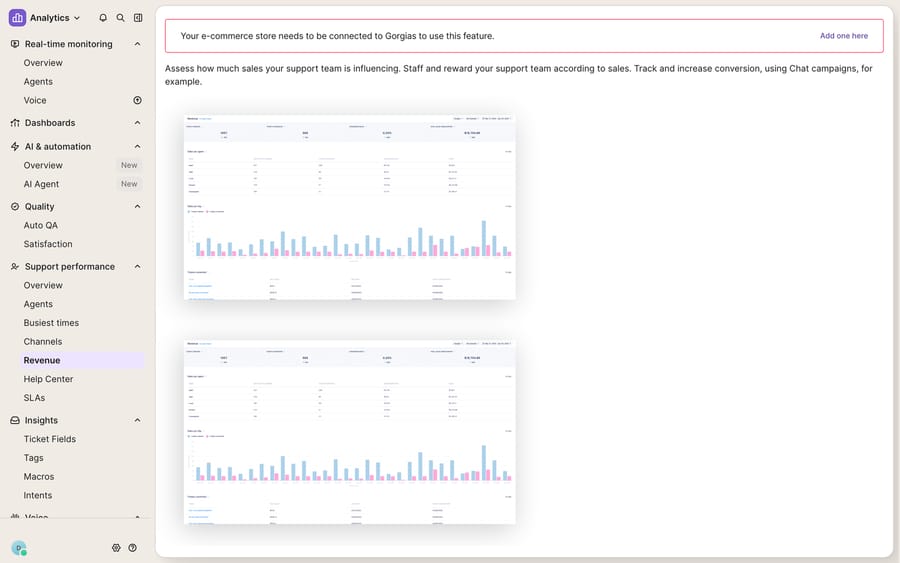
Where do you find the Revenue report, and how do you read it?
The report is a few clicks from anywhere in the help desk. From the main view, open the dropdown menu in the top-left, then go to Analytics → Support performance → Revenue. If your store isn't connected yet, you'll see exactly what the screenshot above shows: a "connect your store" banner sitting over preview charts, with no real data behind it.
Once a Shopify store is connected, you can slice the data with the filters in the top-right corner:
| Filter | What it does |
|---|---|
| Store | Isolate revenue by connected storefront (useful for multi-store setups) |
| Channel | Compare chat vs email vs SMS conversion — often the most revealing cut |
| Tags | See which ticket types (returns, pre-sales, sizing) actually convert |
| Timeframe | Compare a promo week against a baseline, or month over month |
The channel and tags filters are where the insight lives. If pre-sales chats convert at 3× the rate of email returns, that's a staffing and live-chat argument you can make with numbers instead of vibes. Revenue statistics is one panel inside the broader analytics suite — for the response-time and volume side, see Gorgias stats and reporting explained.
How does Gorgias handle refunds in Revenue statistics?
Attribution that ignored refunds would flatter the numbers, so Gorgias adjusts after the fact. Two rules matter:
- Full refund: if an order that was attributed to a converted ticket is fully refunded, that ticket is removed from the report entirely — it no longer counts as converted, and its value drops out of Total sales from support.
- Partial refund: if the order amount is updated (for example, a partial refund or an edited order), "the new amount will always be reflected in the report." The ticket stays converted, but the dollar figure follows the corrected order value.
That's a genuinely honest touch. It means the number you show in a QBR is closer to net support-driven revenue than a naive "tickets followed by a click" metric would be.
Where does Revenue statistics break down?
Revenue statistics is a smart, well-built native feature, and for a Shopify store on the right plan it's one of the best reasons to run support inside Gorgias rather than a generic help desk. But be clear-eyed about its boundaries before you present its numbers as gospel.
It's Shopify-and-Pro gated. Revenue reports require a connected Shopify store, and the feature is only available on the Pro, Advanced, and Enterprise plans. If you're on the Starter tier, or your store runs on a platform other than Shopify, this dashboard is simply the gated placeholder in the screenshot above. That's the single biggest caveat: a large slice of Gorgias's own customer base can't use it at all.
It's correlation, not causation. The three-day rule attributes any purchase within the window, whether or not the support conversation actually influenced it. A customer who emails about a delayed order and happens to reorder a consumable two days later gets counted — even though support didn't "drive" that sale in any meaningful sense. The metric is a directional signal, not a clean incrementality measurement.
Email mismatches leak revenue. Because attribution requires the same email on the ticket and the order, guest checkouts under a different address, purchases made from a second email, or conversations where the shopper never left an email at all will silently fail to convert in the report. Your real support-influenced revenue is almost always higher than the dashboard shows.
The three-day window is fixed. Considered purchases — furniture, high-AOV goods, anything with a long deliberation cycle — routinely close outside three days, and Revenue statistics won't catch them. For a store with a long consideration window, the feature systematically undercounts.
It measures the outcome, not the work. The dashboard tells you a chat converted; it does nothing to make the next one convert. Answering the pre-sales question in seconds, surfacing the right product, checking stock, quoting a discount — that's the labor that turns a browsing shopper into a converted ticket, and it still falls entirely on your agents.
Where does an AI layer fit alongside Gorgias?
That last limit is the seam worth thinking about. Revenue statistics is a measurement tool; it can't do the reasoning-and-response work that actually produces conversions. The category of AI agents for customer service exists to do exactly that job, and if you're new to the platform underneath it all, what Gorgias is is a good primer.
Macha is an AI agent layer that runs on top of the Gorgias you already use — the Macha–Gorgias connector is live, and it is a layer, never a replacement for your help desk. Connected to Gorgias, Macha reads and writes the same tickets Revenue statistics is watching, and it works the pre-sales moment where conversion happens: answering sizing, shipping, and product questions instantly on chat; looking up live order status, inventory, and account data through a custom tool that turns your store's REST API into something the agent can call (see how to use the Gorgias API if you're wiring your own); and handing off cleanly to a human when the conversation needs one. Because Macha operates inside the same ticket, the resulting purchase is still attributed by Gorgias — you get more converted tickets and keep the native reporting that proves it. Macha bills per ticket — one conversation, charged once however many messages it takes — not per resolution and not per attributed sale; the pricing page has the breakdown.
The clean division of labor: let Gorgias Revenue statistics stay the source of truth for how much revenue support drove, and let an AI layer on top do the part the dashboard can't — actually driving more of it.
FAQ
How does Gorgias decide a ticket "converted"? Gorgias marks a ticket as converted when the customer makes a purchase within three days of creating the ticket, using the same email address at checkout as the customer profile attached to the ticket. The order's value is then added to Total sales from support.
What do the main metrics mean? Tickets converted is the count of tickets followed by a qualifying purchase. Conversion ratio is the percentage of created tickets that converted. Total sales from support is the cumulative dollar value of every sale made in those converted tickets. Gorgias also breaks revenue down per day and per agent.
Do I need Shopify and a paid plan? Yes. Revenue statistics requires a connected Shopify store and is available on the Pro, Advanced, and Enterprise plans. Without a connected store you'll only see the gated preview.
How are refunds handled? A fully refunded order removes its ticket from the report entirely. A partial refund (or any order-amount update) is reflected by adjusting the dollar value to the new order total, while the ticket stays counted as converted.
Can I add AI to my Gorgias revenue workflow without replacing Gorgias? Yes. An AI agent layer like Macha connects to Gorgias as a live connector and runs on top of your existing help desk. It answers pre-sales questions and pulls live store data to help convert more tickets, while Gorgias stays the system of record and its Revenue statistics keeps the credit.
Ready to turn more support conversations into attributed sales? Start a free trial of Macha and connect it to your Gorgias in minutes.






