





 Shopify
 Stripe
 Slack
Slack Notion
 Google Workspace
 Confluence

Is Gorgias a CRM? What Data Lives on the Contact, Shopify and the Ticket


Gorgias is a lightweight CRM at most: only the contact profile, with up to four active customer fields, follows a shopper from ticket to ticket. Order data is read live from Shopify, and tags and ticket fields describe a single conversation.
Key takeaways
- Gorgias stores customer data in three places: the persistent contact profile, Shopify order data shown live in the sidebar, and ticket-scoped tags and fields.
- Gorgias allows a maximum of four active customer fields at a time, in four types: Yes/No, Dropdown with up to five nesting levels, Number, and Text capped at 2,000 characters.
- Gorgias Shopify Actions let agents edit orders placed within the last 60 days in the store's currency, plus cancel, refund and duplicate orders without leaving the ticket.
- Gorgias AI Agent costs $0.90 per resolved conversation on most plans and from $1 on Starter ($1.00 monthly, $0.90 annual), and each AI interaction also counts as a helpdesk ticket.
- Gorgias tags and ticket fields describe one conversation and do not carry to the customer's next ticket, while customer fields stay attached to the person.

Gorgias keeps customer data in three places: the contact (persistent identity plus up to four active customer fields), Shopify (orders, tracking and refunds, shown live in the ticket sidebar but owned by Shopify), and the ticket (status, ticket fields and tags, scoped to one conversation). Only the contact follows a customer from ticket to ticket, which makes Gorgias a lightweight CRM at most.
| Data | Lives in / scope | Persists across tickets? | System of record |
|---|---|---|---|
| Name, email, phone, channels | Contact | Yes | Gorgias |
| Customer fields (VIP, size, tier) | Contact (max 4 active) | Yes | Gorgias |
| Customer note | Contact | Yes | Gorgias |
| Order history, status, tracking | Shopify (shown in sidebar) | N/A (live read) | Shopify |
| Lifetime spend, fulfillment, refunds | Shopify | N/A (live read) | Shopify |
| Ticket status, assignee, channel | Ticket | No | Gorgias |
| Ticket fields | Ticket | No | Gorgias |
| Tags | Ticket | No | Gorgias |
Where does customer data live in Gorgias?
Gorgias organises customer data into three distinct scopes, and each one behaves differently.
The contact (customer profile). This is the closest thing Gorgias has to a CRM record. It holds identity data (name, email, phone, channels the customer has reached you on) plus customer fields and a note, and it persists across every ticket that customer ever opens. It is the layer that answers "who is this person, across all their conversations?"
Shopify (the store). For an ecommerce team, the most valuable data (order history, fulfillment status, tracking numbers, refunds, lifetime spend) does not live in Gorgias at all. It lives in Shopify and is rendered inside the ticket sidebar through the integration. Gorgias is a window onto that data, not its owner.
The ticket. Everything scoped to a single conversation: the ticket's status, assignee, channel, ticket fields, and its tags. This layer is disposable in a sense: it describes one interaction, not the person. Close the ticket and this data stays attached to that ticket, not to the customer going forward.
If you are still fuzzy on how Gorgias fits together at all, the what-is-Gorgias overview sets the foundation; this piece assumes you know the helpdesk basics and want the data model.
What lives on the Gorgias contact profile?
The contact is where Gorgias behaves most like a lightweight CRM. The signature feature here is customer fields: properties you attach to the person rather than the conversation.
Per the Gorgias Create and manage customer fields documentation, the defining trait is persistence: "Customer fields stay with your customer from ticket-to-ticket." That is the exact opposite of ticket fields and tags, which are bound to a single conversation. Practical uses are things that are true about the human, not the ticket: VIP or wholesale status, a loyalty tier, a ring size, an allergy, a preferred contact channel.
The constraints are worth committing to memory, because they force real prioritisation:
- A maximum of four active customer fields at a time. To add a fifth, you have to archive an existing one. Gorgias is deliberately steering you toward a few durable attributes, not a sprawling CRM schema.
- Four field types: Yes/No, Dropdown (which supports up to five nesting levels), Number, and Text (with a 2,000-character limit).
- Admins create them; all roles can fill them in. You manage the whole set at Settings → Ticket & Customer data → Customer Fields.
Because there are only four slots, choose fields you will actually automate or segment on: a "Customer Type" dropdown that a rule or view can filter by is worth far more than a free-text field nobody reads. Dropdown values nest with a double colon (for example Wholesale::EU). This customer profile is the surface where all of it comes together.
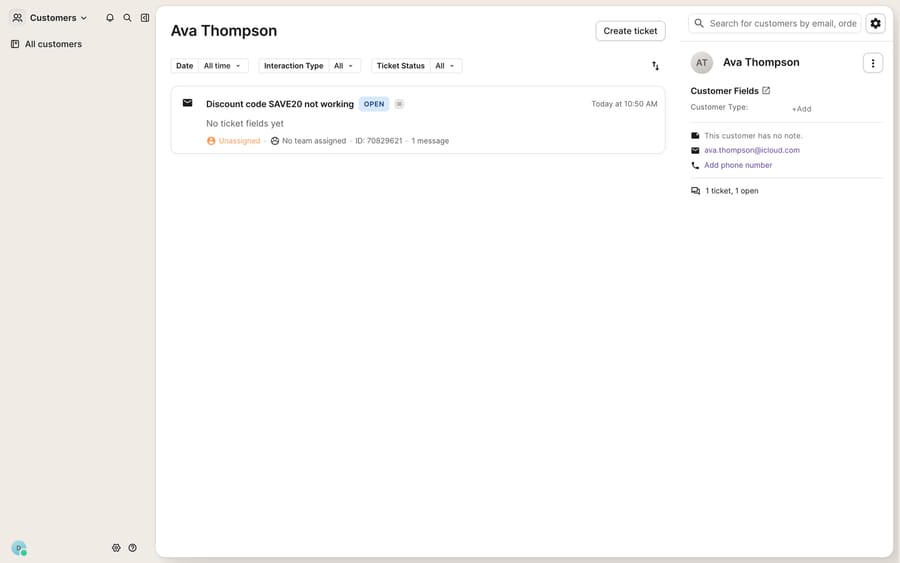
Notice what is not on that profile in the screenshot: any order history, spend, or tracking. That absence is the whole point of the next section: order data only appears once a store is connected, and even then it is not Gorgias's data.
Which data comes from Shopify, and can agents change it?
For a Shopify merchant, the sidebar is where the magic appears to happen. Connect the store and, as the Gorgias Shopify integration docs put it, "you'll see their profile and orders in the sidebar on the right-hand side of each ticket." Order status, fulfillment, tracking numbers, and refund history render right next to the conversation, so an agent answering "where's my order?" never has to open a second tab.
The critical mental model: this is a live read from Shopify, not a copy stored in Gorgias. The order of record is Shopify's. Gorgias displays it and, through Shopify Actions, lets agents write back to it. According to the Shopify Actions documentation, agents can, without leaving a ticket:
- Create, duplicate, cancel, and refund orders (with restock and custom refund amounts).
- Edit orders placed within the last 60 days, in the store's currency (archived orders can't be edited).
- Check remaining stock for a product.
- Create draft orders for the customer to complete.
- Manage customer and order tags that sync straight back to Shopify.
- Edit the shipping address and insert product links as clickable cards.
That write-back is genuinely powerful, but it is also where the "is Gorgias a CRM?" question gets slippery. Gorgias is not the system of record for commerce data; Shopify is. Gorgias is the support surface on top of it. Which is exactly why the boundary matters for the third layer.
What stays on the ticket and disappears after it closes?
The ticket is the conversation-scoped layer, and the easiest one to confuse with the contact. Two things live here that people constantly mis-file:
Tags describe this conversation: "refund," "shipping-delay," "vip-escalation." They are the backbone of reporting and automation, and they're conversation-scoped by design, which is why the Gorgias tags guide treats them as a categorisation tool, not a customer attribute. If a fact is true about the person (they're a wholesaler), it belongs in a customer field; if it's true about the ticket (this one's a refund), it belongs in a tag.
Ticket fields capture structured data about the interaction: reason, sub-category, channel. Like tags, they don't travel with the customer to the next ticket.
Getting this split right is the difference between clean segmentation and a mess. Everything the agent sees (contact on the profile, orders from Shopify, tags on the ticket) is assembled in the sidebar, which is worth understanding in its own right via the Gorgias customer sidebar breakdown.
Where does Gorgias stop working as a CRM?
Gorgias's native data model is well-designed for support. The customer profile gives agents durable context, the Shopify sidebar removes tab-switching, and tags make reporting tractable. Credit where it's due. But there are real edges.
The four-field ceiling is a real cap. If your idea of a CRM includes a dozen segmentation attributes per customer, Gorgias's four active customer fields will feel tight. It's a deliberate choice to keep the profile lean, but it means Gorgias is not where a rich, many-attribute customer profile should live. That's a true CRM's job.
Commerce data is Shopify-first, and so is the AI. The Shopify Actions described above are Shopify's; other store integrations are gated by plan on the Gorgias pricing page (BigCommerce from Basic, Magento from Pro). Gorgias's AI Agent docs describe it as "purpose-built for Shopify ecommerce brands", trained on your Shopify orders, customers and products. It is also billed separately: per Gorgias's AI Agent pricing, each resolved conversation costs $0.90 on most plans and from $1 on Starter ($1.00 on monthly plans and $0.90 on annual, per its pricing FAQ in October 2026), and each AI interaction also counts as a helpdesk ticket. A non-Shopify merchant gets a thinner sidebar and less for the AI to work with.
Reading data is not the same as acting on it. The sidebar shows an agent the order; it doesn't write the reply, decide the refund, or reconcile the customer field with what the shopper is actually asking. Every one of those is still human work.
That last gap is precisely where an AI agent layer fits. The category of AI agents for customer service exists to do the reasoning across these three data layers (read the contact, pull the live Shopify order, understand the ticket) and produce the answer. Macha is one such layer: it runs on top of your Gorgias via a native connector (the Macha–Gorgias integration is live; Gorgias is one of the six help desks Macha runs on) and never replaces the helpdesk. It reads the same contact and ticket data your agents see, reaches order and account status through a custom tool that turns a REST API into something the agent can call, and drafts or sends the grounded reply. It works whether or not your store is on Shopify: Macha has a Shopify connector, and for other carts the tool points at wherever the commerce data actually lives. And Macha bills per ticket, one conversation charged once however many messages it takes, from $299 a month for up to 750 tickets; the pricing page has the tiers. If you want to wire into that data programmatically yourself, the how-to-use-the-Gorgias-API guide covers the endpoints.
The clean division of labour: let Gorgias hold the support-scoped data model (contact, sidebar, tags) and let an agent layer do the cross-layer reasoning and writing that a data model, by itself, never can.
FAQ
Is Gorgias a CRM? Partly. The contact/customer profile behaves like a lightweight CRM: it holds persistent identity data, up to four customer fields, and a note that follow the customer across tickets. But it is not a full CRM: commerce data (orders, spend, fulfillment) lives in Shopify and is only displayed in Gorgias, and the four-field cap keeps the profile deliberately lean.
What's the difference between a customer field and a tag in Gorgias? Scope. A customer field is attached to the person and persists from ticket to ticket (VIP status, ring size). A tag is attached to a single conversation and describes that ticket (refund, shipping-delay). If a fact is true about the human, use a field; if it's true about the ticket, use a tag.
How many customer fields can I have in Gorgias? A maximum of four active customer fields at a time, in four types: Yes/No, Dropdown (up to five nesting levels), Number, and Text (2,000-character limit). To add a fifth, archive an existing one. You manage them at Settings → Ticket & Customer data → Customer Fields.
Does Shopify order data live in Gorgias or in Shopify? In Shopify. Gorgias renders order status, tracking, fulfillment, and refunds live in the ticket sidebar and lets agents write changes back via Shopify Actions, but Shopify remains the system of record for all commerce data.
Can I add AI across these data layers without replacing Gorgias? Yes. An AI agent layer like Macha connects to Gorgias as a native connector and runs on top of your existing helpdesk. It reads the contact, ticket, and (via a custom tool) order data, then drafts or sends the reply, while Gorgias stays the source of truth for the support data model.
Ready to put your Gorgias data to work instead of just displaying it? Start a free trial of Macha and connect it to your Gorgias in minutes.






