





 Shopify
 Stripe
 Slack
Slack Notion
 Google Workspace
 Confluence

Front Tags vs Statuses vs Assignment: What's the Difference? (2026)


A Front conversation carries tags for what it is about, one status for where it sits in your workflow, and an assignment for who owns it. Teams that treat all three as one pile of labels end up with cluttered inboxes and reports that do not add up.
Key takeaways
- In Front, a conversation can carry many tags at once but has exactly one status (open, snoozed, archived, trash or spam), while assignment tracks a single owning teammate.
- Front counts actions in archived conversations toward team analytics and shows them in search by default, while trashed conversations are ignored by analytics and hidden from default search.
- Front's sidebar can display up to 500 tags, and a lock symbol marks private tags that work as personal folders without affecting other teammates.
- An archived Front conversation reopens automatically when new activity arrives, moving from the Archived tab back to the Open tab so a customer reply is never lost.
- Company tags shared across every Front workspace are an Enterprise-plan feature, and Front's Starter plan costs $25 a seat billed annually for up to 10 seats.

In Front, a tag says what a conversation is about (it can carry many), a status says where it sits in your workflow (exactly one of open, snoozed, archived, trash or spam), and assignment says who owns it (one teammate, or unassigned). The three are independent, and Front's shared-inbox tabs filter by status and assignment at the same time.
| Axis | Answers | Possible values | Can a conversation have more than one? |
|---|---|---|---|
| Tag | What is it about? | Any label (billing, bug, VIP…) | Yes, many at once |
| Status | Where is it in the workflow? | Open, snoozed, archived, trash, spam | No, exactly one |
| Assignment | Who owns it? | A teammate, or unassigned | One assignee (per copy) |
How do tags, statuses and assignment differ?
The cleanest way to think about a Front conversation is that it lives at the intersection of three independent questions.
Tags answer "what is this about?" A tag is a label — billing, bug, refund, VIP — that you attach to a conversation to categorize or file it. Tags are orthogonal to everything else: a conversation can be tagged "refund" whether it is open or archived, assigned or unassigned.
Status answers "where is this in my workflow?" Open, snoozed, archived, trash, spam. Status is a single state — a conversation is in exactly one of them at a time. It is the difference between "I need to deal with this now," "later," and "done."
Assignment answers "who owns this?" A conversation can be assigned to a specific teammate or left unassigned for the team to pick up. Assignment is the accountability layer of a Front shared inbox — it is how a group mailbox stops being a free-for-all.
Keep those three questions distinct and the whole system clicks. Tags describe, status sequences, assignment owns.
What is the difference between private and shared tags?
Front has two flavours of tag, and the difference matters more than people expect. Per Front's guide to using tags to label and file conversations, private tags act as personal folders visible only to you — filing a conversation in a private tag does not affect what anyone else sees. Every conversation in your main inbox even carries a default private Inbox tag, which is automatically removed once you file the conversation under another private tag. That is why "moving" something to a folder in Front is really just a tag swap under the hood.
Shared tags, by contrast, are team-wide labels. When one teammate tags a shared conversation "escalation," everyone working that inbox sees it. Shared tags are the ones you build reporting and rules around, because they carry the same meaning for the whole team.
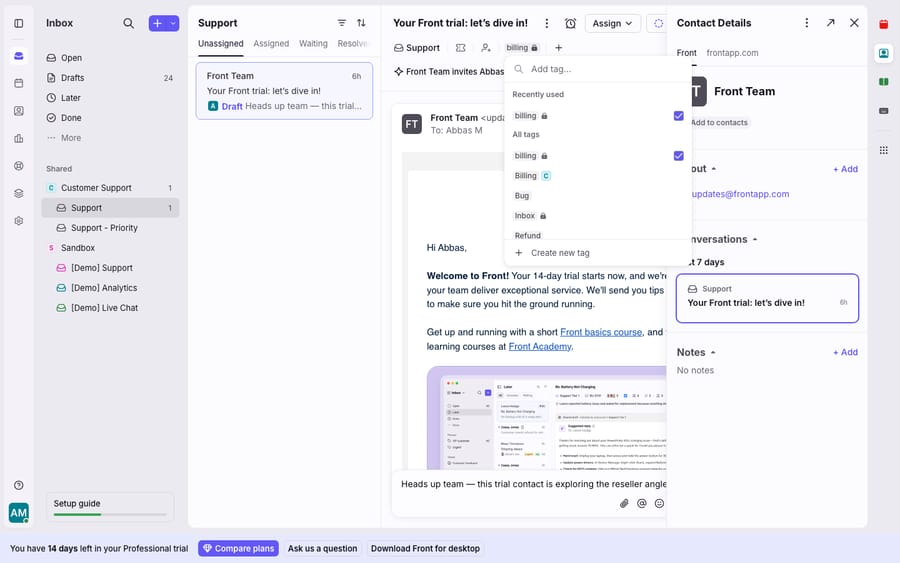
You can add a tag by hand from the conversation header (the tag menu shown above), drag a conversation onto a tag in the sidebar, or let a rule apply it automatically on inbound. Front's sidebar supports up to 500 tags, and a lock symbol marks the private ones so you never confuse a personal folder with a team label.
What do Front's five statuses mean?
Status is where most "why can't I find this conversation?" confusion comes from, so it is worth being precise about each state.
- Open: the conversation needs attention. It is your to-do list. In a shared inbox, open conversations are the ones the team is actively responsible for.
- Snoozed: hidden until a chosen wake time (or until new activity arrives). Front's inbox sections file snoozed items under a "Later" view: not resolved, but not something you are actively working right now.
- Archived: done. Per Front's guide to archiving, archiving moves a conversation out of your Open tab and into the Archived tab — "tasks you've checked off." Crucially, if new activity arrives on an archived conversation, it automatically reopens. You never lose a customer reply by archiving.
- Trash: removed. Trashed conversations are deleted from normal view.
- Spam: flagged by your email provider or by a teammate.
The archived-vs-trashed distinction is the one to internalize, because it has real analytics consequences (more on that below): archived conversations count toward team analytics and appear in search by default; trashed ones do not count and require an explicit filter to surface.
How do the three combine in shared-inbox tabs?
Here is where tags, status, and assignment stop being abstract and become the tabs your team clicks all day. Per Front's guide to inbox tabs, a shared inbox can be configured two ways, and the key insight is that its tabs filter by status and assignment at the same time.
- Split view (default): separate Unassigned and Assigned tabs. The Assigned tab shows conversations that are assigned and still open; Unassigned shows conversations that are open and not yet claimed. Then Snoozed, Archived, Trash, and Spam filter by status.
- Combined view: a single Open tab that merges assigned and unassigned into "all unarchived conversations," with the same Snoozed/Archived/Trash/Spam tabs alongside.
Each teammate picks the view they prefer under Settings gear → Personal settings → Preferences → Shared inbox tabs. The choice only changes their own interface, not the underlying data, and the inbox counters update to match. Tags then cut across all of these: a saved view or sidebar tag can show you every "refund" conversation regardless of which tab it currently lives in.
How does each axis affect Front analytics?
Because the three axes are independent, they show up differently in reporting — and mixing them up quietly distorts your numbers.
Status drives your volume and resolution metrics. Archiving is the signal Front reads as "handled": Front's archiving guide says actions in archived conversations are factored into team analytics while activity in trashed ones is ignored, so if your team trashes conversations they have actually resolved instead of archiving them, your resolved-volume numbers will read artificially low. Trash is for genuine noise, not for closing tickets. This is the single most common way a Front report ends up wrong.
Tags drive your categorical breakdowns. If you want to know how many billing questions came in this month, that is a tag-based report — which is exactly why shared (not private) tags are the ones to standardize on. Private tags are invisible to team analytics, so a teammate quietly filing things under a personal folder contributes nothing to the shared picture.
Assignment drives your per-teammate workload. Who is handling what, and who is overloaded, is an assignment question — separate from how many of those conversations happen to be tagged "refund."
The takeaway: report on status for throughput, on tags for topic, and on assignment for workload. Conflate them and the dashboard lies.
Where does Front's organizing system stop?
This three-axis system is genuinely good. It is simple, it is consistent, and it scales from a two-person team to a large support org without breaking. Nothing here needs replacing.
But notice what it can and cannot do. Every one of these axes is descriptive, not resolving. A tag records that a conversation is about billing; it does not answer the billing question. A status of "open" records that something needs a human; it does not do the work. Assignment records whose job it is; it does not make the reply any faster. The organizing system is a filing cabinet, not an assistant — it puts the right folder in the right person's hands and then waits.
There is also plan and structure friction worth naming. Shared tags can be managed only by company admins or users with workspace permissions, and company tags (tags shared across every workspace) are an Enterprise-plan feature per Front's tags guide. Front's plans run from Starter at $25 a seat billed annually (up to 10 seats) to Professional at $65 (up to 50 seats) and Enterprise at $105, annual billing only. Collision-avoidance features only matter once teammates actually share an inbox. None of that is a knock on Front; it is just where the native product draws its lines. Front's own team inboxes model covers those boundaries in detail.
This descriptive-versus-resolving gap is exactly the seam where an AI agent layer fits. The category of AI agents for customer service exists to do the reasoning work a label cannot. Macha is one such layer: it runs on top of the Front you already use through the live Macha–Front connector — it does not replace Front, your tags, your statuses, or your assignment logic. You keep those axes doing what they do best: describing, sequencing, and owning. Then Macha's agent reads an open, tagged, assigned conversation, understands the intent behind it rather than the label on it, and drafts or sends a grounded reply — pulling a real order or account status through a custom tool that turns your REST API into something the agent can call. A tag says "billing"; the agent actually resolves the billing question and lets the conversation archive itself. Macha bills per ticket: one conversation, charged once however many messages it takes, never per resolution. Plans start at $299 a month for up to 750 tickets.
The clean division of labour: let Front's tags, statuses, and assignment be the organizing system they are excellent at being, and layer an agent on top for the part a label can never do — reading the conversation and answering it. For how the pieces fit together, see Front tags explained and the wider Front shared inbox model.
FAQ
What is the difference between a tag and a status in Front? A tag describes what a conversation is about (billing, bug, VIP) and a conversation can have many at once. A status describes where the conversation is in your workflow — open, snoozed, archived, trash, or spam — and a conversation has exactly one status at a time. They are independent: a conversation can be tagged "refund" whether it is open or archived.
What is the difference between archiving and trashing a conversation? Archiving marks a conversation as done and moves it to the Archived tab; it still counts toward team analytics and appears in search by default, and it auto-reopens if new activity arrives. Trashing removes a conversation from normal view, excludes it from analytics, and requires an explicit filter to find in search. Archive resolved work; trash only genuine noise.
What is the difference between snoozed and archived? Snoozed means "not now, remind me later" — the conversation is hidden until a chosen wake time or until new activity arrives, then it resurfaces as open. Archived means "done" — it stays out of your Open tab unless a customer replies. Snooze is for deferral; archive is for completion.
How do assignment and status work together in shared-inbox tabs? Front's shared-inbox tabs filter by both at once. In the default split view, the Assigned tab shows conversations that are assigned and still open, while Unassigned shows open conversations no one has claimed. You can switch to a combined Open tab under Settings gear → Personal settings → Preferences → Shared inbox tabs.
Can I add AI to Front without changing my tags and statuses? Yes. An AI agent layer like Macha connects to Front as a live connector and runs on top of your existing inboxes, tags, statuses, and assignment — it does not replace them. Your organizing system keeps describing, sequencing, and owning; the agent reads the routed, tagged conversation, understands intent, and drafts or sends a grounded reply.
Ready to turn "open and tagged billing" into "answered and archived"? Start a free trial of Macha and connect it to your Front in minutes.






