





 Shopify
 Stripe
 Slack
Slack Notion
 Google Workspace
 Confluence

Front vs Zoho Desk (2026): Which Is Better for Your Support Team?


Zoho Desk is the budget pick at $7 to $40 per agent a month billed annually, while Front charges $25 to $105 per seat for a collaborative, email-first shared inbox. Choose by how your team works: threads and shared drafts point to Front, queues, SLAs and self-service point to Zoho Desk.
Key takeaways
- Zoho Desk costs $7, $14, $23 or $40 per agent a month billed annually and has a free plan for 3 users, so its top tier undercuts Front's entry price.
- Front charges $25, $65 or $105 per seat a month billed annually, with Starter capped at 10 seats and 10 automation rules and Professional at 50 seats and 20 rules.
- Front's Copilot and Smart QA cost $20 per seat a month each below Enterprise, and Autopilot, the autonomous resolver, starts at $0.05 per conversation.
- Zoho Desk's Blueprints feature, a visual stage-based process builder, starts on the Professional plan, and telephony also starts there.
- Front suits email-first teams that collaborate inside threads, while Zoho Desk suits support teams that want structured tickets, SLAs and a self-service portal.

Zoho Desk is the cheaper choice at $7 to $40 per agent a month billed annually, with a free plan for 3 users, while Front costs $25, $65 or $105 per seat a month billed annually and buys a collaborative, email-first shared inbox rather than queue-based ticketing. Pick Front if your team lives in email threads and works on replies together; pick Zoho Desk if you want structured tickets, SLAs and a self-service portal on a budget, or already run Zoho.
How do Front and Zoho Desk compare at a glance?
| Front | Zoho Desk | |
|---|---|---|
| Best for | Email-first teams who collaborate inside threads (sales, agencies, success, ops) | Budget-conscious support teams that want structured ticketing, especially Zoho users |
| Pricing (annual) | Starter $25, Professional $65, Enterprise $105 per seat/month | Express $7, Standard $14, Professional $23, Enterprise $40 per agent/month; Free for 3 users |
| Shared-inbox / collaboration depth | Deep: comments, @mentions, shared drafts, collision detection built into the inbox | Present but ticket-shaped: internal notes and agent collision, less of an inbox feel |
| Automation | When/If/Then rules, capped by plan (10 → 20 → unlimited) | Workflows and macros; Blueprints (visual process automation) from Professional |
| Channels | Email, chat, SMS, social, WhatsApp, voice in one inbox | Email, social, web forms, community, live chat from Standard, telephony from Professional |
| Standout strength | Collaborative email experience plus AI add-ons | Lowest entry price plus structured lifecycle and self-service portal |
How much do Front and Zoho Desk cost?
Pricing is where the two approaches show most clearly, so start with the numbers, checked on both vendor pages on 24 September 2026.
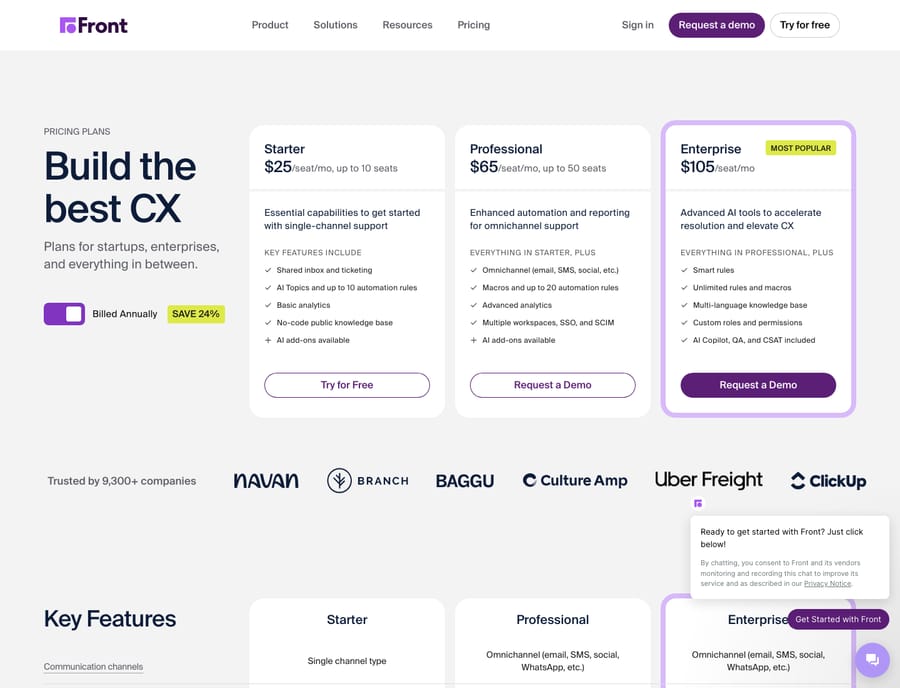
Front publishes three seat-based tiers on its pricing page: Starter is $25, Professional $65, and Enterprise $105 per seat per month billed annually (Front says annual billing saves 24%). Starter caps you at 10 seats and 10 automation rules; Professional allows up to 50 seats and 20 rules; Enterprise removes the rule cap and includes Copilot, Smart QA and Smart CSAT. Below Enterprise, AI is add-on: Copilot and Smart QA are $20 per seat a month each, Smart CSAT is $10, and Autopilot (the autonomous resolver) starts at $0.05 per conversation. Our Front pricing explained breakdown walks through what unlocks where.
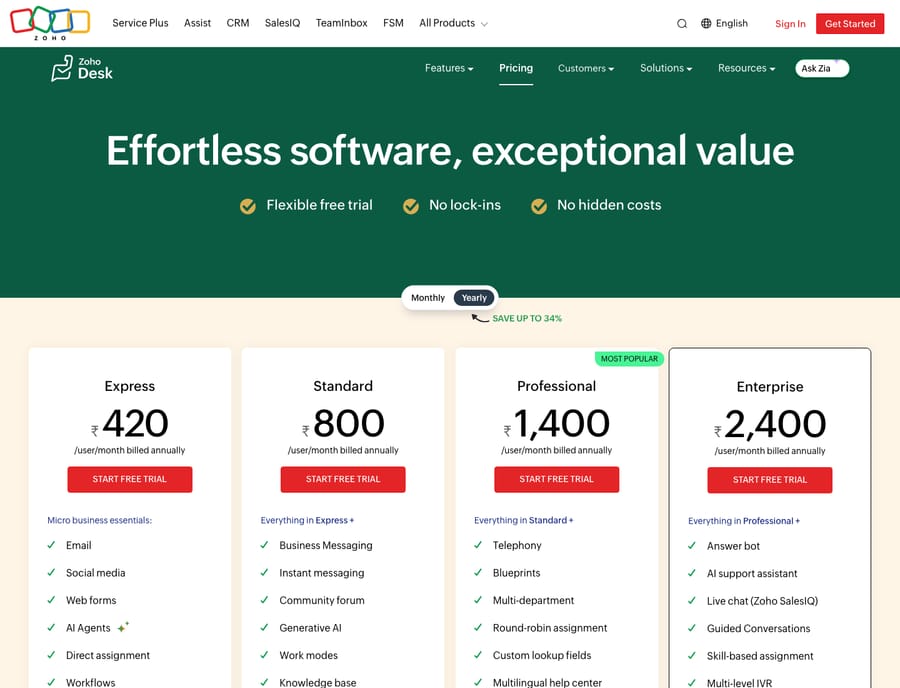
Zoho Desk is the budget option by a wide margin. Its pricing page lists Express, Standard, Professional and Enterprise, plus a free plan with 3 user licenses. The page geolocates: the screenshot below was captured from India, so it shows INR (₹420 / ₹800 / ₹1,400 / ₹2,400 per user a month billed annually). Zoho's own USD price list puts the same tiers at $7, $14, $23 and $40 per agent per month billed annually, or $9, $20, $35 and $50 billed monthly. Zoho's top tier undercuts Front's entry tier, and Front has no free plan to match Zoho's.
The honest read: if seat cost decides it, Zoho Desk wins. Front's price buys a different product, a collaborative inbox with paid AI options, rather than the same thing for more money. Prices change, so re-check both vendor pages before you buy.
Which has the better shared inbox and collaboration?
This is Front's home turf. Every email, chat, SMS, social DM and WhatsApp message lands in a shared inbox that behaves like a real inbox: you reply where you read, and collaboration is native. Internal comments, @mentions, shared drafts, assignment and collision detection sit inside the conversation, so teammates can work out a reply privately before it goes to the customer. Front's shared inbox model is the strongest in this pairing, and it's why account managers, agencies and success teams gravitate to it. For the wider tour, what Front actually is covers it.
Zoho Desk has collaboration (internal notes, agent collision alerts, team feeds and @mentions), but it's ticket-shaped rather than inbox-shaped. You work a queue of tickets with statuses and owners, not a threaded inbox you live in all day. For support teams that think in tickets and SLAs, that's a feature. For a team that lives in email and wants collaboration inside the thread, Front feels more natural.
How do their automation and rules compare?
Front automates with a When / If / Then rule model plus macros, but the rule count is capped by plan: 10 on Starter, 20 on Professional, and unlimited on Enterprise. The more advanced actions (load balancing, dynamic variables, webhooks) sit on higher tiers. It's predictable and easy to reason about, but a busy team can hit the ceiling on lower plans.
Zoho Desk brings heavier machinery. Beyond workflows and macros, its Blueprints feature, available from the Professional plan, is a visual, stage-based process builder that enforces how a ticket moves through your lifecycle. It suits teams with defined, compliance-driven processes. Round-robin and skill-based assignment, multi-level escalations and SLA automation are spread across the paid tiers (Zoho Desk pricing). If your bottleneck is process enforcement, Zoho's automation goes deeper; if it's routing and tagging email fast, Front's rules are simpler to live with.
Which channels does each support?
Both are omnichannel, with different centers of gravity. Front funnels email, chat, SMS, social, WhatsApp and voice into one shared inbox, and every channel feels like the same collaborative surface. Zoho Desk connects email, social, web forms, live chat, community forums and telephony, but not all at once: live chat starts on Standard, telephony on Professional, and Zoho SalesIQ and IVR on Enterprise. Zoho also leans harder into self-service: knowledge base, multi-brand help centers and community forums are first-class, whereas Front's knowledge base is lighter.
Which is easier to set up and learn?
Front is widely praised for feeling familiar on day one: if your team knows email, they know Front, and onboarding is fast. Zoho Desk is more capable but heavier. Reviewers often describe the interface as "cluttered" or the learning curve as steep, especially once you turn on Blueprints, multi-department routing and the wider Zoho integrations (eesel comparison). The depth pays off for teams that invest in setup; it just asks more of you upfront than Front does. Zoho offers a 15-day free trial with no card, which is enough time to test that curve.
What are the pros and cons of each?
Front, pros: collaborative email inbox; native comments, shared drafts and collision detection; AI options from assistive (Copilot) to autonomous (Autopilot); one unified omnichannel surface; fast onboarding. Front, cons: $25/seat entry with steep jumps upward; seat caps of 10 on Starter and 50 on Professional; most AI is an add-on below Enterprise; automation rules capped on lower plans; lighter self-service.
Zoho Desk, pros: much cheaper (free for 3 users; $7 entry); structured ticketing with Blueprints, SLAs and escalations; rich self-service and multi-brand help centers; a natural fit if you already run Zoho. Zoho Desk, cons: cluttered interface and steeper learning curve; collaboration is ticket-shaped, not inbox-native; the best AI and channels sit on higher tiers; can feel heavy for a small email-first team.
Which should you choose?
- Pick Front if your team lives in email and collaboration inside threads is the point: agencies, sales, customer success and ops teams that value a polished, unified inbox and will pay more for it.
- Pick Zoho Desk if you want structured ticketing on a budget, run defined SLAs and escalation processes, need a strong self-service portal, or already use the Zoho suite.
- Still torn? If you want the email-first experience but Front's price stings, our best Front alternatives roundup covers the middle ground.
Neither tool is better across the board. Front wins on the collaborative inbox; Zoho Desk wins on price and structured depth.
Can you add an AI agent on top of either?
Whichever tool you land on, your AI doesn't have to be the one sold in that vendor's tiers. Macha is an AI agent layer that runs on top of the help desk you already use. It connects to Front through the Macha–Front integration and also runs on Zendesk, Freshdesk, Gorgias, Front, HubSpot or Intercom; Zoho Desk is not one of them today. On a supported desk, the agent reads the conversation, works out intent rather than matching keywords, and drafts or sends a grounded reply using a real order or account status pulled through a custom tool. It doesn't replace your help desk. The broader category of AI agents for customer service exists for the work a keyword rule can't do. Macha bills per ticket on one plan, from $299 a month for up to 750 tickets, with setup and monitoring by the Macha team included.
FAQ
Is Front or Zoho Desk cheaper? Zoho Desk, by a wide margin. Its annual tiers run $7 to $40 per agent per month, with a free plan for 3 users, while Front runs $25 to $105 per seat per month billed annually. Zoho Desk's top tier undercuts Front's entry tier. Zoho's page may display local currency, so check the USD view.
What's the core difference between Front and Zoho Desk? Front is an email-first shared inbox built around collaboration inside threads; Zoho Desk is a ticketing-first help desk built around queues, SLAs and a self-service portal.
Which is better for a small team? It depends on how you work. A small team that lives in email and collaborates on replies will likely prefer Front, though Starter caps out at 10 seats. A budget-conscious team that wants structured tickets, or one already using Zoho products, will get more from Zoho Desk, including its free 3-user plan.
Does either include AI, or is it extra? Both offer AI. Front's Copilot, Smart QA and Smart CSAT are paid add-ons below Enterprise (and included on it), and Autopilot is billed per conversation from $0.05. Zoho Desk's Zia adds Answer Bot and sentiment analysis from Standard, predictions and anomaly alerts from Professional, and prebuilt AI agents on Enterprise.
Can I add AI to Front or Zoho Desk without switching tools? On Front, yes: an AI agent layer like Macha connects to your existing inbox and runs on top of it, so you keep your workflows and the agent drafts or sends grounded replies. Macha does not connect to Zoho Desk today, so Zoho teams would rely on Zia or another tool.
Ready to add an AI agent on top of your inbox? Start a free trial of Macha and connect it in minutes.






