





 Shopify
 Stripe
 Slack
Slack Notion
 Google Workspace
 Confluence

How Do You Connect GitHub to Zendesk? No Native App, 3 Options (2026)


Zendesk has no first-party GitHub integration, so teams connect the two through a third-party Marketplace app such as Git-Zen or through an API-based Custom Tool. The apps give a human agent a sync panel, while a Custom Tool lets an AI agent file GitHub issues and read their status inside the ticket.
Key takeaways
- Zendesk has no first-party GitHub integration, so teams use third-party Marketplace apps such as Git-Zen or GitHub Integration by DevOpsIntegration, or a Custom Tool calling GitHub's API.
- Git-Zen's GitHub Marketplace listing offers a $0 plan with two-way sync of comments, status updates and PR events between Zendesk tickets and GitHub issues.
- A Macha Custom Tool lets an AI agent file a GitHub issue with repro steps from the conversation, authenticated with a personal access token, OAuth or GitHub App auth.
- Read tools such as an issue or PR status lookup run freely, while Write tools that create an issue, add a comment or apply a label require confirmation first.
- Custom API tools are included in Macha's plan, and Macha is done for you: the Macha team builds and tests the GitHub tool and the agent at about $0.40 a ticket from $299 a month for 750 tickets, with a dedicated success manager.

Zendesk has no first-party GitHub integration, so you connect the two with a third-party Zendesk Marketplace app such as Git-Zen or GitHub Integration by DevOpsIntegration, or with a Custom Tool that calls GitHub's API from an AI agent. The Marketplace apps give a human agent a ticket panel to create, link and sync GitHub issues. A Custom Tool lets the AI agent decide a ticket is a real bug, file the issue itself, and read its status back to the customer.
| Option | Who acts | What it does | Cost |
|---|---|---|---|
| Git-Zen (third party) | Human agent | Links tickets to GitHub issues and PRs; two-way sync of comments, status and PR events | $0 plan on the GitHub Marketplace; Zendesk-side subscription managed on the Zendesk Marketplace |
| GitHub Integration by DevOpsIntegration (third party) | Human agent | Ticket sidebar panel to create or link a GitHub issue | Set on its Marketplace listing |
| Macha Custom Tool | AI agent, with confirmation on writes | Files issues with repro steps, reads issue and PR status, adds comments and labels | Included in Macha's plan (about $0.40 a ticket, from $299 a month for 750 tickets), built and tested for you by the Macha team |
Framing first. Macha runs on top of the help desk you already use (Zendesk, Freshdesk, Gorgias, Front, HubSpot or Intercom). It's an AI-agent layer, not a Zendesk or GitHub replacement. Your agents keep working in Zendesk; Macha reads the ticket, reasons, and reaches into GitHub to file, link, or check status.
Does Zendesk have a native GitHub integration?
No. There's no first-party GitHub connector for Zendesk. What exists instead are third-party Marketplace apps: GitHub Integration by DevOpsIntegration, Git-Zen, and IntegrateCloud's GitHub connector, among others. Each adds a panel to the ticket where an agent can create or link a GitHub issue. Git-Zen goes furthest: its GitHub Marketplace listing describes two-way sync of comments, status updates and PR events, so support sees when a fix ships (checked 24 September 2026).
Where they stop:
- A human decides what to file. The panel is built for a person to review the ticket, spot the bug, and sync it. It doesn't let an AI agent decide that a message is a genuine bug worth filing, write the issue, and do it.
- They're add-ons. Each is a separate app with its own configuration, account setup and pricing, layered onto Zendesk. The apps say they're governed by their developers' own terms, not Zendesk's.
- They're fixed. You get the fields and sync behavior the app was built for, not the specific issue payload, repo routing, or status query your workflow needs.
For teams that just want a human to click "create issue" from the sidebar, these apps do the job. For anyone who wants their AI agent to use GitHub, there's a lighter, more flexible path.
What does an AI agent do with GitHub access?
The high-value version of this integration isn't a sidebar button. It's the agent doing the work. A customer reports a crash in Zendesk; the agent recognizes it's a real bug, files a GitHub issue with a clean title and repro steps pulled from the conversation, and later reads the issue's status or linked PR back to answer "engineering has a fix merged and it ships this week." That's what a Custom Tool enables.
How do you connect GitHub to Zendesk with a Custom Tool?
A Custom Tool is a single action you define once and point at GitHub's API. No Marketplace app, no code.
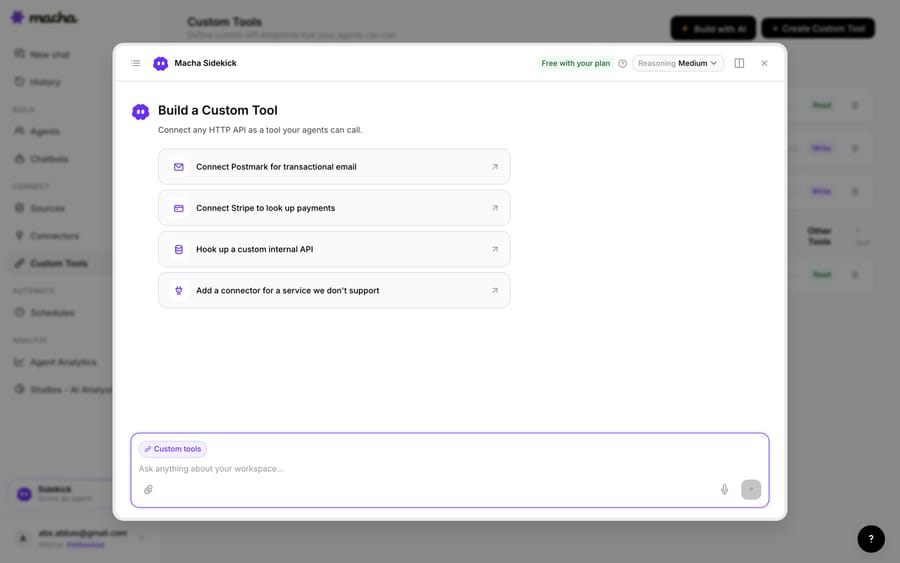
1. Point it at the GitHub API. GitHub exposes REST and GraphQL APIs (with a personal access token, OAuth, or GitHub App auth); you give Macha the endpoint and credentials. The built-in Sidekick can scaffold the request from a plain-English description if you'd rather not fill in the form.
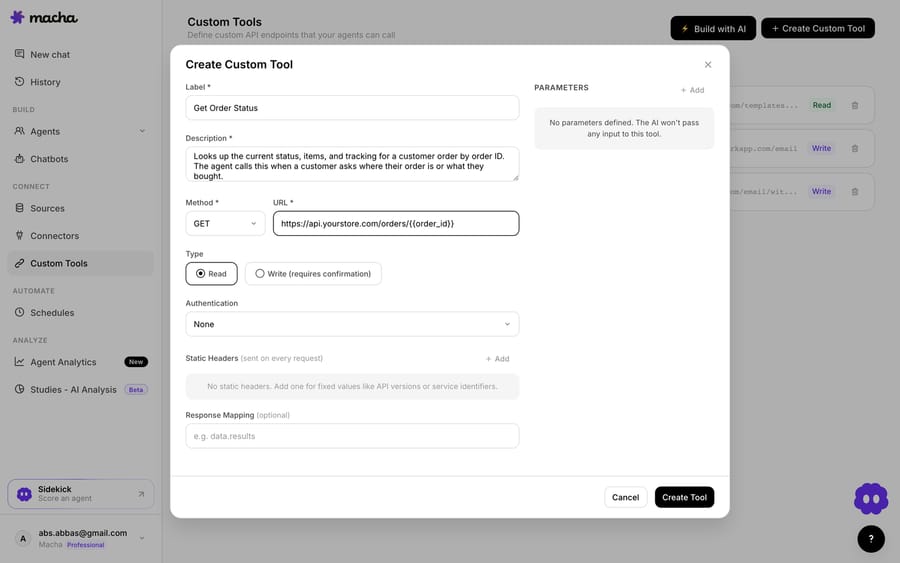
2. Define the action. Give it a label and a description the AI uses to decide when to call it, such as "Create a GitHub issue from a bug report" or "Get the status of a GitHub issue by number". Set the method and URL (against the GitHub API, with placeholders for the repo and fields the agent will fill), and choose Read or Write. Reading an issue or PR status is a Read; creating an issue or comment is a Write, which requires confirmation before it runs.
3. The agent uses it live. Once the tool exists, the agent calls it mid-ticket, filing the issue from a bug report or reading a linked issue's or PR's state, and reasons over what comes back to answer the customer or take the next step.
How do you keep GitHub writes safe?
Because a Custom Tool can reach into GitHub, the guardrails matter. Read tools (issue and PR status lookups) run freely; Write tools (create an issue, add a comment, apply a label) require confirmation. Each tool is scoped to one action, permissioned per agent, and every call is audited. GitHub's token or App auth handles credentials, so secrets never live in the conversation. Scope the token too: a fine-grained personal access token limited to the repos support files into keeps a misfired call away from everything else.
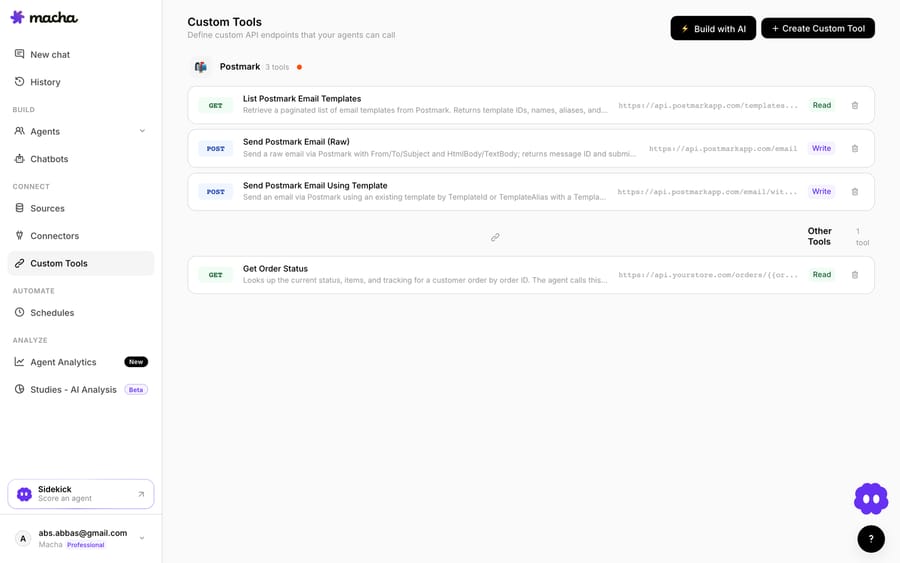
Teams usually build a few GitHub tools and group them, such as a "create issue," a "get issue status," and a "read PR state," alongside tools for their other systems.
Should you use a Marketplace app or a Custom Tool?
- Reach for a third-party Marketplace app if you want a human agent to create or link a GitHub issue from a sidebar panel, with sync handled by the app.
- Reach for a Custom Tool when you want your AI agent to file or look up GitHub issues from the ticket on its own, you need a specific issue payload or query the app doesn't expose, or you'd rather not layer on another app. The two can coexist.
The incentive is worth naming. A sync app is priced and built around the human clicking the button, so it has no reason to judge which tickets deserve an issue. That judgment is the part that costs engineers time when support files duplicates or vague reports.
You also don't have to build the GitHub tool yourself. Macha is the done-for-you option: the Macha team analyzes your past tickets, builds and tests the GitHub tool, the knowledge base and the agent on your existing help desk, and runs it in safe mode, with drafts as internal notes, until the drafts are right. That's included on the trial and every plan at about $0.40 a ticket, which includes setup and a dedicated success manager who handles your changes, such as a new repo to file into or another tool to add.
What else can the agent do once it reaches GitHub?
The same pattern covers more: file a bug with repro steps, read an issue's status to update the customer, check a linked PR, apply a label to route it, or confirm whether a fix has shipped. And because Custom Tools aren't GitHub-specific, the same approach connects your issue tracker, monitoring, or internal API. See the Custom Tools integration directory for more than 200 tools, or the full pillar on building custom Zendesk integrations.
To try it, see how Custom Tools work, browse the integration directory, or start a trial ($50 of free usage, no credit card) and wire up your first GitHub tool.
Frequently asked questions
Does Zendesk have a native GitHub integration? Not a first-party one. Integrations exist through third-party Marketplace apps (Git-Zen, DevOpsIntegration, IntegrateCloud) that add a sidebar panel for a human to create or link issues. A Custom Tool adds AI-agent-driven issue creation and lookups inside a ticket.
Do I need an engineer to connect GitHub to Zendesk this way? No. The Macha team builds and tests the GitHub tool for you as part of setup, included on the trial and every plan. If you'd rather build it yourself, you describe the action in plain English and Macha's Sidekick scaffolds the GitHub request, auth, and parameters. Technical teams can go deeper with full control over the REST or GraphQL call, headers, and response mapping.
Can the agent create issues in GitHub, or only read them? Both. Reads (issue and PR status lookups) run freely; writes such as creating an issue or adding a comment require a confirmation step, and you control which agents can use them.
Is it secure? Each tool is scoped to a single action, permissioned per agent, authenticated via GitHub's token or App auth, and every call is audited.
What does the Custom Tool approach cost? Custom API tools are included in Macha's single plan, which is priced by ticket volume from $299 a month for 750 tickets and billed per ticket, not per tool call. That's about $0.40 a ticket, which includes setup by the Macha team and a dedicated success manager who handles your changes.






