





 Shopify
 Stripe
 Slack
Slack Notion
 Google Workspace
 Confluence

What Is Gleap and What Does Its Kai AI Cost? (2026)


Gleap is an in-app support and feedback platform for software teams whose AI agent, Kai, is included from the $49 Starter plan, while Kai Resolve, Kai Code and Kai PM start on the $299 Pro plan. Every plan also pays for AI usage from prepaid credits, billed by tokens and model.
Key takeaways
- Gleap's Kai AI support agent is included on every plan, starting with Starter at $49 a month billed annually or $59 billed monthly for one seat and one project.
- Kai Resolve, Kai Code and Kai PM are gated to Gleap's Pro plan, priced at $299 a month annually or $359 monthly, which also adds 25% bonus AI credits.
- Gleap bills AI usage on top of every plan from prepaid credits charged by tokens and model, and the 14-day free trial includes $25 of AI credit.
- Gleap no longer claims an 80% resolution rate for Kai; its Kai page cites Commonplace at 50-60% of inbound support and calls that their result, not a benchmark.
- Gleap's Enterprise plan starts at $999 a month annually and adds SSO and a dedicated success manager, with a HIPAA BAA depending on plan and agreement.

Gleap is an in-app support and feedback platform for software teams, and its AI agent, Kai, answers customer questions on every Gleap plan from $49 a month billed annually, while the investigation, coding and product agents (Kai Resolve, Kai Code and Kai PM) start on the $299 Pro plan. AI usage is billed on top of every plan from prepaid credits, charged by the tokens and model used (gleap.ai/pricing, checked 24 September 2026).
| Plan | Annual billing | Monthly billing | AI agents included |
|---|---|---|---|
| Starter | $49/mo | $59/mo | Kai (1 seat, 1 project) |
| Team | $149/mo | $179/mo | Kai (unlimited seats and projects) |
| Pro | $299/mo | $359/mo | Kai, Kai Resolve, Kai Code, Kai PM, custom agents |
| Enterprise | from $999/mo | from $1,199/mo | Everything in Pro, plus SSO and a dedicated success manager |
We build an AI agent layer for customer service ourselves. It connects to a team's existing help desk instead of replacing one, so we have a stake in this comparison. We checked Gleap's own product and pricing pages directly for this guide.
What is Gleap?
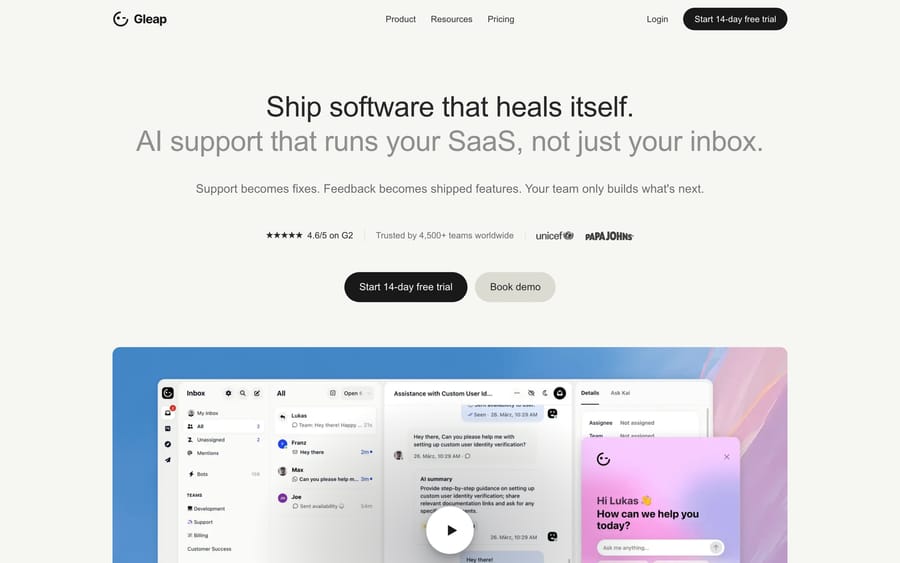
Gleap's homepage, describing itself as an AI support and self-healing software platform.
Gleap combines in-app bug reporting with session replay, live chat, a knowledge base, a public roadmap, and marketing automation into one platform, aimed at software teams that want feedback, support, and product signals in a single tool instead of four. Its current homepage pitches it as "your AI software team" that will "turn customer feedback into shipped software." Gleap says it's trusted by more than 4,500 teams, with logos on its site including Microsoft, Squarespace, UNICEF, and Papa Johns. The idea is a closed loop: a bug gets reported, the AI investigates it, and in some cases a fix ships without an engineer opening the ticket first. (Gleap has also moved its site from gleap.io to gleap.ai; the old URLs redirect.)
What does Gleap's AI actually do?
Gleap doesn't ship one AI feature. It ships four, under a shared brand called Kai, each doing a different job in the same pipeline.
- Kai is the support agent. It answers in the customer's language across seven channels listed on the Kai page: the chat widget, email, WhatsApp, Instagram, Facebook, Slack and Telegram, all landing in one inbox.
- Kai Resolve is an investigation and routing layer. When Kai can't answer something directly, Resolve uses tools and APIs to dig into the issue and decide where it goes next: a safe operational action it can take itself, Kai Code for a development fix, Kai PM for a product decision, or a task in the human inbox.
- Kai Code is the part that turns a routed bug into an actual pull request, moving through what Gleap calls plan mode and build mode before a human reviews the change.
- Kai PM clusters feature requests and feedback into roadmap priorities, working as a product-management layer over the same conversation data the other three agents generate.
Gleap no longer puts a headline resolution rate on the Kai page. An earlier version claimed Kai "resolves up to 80% of tickets"; today the page cites one customer instead, Commonplace, with "50-60% of inbound support handled by Kai," and adds that "that is their result, not a benchmark." That's the more useful number for a buyer, because it comes with the caveat attached.
The mechanism behind Kai's answers is what makes it more than a scripted FAQ bot. Kai can be trained on snippets, websites, help articles, files (PDF, Word, PowerPoint, Excel and Markdown), API data sources, code repositories, news and changelog posts, Notion pages and YouTube videos, and published help articles are picked up automatically. A ticket that needs the actual wording of a return policy and one that needs a line from a setup guide buried in a code comment can both, in principle, get answered from the same agent.
How long does Kai take to set up?
Gleap doesn't publish a standard setup time on its Kai or pricing pages today. The customer stories on its homepage give a range: Salesforge says its "full setup took less than a day," while Lywand replaced a Freshdesk setup in "two to three weeks." In practice setup means dropping in the SDK, connecting whichever knowledge sources apply (help center, docs, code repo, Notion), and deciding which conversations Kai should hand to a person. Gleap's own guidance names billing disputes, frustrated customers, complex bugs, churn risk and strategic account issues as ones to escalate, and says that when a conversation needs a person, "Kai should not pretend otherwise." Those handoff rules are still on the team running Gleap to configure; the defaults won't cover a regulated product on their own.
How much does Gleap cost?
Kai support is included from the entry tier, but the rest of the Kai family is gated behind higher plans, which is worth knowing before you price this out from the homepage alone.
- Starter ($49/mo annual, $59/mo monthly): 1 seat, 1 project, Kai, and the Jira, Trello and Slack integrations.
- Team ($149/mo annual, $179/mo monthly): unlimited seats and projects, Kai, and all native integrations.
- Pro ($299/mo annual, $359/mo monthly): adds Kai Resolve, Kai Code, Kai PM, custom agents and model selection, plus 25% bonus AI credits on every credit purchase.
- Enterprise (from $999/mo annual, $1,199/mo monthly): everything in Pro plus SSO, invoice billing, a dedicated success manager, bring-your-own-key model access and a custom SLA by agreement. Gleap says it is SOC 2 Type II audited; a HIPAA BAA depends on your plan and agreement.
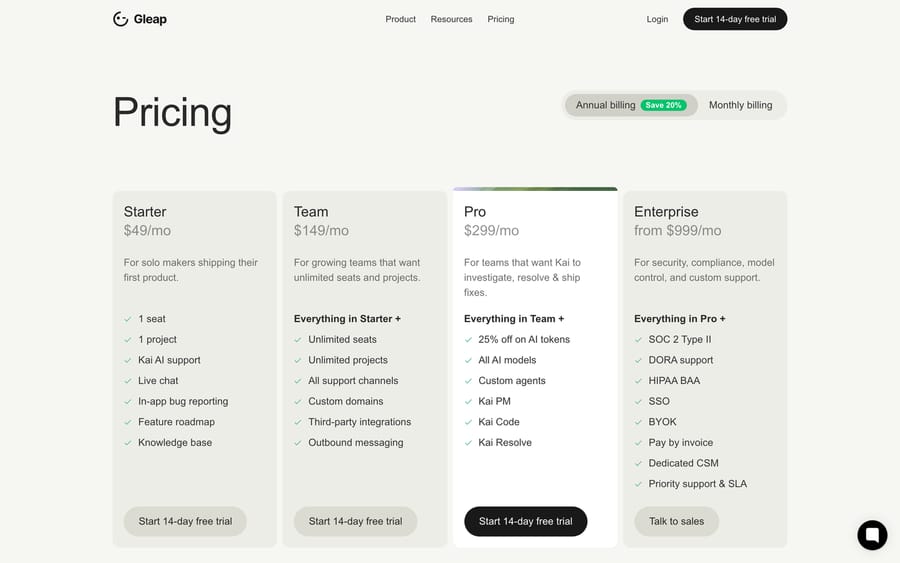
Gleap's pricing page, with annual billing toggled on and Kai PM, Kai Code, and Kai Resolve gated to the Pro tier.
On top of the plan fee, "AI usage is deducted from prepaid credits by the tokens and model used," on every plan. The 14-day free trial includes $25 of AI credit. Pro and Enterprise get 25% bonus credits, so a $100 top-up becomes a $125 balance. That's a meaningful incentive built into the pricing: Gleap earns more the more tokens Kai burns through, so a heavier model set to handle simple FAQ traffic costs you twice, once in the plan tier and once in the credit bill, without necessarily answering any better.
Where does Gleap's AI stop?
Kai answers from what it's been pointed at. It's strong on questions with a documented answer somewhere in your help center, docs, code, or Notion, and weak on anything that requires looking up a specific customer's account state unless that's been wired in as an API data source or as one of Kai Resolve's "safe operational actions." Gleap's own materials don't spell out a general library of prebuilt account or billing actions the way a help-desk-native tool might. The investigation and action layer is described in terms of routing and safe operations, not a broad catalog of pre-built integrations.
The deeper automation, Kai Code shipping an actual pull request, is useful but scoped to bugs Gleap's pipeline already investigated and routed. It's a fix constrained by whatever Kai Resolve decided the issue was, reviewed by a human before merge, not a general coding agent loose on your repo. Treat it as a productivity tool for the bug-report backlog rather than an unattended deploy pipeline.
Who is Gleap best for?
Gleap fits teams that already treat bug reports, feature feedback, and support tickets as one connected stream, and that want the AI reading all of it instead of just the support inbox. A team that gets a steady flow of "this is broken" reports alongside "can you add X" requests, and wants both routed and partly resolved by the same system, is the shape Gleap is built for.
It's a weaker fit if your support volume is mostly generic customer service unrelated to your own product's bugs or roadmap, since a chunk of what you're paying for (Kai Code, Kai PM, the bug-reporting SDK) goes unused. In that case a simpler, help-desk-focused AI is a better price-to-value match.
Where does an AI agent layer fit on top of Gleap?
Kai is built to answer from Gleap's own knowledge sources and to route bugs through Gleap's own pipeline. What it isn't built to do is reach into the rest of a support team's stack, like Shopify, Stripe, or an internal admin tool, to look something up or take an action on a specific customer's account without custom wiring. That's the gap Macha is built to fill. Macha runs as an agent layer connected to the help desk a team already uses (Zendesk, Freshdesk, Gorgias, Front, HubSpot or Intercom), plus the systems around it, so an agent can check an order, verify a refund against policy, and act, with a confirmation gate before anything customer-facing goes out. It sits alongside a tool like Gleap. Gleap stays the system handling in-app feedback and bug triage, and Macha is the part reaching into the rest of the stack for the tickets that need account-specific action. Pricing runs on monthly ticket volume from $299/month for 750 tickets, about $0.40 a ticket at every tier (see pricing), billed per ticket however many messages it takes, with setup and monitoring by the Macha team included and $50 of free usage to start.
FAQ
What is Gleap? Gleap is an in-app support and feedback platform for software teams, combining bug reporting, live chat, a knowledge base, a public roadmap, and AI agents branded Kai into one product.
What does Gleap's Kai do? Kai is the AI support agent that answers routine questions in the customer's language across seven channels, using content from a team's help center, files, code repository, Notion, and other connected sources. Gleap cites one customer, Commonplace, at 50-60% of inbound support handled by Kai, and calls that their result rather than a benchmark.
What are Kai Resolve, Kai Code, and Kai PM? Kai Resolve investigates issues Kai can't answer directly and routes them; Kai Code turns a routed bug into a pull request for human review; Kai PM clusters feedback into roadmap priorities. All three are gated to the Pro plan and above.
How much does Gleap cost? Starter is $49 to $59/month depending on billing term with Kai included; Team is $149 to $179/month; Pro is $299 to $359/month and unlocks Kai PM, Kai Code, and Kai Resolve; Enterprise starts at $999 to $1,199/month. AI usage is billed separately from prepaid credits by tokens and model, and Pro and Enterprise get 25% bonus credits.
How long does Gleap take to set up? Gleap doesn't publish a standard setup time. Customer stories on its site range from under a day (Salesforge) to two to three weeks for a team replacing Freshdesk (Lywand), and connecting a code repository or Notion adds work beyond the basic SDK install.
Can Gleap's AI look up a specific customer's order or account? Only through an API data source or a "safe operational action" configured in Kai Resolve. Gleap's own materials describe routing and investigation rather than a broad library of prebuilt account or billing integrations, so this typically needs custom setup.
Does Gleap have guardrails for sensitive topics? Gleap's guidance is to hand conversations to a person rather than let Kai bluff, naming billing disputes, frustrated customers, complex bugs, churn risk and strategic accounts as escalation cases. Its public Kai pages don't document subject-level restrictions for medical, legal or financial advice, so test that before deploying Kai on a regulated product.
What are good alternatives if I need more than Gleap's built-in AI? Teams that need an AI agent to act across connected systems like Shopify, Stripe, or an internal admin tool, not just answer from Gleap's own knowledge sources, typically add a layer like Macha alongside Gleap rather than replacing it.
Sources: Gleap homepage, Gleap Kai page, Gleap pricing, Gleap: Introducing Kai.






