





 Shopify
 Stripe
 Slack
Slack Notion
 Google Workspace
 Confluence

How Does CSAT Work in Gorgias? Satisfaction Survey Setup, Rules and Benchmarks (2026)


Gorgias measures CSAT with a built-in Satisfaction Survey that sends a star rating 2 hours after a ticket closes, but only for conversations that meet its rules. Scores appear under Statistics, Support Performance, Satisfaction.
Key takeaways
- The Gorgias Satisfaction Survey sends automatically after a ticket closes, 2 hours later by default, and is available on all Helpdesk plans under Workflows, Tools, CSAT.
- A Gorgias survey only fires when the conversation exceeds 250 characters, includes a customer message and an agent reply, and the last agent reply was under a week old at close.
- Gorgias surveys only Chat, Email, Contact Form and Help Center tickets, and replies from Rules, notes or AI don't count, so AI-only and social tickets are never surveyed.
- Retently's 2026 benchmark puts ecommerce and retail CSAT at 77, and Fullview reports an ecommerce average of 80 in 2023.
- Gorgias attributes each CSAT survey to the date it was sent rather than the date the customer answered, which can skew week-over-week reads.

Gorgias measures CSAT with its built-in Satisfaction Survey, which sends a star-rating prompt 2 hours after a ticket closes by default and only when the conversation is over 250 characters and includes an agent reply. You set it up under Workflows → Tools → CSAT, it covers Chat, Email, Contact Form and Help Center tickets, and it is available on all Helpdesk plans (Gorgias docs, checked 24 September 2026). Scores land under Statistics → Support Performance → Satisfaction.
| Question | Answer (Gorgias docs, 24 Sept 2026) |
|---|---|
| Where to set it up | Helpdesk dropdown → Workflows → Tools → CSAT |
| When it sends | After close; 2 hours later if no delay is set |
| Channels surveyed | Chat, Email, Contact Form, Help Center (never social media) |
| Must be true to send | 1+ customer message and 1+ agent reply; over 250 characters; last agent reply under a week old at close |
| Doesn't count as a reply | Rules, internal notes, AI-generated messages |
| Plans | All Helpdesk plans |
| Where scores show | Statistics → Support Performance → Satisfaction |
What is the Gorgias satisfaction survey?
The Satisfaction Survey is Gorgias' built-in CSAT tool. When a ticket is closed, Gorgias can email or message the customer a short "Rate your conversation" prompt with a 5-star scale, and the star the customer picks becomes that ticket's satisfaction score. Aggregate those stars across every rated ticket and you get your CSAT.
The survey is automatic and close-triggered, not something an agent sends by hand. You configure it once, and from then on Gorgias decides, based on the rules below, whether any given closed ticket earns a survey. That makes it low-effort to run, but it also means your response volume and your score are shaped by configuration choices you might not realise you've made. For the broader picture of how Gorgias organises support work around tickets, what is Gorgias is the wider primer.
How do you set up CSAT in Gorgias?
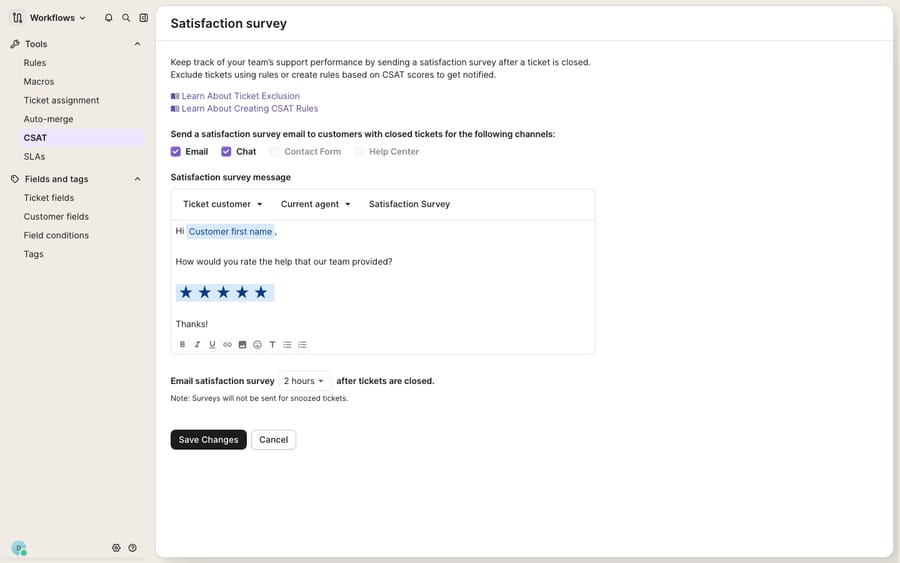
Per Gorgias' CSAT survey documentation, click the dropdown menu in the top-left corner of the helpdesk → Workflows → Tools → CSAT. Three things are yours to control:
- Channels / ticket types: check or uncheck the interaction types you want surveyed. Surveys are supported on Chat, Email, Contact Form and Help Center. Social-media tickets do not receive a survey at all.
- The survey message: write the "Rate your conversation" copy that goes out, and drop in variables (customer name, agent name, order details) through the variable dropdowns.
- Timing: pick how long after a ticket closes the survey should send. If you leave the delay unset, Gorgias sends it 2 hours after the ticket is closed by default.
Save your changes and the survey starts firing on newly closed tickets that qualify. Gorgias says CSAT surveys are available on all Helpdesk plans, so there's no upgrade needed to turn them on.
Why didn't a Gorgias satisfaction survey send?
These rules quietly decide how many surveys go out, and they're where most "why is my response rate so low?" confusion starts. According to the Gorgias docs, a satisfaction survey is only sent when all of the following are true:
- There is at least one message from the customer and at least one answer from an agent. Messages sent via Rules, internal notes and AI-generated messages don't count toward this, so an auto-responder that closes a ticket won't trigger a survey.
- The total conversation is longer than 250 characters, so trivially short exchanges are skipped.
- The agent's last reply was less than a week old at the moment the ticket was closed, so stale, long-dormant tickets don't get surveyed.
- The channel is one of the four supported ones (Chat, Email, Contact Form, Help Center).
Read that list carefully, because it explains most CSAT surprises. A ticket fully handled by automation or AI Agent with no human reply generates no survey. A one-line "thanks, sorted!" under 250 characters generates no survey. That's by design, since it keeps the score focused on real, agent-touched conversations, but it also means your CSAT reflects a subset of your ticket volume, not all of it. The more tickets AI Agent closes on its own, the smaller that subset gets.
Where do CSAT scores show up in Gorgias Statistics?
Once responses start coming in, they live in one place. Per the Gorgias CSAT reporting docs, you'll find everything under Statistics → Support Performance → Satisfaction. There you get:
- Surveys sent: how many qualifying tickets got a survey.
- Response rate: what share of those were actually rated.
- Average score: your headline CSAT, averaged across returned stars.
- Per-survey rows: customer, agent, the rating, and whether the shopper left a comment, shown as a clickable link that jumps you straight to the ticket.
You can slice all of it with filters for integration, channel, score, agent, tag and date range. Filtering by score shows whether a middling average is "consistently okay" or "half delighted, half furious", and filtering by channel or agent shows that, say, chat CSAT trails email, or one agent's scores diverge from the team.
One trap worth flagging: Gorgias attributes each survey to the date it was sent, not the date the customer completed it. A survey sent on 9 September but filled in on 20 September shows under the 9th. That's fine for steady-state reporting but can distort a tight week-over-week read. For the wider reporting picture beyond CSAT, Gorgias Stats and reporting explained covers the rest of the Statistics tabs.
What is a good CSAT score for an ecommerce store?
A CSAT number means nothing without a yardstick. Most benchmarks express CSAT as a percentage: the share of respondents who picked one of the top ratings (4 or 5 stars on Gorgias' scale). You can work that out from the per-survey rows by filtering on score. Retently's 2026 benchmark puts ecommerce and retail at 77, with 65% to 80% the dominant range across industries, and Fullview reports that ecommerce companies averaged 80 in 2023.
| Your CSAT (% of 4–5 star ratings) | Band | How to read it |
|---|---|---|
| Below 65% | Under benchmark | Something specific is going wrong; dig into low-rated comments and by-agent/by-channel filters |
| 65–80% | Typical | In line with most industries; Retently's ecommerce and retail figure is 77 |
| Above 80% | Strong | Above the ecommerce averages from Retently and Fullview |
| Above 90% | Excellent | Retently's bar for excellent satisfaction |
Treat these as directional. Luxury and high-consideration brands tend to be held to a higher bar than budget retailers, and your own trend line over time is a better signal than any single industry figure. The benchmark tells you which row you're in; the comments and filters tell you why.
What can't the native CSAT survey do?
Gorgias' Satisfaction Survey is a clean, reliable native feature. It fires automatically, filters out noise, and gives you per-ticket ratings and comments rather than just a lonely average. For most ecommerce teams it's all the CSAT tooling they need, and you should run it. But it's worth being clear about what it is and isn't.
CSAT is a measurement, not a lever. The survey can tell you that a WISMO ("where is my order?") reply landed a 2-star rating; it can't go back and produce the fast, accurate reply that would have earned a 5. It's also backward-looking and thin on volume: only agent-touched conversations over 250 characters get surveyed, and only a fraction of those get answered, so your score is a lagging read on a slice of your tickets. And the survey can't diagnose the cause. It'll show you the low star and the comment, but working out that returns tickets score badly because your policy answer is buried three clicks deep in the Help Center is on you.
There's also a scope point: the survey covers Chat, Email, Contact Form and Help Center but not social channels, and it skips AI-only conversations, so DM-heavy and highly automated brands are measuring an incomplete picture. Richer analysis (custom dashboards, cohorting) generally means exporting the data.
How can an AI agent layer raise your Gorgias CSAT?
An AI agent layer helps by moving the number, not by replacing CSAT. The category of AI agents for customer service exists to do the reasoning-heavy work a survey can only grade after the fact. Macha is one such layer: it runs on top of the Gorgias you already use as a native, live connector (it also runs on Zendesk, Freshdesk, Gorgias, Front, HubSpot or Intercom) and does not replace Gorgias or its Satisfaction Survey. You connect Macha to Gorgias (here's how the integration works), and it reads and writes the same tickets your CSAT already measures, drafting or sending grounded first replies to WISMO, returns and subscription questions by pulling live order and account status through a custom tool. The conversation that gets rated is then a fast, correct one.
The commercial difference is worth naming. Gorgias' own AI Agent is billed per automated interaction, $1.50 each past the bundle included in your plan. Macha bills per ticket, from $299 a month for up to 750 tickets: one conversation, charged once however many messages it takes, a unit that doesn't tie your bill to an outcome definition (see the pricing breakdown).
The clean division of labour: keep Gorgias' Satisfaction Survey as the source of truth for how customers rate you, and layer an agent on top for the part the survey can't do: making more of those conversations worth five stars before the survey goes out.
FAQ
Where do I set up CSAT in Gorgias? Open the helpdesk dropdown menu in the top-left corner, go to Workflows → Tools → CSAT, and configure the channels to survey, the survey message and the send delay after a ticket closes. Save your changes and surveys start firing on qualifying closed tickets. It's available on all Helpdesk plans.
When does a Gorgias satisfaction survey actually send? After a ticket closes (2 hours later by default, or a delay you set), but only if it qualifies: there's at least one customer message and one agent reply, the conversation is over 250 characters, the last agent reply was under a week old at close, and the channel is Chat, Email, Contact Form or Help Center. Social-media tickets are never surveyed, and replies from Rules, notes or AI don't count as the agent reply.
Where do I see my CSAT scores? Under Statistics → Support Performance → Satisfaction, where you get surveys sent, response rate, average score and per-survey rows with the customer, agent, rating and a link to any comment. You can filter by integration, channel, score, agent, tag and date range.
What's a good CSAT score for an ecommerce store? Retently's 2026 benchmark puts ecommerce and retail at 77, with 65% to 80% typical across industries; Fullview reports an ecommerce average of 80 in 2023. Above 80% beats those averages, and Retently treats above 90% as excellent. Your own trend over time matters more than any single benchmark.
Do tickets resolved by Gorgias AI Agent get a CSAT survey? Not on their own. Gorgias only sends a survey when an agent has replied, and AI-generated messages don't count toward that condition, so a ticket AI Agent closes without a human reply isn't surveyed.
Can I improve CSAT with AI without leaving Gorgias? Yes. An AI agent layer like Macha connects to Gorgias as a native connector and runs on top of your existing helpdesk and its Satisfaction Survey without replacing them. It helps raise the score by drafting or sending grounded, accurate first replies to WISMO, returns and subscription questions, while Gorgias stays the system of record for how customers rate you.
Want more of your Gorgias conversations to earn the fifth star? Start a free trial of Macha and connect it to your Gorgias in minutes.






