





 Shopify
 Stripe
 Slack
Slack Notion
 Google Workspace
 Confluence

How Do You Guide New Customers Through Setup in Slack with an AI Agent?


New customers decide in their first two weeks whether a product is worth the effort, and their setup questions often sit unanswered in a shared Slack channel over a weekend. An AI agent that answers on @mention from your own Notion and Google Docs setup content covers those questions without a person watching every channel.
Key takeaways
- A Macha onboarding agent fires on a Slack App Mention, pulls the checklist from Notion and the quick-start guide from Google Docs, and replies in-thread with numbered next steps.
- Notion and Google Workspace both sync as live knowledge sources in Macha, so edits to the quick-start guide change the onboarding agent's answers without a re-upload.
- Macha's Slack connector has App Mention and Direct Message triggers plus five actions: Send Message, Reply in Thread, List Channels, Get Channel Info and List Users.
- A typical onboarding thread with Notion and Docs searches plus a follow-up counts as one ticket, about $0.40 on the $299-a-month plan for 750 tickets.
- Mention-only scoping is the safer default in Slack Connect onboarding channels, because the agent stays quiet until a customer explicitly @mentions it.

To guide new customers through setup in Slack, put an AI agent in each shared channel that fires on an @mention, pulls your onboarding checklist from Notion and your quick-start guide from Google Docs, and replies in-thread with a numbered next step. With Macha that takes three connectors (Slack, Notion, Google Workspace) and one agent, and it answers at 2am across every account at once.
| Piece | Job in the onboarding flow | What Macha uses |
|---|---|---|
| Slack | Where the customer asks and the agent answers | App Mention and Direct Message triggers; Send Message, Reply in Thread, List Channels, Get Channel Info, List Users |
| Notion | The onboarding checklist | Search Pages, Get Page, Search Databases, live knowledge sync |
| Google Workspace | The quick-start guide | Read Google Doc, Read Google Sheet, Docs synced as a live knowledge source |
| Agent | Instructions, scope, escalation | One agent, mention-only in customer channels |
Here's the important framing: Macha is not a Slack chatbot product, and it's not a helpdesk replacement. It's an AI agent layer that sits on top of the help desk you already run (Zendesk, Freshdesk, Gorgias, Front, HubSpot or Intercom) and connects to the rest of your stack — Slack, Notion, Google Workspace, and more. The same agent definition and the same knowledge base that answer email tickets can also answer in a customer Slack channel. You build the onboarding logic once; it works wherever your customers are.
What does the Slack onboarding agent actually do?
The workflow is short and concrete. The trigger is a Slack App Mention — a new customer types something like "@macha we just signed up and need help getting started. Where do we begin?" From there the agent runs a few tool calls and answers:
- Searches Notion for your onboarding checklist (e.g. "New Customer Onboarding Checklist").
- Pulls the quick-start guide from Google Docs, which it searches as a synced knowledge source (or reads directly by document link).
- Replies in the thread with a structured, numbered checklist and a link to the guide — then stays available for the follow-up questions.
A real reply looks like this:
Welcome! Here's your getting-started checklist: 1. ✅ Account created (done!) 2. Connect your first integration (start with Zendesk or Slack) 3. Set up your knowledge base — import your Help Center or Notion docs 4. Configure your first AI agent — I'll walk you through it 5. Test with a sample ticket I've shared the Quick Start Guide in this channel. Want to start with step 2?
In practice it looks like this in a real shared channel:
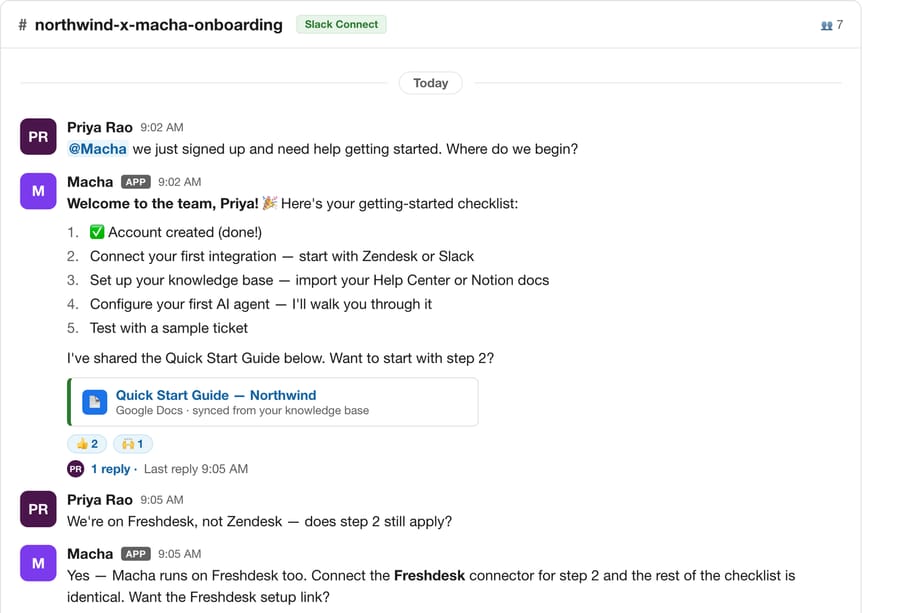
Because it replies in the thread, the channel stays clean and the conversation has context. And because it's an agent — not a static FAQ macro — it handles the messy follow-ups: "we don't use Zendesk, we're on Freshdesk" gets a tailored answer, not a dead end. That's the moment a doc-retrieval bot breaks and an agent keeps going.
Why not just use a Slack Workflow or a static welcome message?
Most teams start onboarding-in-Slack with a Slack Workflow Builder message that fires when a channel is created, or a pinned doc. That's fine for the first message — but it can't answer. The customer reads the welcome, hits their first real question, and now they're waiting on a human anyway.
Tools like ClearFeed, Thena, and Question Base improved on this by adding a knowledge-base bot that retrieves answers from your docs in-thread. Macha does that too — but the difference that matters for onboarding is actions, not just answers. The same agent can look up the customer's order in Shopify, check a payment in Stripe, or relay a complex setup blocker to the right internal channel. Retrieval is table stakes; an onboarding agent earns its keep when it can do the next step, not just describe it.
The other practical edge: one knowledge base, one agent, everywhere. If you've already pointed Macha at your help content for ticket deflection, your Slack onboarding agent inherits it for free. You're not maintaining a separate "Slack bot brain" that drifts out of sync with your support content.
How do you build the onboarding agent?
You don't need to write any code. The whole thing is three connectors and one agent.
1. Connect Slack, Notion, and Google Workspace
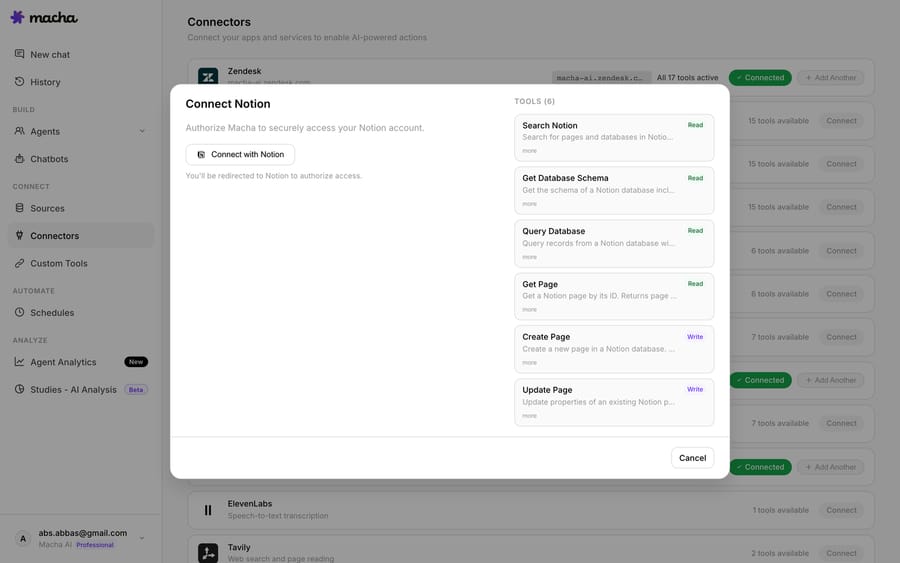
In your Macha workspace, add the connectors. The Slack integration gives the agent its home — App Mention and Direct Message triggers, plus Send Message, Reply in Thread, List Channels, Get Channel Info, and List Users actions. Notion and Google Workspace give it the source material.
The Notion connector exposes Search Pages, Get Page, and Search Databases, so the agent can find the right onboarding page rather than hallucinating one.
2. Make your setup docs a live knowledge source
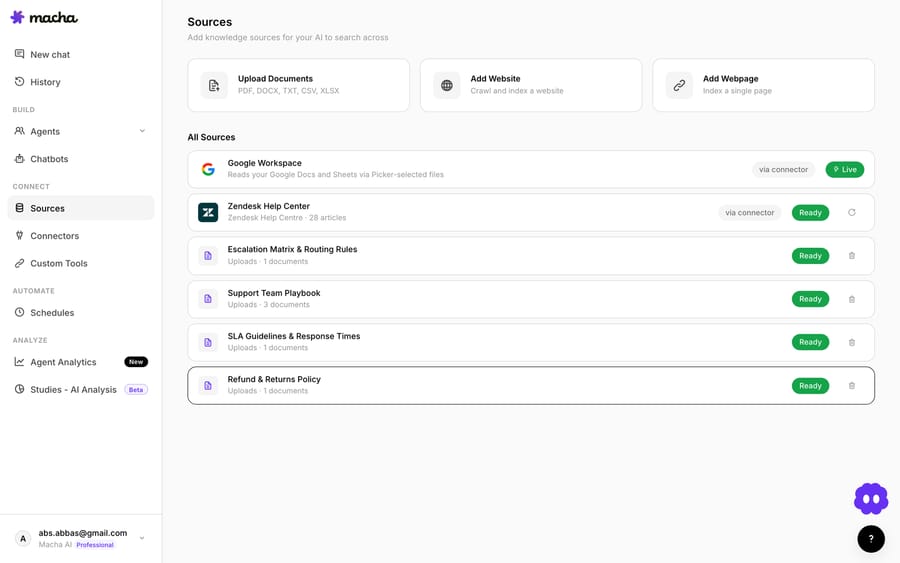
This is the step that keeps answers accurate. Both Notion and Google Workspace can sync as a live knowledge source — so when your team edits the quick-start guide in Google Docs, the agent's answers update too. No re-uploading, no stale instructions.
3. Configure the onboarding agent
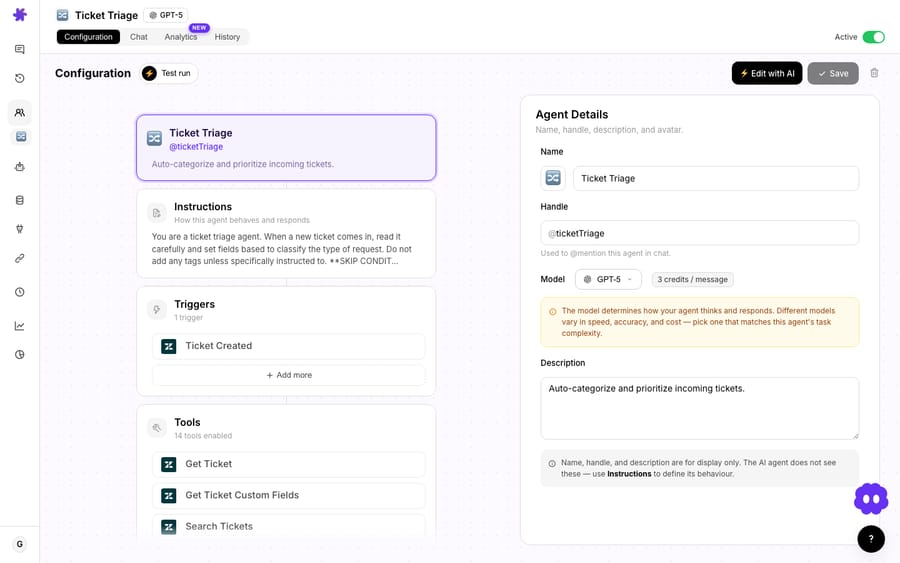
Create an agent, give it the Slack/Notion/Google tools, and write its instructions: greet new customers warmly, find the onboarding checklist, share the quick-start guide, answer follow-ups, and escalate anything it can't resolve to your team's internal channel. Scope it to the shared customer channels so it only speaks where it should.
That's the entire build. Drop the app into a customer's shared Slack channel and it's live.
How do you turn it into operational onboarding?
Answering questions in-thread is the floor. The teams that actually move the needle on activation treat the Slack channel as the onboarding system of record — a place where progress is visible, milestones get marked, and nothing slips through the gap between sales, the CSM, and support. Tools like ClearFeed built their reputation on exactly this: turning a Slack channel into a real-time progress tracker the customer can see, react to, and contribute toward. Here's how to get the same operational rigor with a Macha agent doing the legwork.
1. Post a welcome and channel-setup template the agent keeps current
Every onboarding channel should open with a pinned message that sets expectations. Don't make a human write it from scratch each time. Give the agent the template and have the CSM kick things off with an @mention (@Macha kick us off); the agent posts the welcome and the CSM pins it. Macha's Slack triggers are App Mention and Direct Message, so a channel-created event can't start it on its own. Steal this and adapt it:
👋 Welcome to your onboarding channel! This is your shared space with the [Your Company] team for the next few weeks. Your team: • CSM — @[csm-name] (owns your rollout) • Support — @Macha (AI agent — @mention me any time for setup help, 24/7) Your roadmap: 1. Kickoff & goals (this week) 2. Connect your first integration 3. Knowledge base + first agent live 4. Go-live with a pilot queue 5. Review & expand 📌 Pinned: Quick Start Guide · Implementation timeline · Your account brief @mention me for any setup question — I'll pull the answer straight from our docs. For anything time-sensitive, tag @[csm-name] directly.
The Slack connector posts and replies but doesn't edit earlier messages, so progress goes in the thread under the pinned post: when a step is done, the agent replies with the updated roadmap, and the channel reflects reality instead of going stale after week one.
2. Track milestones and checklists in-channel
Because the agent is already in the channel and connected to your knowledge base, it can do lightweight milestone tracking without a separate project tool. Ask it — "@Macha where are we in onboarding?" — and it reads the channel context plus your Notion onboarding checklist and answers with what's done and what's next. You can also have it nudge: a scheduled trigger that posts "Heads up — step 3 (knowledge base) has been open for 4 days. Want a hand?" keeps a stalled rollout from quietly dying. This is the difference between an onboarding channel that drives activation and one that's just a support inbox with a friendlier name. For a deeper pattern on driving the first session with real account data, see our write-up on a data-driven welcome conversation.
3. Hand off cleanly to the CSM and support team
Onboarding ends; the relationship doesn't. The failure mode is a customer who finishes setup and then falls into a void because nobody owns them anymore. Build the handoff into the agent's instructions:
- Escalate live blockers in real time. When the agent can't resolve something — a billing edge case, a contract question, a genuinely stuck integration — it tags the CSM in-thread and, if you've added a custom tool that calls your help desk's create-ticket API, opens a ticket so it's tracked, not lost in scrollback.
- Summarize the onboarding at the finish line. Have the agent post a closing summary — milestones completed, open items, key decisions — that doubles as the handoff note from the onboarding/CSM owner to your day-to-day support team. Slack's own guidance recommends a canvas for storing this so it survives the channel history; the agent can draft the contents.
- Keep answering after go-live. The same agent stays in the channel as the steady-state support line, sharing the exact knowledge base your ticket-handling agents use — so the customer's experience is continuous, not a cliff.
This is where the "agents, not just answers" point pays off: a retrieval bot stops at here's the doc; an agent can post the milestone, tag the human, open a ticket through a custom tool, and write the handoff. If you want the full picture of running support this way, our guide to the Macha × Slack integration covers the broader workflow set.
Should the agent answer everyone in a Slack Connect channel?
Customer onboarding usually happens in Slack Connect channels — your workspace and the customer's, sharing one channel. Decide up front whether the agent responds to anyone in the channel or only on explicit @mention. For onboarding, mention-only is the safer default: it keeps the agent from jumping into internal side conversations and makes its behavior predictable to the customer. Set clear expectations in your pinned welcome message — tell the customer they can @mention the agent any time for setup help, and who to tag for anything urgent.
When should you not lean on an onboarding agent?
An onboarding agent is genuinely useful, but it's not a substitute for a human relationship on every account — and pretending otherwise backfires.
- High-touch enterprise onboarding still needs a human. For a six-figure account with a custom implementation, the agent is a helpful first responder and checklist-keeper, not the owner. Use it to handle the routine 80% so your CSM spends time on the 20% that matters.
- Garbage in, garbage out. The agent is only as good as your Notion checklist and Google Docs guide. If those are outdated, the live-sync means it confidently shares outdated steps. Audit the source docs before you point an agent at them.
- Set the escalation path explicitly. Make sure the agent knows when to stop guessing and tag a human. An onboarding agent that loops a confused customer through the same three docs is worse than no agent. Test it against real "I'm stuck" messages, not just happy-path questions.
- Don't let it speak unprompted in a customer channel. Mention-only scoping exists for a reason. An agent that auto-replies to every message in a Slack Connect channel reads as noisy and a little uncanny.
The honest version of the pitch: this gives every new customer a responsive, knowledgeable first line during the fragile early days — and frees your team to do the human parts of onboarding that actually drive retention.
What does a Slack onboarding agent cost?
Macha bills per ticket — one conversation with one person, charged once however many messages, searches and tool calls it takes. A typical onboarding thread — search Notion, search Docs, compose an answer, then handle the follow-up — is one ticket, not four charges, so a chatty thread costs the same as a one-shot answer. Pricing starts at $299 a month for 750 tickets, about $0.40 each, and there's no per-message or per-seat fee for the customers in the channel. You can start on a free trial ($50 of usage, no credit card required); see the pricing page for the tiers.
FAQ
Does Macha replace our helpdesk? No. Macha is an AI agent layer that runs on top of Zendesk, Freshdesk, Gorgias, Front, HubSpot or Intercom and connects your other tools (Slack, Notion, Google Workspace). The Slack onboarding agent shares the same knowledge base and agent logic as your ticket-handling agents.
Does the agent answer in the channel or in DMs? Both are supported. Slack triggers include App Mention (replies in-thread in a channel) and Direct Message. For shared customer channels, mention-in-thread is the recommended default.
How do I keep the setup instructions up to date? Sync your Notion pages and Google Docs as live knowledge sources. When your team edits the doc, the agent's answers update automatically — no re-upload needed.
Can it do more than answer questions? Yes — that's the point of an agent versus a doc-retrieval bot. It can take actions through connected tools (look up an order in Shopify, check a payment in Stripe, post to an internal channel) and escalate to a human when needed.
Will it spam the customer's channel? Only if you let it. Scope it to respond on @mention, and it stays quiet until invited.
How fast can you get one running?
If new-customer questions are piling up in Slack channels faster than your team can answer them, an onboarding agent closes that gap in an afternoon. Connect Slack, Notion, and Google Workspace, point an agent at your setup docs, and let every new customer get a warm, accurate first answer — instantly. Start a free trial ($50 of usage, no credit card required), browse the use cases for more agent recipes, or read the docs for the full build.
Written by Abbas (Customer Support & AI, Macha) · Reviewed by Ankeet Guha (Co-founder & CTO) · Published 2026-06-24 · Last updated 2026-09-24.






