





 Shopify
 Stripe
 Slack
Slack Notion
 Google Workspace
 Confluence

How Does Macha's Slack Integration Work? AI Support Agents in Slack (2026)


Macha's Slack integration puts your AI support agents in Slack: @mention one in a channel or DM it, and it replies in the thread with live data from Zendesk, Shopify, Stripe or Notion. The same agents can also post urgent-ticket alerts and daily metrics into your team channels.
Key takeaways
- Macha connects to Slack over OAuth and gives agents five actions, including Send Message and Reply in Thread, plus App Mention and Direct Message triggers that start an agent without a human.
- Macha's Slack DM trigger waits 10 seconds by default before answering a burst of messages, and a debounce bucket force-fires after 25 events or a wait capped at 2 minutes.
- Macha includes Slack in its one plan with no per-seat or per-channel fee and bills per ticket, from $299 a month for 750 tickets (about $0.40 each), with setup by the Macha team and a dedicated success manager included.
- ClearFeed charges $24 or $49 per agent per month for its Slack-native helpdesk, while Fin charges $0.99 per outcome on top of Intercom seats.
- Support teams use the Slack connector two ways: as a question box answering @mentions from Shopify and Notion data, and as an ops layer posting urgent Zendesk tickets to #urgent-support.

Macha's Slack integration connects over OAuth and gives your AI agents five Slack actions (Send Message, Reply in Thread, List Channels, Get Channel Info, List Users) and two triggers (App Mention and Direct Message), so a teammate can @mention an agent in #support and get a sourced answer in the thread. It is not a "Slack helpdesk." Macha is an AI agent layer that sits on top of the helpdesk you already run: Zendesk, Freshdesk, Gorgias, Front, HubSpot or Intercom. Slack is one of the surfaces those agents show up on. So the same agent that triages a Zendesk ticket can also answer a teammate's question in #support, and the same automation that resolves a payment query can relay an urgent ticket into #urgent-support the second it lands. One brain, two doors.
| Question | Short answer |
|---|---|
| How does it connect? | OAuth, authorized once per workspace |
| What starts an agent? | An @mention (App Mention) or a DM (Direct Message) |
| What can it post? | Channel messages and threaded replies |
| Debounce default | 10 seconds on Slack DMs; off (0 seconds) on other new event triggers |
| Price | No Slack fee; Macha bills per ticket, from $299 a month for 750 tickets |
What does the Slack connector actually do?
Slack connects to Macha over OAuth: you authorize the Macha app into your workspace once, pick the channels it can see, and you're live. There's no API key to rotate by hand. Once connected, your agents gain a small, focused set of Slack capabilities:
| Action | What it does |
|---|---|
| Send Message | Post a message to any channel or DM the bot has access to. |
| Reply in Thread | Post a threaded reply to a specific message, keeps answers attached to the question. |
| List Channels | Enumerate the public and private channels the bot can reach. |
| Get Channel Info | Pull a channel's members and topic for context or routing. |
| List Users | Read the workspace user directory with profile info. |
And two triggers that let an agent run on its own, with no human kicking it off:
- App Mention: fires when someone
@mentionsthe Macha bot in any channel. - Direct Message: fires when someone DMs the bot.
That's deliberately a tight surface. Slack isn't where Macha stores tickets or knowledge; it's where people ask and where the team gets told. The heavy lifting (reading a Zendesk ticket, searching your Notion wiki, looking up a Shopify order, refunding a Stripe charge) happens through Macha's other connectors, and Slack is the conversational front door. The agent replies "in threads with full context from all your connected tools," which is the whole point: an answer in Slack can carry order data, billing status, and a policy citation because the agent that wrote it can see all three.

How do teams run support from Slack?
In practice the integration splits cleanly into two patterns. Most teams use both.
1. Slack as the question box (team-facing answers)
Your support, ops, and CX teams already ask each other things in Slack all day: what's our enterprise refund policy? where's order #2041? do we cover returns after 30 days? Those questions usually bounce around until someone who knows replies. An agent with the Slack connector turns the channel into a self-service answer layer.
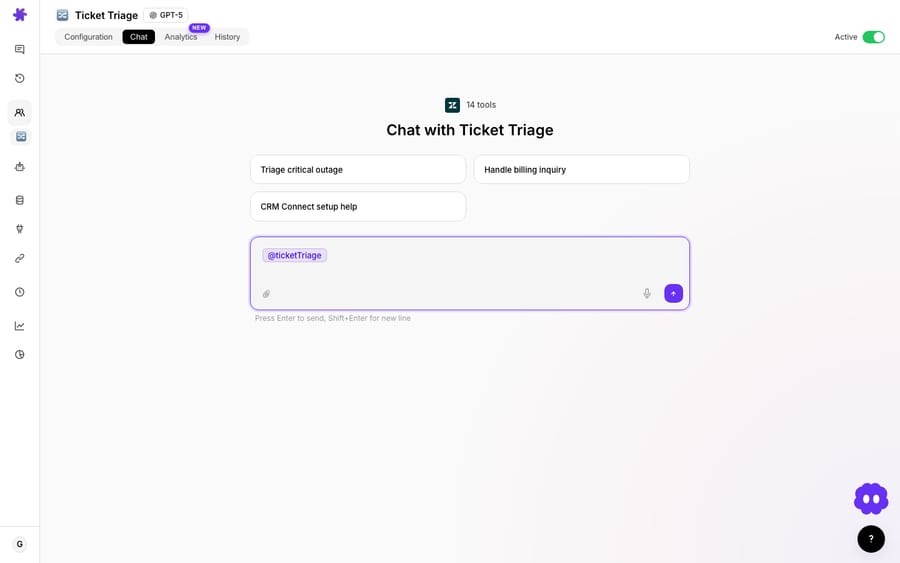
The pattern is always the same: someone @mentions the agent, the App Mention trigger fires, the agent searches the right source, and it replies in the thread with the answer plus where it came from. Three quick examples, each a real Macha use case:
- "Where is my order?" from Slack. A teammate asks
@macha what's the status of order #2041?The agent looks the order up in Shopify and replies in-thread with the line items, carrier, tracking number, and delivery estimate, no tab-switch to the Shopify admin. - Policy and process questions from Notion. Someone asks about the enterprise refund policy; the agent searches your Notion wiki, finds the right page, and answers with the bullet points and a source link so the asker can verify it.
- Knowledge-base suggestions across sources. A returns question gets answered from both your Zendesk Help Center and your Notion docs at once, the agent searches each, merges what it finds, and cites both. This is the auto-suggest knowledge base articles in Slack flow.
The differentiator versus a generic Slack knowledge bot is that Macha's answer isn't limited to documents. Because the same agent holds your Stripe, Shopify, and Zendesk connectors, a single Slack reply can blend live system data ("order shipped, tracking #9400111") with documented policy ("returns within 30 days, source: Help Center"). Most Slack-first answer tools (ClearFeed, Question Base, IrisAgent) index docs beautifully but stop at the document boundary. Macha's agents take actions.
Below is the same answer behavior rehearsed in Macha's chat playground: the exact tool calls and wording an agent will use before it ever posts in a Slack thread:
2. Slack as the ops layer (push alerts and reports)
The second pattern runs the other direction: Macha posts into Slack when something in your support stack needs eyes. Here Slack's Send Message action is paired with a trigger from another connector: a Zendesk ticket event, a Stripe webhook, or a scheduled time.
- Relay urgent tickets. When a Zendesk ticket is created with Urgent priority, the agent reads it and posts a formatted alert to
#urgent-support: subject, customer, age, and a direct link, so a possible security incident gets seen in seconds instead of when someone next checks the queue. - Daily support metrics summary. Every morning at 9:00, a scheduled trigger pulls yesterday's Zendesk numbers (created, solved, first-response time, CSAT, top topic) and drops a clean summary into your team channel. No manual reporting. For deeper, ad-hoc questions across thousands of tickets, point a Studies AI analysis at the same data and post the findings to Slack.
- Escalation context bundles. When a ticket needs escalation, the agent gathers the history, customer orders, and payment data into one summary, escalates the ticket, and posts the bundle to Slack so the next responder starts with everything in hand. (This is the Slack-side mirror of a clean human handoff: the agent does the legwork, a person makes the call.)
- Route questions to the right channel. If a billing question lands in the wrong channel, the agent replies with the redirect and cross-posts the question to
#billing-supportwith context, using both Reply in Thread and Send Message in one run.
These aren't dashboards anyone has to watch. They're agents that watch for you and speak up in the place your team already lives.
How do the Slack triggers behave (debounce and safeguards)?
The two Slack triggers (App Mention and Direct Message) are part of Macha's broader webhook automation system, where agents run autonomously in response to external events (Zendesk ticket events, Freshdesk updates, Slack mentions, custom webhooks). A couple of behaviors are worth knowing before you wire one up.
Debounce. Slack conversations come in bursts: people fire off three messages in a row while they think out loud. Every event-driven trigger, Slack mentions and DMs included, exposes a Debounce chip: set a delay in seconds and Macha waits for the burst to settle before the agent responds once, with the full context, instead of three half-answers. Slack DMs ship with a 10-second default debounce and Zendesk messaging tickets default to 15 seconds. Other new event-driven triggers, including App Mention, start at 0 seconds (off) until you set a window. You can change it per trigger. Per Macha's trigger docs, this is a trailing-edge debounce: the timer resets with each new event, so the agent answers once the conversation goes quiet.
Safeguards. Debouncing has guardrails so a noisy event source can't hold an agent hostage: a debounce bucket force-fires when it accumulates 25 events, or after a total wait of 10× the debounce window (capped at 2 minutes), whichever comes first. It's a small detail, but it's the kind of thing that separates "we wired a webhook to GPT" from a system you can leave running.
How do you set up an internal "WISMO + policy" agent in Slack?
Here's the shortest path to value. Build one agent that answers the two questions your team asks most: where's this order and what's our policy on X, and let it live in #support.
- Connect Slack (OAuth) and the sources the answers come from: Shopify for orders, Notion or your Zendesk Help Center for policy.
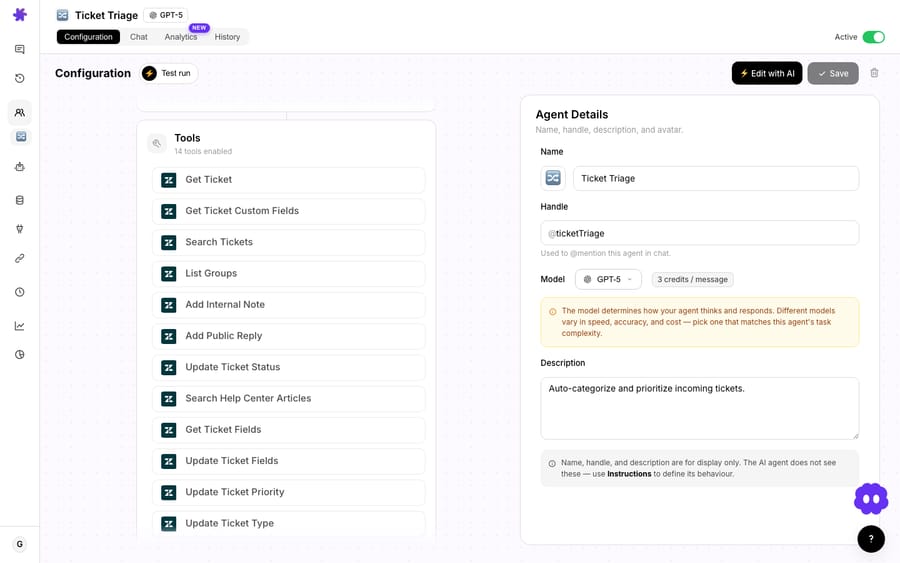
- Create an agent and give it a plain-English instruction: "When someone @mentions me in #support, read the thread, look up any order numbers in Shopify, search the knowledge base for any policy questions, and reply in-thread with the answer and a source link."
- Attach the App Mention trigger so it runs on its own, and set a short debounce so it waits out multi-message questions.
- Test it in the chat playground first: Macha lets you rehearse the exact tool calls and wording before the agent ever posts publicly, then turn it on.
The same skeleton scales: add a Stripe connector and the agent answers billing questions; add a scheduled trigger and it posts the morning metrics; add Zendesk and it relays urgent tickets. You're composing one agent's job, not buying five products.
When is Slack the wrong surface?
Honesty matters more than a feature list. A few cases where you should not reach for the Slack connector:
- Customer-facing resolution isn't Slack's job. Macha's Slack integration is built around your internal workspace: channels and DMs with your team. If your goal is to deflect customer tickets, that work belongs on the helpdesk side (the agent replying inside Zendesk, Freshdesk, Gorgias, Front, HubSpot or Intercom) or in a web chat widget, not your internal Slack. Slack Connect with external customers is a different setup than the internal-team pattern this connector is designed for.
- Image-heavy questions. Macha's Slack actions are text-first: the connector lists no action for reading image attachments shared in Slack. If your team routinely pastes screenshots that must be interpreted, validate that path before you rely on it. Image reading is covered on the Zendesk side, where the Read Attachment action handles images, PDFs and documents.
- Slack as a system of record. Slack is the front door, not the filing cabinet. Tickets, knowledge, and audit trails should live in your helpdesk and knowledge sources. Don't try to make Slack the place where support state is stored; let Macha read and write to the systems that are built for that.
- Every notification, everywhere. It's tempting to relay all ticket events into Slack. Resist it: that recreates the firehose you were trying to escape. Relay the events that need a human in the next few minutes (urgent, escalations, failed payments) and let the daily summary handle the rest.
How does Macha compare with other Slack support tools?
"AI support in Slack" is a crowded shelf, and the tools on it aren't really the same product. Most teams shopping this space are weighing a few distinct shapes: a Slack-native helpdesk, a Slack-first answer bot, a suite-native agent, and an outcome-priced resolution bot. Here's where Macha sits among them.
| Tool | What it is | Pricing (verify with vendor) | Best when |
|---|---|---|---|
| Macha | AI agent layer on your existing helpdesk; Slack is one surface the same agents appear on | Per ticket (from $299/mo for 750); see pricing | You already run Zendesk, Freshdesk, Gorgias, Front, HubSpot or Intercom and want agents that act across tools: in Slack and in the helpdesk |
| ClearFeed | Slack-native helpdesk: tickets, SLAs, and triage live inside Slack | $24/agent/mo (Starter, AI Pack from $20/mo extra) or $49/agent/mo (Professional, AI Pack included), billed monthly | You want a ticketing/SLA system built into Slack itself |
| Question Base | Slack-first answer agent that learns from your docs | No free plan; Annual Pro $5/user/mo, from $6,000 a year | Pure internal Q&A from Notion/Confluence/Drive |
| Suite-native agents | AI agent built into a specific suite (Zendesk, which completed its Forethought acquisition on 26 March 2026, or Salesforce's Agentforce) | Per-conversation / custom platform pricing | You're standardized on that suite and want its native agent |
| Intercom Fin in Slack | Outcome-priced AI resolution agent | $0.99 per outcome + Intercom seats ($29 a seat billed annually on Essential) | You're an Intercom shop and want Fin's resolution model |
The honest read: if you want a helpdesk that lives in Slack, ClearFeed or Question Base are purpose-built for that and worth a look. Macha is a different bet: it assumes your tickets and knowledge already live in Zendesk, Freshdesk, Gorgias, Front, HubSpot or Intercom, and it puts agents that can take actions across your whole stack onto Slack as one of several surfaces. If you only need a doc-answer bot in one channel, Macha is more than you need; if you want the same brain answering in Slack and resolving tickets in your helpdesk, that overlap is the point. Macha is also the done-for-you option: the Macha team analyzes your past tickets, builds the knowledge base and the agents on your existing help desk, and runs them in safe mode until the drafts are right, so nobody on your team has to configure the Slack agent alone. For the deflect-vs-resolve distinction these tools blur, see automated resolution vs deflection vs automation.
What does the Macha Slack integration cost?
Macha has one plan, and every integration, Slack included, comes with it. There is no per-seat or per-channel Slack fee, and team seats are unlimited. What you pay for is tickets: Macha bills per ticket, one conversation charged once however many messages, lookups or summaries the agent takes to finish it. Pricing starts at $299 a month for 750 tickets, about $0.40 each, and steps up to $599 for 1,500, $1,199 for 3,000 and $3,999 for 10,000. The model an agent runs on doesn't change the charge, and the price includes setup by the Macha team and a dedicated success manager who handles your changes, such as a new channel, a new tool or a new kind of question.
That model is worth contrasting with the Slack-support market. Slack-native helpdesks like ClearFeed price per agent seat: its published pricing lists $24/agent/month (Starter, with an AI Pack from $20 a month extra) and $49/agent/month (Professional, AI Pack included with 50 AI credits per agent), billed monthly, with 15% off annual plans (checked 24 September 2026). Outcome-priced agents like Fin, which Salesforce finished acquiring on 10 September 2026, charge $0.99 per outcome (Fin pricing) on top of Intercom seats (ClearFeed's roundup of Intercom pricing covers the seat side). Slack-first answer bots like Question Base no longer list a free plan: Annual Pro is $5/user/month, starting at $6,000 a year (Question Base pricing). Macha's per-ticket model is neither per-seat nor per-resolution: one conversation is charged once, however many steps the agent takes inside it. See the pricing page for the current tiers.
FAQ
Does Macha replace our helpdesk with Slack? No. Macha sits on top of your existing helpdesk (Zendesk, Freshdesk, Gorgias, Front, HubSpot or Intercom) and uses Slack as a surface for your internal team: answers, alerts, and reports. Your tickets and knowledge stay where they are.
How do people invoke the agent in Slack? Two ways: @mention the Macha bot in any channel it's in (App Mention trigger), or send it a direct message (Direct Message trigger). It replies in the thread with context from your connected tools.
Can the agent act on other systems from a Slack message? Yes, that's the point. A single Slack reply can include a live Shopify order lookup, a Stripe payment status, and a cited policy from Notion or your Zendesk Help Center, because the same agent holds all those connectors.
Will it spam the channel if someone sends several messages quickly? No. Slack mention and DM triggers support a debounce delay (10 seconds by default on DMs; set one on mentions) so the agent waits for a burst to finish and answers once. Safeguards force a response after 25 queued events or a capped wait, so it never hangs.
How is it authenticated? Slack connects over OAuth: authorize the Macha app into your workspace once and choose the channels it can access.
What does it cost to run? Slack is included in Macha's one plan; Macha bills per ticket (one conversation, charged once however many steps the agent takes) from $299 a month for 750 tickets. No per-seat or per-channel Slack fee, and the price includes setup by the Macha team and a dedicated success manager who handles your changes. See pricing.
How do you get started?
If your team is already answering the same questions in Slack, and relaying tickets by hand, the Slack connector turns that effort into an agent that does it for you, with the context your whole stack already holds. Start a free trial ($50 of usage, no credit card, no time limit), connect Slack from the integrations directory, and @mention your first agent. For the step-by-step, the Slack integration docs cover setup, channels, and triggers.
Written by Abbas (Customer Support & AI, Macha) · Reviewed by Ankeet Guha (Co-founder & CTO) · Published 2026-06-24 · Last updated 2026-09-24.






