





 Shopify
 Stripe
 Slack
Slack Notion
 Google Workspace
 Confluence

How Much Does Gorgias Really Cost in 2026? Overages, AI Fees and Worked Bills


Gorgias lists plans from $10 to $900 a month, but it bills by the ticket, so overage and AI Agent fees set the real number. Here are the published rates as of September 2026 and three worked bills at real volumes.
Key takeaways
- Gorgias self-serve plans cost $10, $60, $360 and $900 a month on monthly billing, for 50, 300, 2,000 and 5,000 billable tickets, with overage at $0.40 or $0.36 per ticket.
- Gorgias bills each AI Agent resolution twice: the conversation counts as a helpdesk ticket and also carries a $0.90 to $1.00 interaction fee, or $1.50 past the plan's allowance.
- A Gorgias Pro merchant on annual billing who handles 5,000 tickets in November pays about $1,380 that month, 4.6 times the $300 base, because overage has no monthly cap.
- Gorgias Pro with AI Agent at $550 includes only 190 automated interactions, so automating 45% of 2,000 tickets adds $1,065 in AI overage for a month of about $1,615.
- Gorgias does not publish SMS or Voice rates; its pricing page says only that pricing scales with call and text volume, so get per-ticket rates in writing.

Gorgias costs $10 to $900 a month on its four self-serve plans, but most brands pay more because the bill is set by tickets, not seats: every ticket past your plan's pool costs $0.36 to $0.40, and each AI Agent resolution is charged as a helpdesk ticket plus a $0.90 to $1.50 interaction fee (gorgias.com/pricing, checked 24 September 2026). A Pro brand that handles 5,000 tickets in November on annual billing pays about $1,380 for that month, 4.6 times its $300 base.
| Plan | Monthly billing | Annual billing (per month) | Tickets included | Overage per extra ticket | User seats | AI Agent add-on (monthly) |
|---|---|---|---|---|---|---|
| Starter | $10 | Monthly only | 50 | $0.40 | 3 | +$30 for 30 interactions |
| Basic | $60 | $50 | 300 | $0.40 | 500 | +$30 for 30 interactions |
| Pro | $360 | $300 | 2,000 | $0.36 | 500 | +$190 for 190 interactions |
| Advanced | $900 | $750 | 5,000 | $0.36 | 500 | +$530 for 530 interactions |
| Enterprise | Custom | Custom | Above 5,000 | Not published | Custom | Custom |
AI Agent interactions past the included allowance cost $1.50 each on every plan. Source: Gorgias pricing page, 24 September 2026.
What are Gorgias's published plans?
Gorgias sells four self-serve tiers plus a custom Enterprise plan, which it pitches at brands handling over 5,000 conversations a month. Each tier is built around an included pool of billable tickets, not agent seats. Basic, Pro and Advanced each allow 500 user seats and Starter allows 3, so adding staff is close to free and adding volume is where the cost lives. Annual billing takes about 17% off (Pro drops from $360 to $300 a month), but it is a real commitment: Pro on annual terms is $3,600 billed up front, and Starter is monthly only.
A high seat allowance on ticket-based billing is good value for a larger team. That's a real Gorgias strength, and reviewers say so. The catch is that the "included tickets" number is the one that governs your bill, and it's easier to blow through than it looks. (For the plan-by-plan feature list, see Gorgias pricing explained.)
What counts as a billable ticket in Gorgias?
This is the most misunderstood line item, and it's where most of the surprise comes from. Gorgias's own pricing FAQ defines a billable ticket as "a conversation started on any Gorgias channel that includes a message from a human agent, a Rule or AI Agent." The number of messages doesn't matter; one conversation is one billable ticket.
A few things follow from that definition that catch merchants off guard:
- Late replies can open a new ticket. The same FAQ says "a reply to an existing ticket thread may count as a new billable ticket, but only after a defined period of inactivity." A slow back-and-forth with one customer can bill as two or three tickets across a week. The pricing page doesn't state the inactivity window, so ask for it in writing.
- Auto-responders make everything billable. A Rule counts as a sender. If a Rule auto-replies to every inbound message, every inbound message that gets past the spam filter, junk included, becomes a billable ticket.
- What's not billable. Inbound tickets nobody replies to, by human, Rule or AI, don't meet the definition. That's fair, but it also means your billable count is driven by how aggressively you automate, not just by demand.
Why does the AI Agent get billed twice?
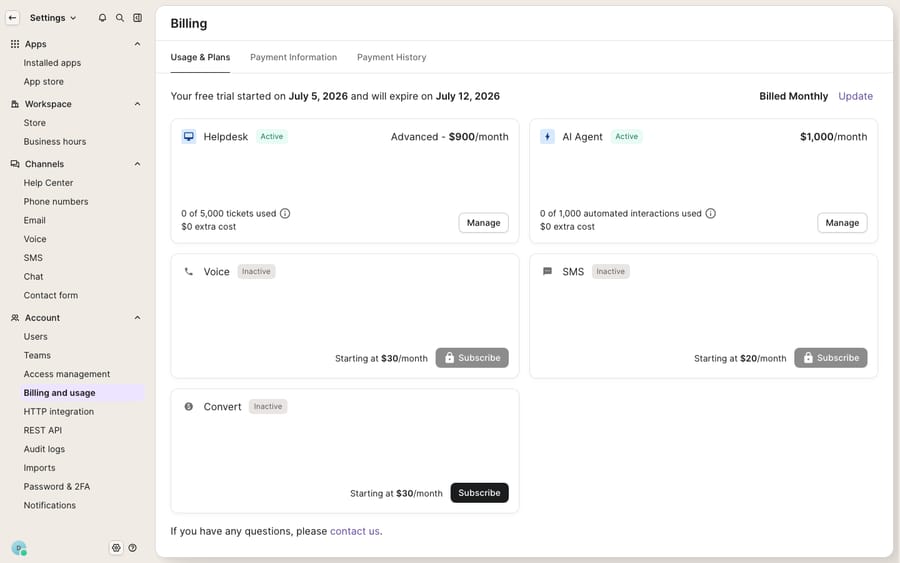
Here's the part that most reshapes the true cost. When Gorgias's AI Agent fully resolves a conversation, you pay for it twice. Gorgias states it directly: "AI Agent interactions are priced at $0.90 each on annual plans or $1.00 on monthly plans. Each AI Agent interaction also counts as a helpdesk ticket and is billed accordingly." Each plan's AI add-on buys a fixed allowance of interactions, and anything past it is $1.50 each. One small relief: if a human agent replies within 72 hours of an AI resolution, Gorgias charges that conversation only as a helpdesk ticket.
Now the arithmetic, using the published Pro numbers on monthly billing. Pro with AI Agent costs $550 and includes 2,000 tickets and 190 automated interactions. Automate 45% of 2,000 tickets and you have 900 AI resolutions: 710 past the allowance at $1.50 is $1,065 in AI overage, for a month of about $1,615 against a $360 helpdesk sticker. Those 900 resolutions also use 900 of your 2,000 helpdesk tickets. Before running at that rate, ask Gorgias sales whether a larger interaction bundle is available, because the $1.50 rate is the one that hurts.
The incentive is worth naming. Per-resolution pricing means the vendor earns more as automation rises, so automation marketed as a cost-saver can increase the bill. The Ringly review reaches the same place with its own example, where the real bill is "closer to $720, about double the sticker price." (For how the agent itself works, our Gorgias AI Agent explained walkthrough goes deeper.)
How much can peak-season overages add?
Ticket-based pricing is stable right up until Black Friday. Overages are billed per ticket with no monthly ceiling, so a volume spike flows straight through to the invoice. Take a Pro merchant on annual billing, $300 base and 2,000 included tickets, who handles 5,000 tickets in November: 3,000 extra tickets at $0.36 is $1,080, for about $1,380 for the month, 4.6 times the base. On monthly billing the same month is $1,440. Reviewers in the Ringly write-up describe exactly this: "Ticket-based pricing gets unpredictable," and one noted that "new updates are always an add-on."
The defensive move most merchants miss is that your tier sets your included pool as well as your overage rate. Advanced covers 5,000 tickets for $900 on monthly billing, so a Pro merchant who reliably spikes to 5,000 in Q4 pays $540 less that month by moving up than by eating overage. Gorgias's FAQ says it will recommend an upgrade when that's cheaper, but the timing is on you.
Which add-ons don't show up on the pricing page?
SMS and Voice are add-ons with no published rates. Gorgias's pricing page says only that "pricing scales with your call and text volume." Its FAQ explains the unit: a ticket becomes an SMS ticket once one text is exchanged, and a Voice ticket once one call takes place, with further texts or calls on that ticket at no extra charge. Get the per-ticket rates in writing before you commit. For a brand doing real SMS support, that's a line worth hundreds of dollars a month stacked on top of everything above.
Add it up for a realistic mid-size brand on Pro with AI Agent, monthly billing: 2,500 tickets and 45% automation. That's $550 base, 500 extra tickets at $0.36 ($180), and 1,125 AI resolutions of which 935 are past the 190 allowance at $1.50 ($1,402.50). The total is about $2,133 a month before SMS and Voice, against a $360 headline. The gap between sticker and reality is the whole point of this page.
Is Gorgias still worth it at the real price?
Gorgias earns its reputation. The Shopify integration is best-in-class: agents refund, edit, cancel and track orders without leaving the conversation, and reviewers call it the primary differentiator. A 500-seat allowance from Basic up makes it economical for larger teams, and tuned automation can carry a large share of volume; Orthofeet, quoted on Gorgias's pricing page, says it is "now above 50% automation." If you're a Shopify-native brand, it's a strong, purpose-built help desk.
But be clear-eyed about the trade-offs the reviews surface:
- Billing shock is the recurring complaint. Overages, late replies opening new tickets and double-billed AI resolutions combine to make bills unpredictable, especially in peak season.
- Shopify dependency cuts both ways. The deep Shopify tie is the strength, but it's less compelling if you're off Shopify.
- AI accuracy still needs guardrails. Reviewers note the agent is "not always fully accurate yet," so human review is part of the deal.
- Annual billing locks you in. The roughly 17% discount means paying for 12 months up front ($3,600 on Pro), so it's a commitment, not a hedge.
For a fuller feature-by-feature picture, see our Gorgias review and the plan-by-plan Gorgias pricing explained. If the true-cost math pushes you to shop around, we compare options in the best Gorgias alternatives. And if you're still deciding whether Gorgias is the right category of tool at all, what is Gorgias sets the baseline.
How does an AI layer on top of Gorgias change the cost?
Gorgias charges per resolution, a flat fee whether the AI took one action or handled a twelve-step return, on top of the helpdesk ticket. A different approach is to run an AI agent layer on top of the Gorgias you already use and pay for it per ticket instead. That's what Macha does: it connects to Gorgias as a native integration and works your existing tickets. It is not a help-desk replacement and doesn't change where your tickets live. Macha bills per ticket, one conversation charged once however many messages, lookups or drafts it takes, and never per resolution, so a twelve-step return costs the same as a one-line answer and a heavy automation month doesn't run up a per-resolution counter. It can also look up live order or account status through a custom tool that turns a REST API into something the agent can call, so the answer is grounded rather than guessed. Pricing starts at $299 a month for 750 tickets, about $0.40 each, with setup and monitoring by the Macha team included; the pricing page has the full tier table, and Macha's Gorgias integration covers the setup. The division of labor: keep Gorgias as your Shopify-connected help desk, and layer an agent on top for the reasoning-heavy resolutions. For the one-off setup cost on top, see Gorgias AI setup cost.
FAQ
What does Gorgias actually cost per month? The published plans on monthly billing are Starter at $10 (50 billable tickets), Basic at $60 (300), Pro at $360 (2,000) and Advanced at $900 (5,000), plus custom Enterprise; annual billing takes Basic, Pro and Advanced to $50, $300 and $750. Your real bill adds per-ticket overage ($0.40 or $0.36), AI Agent interactions ($0.90 to $1.00 within the allowance, $1.50 past it) and unpublished SMS and Voice rates, so mid-size brands often land well above the sticker.
What counts as a billable ticket in Gorgias? Any conversation that includes a message from a human agent, a Rule or the AI Agent counts as one billable ticket, regardless of message count. A reply to an old thread can open a new billable ticket after a period of inactivity, and auto-responder Rules can make junk mail billable too.
Why does the AI Agent make my bill go up? Because each AI resolution is billed twice: Gorgias says every AI Agent interaction "also counts as a helpdesk ticket," on top of the $0.90 or $1.00 interaction fee, or $1.50 past your allowance. At high automation rates this can double the bill, which is why modeling it in advance matters.
How bad can peak-season overages get? Bad. A Pro merchant on annual billing handling 5,000 tickets against a 2,000 pool pays about $1,380 that month, roughly 4.6 times the $300 base, because overages are billed per ticket with no monthly cap.
Is there a cheaper way to add AI on top of Gorgias? An AI agent layer like Macha runs on top of Gorgias and bills per ticket, one conversation charged once however many messages it takes, from $299 a month for 750, rather than per resolution. There's no separate fee riding on every closed ticket, and Gorgias stays your help desk and system of record.
Want the AI cost to be one predictable charge per conversation? Start a free trial of Macha and connect it to your Gorgias in minutes.






