





 Shopify
 Stripe
 Slack
Slack Notion
 Google Workspace
 Confluence

How Do You Integrate Freshdesk with Trello? Setup, Sync Limits and Zapier


Freshdesk connects to Trello through a paid Marketplace app that turns a ticket into a Trello card from the ticket sidebar, with a 21-day free trial before per-agent billing. The sync runs mainly from ticket to card, so status changes on the board still need an agent or a Zapier zap to reach the ticket.
Key takeaways
- Freshdesk integrates with Trello through a third-party Marketplace app, Verified by Freshworks, that offers a free 21-day trial and then bills per agent at a rate the listing does not publish.
- The Freshdesk Trello app authenticates with a Freshdesk agent's API key, and the recommended setup is a dedicated 'Trello Agent' with admin-level permissions rather than a human agent's credentials.
- A card created from the Freshdesk Trello widget takes the ticket subject as its title and the ticket description as its body, and both can be edited before the card is created.
- Trello status changes do not reliably flow back to the Freshdesk ticket, so closing the loop is usually a manual update by an agent or a Zapier zap.
- Zapier's Freshdesk and Trello integration can create a Trello card for every new Freshdesk ticket, or a Freshdesk ticket from every new Trello card, without an agent clicking anything.

To integrate Freshdesk with Trello, install the paid Trello app from the Freshworks Marketplace (21-day free trial, then billed per agent), authenticate it with a dedicated Freshdesk agent's API key, and push tickets to cards from the Trello widget in the ticket sidebar. The sync runs mainly one way, ticket to card; for automatic, event-driven cards, use Zapier instead.
There are three ways to build that bridge, and they trade off very differently:
| Approach | Setup effort | Sync direction | Cost | Best for |
|---|---|---|---|---|
| Native Marketplace app (Trello for Freshdesk) | Low — install + authorize | Ticket → card (create/link); status back is limited | 21-day trial, then paid per agent | In-ticket dev/ops handoff |
| Zapier / middleware | Medium — build zaps | Either direction, event-driven | Zapier plan on top | Custom triggers, no in-ticket widget |
| Custom app / API | High — you build it | Whatever you code | Dev time | Bespoke field logic |
What does the Freshdesk–Trello integration actually do?
The connection between Freshdesk and Trello is a handoff bridge, not a shared database. The most common flow runs one direction: a support agent working a ticket creates a Trello card so a different team can act on it. A smaller number of teams also run it the other way, where a Trello card spawns a Freshdesk ticket, but the everyday value is turning "this needs engineering" into a tracked card in one click. The native app is the fastest path for that dev handoff, so the steps below start there and then cover where middleware earns its keep.
How do you install the Trello app in Freshdesk?
The Trello app is a third-party integration listed on the Freshworks Marketplace, built by an outside developer (Moises), marked "Verified by Freshworks," and it supports both Freshdesk and Freshdesk Omni. The listing shows a free 21-day trial, after which the developer charges per agent (the listing does not publish the per-agent rate, checked 24 September 2026), so treat it as a paid add-on rather than a bundled feature.
- In Freshdesk, go to Admin → Apps and choose Get More Apps to open the Marketplace.
- Search for Trello and open the listing.
- Click Install (labelled Buy App on some plans) to add it to your account.
- When prompted, authorize Freshdesk to access your Trello account via OAuth — this connects the two products.
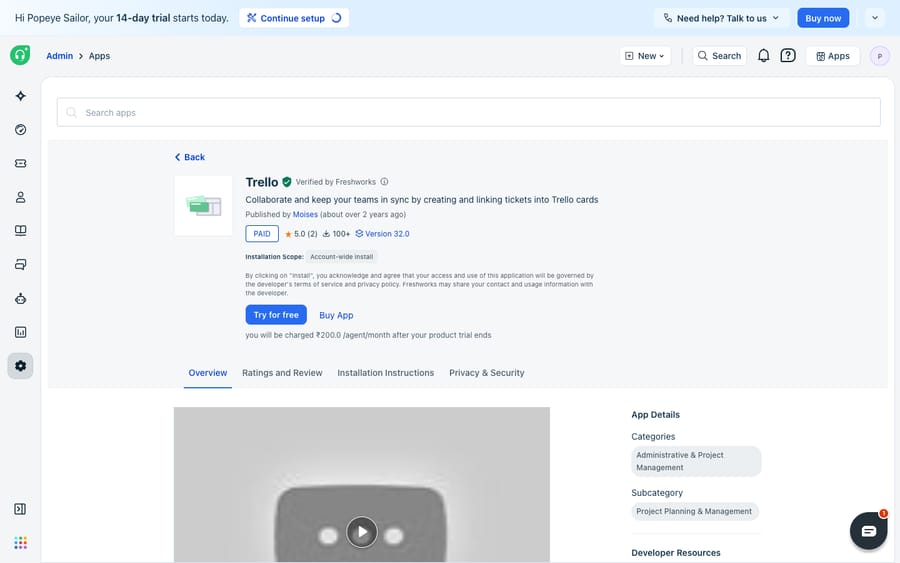
The screenshot above is the app's Marketplace listing (the overview and install screen), not a configured, live sync. The actual field mapping happens after install, in the setup and per-ticket steps below.
Which Freshdesk account should the Trello app authenticate with?
This is the step people skip and then wonder why cards post under the wrong name. The app authenticates back into Freshdesk using an agent's API key, and the vendor documentation recommends you create a dedicated agent for it rather than borrow a human's credentials.
- In Admin → Agents, create a new agent named something like Trello Agent with admin-level permissions.
- Copy that agent's API key (found on the agent's profile).
- On the Trello app's setup page, enter your Freshdesk domain and paste the Trello Agent's API key.
- Choose a notification preference for what gets written back to the ticket when a card is created or updated — the options are typically none, a private note, or a public note. Private notes are the safe default: your team sees the link, the customer doesn't.
- Save to finish setup.
Using a dedicated service agent keeps the audit trail clean and means a departing employee's deactivated account won't quietly break the integration.
How do you push a Freshdesk ticket to a Trello card?
With the app installed, every ticket gains a Trello widget in the right-hand sidebar. This is where the handoff happens.
- Open the ticket you want to escalate to a board.
- In the sidebar Trello widget, click Create a new card.
- The card title defaults to the ticket subject and the description defaults to the ticket description. Edit either before you create it, since long email threads rarely make a readable card.
- Pick the destination board and list (e.g. your engineering board's "Triage" list).
- Optionally assign members, labels, and a due date so it lands correctly on the other team's board.
- Create the card. The ticket now shows the linked card, and — depending on your Step 2 choice — a note recording the link.
You can also link an existing card instead of creating a new one: select the board, list, and specific card, then confirm. And from the Trello side, a card can carry a "Create a Ticket" action back into Freshdesk, which is how the reverse flow works for teams that want it.
When should you use Zapier instead of the native app?
The native app is agent-initiated: a person clicks "Create a new card." If you instead want cards to appear automatically on every new or updated ticket, or you want triggers the widget doesn't offer, Zapier is the standard middleware route. Its Freshdesk triggers include New Ticket, Update Ticket and New Ticket Note, and its Trello actions include Create Card, Move Card to List and Create Comment. That supports zaps such as create a Trello card for each new Freshdesk ticket and, in reverse, create a Freshdesk ticket from each new Trello card, running in the background without an agent touching the sidebar. Mapping Update Ticket to Move Card to List also gives you the ticket-to-card status movement the native app lacks.
The trade-off is that middleware adds its own subscription and its own place to debug, and it does not give you the in-ticket widget your agents see. Many teams run both: the native app for deliberate, in-context handoffs, and a couple of zaps for the always-on, no-human-needed cases. This is the same build-vs-buy calculus that shows up everywhere in automating Freshdesk — glue you assemble yourself versus a maintained connector.
Does Trello status sync back to the Freshdesk ticket?
The native app is good at the thing it advertises: turning a ticket into a card and keeping a link between them. Give it credit for that — it is a clean, low-effort handoff, and the field pre-fill saves real copy-paste. But it is worth being precise about what "sync" does and doesn't mean here.
The relationship is primarily one-directional. Pushing a ticket into a card is smooth. Getting Trello status changes to flow back into Freshdesk automatically is the part the vendor documentation does not clearly promise — a card moving from "In Progress" to "Done" on the board won't reliably change your ticket's status or reply to the customer on its own. In practice, closing the loop is a manual step: an agent watches the board, sees the work is done, and updates the Freshdesk ticket themselves. If true two-way status parity matters to you, that generally requires deeper field mapping configured inside the app vendor's own product, on a paid tier — configuration you can't fully set up from the Freshdesk trial alone.
Two more honest caveats. First, it's a paid, third-party app: once the 21-day trial ends, it bills per agent, so a large team should price it before rolling it out. Second, the integration moves tickets, but it does nothing about the volume of tickets — every bug report and status question still lands in your queue first, and a human still has to read each one and decide whether it deserves a card.
Where does an AI agent fit between Freshdesk and Trello?
That last gap is where an AI agent layer fits: not as a replacement for Trello or Freshdesk, but as triage in front of them. The broader category of AI agents for customer service exists to do the reading-and-deciding that a handoff button can't, and it's worth understanding the build-versus-buy tradeoff before you wire anything together. Macha is one such layer: it runs on top of the Freshdesk you already use as a native connector — it does not replace your help desk, and it doesn't compete with Trello. You connect it to Freshdesk with your subdomain and API key, and it reads the same tickets your Trello app sees: resolving the routine "where's my order" questions automatically so they never need a card, and — through a custom tool that wraps an API like Trello's — it can even create or update a card as part of an automated workflow, so the handoff itself becomes something an agent does rather than a human. (Macha's connector is for Freshdesk specifically — not Freshchat, Freshservice, or Freshcaller. And Macha bills per ticket — one conversation, charged once however many messages it takes — never per resolution.)
The clean division of labour: let the native Trello app own the deliberate, human-driven handoff; let middleware cover the always-on triggers; and let an AI layer cut the volume that reaches either, so the cards that do get created are the ones that actually needed a human.
FAQ
How do I connect Freshdesk to Trello? Install the Trello app from the Freshworks Marketplace (Admin → Apps → Get More Apps, search Trello, then Install/Buy App), authorize access to your Trello account, create a dedicated "Trello Agent" in Freshdesk, and supply your Freshdesk domain plus that agent's API key on the setup page. A Trello widget then appears in the ticket sidebar.
Is the Trello integration free? No. The Marketplace app runs a 21-day free trial and then bills per agent at a price set by the app developer, which the listing does not publish, so it's a paid add-on. Zapier, the middleware alternative, has its own separate subscription.
Does ticket status sync both ways between Freshdesk and Trello? Pushing a ticket to a card and linking them is smooth and reliable. Automatic status sync back from Trello to Freshdesk is not clearly guaranteed by the app's documentation. In practice, updating the ticket when the card is done is a manual step, and true two-way parity typically needs deeper field mapping configured in the vendor's own product on a paid tier, or a Zapier zap per direction.
Can I create a Freshdesk ticket from a Trello card? Yes. From a linked card in Trello you can use a Create a Ticket action to spin up a Freshdesk ticket, or use a Zapier zap to do it automatically whenever a new card is added to a board.
Can AI decide which tickets should become Trello cards? That's exactly the gap an AI layer like Macha fills. Running on top of Freshdesk, it triages tickets by intent — resolving routine questions itself and, via a custom tool, creating a Trello card only for the ones that genuinely need engineering or ops — without replacing Freshdesk or Trello.
Ready to stop hand-sorting which tickets become cards? Start a free trial of Macha and connect it to your Freshdesk in minutes.






