





 Shopify
 Stripe
 Slack
Slack Notion
 Google Workspace
 Confluence

How Do You Integrate Freshdesk with Typeform? Setup, Field Mapping and Zapier (2026)


Typeform's native Freshdesk integration turns each form response into a new Freshdesk ticket, set up from Typeform's Connect panel with your Freshdesk API key and domain. It maps five fields and runs one way, so Zapier or an AI layer covers the rest.
Key takeaways
- Freshdesk integrates with Typeform from the form's Connect panel in Typeform, using a Freshdesk API key and the part of the domain before .freshdesk.com.
- Typeform's Freshdesk integration maps questions to five Freshdesk fields: Email, Ticket subject, Ticket description, Priority and Status, with Status defaulting to Open when unmapped.
- Typeform says the Freshdesk integration is available on all Typeform plans except legacy plans, and it creates tickets one way without syncing replies back.
- Zapier's Free plan allows 100 tasks a month and two-step Zaps only, so a multi-step Typeform-to-Freshdesk workflow starts on Professional at $19.99 a month billed annually.
- Macha connects to Freshdesk as a native connector and bills per ticket, from $299 a month for up to 750 tickets, drafting or posting replies to form-created tickets.

To integrate Freshdesk with Typeform, open your form's Connect panel in Typeform, click Connect on Freshdesk, enter your Freshdesk API key and helpdesk domain, then map questions to five ticket fields: email, subject, description, priority and status. Every completed response then creates a new Freshdesk ticket. Per Typeform's help article, the integration is available on all Typeform plans except legacy plans.
| Question | Answer (checked 24 September 2026) |
|---|---|
| Where you set it up | Typeform's Connect panel, not Freshdesk admin |
| Credentials | Freshdesk API key + the part of your domain before .freshdesk.com |
| Fields you can map | Email, Ticket subject, Ticket description, Priority, Status |
| Direction | One-way, create-only (Typeform → Freshdesk) |
| Typeform plan | All plans except legacy plans |
| Fallback for more fields | Zapier: New Entry trigger + Create Ticket action |
What does the Typeform-Freshdesk integration actually do?
The core promise is narrow and worth stating plainly: a new Typeform response creates a new ticket in Freshdesk. The app on the Freshworks Marketplace describes itself in exactly those terms, "Automatically create new tickets in Freshdesk from new typeform responses", and it lists Freshdesk and Freshdesk Omni as its supported products. That's the whole job. It's a one-way pipe from Typeform into your help desk.
A few things follow from that. This is not a two-way sync: replies your agents send in Freshdesk don't flow back into Typeform, and there's no live field synchronisation between the two systems. It's a trigger-and-create relationship. So the right mental model is "Typeform is a smart contact form; Freshdesk is the system of record for what happens next." Once a submission becomes a ticket, everything (assignment, SLAs, automations, replies) happens inside Freshdesk exactly as it would for any other ticket. If you're already leaning on Freshdesk automations, it's worth reading how to automate Freshdesk with AI so those form-born tickets get triaged the moment they arrive.
What do you need before you start?
Setup for the native connection happens inside Typeform, not inside Freshdesk's admin, which surprises people the first time. To connect the two, you'll need:
- A Freshdesk API key. Per Freshdesk's support article, click your profile picture in the top-right corner, choose Profile Settings, then click View API key in the right pane and complete the captcha. The key only shows for a verified agent account, and API activity follows that agent's role permissions.
- Your Freshdesk domain. Typeform only wants the part before
.freshdesk.com: foracmehelp.freshdesk.com, you enteracmehelp. - A typeform with the right questions. Typeform's article lists what the form must include: an Email question (or the Email field in Contact info), a Multiple Choice or Dropdown question for the issue's importance (Urgent, High, Medium, Low), a Short or Long text question for the subject line, and a Short or Long text question describing the issue. A status question (Open, Pending, Resolved, Closed) is optional; unmapped tickets default to Open.
How do you connect Freshdesk from the Typeform Connect panel?
Per Typeform's How to integrate Typeform with Freshdesk article, the connection lives in the Connect panel of the form you want to wire up.
- Open the typeform you want to route into Freshdesk and click Connect.
- Scroll or search for Freshdesk and click Connect. Typeform says to pick the new version, labeled Freshdesk.
- Enter your Freshdesk API key and Helpdesk URL (domain), click Add account, then Continue.
Once authorised, Typeform drops you into the field-mapping step, which is where the integration earns its keep.
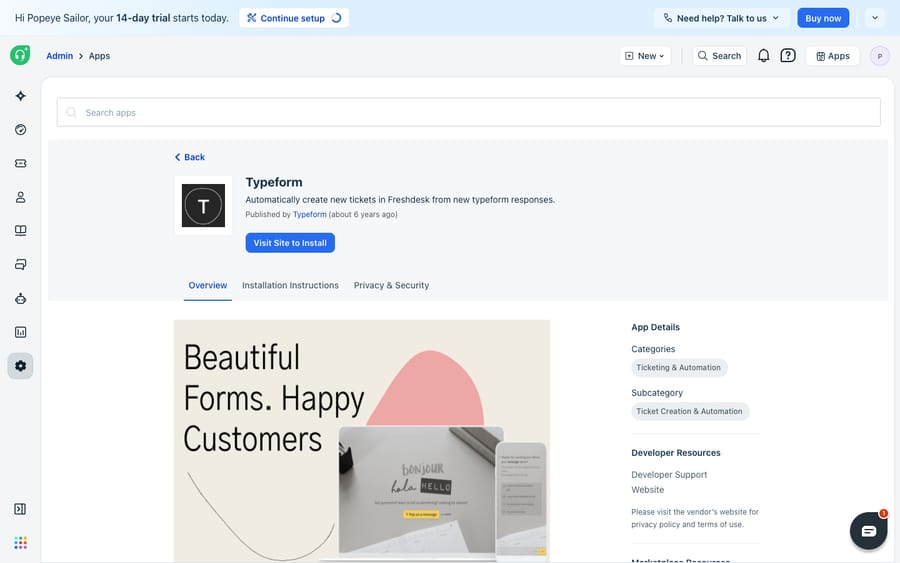
The Freshworks Marketplace also carries a Typeform app listing (shown above) that surfaces the same connection from the Freshdesk side. The field mapping itself happens in Typeform's Connect panel, using your Typeform account. The Marketplace page is the overview, not where you wire up each question.
Which Typeform questions map to which Freshdesk fields?
This is the part that turns a raw form response into a well-formed ticket. Typeform only lets you map to these Freshdesk fields:
- Email: from an Email or Contact info question. Freshdesk uses this address as the requester, so the ticket attaches to the right contact and your reply reaches the right inbox.
- Ticket subject: from a Short or Long text question (often a short "What can we help with?"), or from a variable.
- Ticket description: from a Short or Long text question. This is usually your long-answer field where the customer explains the problem.
- Priority: from a Multiple Choice or Dropdown question, or a variable.
- Status: from a Multiple Choice or Dropdown question, or a variable if every form ticket should start in the same status.
Click Finish and the form is live: every completed submission creates a ticket automatically. To turn it off, toggle it off in the Connect panel or delete it from the three-dots menu.
One constraint to plan around: only those question types map. Anything outside that list, including video answers and the text option from Video Answers, doesn't pass through to Freshdesk. Ticket type, tags, groups and custom fields are not on the list, so if you need them, you need Zapier or the API.
Should you use the native app, Zapier or a custom API?
The native connection is the fastest path, but it's deliberately simple. If you need more than email, subject, description, priority and status, you have two other routes. Here's how they compare.
| Native Typeform app | Zapier / Make | Custom API | |
|---|---|---|---|
| Setup effort | Lowest: Connect panel, a few clicks | Low to medium: build a Zap | High: you write and host code |
| Sync direction | One-way (Typeform → Freshdesk) | One-way, but flexible | Whatever you build |
| Field control | Email, subject, description, priority, status | Map most Typeform answers to most ticket fields | Total |
| Extra logic | None | Filters, paths, multi-step actions | Unlimited |
| Cost | Included on non-legacy Typeform plans | Free plan: 100 tasks/mo, two-step Zaps only | Engineering time |
| Best for | Simple contact form → ticket | Conditional routing, tags, custom fields | Bespoke, high-volume flows |
When to reach for Zapier. If the native mapping is too thin (say you want to set a ticket type, populate a custom Freshdesk field, add a note, or only create a ticket when a certain option is chosen), Zapier is the pragmatic step up. Its Typeform trigger is "New Entry" ("Triggers when a form is submitted") and its Freshdesk action is "Create Ticket." Zapier also exposes "Add Notes to a Ticket" and "Create Contact" actions, per its Freshdesk-Typeform integration listing, so you can stack a few steps into one workflow. Zapier's pricing page limits the Free plan to 100 tasks a month and two-step Zaps (one trigger, one action); multi-step Zaps start on Professional, from $19.99 a month billed annually.
Where does the integration stop, and where does an AI layer pick up?
The native integration is good at the one thing it promises: it reliably turns submissions into tickets with the essentials in place, without code. For a straightforward "contact us" or "report a bug" form, it's often all you need.
But be clear-eyed about the ceiling. It's one-way and create-only: it makes a ticket, and then it's done. It maps a fixed, small set of fields; custom fields, ticket types or conditional logic push you toward Zapier or the API. And it doesn't answer anything. A tidy ticket still lands in a queue where a human has to read it, figure out what the customer actually wants, look up the relevant order or account detail, and write the reply. The integration solves intake; it does nothing for resolution.
That last gap is where an AI agent layer fits, and it's worth weighing the build-versus-buy tradeoff before you add one. The broader category of AI agents for customer service exists to do the reasoning the form-to-ticket pipe can't. Macha is one such layer: it runs on top of the Freshdesk you already use as a native connector. It does not replace your help desk, and it doesn't replace this integration either. You connect Macha to Freshdesk with your subdomain and API key, and it reads and writes the same tickets your form creates: understanding the submission by intent, drafting or posting a grounded first reply, and looking up order or account status through a custom tool that turns a REST API into something the agent can call. (Macha's connector is for Freshdesk specifically, not Freshchat, Freshservice or Freshcaller. Billing is per ticket, not per resolution: one conversation, charged once however many steps it takes, from $299 a month for up to 750 tickets; see the pricing breakdown.)
The clean division of labour: let Typeform be the front door and the native app (or Zapier) be the intake pipe that turns submissions into well-formed tickets, then layer an agent on top for the part neither can do, which is reading the ticket and answering it fast.
FAQ
How do I connect Typeform to Freshdesk? Open the typeform you want to route, click Connect, search for Freshdesk, and click Connect. Enter your Freshdesk API key (profile picture → Profile Settings → View API key) and the part of your domain before .freshdesk.com, click Add account, map your questions, and click Finish.
Which fields does the native Typeform-Freshdesk integration map? Five: Email (from an Email or Contact info question), Ticket subject and Ticket description (from Short or Long text questions), and Priority and Status (from Multiple Choice or Dropdown questions, or variables). Status defaults to Open if you don't map it.
Is the integration two-way? No. The native app is one-way: a new Typeform response creates a new Freshdesk ticket. Agent replies and ticket updates in Freshdesk do not flow back into Typeform.
How do I integrate Typeform with Freshdesk if I need more than the basic fields? Use Zapier (or Make). The Typeform trigger "New Entry" paired with the Freshdesk "Create Ticket" action lets you map far more fields and add conditional logic: set a ticket type, populate custom fields, or add notes. Zapier's Free plan allows only two-step Zaps, so multi-step workflows need a paid plan.
Which Typeform plans include the Freshdesk integration? Typeform says it's available on all Typeform plans except legacy plans.
Can I add AI to these tickets without replacing Freshdesk? Yes. An AI agent layer like Macha connects to Freshdesk as a native connector and runs on top of your existing help desk. It reads the tickets your Typeform integration creates and drafts or sends grounded first replies, while Freshdesk stays the system of record.
Ready to turn form submissions into answered tickets, not just filed ones? Start a free trial of Macha ($50 of usage, no credit card) and connect it to your Freshdesk in minutes.






