





 Shopify
 Stripe
 Slack
Slack Notion
 Google Workspace
 Confluence

How Do You Integrate Freshdesk with Zapier? Setup, Triggers and Plans (2026)


You connect Freshdesk to Zapier with your Freshdesk subdomain and API key, and the integration works on the Growth, Pro and Enterprise plans. Below are the setup steps, the 5 Freshdesk triggers and their actions, the first Zaps worth building, and when a native Freshdesk webhook is the better choice.
Key takeaways
- Freshdesk connects to Zapier through a Zap that uses Freshdesk as the trigger app, authenticated with the account subdomain plus the API key from Profile Settings.
- Freshworks lists the Freshdesk Zapier integration on the Growth, Pro and Enterprise plans, and it is not available on the Free or legacy Sprout plans.
- The Freshdesk app on Zapier has 5 triggers, including New Ticket and Update Ticket, plus actions such as Create Ticket and searches such as Find Ticket by Id.
- Zapier checks polling triggers every 15 minutes on its Free plan and every 2 minutes on Professional, so a native Freshdesk webhook is the faster option for real-time events.
- Macha connects to Freshdesk with an API key and reads and answers tickets, billed per ticket from $299 a month for 750 tickets rather than per resolution.

To integrate Freshdesk with Zapier, create a Zap in Zapier, choose Freshdesk as the trigger app (for example New Ticket), and connect it with your Freshdesk subdomain and API key. Freshworks lists the integration on the Growth, Pro and Enterprise plans, not on Free or the legacy Sprout plan, and Zapier's Free plan checks polling triggers for new data every 15 minutes.
| Requirement | What you need |
|---|---|
| Freshdesk plan | Growth, Pro or Enterprise (older Blossom, Garden, Estate and Forest plans also qualify) |
| Credentials | Account subdomain + API key |
| Zapier plan | Free: 100 tasks a month, 15-minute checks. Professional: from $19.99/month billed annually, 2-minute checks |
| Freshdesk triggers | New Ticket, New Contact, New Ticket Note, Update Ticket, Update Contact |
| Setup time | A few minutes per Zap, plus testing |
What is the Freshdesk–Zapier integration?
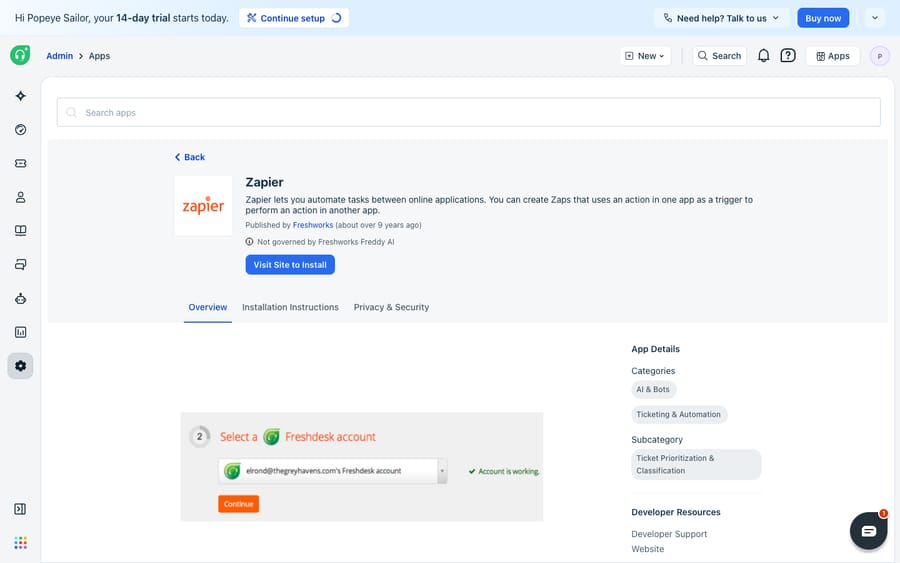
Zapier is a first-party app on the Freshdesk Marketplace, published by Freshworks itself. On the listing, the overview describes it plainly: "Zapier lets you automate tasks between online applications" by using an event in one app as a trigger to perform an action in another. The app is supported on both Freshdesk and Freshdesk Omni per the Freshworks Marketplace listing.
It's worth being precise about the shape of this integration. Unlike a deep two-way sync product, the Marketplace tile is a launch point: the actual connection and all the field mapping happen inside your Zapier account, not inside Freshdesk. A Zap is a single automation made of one trigger (the event that starts it) and one or more actions (what happens next). The trigger and action don't have to involve the same app, which is the whole point: a new Freshdesk ticket can trigger a message in Slack, a row in Google Sheets, or a card in Trello.
Which Freshdesk plan and credentials do you need?
Two prerequisites catch people out before they even start.
- Check your Freshdesk plan. Per Freshworks' Using Zapier to integrate Freshdesk with other apps, the Zapier integration is available on the Growth, Pro, and Enterprise plans (plus the older Blossom, Garden, Estate and Forest plans). It is not available on Free or Sprout. Freshdesk's pricing page no longer shows a free plan; its Free program covers up to 2 agents for 6 months, and that tier doesn't include Zapier either.
- Find your Freshdesk API key. Zapier authenticates to Freshdesk with your account subdomain plus your API key. To find the key, click your profile picture → Profile Settings, then View API key on the right, and complete the captcha. The key only appears once your agent account is verified, and resetting it will disconnect every app that was using it.
Have your subdomain (the yourcompany in yourcompany.freshdesk.com) and API key ready before you move to Zapier; you'll paste both into the connection dialog.
How do you connect Freshdesk inside Zapier?
The Marketplace tile's "Visit Site to Install" button sends you to Zapier, which is where the real work happens. You'll need a Zapier account. Zapier's Free plan includes 100 tasks a month, and the Professional plan has a 14-day free trial with no credit card (zapier.com/pricing).
- In Zapier, click Create → Zaps, and start a new Zap.
- For the trigger app, search for and select Freshdesk, then pick a trigger event (for example, New Ticket).
- When prompted to choose an account, click Connect a new account and enter your Freshdesk subdomain and API key from the step above.
- Click Test trigger. Zapier will pull in a recent ticket as a sample so you can confirm it's reading the right data and can see the fields you care about.
Once the sample looks right, the trigger half of your Zap is done. Everything after this is choosing what happens next.
How do you add an action and map the fields?
Now pick the destination. Search for the app you want to send data to (Slack, Google Sheets, Jira, Asana), choose its action event, connect that account, and then map the fields: you drag values from the Freshdesk trigger (ticket subject, requester email, priority, ticket URL) into the action's inputs. Run Test action to send one real record through, confirm it landed correctly in the destination, and only then flip the Zap On. Testing at both the trigger and action step is the difference between a reliable automation and one that silently mangles data for a week before anyone notices.
Which triggers and actions does Freshdesk expose on Zapier?
The integration is only as flexible as the events and operations it supports. Zapier's Freshdesk app page lists a focused, ticket-centric set:
| Type | What Freshdesk offers on Zapier |
|---|---|
| Triggers | New Ticket, New Contact, New Ticket Note, Update Ticket, Update Contact |
| Create/Update actions | Create Ticket, Update Ticket, Create Contact, Add Notes to a Ticket, Create Company, Create Forum / Forum Category / Forum Topic |
| Search actions | Find Contact, Find Ticket by Id |
The search actions are the underrated ones: they let a Zap look up an existing contact or ticket mid-workflow rather than blindly creating a duplicate, which is useful when you're enriching a ticket with data that already lives elsewhere. Note that there is no Update Contact action; Update Contact exists only as a trigger.
Which Zaps should you build first?
You don't need to be clever to get value on day one. A few patterns pay for themselves immediately:
- New ticket → Slack message. Trigger on New Ticket, action posts to a
#support-firehoseor#urgent-ticketschannel with the subject, priority, requester, and a direct link. Filter to only urgent tickets so the channel stays signal, not noise. - New ticket → Google Sheets row. Trigger on New Ticket, action appends a row. A lightweight way to build a reporting log or feed a dashboard without touching Freshdesk Analytics.
- New ticket → task in your project tool. Trigger on New Ticket (filtered to a "Bug" type), action creates a Jira or Asana task so engineering picks it up in their own board.
- Form submission → Create Ticket. Trigger on a Typeform or Google Forms entry, action is Freshdesk Create Ticket, turning an intake form into a properly tracked ticket.
Should you use Zapier or a native Freshdesk webhook?
Here's the decision most guides skip. Zapier is not the only way to make a Freshdesk event trigger something elsewhere. Freshdesk has a native webhook action built into its automation rules, under Admin → Workflows → Automations (in the Ticket creation, Ticket updates, or Time-triggered rule types), where you can add a "Trigger webhook" action that fires an HTTP request to any endpoint. The two approaches solve overlapping problems very differently.
| Consideration | Zapier | Native Freshdesk webhook |
|---|---|---|
| Setup difficulty | No code; visual, beginner-friendly | Needs an endpoint that can receive the request |
| Speed | Checks every 15 minutes on Free, 2 on Professional, 1 on Team | Fires when the rule runs |
| Cost model | Task-based pricing; can add up at volume | Included in Freshdesk; no per-event cost |
| Destinations | 9,000+ apps | Anything with a URL you control |
| Best for | Connecting to off-the-shelf SaaS tools | High-volume, latency-sensitive, or in-house systems |
The rule of thumb: reach for Zapier when the other end is a popular SaaS app that already has a Zapier connector and your volume is modest. It's the fastest path, and the pre-built integrations are good. Reach for a native webhook when you're sending events to your own backend, when you need them instantly, or when your ticket volume is high enough that task-based pricing starts to sting. Neither is "better" in the abstract; they're tools for different jobs.
What can't Zapier do with Freshdesk tickets?
Zapier is popular for good reason and the Freshdesk connector is solid, but be clear about the boundary. Zapier is a plumbing layer: it moves structured data from one place to another when a condition is met. It does not understand the ticket. A Zap can route a new ticket to Slack, tag it, or copy it to a sheet, but it cannot read the customer's message, work out what they actually need, look up their order status, and write the reply that resolves it. Every Zap still ends with a human doing the reading and the answering.
The triggers are also coarse. "Update Ticket" fires on any update, so you often end up adding filter steps to narrow it down. And because Zapier polls for new data on a schedule (update time is every 15 minutes on the Free plan, every 2 minutes on Professional, every minute on Team and Enterprise, per zapier.com/pricing), a Zap may not fire the instant a ticket is created. If you need real-time behavior, that's another nudge toward a native webhook.
This is exactly the seam where an AI agent layer fits, and it's worth understanding the build-versus-buy tradeoff before you assume more Zaps is the answer. The broader category of AI agents for customer service exists to do the reasoning Zapier can't. Macha is one such layer: it runs on top of the Freshdesk you already use as a native connector. It does not replace your help desk, and it coexists with your Zaps and webhooks. You connect Macha to Freshdesk with an API key, as Zapier does, and instead of just shuttling a ticket to Slack, it can read the ticket, triage it by intent, look up an order or account through a custom tool that turns a REST API into something the agent can call, and draft or post a grounded reply. If your instinct is to automate the answering rather than just the routing, that's the difference between plumbing and an agent, a distinction we unpack in how to automate Freshdesk with AI. Macha's connector is for Freshdesk specifically, not Freshchat, Freshservice, or Freshcaller, and Macha bills per ticket, from $299 a month for 750 tickets: one conversation, charged once however many messages it takes, never per resolution.
The clean division of labour: let Zapier handle "when a ticket happens, notify or copy it somewhere," keep native webhooks for real-time, high-volume, or in-house destinations, and add an AI agent on top for the part neither can do: reading and answering the ticket.
FAQ
Is Zapier free with Freshdesk? The Zapier app itself is free to install from the Freshdesk Marketplace, but two costs apply. First, the integration is only available on Freshdesk's Growth, Pro, and Enterprise plans, not Free or Sprout. Second, Zapier has its own pricing: a Free plan with 100 tasks a month, and paid plans from $19.99 a month billed annually, so heavy automation volumes may need a paid Zapier plan.
How do I authenticate Freshdesk in Zapier? Zapier connects using your Freshdesk account subdomain plus your API key. Find the key by clicking your profile picture, going to Profile Settings, and choosing View API key (you'll pass a captcha). Paste both into Zapier's "Connect a new account" dialog when you add the Freshdesk trigger.
What Freshdesk triggers does Zapier support? The triggers are New Ticket, New Contact, New Ticket Note, Update Ticket, and Update Contact. On the action side you can create or update tickets, create contacts, add notes, and create companies and forum content, plus search for a contact or a ticket by ID.
How fast does a Freshdesk Zap fire? Zapier checks for new Freshdesk events every 15 minutes on the Free plan, every 2 minutes on Professional and every minute on Team. A native Freshdesk webhook fires as soon as its automation rule runs.
When should I use a webhook instead of Zapier? Use a native Freshdesk webhook (Admin → Workflows → Automations → Trigger webhook) when you're sending events to your own backend, need them to fire instantly, or have high enough volume that Zapier's task pricing adds up. Use Zapier when the destination is a popular off-the-shelf SaaS app and your volume is modest.
Can I add AI to Freshdesk without replacing Freshdesk or my Zaps? Yes. An AI agent layer like Macha connects to Freshdesk as a native connector using an API key, and runs on top of your existing help desk. It coexists with your Zaps and webhooks: those keep doing the routing, while the agent handles the reading, lookups, and drafting a reply.
Ready to automate the answering, not just the routing? Start a free trial of Macha and connect it to your Freshdesk in minutes.






