Intercom
 Shopify
 Stripe
 Slack
Slack Notion
 Google Workspace
 Confluence

How Do Intercom Webhooks Work? Setup, Topics, Signatures and Retries (2026)


An Intercom webhook subscription belongs to an app, not a workspace, and you set it up in Developer Hub under your app's Configure > Webhooks tab with one HTTPS endpoint and a list of topics. Intercom signs each delivery with X-Hub-Signature, waits 5 seconds for a response, and suspends a private app's subscription after more than seven days of errors.
Key takeaways
- Intercom webhook subscriptions are set up in Developer Hub under an app's Configure > Webhooks tab, with an HTTPS endpoint that answers a HEAD request for validation.
- An Intercom webhook subscription belongs to the app rather than one workspace, so a public app receives events from every workspace it is installed in and should route on app_id.
- Intercom signs each webhook delivery with an X-Hub-Signature header: sha1= followed by an HMAC-SHA1 of the raw JSON body, keyed on the app's client_secret.
- An Intercom webhook endpoint has 5 seconds to respond, a failed delivery is retried once after 1 minute, and more than seven days of errors suspends a private app's subscription.
- Intercom prioritizes webhook delivery up to 150,000 events a minute in the US and 20,000 a minute in the EU and Australia, for endpoints answering within 500ms.

To set up an Intercom webhook, open Developer Hub, select your app, go to Configure > Webhooks, enter an HTTPS endpoint that answers a HEAD request, pick your topics and save. Intercom then gives the endpoint 5 seconds to respond, retries a failed delivery once after 1 minute, and suspends a private app's subscription after more than seven days of errors.
Which Intercom feature do you mean by webhook?
Intercom uses the word for three unrelated features, and picking the wrong one costs an afternoon.
| Feature | Direction | Where it lives | Use it for |
|---|---|---|---|
| Webhook subscriptions | Intercom sends to you | Developer Hub › Configure › Webhooks | Reacting to events: a reply, an assignment, a ticket state change |
| Series webhooks | Intercom sends to you | Outbound › Series, as a block | Firing a call at a point in a marketing series |
| Wait for Webhook | You send to Intercom | Workflows, as a step | Pausing a workflow until your system answers |
Most of this page is about the first one. The other two get a section at the end.
How do you set up an Intercom webhook subscription?
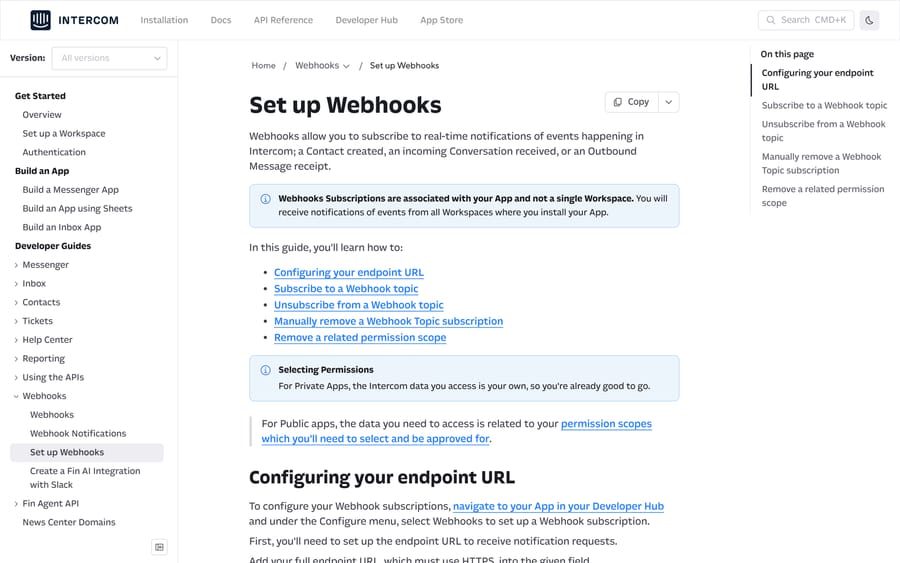
- Open Developer Hub and select your app. For a private app you already have the permissions you need; for a public app the scopes go through Intercom's review.
- Under Configure, select Webhooks.
- Enter your full endpoint URL. It must be HTTPS, and it must answer a HEAD request, which Intercom uses to validate it. Services like ngrok or webhook.site work for testing.
- Open the Webhook topics dropdown and select the topics you want. Each one shows the permission it needs.
- If a topic shows a permission error, fix it on the app's Authentication page rather than on the Webhooks page.
- Click Save.
The line on that page that catches teams out: a subscription is attached to your app, so a public app receives notifications from every workspace where it's installed. Route on app_id in the payload, because you will get traffic from workspaces you weren't thinking about.
To unsubscribe, either click Edit on the Webhooks page and delete the topic, or remove the permission scope the topic depends on, which stops the notifications automatically.
Which webhook topics should a support team subscribe to?
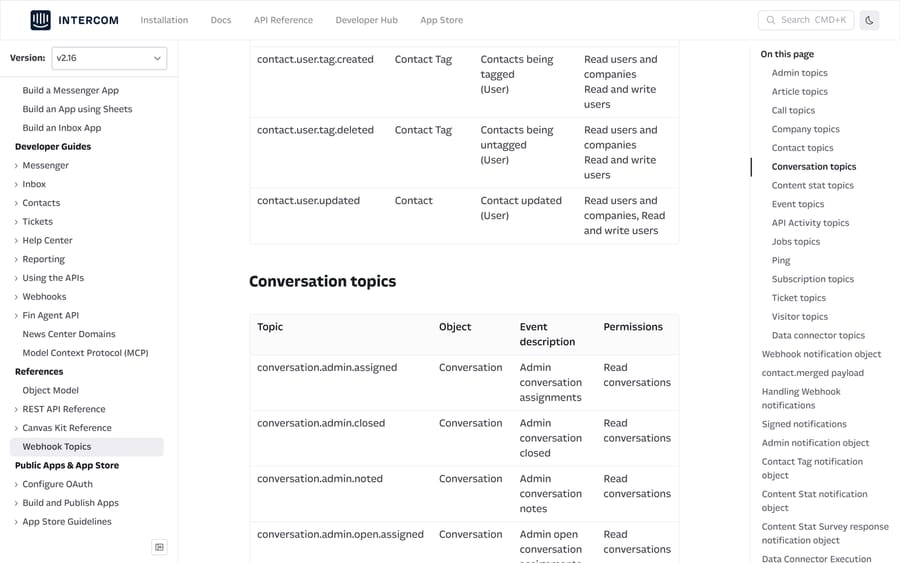
Intercom's webhook topics reference lists topics across admins, articles, calls, companies, contacts, conversations, content stats, events, tickets, jobs, visitors and data connectors. For a support integration the useful set is small.
| Topic | Fires when | Permission |
|---|---|---|
conversation.user.created | A customer opens a conversation | Read conversations |
conversation.user.replied | A customer replies | Read conversations |
conversation.admin.replied | A teammate replies | Read conversations |
conversation.admin.assigned | A conversation is assigned | Read conversations |
conversation.admin.closed | A teammate closes it | Read conversations |
conversation.operator.replied | Fin or a bot replies | Read conversations |
conversation.rating.added | A conversation gets a rating | Read conversations |
ticket.created | A ticket is created | Read tickets |
ticket.state.updated | A ticket's state changes | Read tickets |
ticket.admin.snoozed | A teammate snoozes a ticket | Read tickets |
contact.user.created | A user contact is created | Read and write users |
article.published | An article goes live | Read and list articles |
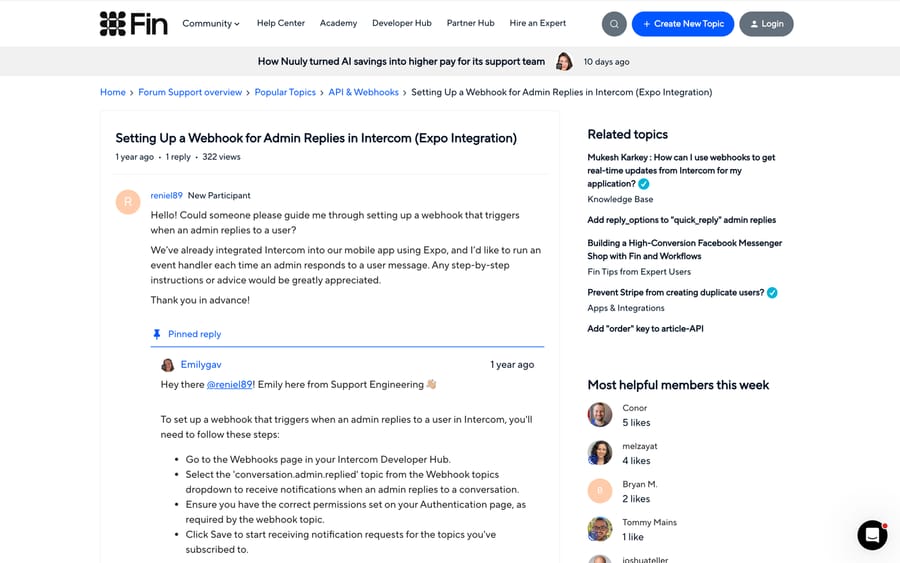
The topic names are specific enough that guessing goes wrong. A community thread from November 2024 asks how to fire an event when a teammate replies, and Intercom's Support Engineering answer is four steps long: open the Webhooks page, choose conversation.admin.replied, make sure the matching permission is set on the Authentication page, and save. That permission step is the one people miss.
Two topic quirks to design around. Every *.deleted topic sends a minimal payload with identifying fields only, not the full object, so if you need the record you have to have cached it. And since API version 2.15, ticket.closed nests the Ticket under data.item.ticket while ticket.resolved puts it at data.item. Branch on the topic name before you read any ticket field, or the handler that works for one will throw on the other.
How do you verify that a webhook came from Intercom?
Every notification has the same envelope:
{
  "type": "notification_event",
  "id": "notif_ccd8a4d0-f965-11e3-a367-c779cae3e1b3",
  "topic": "conversation.admin.replied",
  "app_id": "a86dr8yl",
  "created_at": 1392731331,
  "delivery_attempts": 1,
  "first_sent_at": 1392731392,
  "data": { "item": { "type": "conversation", "id": "..." } }
}
data.item.type tells you what shape the object is. delivery_attempts tells you whether this is a retry, which is useful for logging even though your handler should be idempotent regardless.
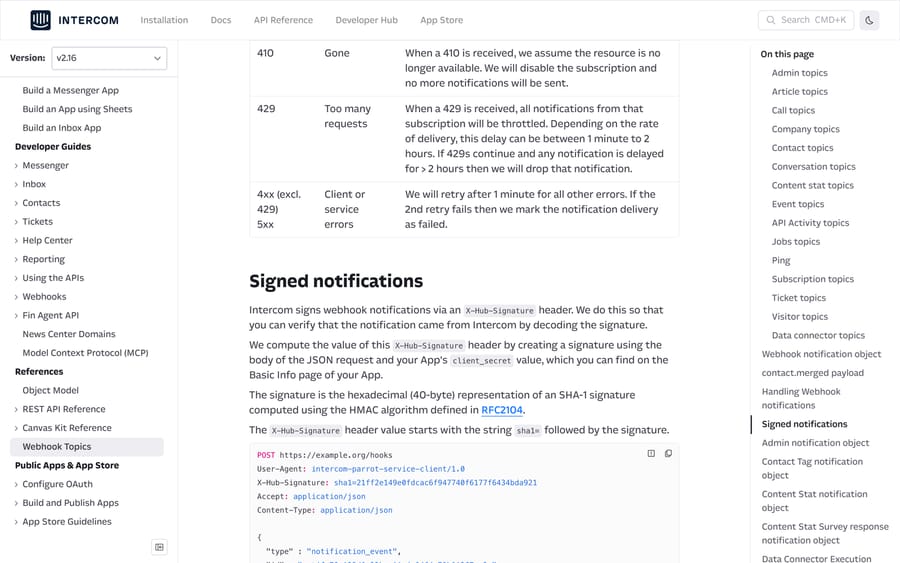
Intercom signs each delivery with an X-Hub-Signature header: the string sha1= followed by a 40-byte hex HMAC-SHA1 of the raw JSON body, keyed on your app's client_secret from the app's Basic Info page.
const crypto = require('crypto');

function verify(rawBody, header, clientSecret) {
  const expected = 'sha1=' + crypto
    .createHmac('sha1', clientSecret)
    .update(rawBody, 'utf8')
    .digest('hex');
  const a = Buffer.from(expected);
  const b = Buffer.from(header || '');
  return a.length === b.length && crypto.timingSafeEqual(a, b);
}
Two implementation notes that decide whether this works. Hash the raw request body, before any JSON parsing, because re-serializing changes the bytes; in Express that means express.raw({ type: 'application/json' }) on this route. And compare with a constant-time function.
If you also sit behind a firewall, Intercom publishes its outbound IP ranges as region-specific JSON files refreshed daily, and you want the entries tagged INTERCOM-OUTBOUND. Fetch the file on a schedule; new ranges are published before they carry traffic, but the lead time isn't guaranteed.
What happens when your endpoint fails or responds slowly?
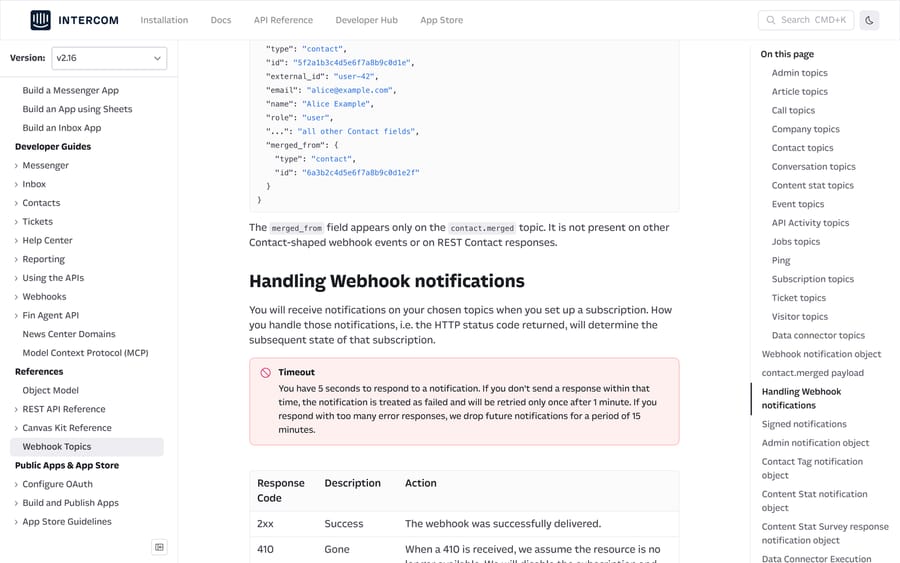
You have 5 seconds to respond. Miss it and the notification counts as failed and is retried once, a minute later.
| Your response | What Intercom does |
|---|---|
2xx | Marks it delivered |
410 Gone | Disables the subscription immediately and stops sending |
429 Too Many Requests | Throttles the subscription, from 1 minute up to 2 hours, then drops anything still delayed past 2 hours |
Any other 4xx or 5xx | Retries once after 1 minute, then marks the delivery failed |
Three escalating consequences sit on top of that, and they're the reason a working integration goes quiet.
- More than 1,000 consecutive error responses in a 15-minute window pauses notifications for 15 minutes, then delivery resumes.
- Errors for more than seven days suspend the subscription. An error banner appears on the Webhooks page, and you resume it by pressing Set live in the top right after fixing your server.
- A
410skips all of that and disables the subscription on the spot, so never return 410 from a health check or a catch-all route.
Intercom only suspends subscriptions on private apps; subscriptions in public apps are never suspended. The asymmetry is optimized for the App Store rather than for your single-workspace integration: a public app's failures belong to the vendor and would take down every install, while a private app's failures belong to you. It means a private-app integration needs its own alerting, because Intercom will eventually stop calling and tell you only by a banner on a page nobody visits.
Are Intercom webhooks rate-limited, ordered or duplicated?
Four documented behaviors shape how you write the handler.
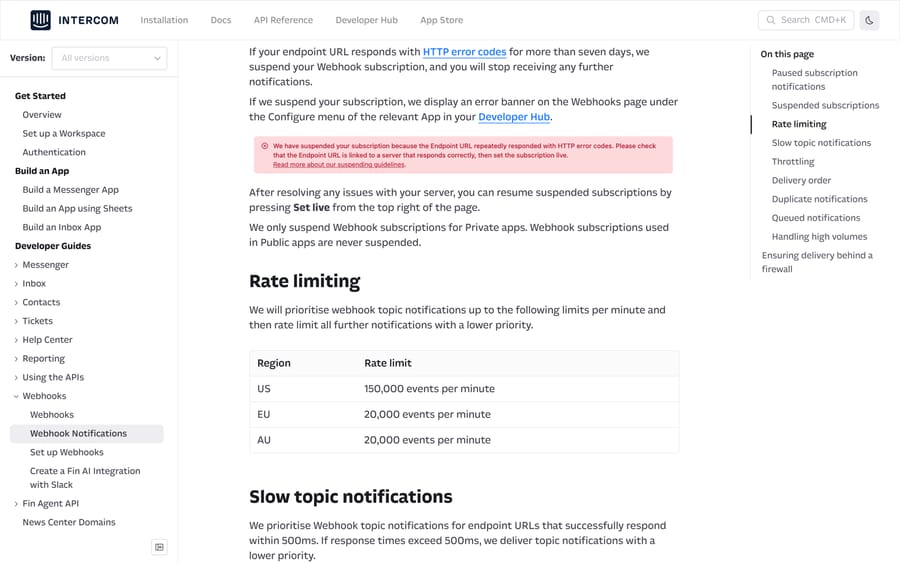
Rate limits are per region. Intercom prioritizes notifications up to 150,000 events a minute in the US and 20,000 a minute in the EU and in Australia, then delivers the rest at lower priority. These are separate from the REST API's 10,000-a-minute limit, which doesn't apply to webhooks at all.
Slow endpoints get demoted. Endpoints that respond within 500ms are prioritized. Above that, your notifications are delivered at lower priority, so a slow handler degrades before it fails.
Order is not guaranteed. Use the created_at timestamp in the payload to sequence events, not arrival order.
Duplicates happen. Intercom resends if it doesn't get a 200 within 5,000ms, so a slow response can produce two deliveries of the same event. Respond 200 immediately and queue the work.
The topics that generate real volume are content_stat and contact. Intercom notes that content_stat volume is typically about five times the size of the audience receiving an outbound message when it goes out over several channels. Subscribe to those two deliberately, if at all.
How do API versions change the topic list?
Webhook topics are versioned along with the REST API. When you change an app's version in Developer Hub, Intercom shows a conflict table of topics that don't exist in the new version, marked "Off", and you have to delete them before the change goes through. Check the changelog for the version you're moving to; 2.16, released on July 15, 2026, added ticket.admin.snoozed and ticket.admin.unsnoozed as the ticket equivalents of the conversation snooze topics.
A safer upgrade path than switching the app outright: create a second private app on the target version, point it at a test endpoint, subscribe it to the same topics, and compare payloads before you move production.
How do you debug a missing webhook delivery?
Intercom keeps a delivery log. Its developer FAQ says you can inspect recent webhook deliveries and their payloads in Developer Hub under your app's webhook settings, and that's the first place to look for a missed or malformed event rather than your own logs.
The plan gate to know about is a 403 carrying API Plan restricted. That means the API you're calling isn't available on the workspace's plan, and no amount of webhook configuration changes it. A 409 conflict on a contact create usually means the email already exists, and the fix is to use the update endpoint or create by user_id.
How do Series webhooks and Wait for Webhook work?
Series webhooks sit in Outbound. You drag a webhook block after a rule block, pick PUT or POST, set the URL and headers, and build the body from key-value pairs with Intercom attributes available through the {...} menu. There's a Test button that runs it against a named user and shows the response, which is more than the developer webhooks give you. On failure Intercom retries twice more and then marks the checkpoint Failed. Intercom's Series webhook article says this is available on certain plans only, so check yours before designing around it.
Wait for Webhook runs the other way: it pauses a workflow until your system posts to a URL Intercom gives you. Add the step from Fin AI Agent › Workflows › Add step › Wait for Webhook, configure the example request so every field you expect appears inside the data object, and copy the URL. Three details from Intercom's Wait for Webhook article decide whether it works: the JSON you post must match the structure in the step or nothing is received, fields missing from the configuration are inaccessible in the task, and the step times out after 7 days, which isn't configurable. It accepts an Idempotency-Key header, ideally a UUID, and those keys expire after 24 hours.
When should you use a webhook instead of polling?
Webhooks suit teams who need to react inside a minute: post a Slack message on assignment, write a row when a ticket resolves, page someone when a VIP opens a conversation. They're a poor fit for reconciliation, because delivery isn't ordered, failures are silent after the retry, and a seven-day outage costs you the subscription. Pair them with a nightly pass over the search API, which our Intercom API guide covers, and treat the webhook as the fast path rather than the record of truth.
If you already have an integration reading conversations on a timer, the win from moving to webhooks is latency and call volume, not correctness. Our guides on custom Intercom integrations and building an AI agent for Intercom cover the write side.
How we researched this
We checked every topic name, header, status code and limit on this page against developers.intercom.com on September 21, 2026, across Set up Webhooks, Webhook Notifications, the Webhook Topics reference, the IP allowlisting page and the changelog, plus three Intercom help center articles and the community thread linked above. We don't have an Intercom workspace, so no subscription was created and no signature was verified against a live delivery; the Node snippet implements Intercom's documented algorithm and has not been run against an Intercom payload.
Frequently asked questions
How do I set up a webhook in Intercom? In Developer Hub, open your app, go to Configure, then Webhooks. Add an HTTPS endpoint URL that can answer a HEAD request, select your topics from the dropdown, make sure the matching permissions are set on the Authentication page, and save.
How do I verify an Intercom webhook signature? Compute an HMAC-SHA1 of the raw request body using your app's client_secret, render it as 40 hex characters, prefix it with sha1=, and compare it in constant time to the X-Hub-Signature header. Hash the raw body before JSON parsing, because re-serializing changes the bytes.
Why did my Intercom webhook stop firing? Most likely the subscription was suspended. Endpoints that return HTTP errors for more than seven days are suspended, and Intercom shows an error banner on the Webhooks page in Developer Hub. Fix the server and press Set live. Returning a 410 disables it immediately instead.
How long do I have to respond to an Intercom webhook? Five seconds. A slower response counts as a failure and is retried once after a minute. Responses slower than 5,000ms can also produce duplicate deliveries, so return 200 first and do the work afterwards.
Does Intercom retry failed webhooks? Once, a minute later, for 4xx and 5xx responses other than 429. If the second attempt fails, the delivery is marked failed. A 429 throttles the subscription for between 1 minute and 2 hours, and anything delayed beyond 2 hours is dropped.
Which webhook topic fires when a teammate replies? conversation.admin.replied, with the Read conversations permission. For a customer reply it's conversation.user.replied, and for Fin it's conversation.operator.replied.
Are Intercom webhooks delivered in order? No. Intercom states there's no ordering guarantee and recommends sequencing on the created_at timestamp in the payload.
What is the difference between Intercom webhooks and Series webhooks? Developer Hub webhooks are event subscriptions on your app, available across plans and covering the whole topic list. Series webhooks are an outbound block inside a Series, configured with a URL, headers and a body, with a Test button and two retries, and Intercom says they're available on certain plans only.
Sources: Set up Webhooks · Webhook Notifications · Webhook Topics reference · Intercom IP addresses · About the API Changelogs · Intercom developer FAQs · Sending webhooks with Series · Use Wait for Webhook in Workflows · Setting Up a Webhook for Admin Replies (Intercom Community)
Add AI agents to your Intercom
Macha reads the conversation, drafts the reply and takes the action, inside the Intercom you already run.