Intercom
 Shopify
 Stripe
 Slack
Slack Notion
 Google Workspace
 Confluence

How Do You Set Up Conditional Ticket Fields in Zendesk and Make Them Required? (2026)


Zendesk conditional ticket fields are set per ticket form under Admin Center > Objects and rules > Tickets > Forms > Conditions, and they need Support Enterprise or a Suite Growth plan or above. Making a field required is a separate setting in two places, and the condition overrides the field.
Key takeaways
- Zendesk conditional ticket fields are configured from Admin Center > Objects and rules > Tickets > Forms, by hovering a form and choosing Conditions from its options menu.
- Conditional ticket fields need Zendesk Support Enterprise or a Suite Growth, Professional, Enterprise or Enterprise Plus plan; Support Team, Support Professional and Suite Team do not include them.
- A Zendesk condition's parent field must be a drop-down, checkbox, text, multi-line text, Priority or Type field; multi-select, numeric, decimal, date, regex and lookup fields can only be children.
- Zendesk allows up to 1,500 conditions per user type on each ticket form, and conditions cannot be copied from one form to another.
- The Required to submit a request checkbox only appears on a Zendesk field after its Permissions are set to Customers can edit.

Zendesk conditional ticket fields are set on the ticket form, not the field: in Admin Center go to Objects and rules > Tickets > Forms, hover the form, open its options menu and choose Conditions. They need Support Enterprise or Suite Growth and above, and making a field required is a separate setting that a condition can override.
We checked every path, label and drop-down value below first-hand in our own Zendesk sandbox on September 21, 2026, on a Support Enterprise plan.
Which Zendesk plans include conditional ticket fields?
Conditional ticket fields are gated, and it is the narrowest gate in the ticketing area:
| Product | Plans that include conditional ticket fields |
|---|---|
| Zendesk Support | Enterprise only |
| Zendesk Suite | Growth, Professional, Enterprise, Enterprise Plus |
Support Team and Support Professional don't have it, and neither does Suite Team. If you are below the line, the workaround is one form per branch: build a "Billing question" form and a "Technical issue" form with only the fields each needs, and let the requester pick. You'll lose progressive disclosure inside a single form, but you get most of the benefit, and separate forms are available on every paid plan.
Plain required fields are not gated the same way. "Required to solve a ticket" and "Required to submit a request" are ordinary ticket field settings, available on Team, Professional and Enterprise, and on every Suite plan. If all you need is a mandatory field, you don't need conditions at all.
How do you make a Zendesk field required without conditions?
Start here, because the field-level setting is what the conditional setting overrides later.
- In Admin Center, click Objects and rules in the sidebar, then select Tickets > Fields.
- Open the field you want to change.
- To force agents to fill it in before solving, tick Required to solve a ticket. Zendesk's own help text under that box says it plainly: this can be overridden by conditional ticket fields.
- To force end users to fill it in when they submit a request, first set Permissions to Customers can edit. A Customers section then appears with Title shown to customers, Description shown to customers and Required to submit a request.
That fourth step is the one people miss. While a field is set to Agents can edit, Zendesk doesn't show a "Required to submit a request" checkbox on the page at all, because the field never reaches the request form. This is the answer to the recurring r/Zendesk question about custom fields being required to submit for agents: the two checkboxes aren't two flavors of the same switch, they belong to two audiences.
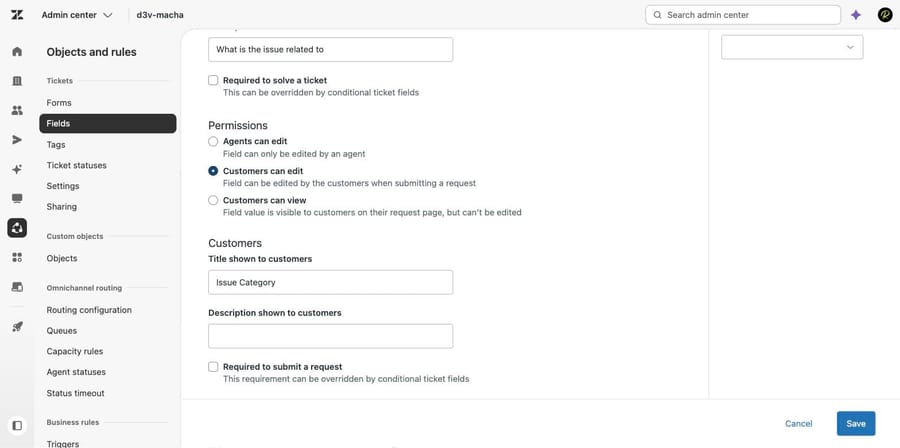
The three permission options, in Zendesk's own wording, are Agents can edit (only an agent sees and edits it), Customers can edit (agents and end users both edit it, and it appears on the support request form), and Customers can view (agents edit it, end users only read it on their request page).
How do you build a conditional ticket field?
Conditions attach to a ticket form, and you edit them from the forms list rather than inside the form editor. That's the usual reason people conclude the feature is missing from their account: they open the form, find fields and brands and no mention of conditions, and give up.
- In Admin Center, click Objects and rules, then select Tickets > Forms.
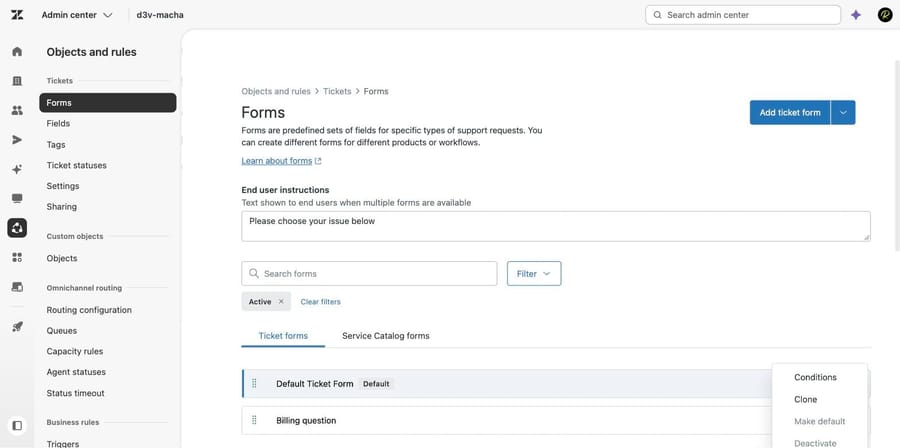
- Move the cursor over the form you want, click the options menu on the right of the row, and select Conditions.
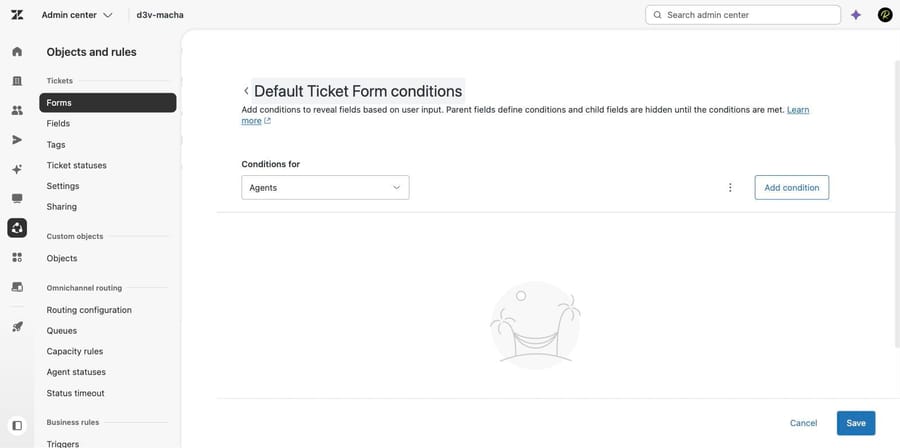
- On the page that opens, choose Agents or End users from the Conditions for drop-down. The two sets are independent: a condition built for agents won't do anything on the help center form, and vice versa.
- Click Add condition.
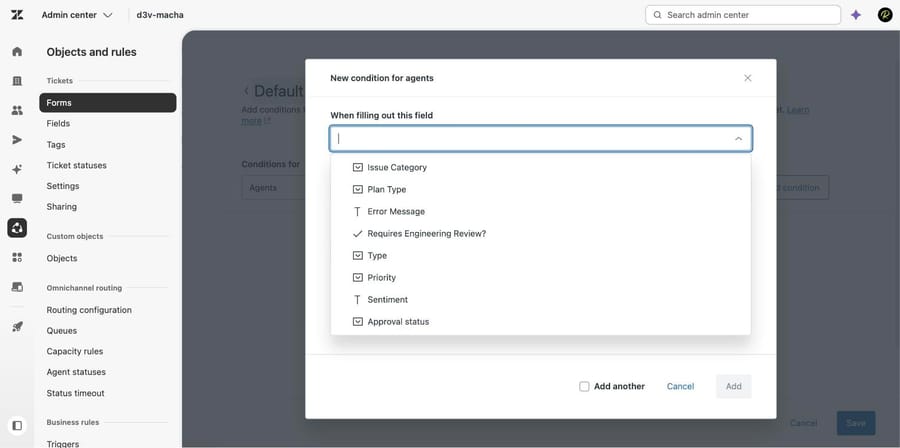
- Fill in When filling out this field (the parent), If value is (the trigger value) and Then show these fields (the children).
- Set Required for each child field, if you want to.
- Click Add, then click Save on the conditions page. The Save is separate and it's easy to skip. If you leave without it, the condition's gone.
The conditions page is plain: an audience selector, an Add condition button, and the conditions you already have, grouped so you can expand each parent field.
Which fields can be a parent, and which can be a child?
This is where most "why is my field not in the list" tickets come from, and the rule is asymmetric. The parent field, the one in When filling out this field, has to be one of a short list of types. The child fields don't.
Zendesk documents the parent list as drop-down, checkbox, text, multi-line text, Priority and Type. We tested it on our instance and the picker matched exactly: it offered Issue Category, Plan Type, Error Message, Requires Engineering Review?, Type, Priority, Sentiment and Approval status, and it silently left out the date field sitting on the same form.
Open the child picker on the same dialog and the excluded types come back. Our date field, two numeric fields and a multi-select all appeared there. So a date field can be revealed by a condition; it just can't be the thing that triggers one. Per Zendesk's documentation the types that can never be a parent are multi-select, numeric, decimal, date, regex and lookup relationship, plus every system field except Priority and Type. Subject and Description can't be children either.
Which required setting wins, the field or the condition?
Once you choose a child field, a Required column appears beside it. For conditions built for agents it is a multi-select of ticket statuses; for conditions built for end users it is the submit-time equivalent.
Two behaviors are worth knowing before you touch it.
It inherits from the field. If the child field already has Required to solve a ticket ticked, the Required column arrives pre-filled with Solved. We picked a date field with that box ticked and the condition came up showing Solved without us picking anything.
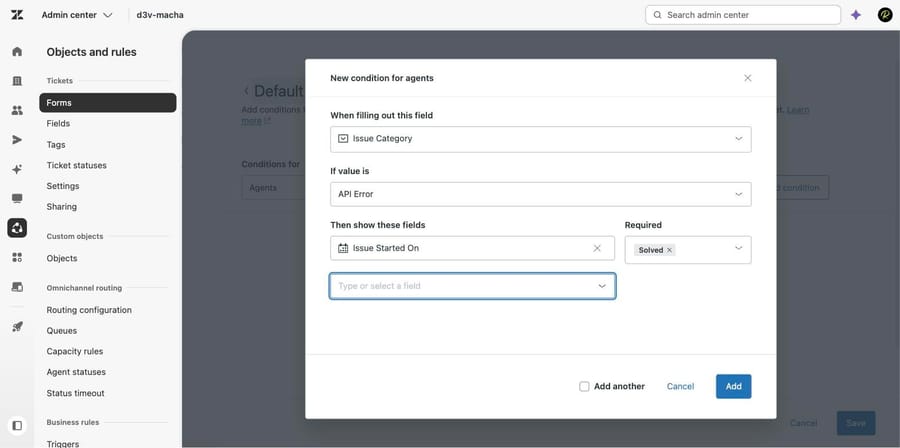
It includes your custom statuses. Opening the Required drop-down gives you Never, Always, and then the statuses themselves. We ran GET /api/v2/ticket_fields.json to confirm the field list first, then opened the drop-down: it listed New, Escelation, New on-boarding request, Open, Pending, On-going investigation and Solved, because three custom ticket statuses are active on the account. If you have built custom statuses, they are selectable here, which is genuinely useful and completely undocumented in the place people look.
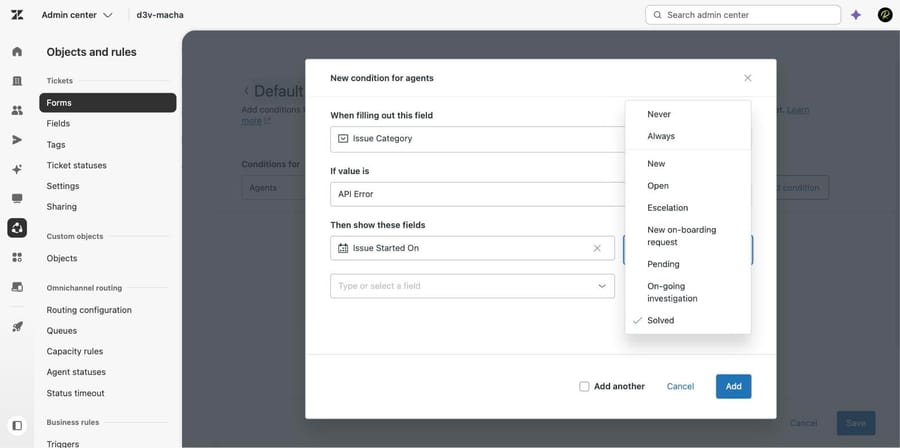
Two entries in that list behave unlike the rest, and Zendesk's own article is specific about it. Always makes the field required regardless of status, and selecting it clears every other selection. Picking every status individually is not the same thing as Always, and clearing every status does not turn Always off. Never clears the whole list, Always included, and it's how you make a field optional on one form while it stays required everywhere else.
So the precedence, in practice: the field setting is the default, the condition overrides it, and Always overrides the status list. If a field is required in a way nobody intended, check the condition before you check the field.
Why is the end-user condition list empty?
Switch Conditions for to End users, click Add condition, open the parent picker and you may get "No matches found" on a form that has eight usable fields for agents. That's what happened to us on the first try.
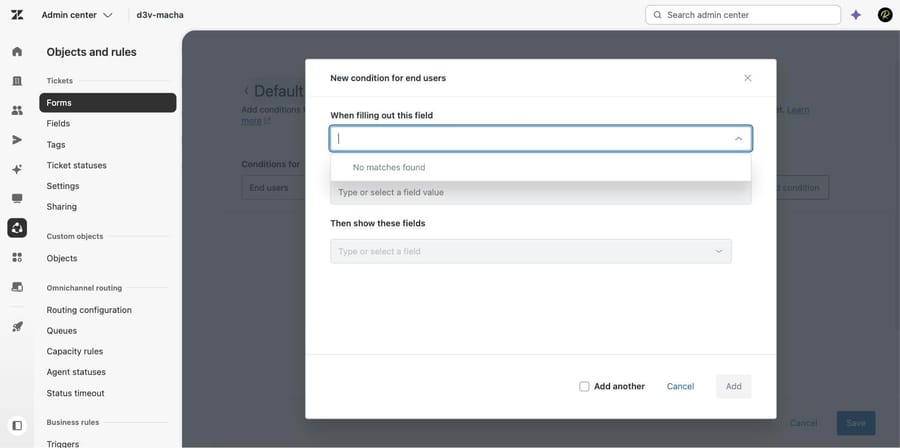
The reason is the permission setting from earlier. Every custom field on that form was Agents can edit, so they don't exist on the end-user form, and so they can't trigger an end-user condition. Set the field to Customers can edit (or Customers can view, for a child field you only want them to read) and it appears. The conditions UI doesn't say any of this, which is why the r/Zendesk thread on dependent dropdown field values keeps getting answered with "check the field permissions".
What limits apply to conditional ticket fields?
- 1,500 conditions per user type, per form. Generous, but real, and it's per form rather than per account.
- Each "If value is" has to be unique on the form. You can't write two conditions that both fire on Billing Issue; put every field you want revealed into the one condition's child list. It's also why Zendesk makes you edit a duplicated condition before it will save it.
- Conditions don't copy between forms. You can duplicate a condition inside a form but not across forms, so a 20-condition form rebuilt as a second brand's form is 20 manual re-entries.
- Deleting a form permanently deletes its conditions. Deactivating doesn't.
- Unsaved child values are discarded on submit. Only the fields visible at the moment of submission are saved. If an agent picks a value under one branch, switches the parent, and submits, the first branch's value is gone. It looks like data loss, and it's documented behavior.
- Conditions apply to the submission form only. When an end user later views the ticket on their Requests page, Zendesk shows every field visible to them, including conditional fields that were hidden or never filled.
- Web Widget (Classic) supports most conditions but not Priority or Type. Conditions on those two work in the agent interface and the help center and are ignored in the widget.
Why does an agent get an alert about a field that is not on screen?
The symptom is an agent submitting a ticket and being told a field is still needed, when the field was never marked required in front of them. Zendesk's article calls this out and blames system ticket rules, and the scenario it gives is worth memorizing because it is common.
A group contains exactly one agent. A trigger routes a new ticket to that group. Zendesk's default behavior promotes the ticket from New to Open and assigns the single agent immediately. If a conditional field is required When Open, the agent is now trying to submit a ticket as New against a rule that fires on Open, and gets the alert.
The fix is almost always to look at the Required column on the condition rather than at the field, and to widen or narrow the status list to match how tickets actually move through the group.
Can you report on conditional fields in Explore?
Plan for this before you build a twenty-branch form. Conditional fields are ordinary ticket fields as far as the data goes, so Explore reports on them normally, but it has no concept of "this field was hidden for this ticket". A blank means unfilled, and you can't tell from the dataset whether the agent skipped it or the branch never appeared. If that distinction matters, tag the branch with a trigger and report on the tag.
When should AI categorize tickets instead of a form?
Conditional fields get a human to categorize a ticket accurately at the moment of submission. They work, and they're not free: every branch is another decision pushed onto an end user who just wants to describe their problem, or onto an agent measured on handle time.
Macha on Zendesk is the other way round. It reads the ticket as written, classifies it against your own ticket history, writes the fields and tags back, and answers the request outright when it can, so the categorization exists without anybody navigating a form to produce it. It suits teams already running Zendesk whose forms have grown to fifteen branches because the data was never reliable otherwise, and it's the wrong fit if your requirement is regulatory, where a person has to attest to a value rather than have one inferred.
Worth naming the incentive on this one: an AI vendor that bills per resolution earns more the more tickets arrive, so it's got no reason to care whether your intake is efficient. Macha bills per ticket, one thread with one person as one charge however many replies it takes, from $299 a month for 750 tickets on published pricing, with setup and monitoring by our team included and $50 of free usage to start.
How we researched this
Every step, label and drop-down value above was checked on September 21, 2026 in d3v-macha, our own Zendesk sandbox, which runs Support Enterprise. Six of the seven screenshots are that instance: the forms list options menu, the conditions page, the parent-field picker, a completed condition with its Required column, the Required drop-down, and the end-user picker returning no matches. The seventh is the ticket field editor. We opened and canceled every dialog rather than saving, so no condition was created. The plan gate, the 1,500-condition limit, the unsupported parent field types and the Web Widget (Classic) exceptions are quoted from Zendesk's "Creating conditional ticket fields" (edited May 15, 2026) and "Making conditional ticket fields required" (May 1, 2026), read through the Zendesk help center API on the same day. We did not submit a ticket through a help center or a widget, so the end-user behavior is documented rather than tested by us.
For the layer below this one, Zendesk ticket fields versus forms covers which object does what, and creating custom fields and forms covers building the pieces that conditions arrange.
Frequently asked questions
What plan do I need for Zendesk conditional fields? Support Enterprise, or Suite Growth, Professional, Enterprise or Enterprise Plus. Support Team, Support Professional and Suite Team do not include them. On those plans, use separate ticket forms per request type instead.
Where are conditional ticket fields in Zendesk? Admin Center > Objects and rules > Tickets > Forms. Hover the form, click the options menu at the right of the row, and choose Conditions. They are not inside the form editor, which is why they're hard to find.
Why can't I select my field in the condition? The parent field, the one in "When filling out this field", must be a drop-down, checkbox, text, multi-line text, Priority or Type field. Multi-select, numeric, decimal, date, regex and lookup relationship fields cannot trigger a condition, though they can all be revealed by one.
How do I make a Zendesk field required? For agents, open Admin Center > Objects and rules > Tickets > Fields, open the field and tick Required to solve a ticket. For end users, set Permissions to Customers can edit first, then tick Required to submit a request in the Customers section that appears.
Why is a field required when I didn't mark it required? A condition overrides the field setting, so check the Required column on the condition. The other cause is Zendesk's system ticket rules: a group with one agent auto-assigns and moves a ticket from New to Open, so a field required When Open starts applying sooner than you'd expect.
What is the difference between Always and selecting every status? Always makes the field required regardless of ticket status and clears every other selection in the list. Selecting all five statuses individually is not equivalent, and clearing all of them does not switch Always off.
Can I use custom ticket statuses in a condition's Required setting? Yes. If you have activated custom ticket statuses, they appear in the Required drop-down alongside New, Open, Pending, On-hold and Solved. We confirmed this in our own instance, which has three custom statuses.
Can I copy conditions from one ticket form to another? No. You can duplicate a condition within the same form and edit the copy, but Zendesk gives you no way to copy one into a different form, so a second brand's form has to be rebuilt by hand.
Do conditional fields work in the help center and the web widget? Conditions built for end users apply to the help center request form and to Web Widget (Classic), with one exception: the widget ignores conditions on the Priority and Type fields. Conditional logic applies to submission only, so an end user viewing an existing request sees every field visible to them.
Sources: Creating conditional ticket fields · Making conditional ticket fields required · Adding custom ticket fields to your tickets and forms · How can I report on conditional ticket fields? · About system ticket rules
Add AI agents to your Zendesk
Macha reads the ticket, drafts the reply and takes the action, inside the Zendesk you already run.