





 Shopify
 Stripe
 Slack
Slack Notion
 Google Workspace
 Confluence

How Do You Connect QuickBooks to Zendesk in 2026?


Zendesk Support has no native QuickBooks app, so teams connect the two through middleware or a direct API call. A Macha Custom Tool lets an AI agent look up live invoices inside a ticket, as long as you handle QuickBooks' one-hour access tokens.
Key takeaways
- Zendesk Support has no first-party QuickBooks app; the QuickBooks for Sell listing is a widget for the Zendesk Sell CRM, not the ticketing product.
- A Macha Custom Tool can call the QuickBooks Online Accounting API so an AI agent finds a customer by email and reads their latest invoice balance mid-ticket.
- QuickBooks access tokens are valid for 3600 seconds, and Macha Custom Tools send a static token, so teams need a token endpoint or middleware to keep it fresh.
- Macha Custom Tools marked Write, such as creating a credit memo or voiding a transaction, require confirmation before they run in chat.
- On the trial and every Macha plan, the Macha team builds and tests the QuickBooks tools and the agent for you, at about $0.40 a ticket including setup and a dedicated success manager who handles your changes.

You connect QuickBooks to Zendesk Support through third-party middleware (Zapier, Make, n8n, Patchworks) or a direct API build, because Zendesk's Marketplace has no first-party QuickBooks app for Support; the one QuickBooks listing we found is a widget for Zendesk Sell, the CRM. If you want an AI agent to look up a live invoice inside a ticket, a Macha Custom Tool can call the QuickBooks Online Accounting API directly, with one catch covered below: QuickBooks access tokens last one hour.
| Option | What it does | Main limit |
|---|---|---|
| Native Zendesk Support app | None exists | The QuickBooks listing is for Zendesk Sell |
| Zapier / Make / n8n | Pushes QuickBooks events (such as a new invoice) into tickets | Fixed to the triggers the connector exposes |
| Macha Custom Tool | AI agent queries QuickBooks mid-ticket and reasons over the result | Needs a valid OAuth 2.0 access token, which expires after 3600 seconds |
Framing first. Macha runs on top of the Zendesk you already use. It's an AI-agent layer, not a Zendesk or QuickBooks replacement. Your agents keep working in Zendesk; Macha reads the ticket, reasons, and reaches into QuickBooks to answer or act.
Is there a native QuickBooks app for Zendesk?
Not for Zendesk Support. The one native listing, QuickBooks for Sell, is a widget for Zendesk Sell (the CRM), not the ticketing product your support team lives in. To connect QuickBooks to Zendesk Support today, teams reach for third-party middleware, such as Zapier, Make, n8n or Patchworks, or a custom API build.
Where middleware stops:
- It moves data on events, not on demand. A Zapier flow can push a "new invoice" event into a ticket, but it doesn't let an AI agent decide to look something up mid-conversation, pass the right customer, and reason over the result.
- It's another tool to run. Each middleware step is a connector to maintain, with its own task quotas and failure modes between the two systems.
- It's fixed to preset triggers. You get the events the connector exposes, not the specific query your workflow needs ("is this customer's latest invoice past due?").
So the QuickBooks question keeps escalating to a human who opens QuickBooks to read one field.
What should the integration actually do?
The useful version isn't a synced field; it's the agent doing the lookup. A customer emails Zendesk asking "did my payment go through?" The agent finds them in QuickBooks by email, pulls their latest invoice, reads its balance and due date, and answers "yes, invoice #1043 was paid on the 3rd" or "it's still open, due next week", grounded in QuickBooks rather than a stale synced copy. That's what a Custom Tool enables.
How do you connect QuickBooks with a Macha Custom Tool?
A Custom Tool is a single HTTP action you define once and point at an API. No marketplace app.
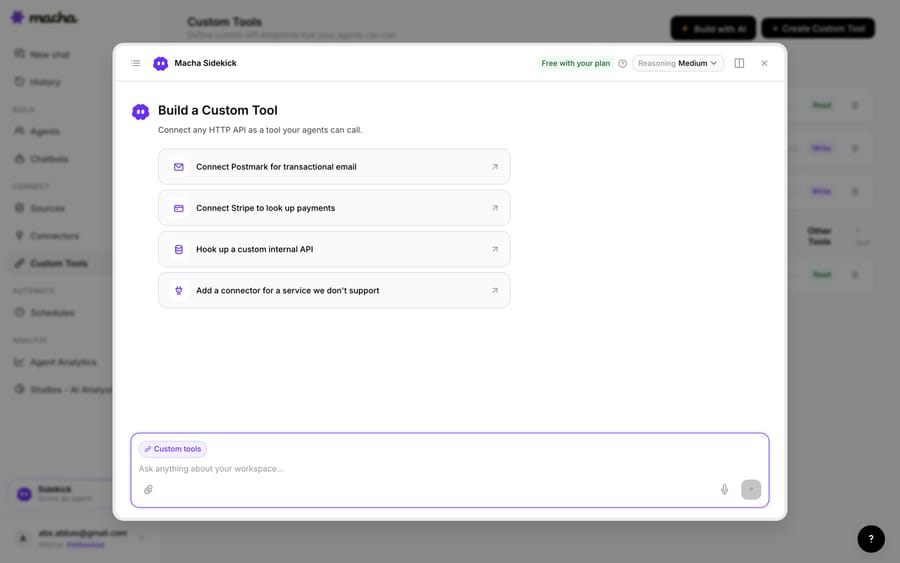
1. Point it at the QuickBooks API. QuickBooks Online exposes an Accounting REST API. You give Macha the endpoint (your company's realm ID is part of the URL) and the credentials. Custom Tools authenticate with an API key header, a Bearer token or Basic auth; QuickBooks expects a Bearer token. Click Build with AI and the Sidekick proposes the tools, parameters and descriptions from a plain-English description if you'd rather not fill in the form.
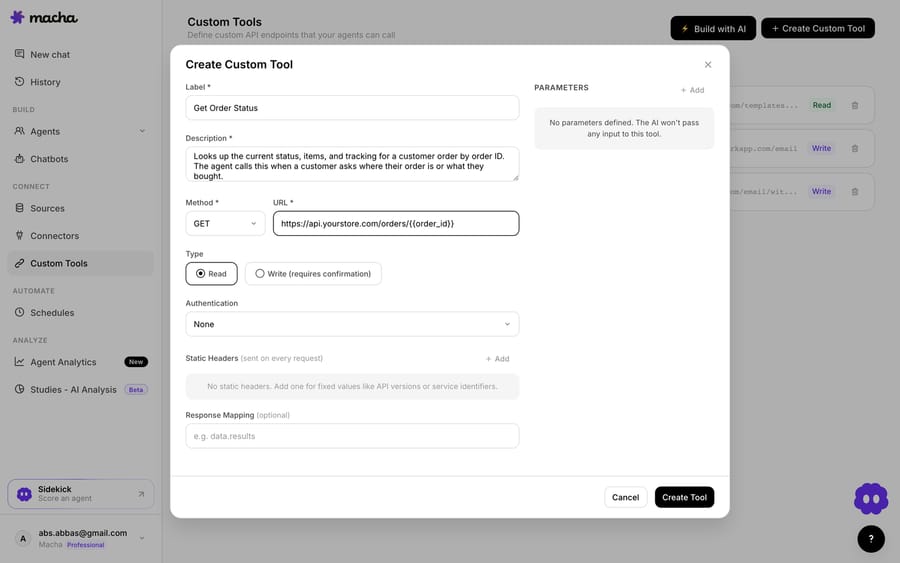
2. Define the action. Give it a label and a description the AI uses to decide when to call it, such as "Get the customer's latest QuickBooks invoice and paid status by customer ID". Set the method and URL: a query against the QuickBooks Online API with a {{customer_id}} placeholder, paired with a second tool that finds the customer by {{email}}. Then choose Read or Write. A lookup is a Read; creating a credit memo or updating an invoice is a Write. Use the Test button with a real customer ID before you assign the tool to an agent.
3. The agent uses it live. Once the tool exists, the agent calls it mid-ticket, passes the customer's details, and reasons over the QuickBooks record it gets back, answering the billing question or taking the next step.
What about QuickBooks' one-hour tokens?
This is the part most guides skip. QuickBooks uses OAuth 2.0, and Intuit's own OAuth client library documents that access tokens are valid for 3600 seconds, after which you need a fresh one from the refresh token. Macha's Custom Tools send a static token; they don't run the OAuth refresh for you. A token pasted into the tool will work in testing and fail an hour later.
Two ways teams handle it:
- A small token endpoint you own. A few lines on your own server (or a serverless function) hold the refresh token, refresh on schedule, and either proxy the QuickBooks call or hand back a current token. The Custom Tool calls your endpoint with an API key.
- Middleware that already manages the QuickBooks connection. Zapier and Make both keep QuickBooks authorized for you; a webhook-triggered scenario can run the lookup and return the result to the tool.
Setup by the Macha team is included on the trial and every plan, along with a dedicated success manager who handles your changes, so raise the token question with them before the tool goes live.
How do Read and Write tools keep QuickBooks safe?
Because a Custom Tool can reach into QuickBooks, the guardrails matter. Read tools (lookups) run freely. Write tools (create a credit memo, update an invoice, void a transaction) require confirmation before they execute in chat, so an agent working with a human asks first. Each tool is scoped to one action and assigned per agent, and every call appears in the agent's History with the steps it took. Credentials sit in the tool's configuration, not in the conversation.
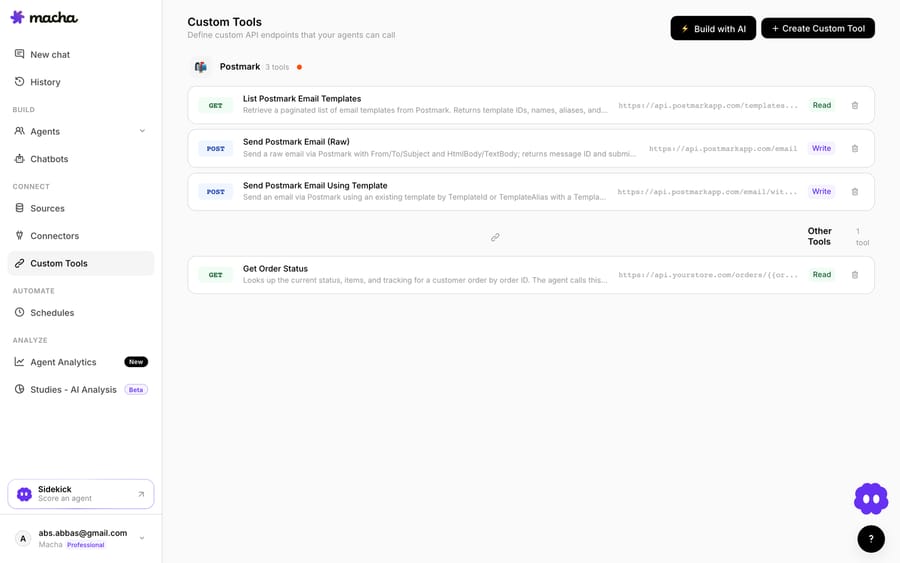
Teams usually build a few QuickBooks tools and group them, such as "find customer", "invoice lookup" and "create credit memo", alongside tools for their other systems.
Should you use middleware or a Custom Tool?
- Use Zapier or Make if you want a one-way push, such as a "new invoice" note on a ticket for human agents, and you're happy maintaining the connector.
- Use a Custom Tool when you want your AI agent to look up live QuickBooks data or take an action from the ticket, or you need a specific query the middleware doesn't expose. The two can coexist, and the middleware can even be the thing that keeps the QuickBooks token fresh. Macha is the done-for-you option: the Macha team builds and tests the QuickBooks tools and the agent on your Zendesk, then runs it in safe mode, with drafts as internal notes, until the drafts are right. That's included on the trial and every plan at about $0.40 a ticket, which covers setup and a dedicated success manager who handles your changes.
What else can the agent do once it reaches QuickBooks?
The same pattern covers more: check an invoice's paid status before answering, read the customer's balance to triage a billing dispute, create a credit memo, or verify a payment. The Custom Tools integration directory lists 200+ tools, and the pillar on building custom Zendesk integrations covers the general method.
What's the short version?
There's no native QuickBooks app for Zendesk Support. Middleware covers one-way pushes; a Custom Tool puts live QuickBooks lookups and actions in your AI agent's hands, with Read/Write guardrails and every call in the agent's history. Plan for the one-hour token before you go live.
Ready to try it? See how Custom Tools work, browse the integration directory, or start with $50 of free usage, no credit card required.
Frequently asked questions
Does Zendesk have a native QuickBooks integration? Not for Zendesk Support. The only first-party Marketplace listing we found is "QuickBooks for Sell," a widget for the Zendesk Sell CRM. To connect QuickBooks to Zendesk Support you use third-party middleware or a Custom Tool that gives your AI agent live QuickBooks lookups and actions.
Do I need an engineer to connect QuickBooks to Zendesk this way? For the tool itself, no: the Macha team builds and tests it for you on the trial and every plan, or you describe the action and the Sidekick scaffolds the request and parameters. The token refresh is the part that needs either a small endpoint someone owns or middleware that holds the QuickBooks connection, because QuickBooks access tokens expire after 3600 seconds.
Can the agent update QuickBooks, or only read it? Both. Reads run freely; Write tools, such as creating a credit memo or updating an invoice, require confirmation before they run in chat, and you choose which agents get them.
Is it secure? Each tool is scoped to a single action, assigned per agent, and every call shows in the agent's history. Credentials live in the tool's configuration, never in the conversation.






