





 Shopify
 Stripe
 Slack
Slack Notion
 Google Workspace
 Confluence

What Does Re:amaze's AI Agent Do and Cost in 2026?


Re:amaze, the GoDaddy-owned ecommerce helpdesk, bundles an AI Agent into every per-seat plan with 5 to 20 included resolutions per user a month and $0.85 for each one after that. The AI drafts, summarizes and suggests articles from your Help Center, but it doesn't look up orders or issue refunds on its own.
Key takeaways
- Re:amaze's AI Agent drafts replies, summarizes conversations, gauges sentiment and suggests Help Center articles, but cannot look up an order status or process a refund on its own.
- Re:amaze Basic costs $29 a seat monthly and includes 5 AI Agent resolutions per user, with each additional resolution billed at $0.85.
- Re:amaze Plus, the plan Re:amaze calls its most popular, costs $69 a seat monthly and includes 20 AI Agent resolutions per user before the same $0.85 rate.
- A 4-seat Re:amaze Pro team pays $196 a month, and 300 AI resolutions that month add $221 in overage beyond the 40 included.
- Re:amaze's AI Agent is labeled Beta and learns only from articles published in the store's Help Center, with no separate training step.

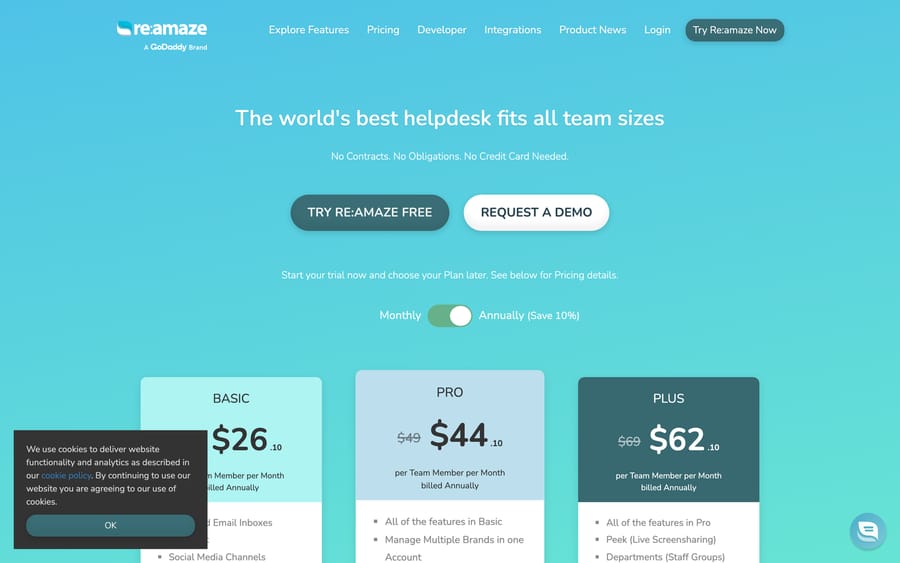
Re:amaze's AI Agent drafts replies, summarizes conversations, gauges sentiment and suggests Help Center articles, and it comes bundled with every per-seat plan: 5 resolutions per user a month on Basic ($29 a seat), 10 on Pro ($49) and 20 on Plus ($69), then $0.85 per extra resolution (reamaze.com/pricing, checked 24 September 2026). It learns only from your published Help Center, is still labeled Beta, and doesn't look up orders or issue refunds on its own.
| Plan | Price (monthly / annual) | AI Agent resolutions included | Extra resolutions |
|---|---|---|---|
| Basic | $29 / $26.10 per seat | 5 per user a month | $0.85 each |
| Pro | $49 / $44.10 per seat | 10 per user a month | $0.85 each |
| Plus | $69 / $62.10 per seat | 20 per user a month | $0.85 each |
| Starter | $59 a month flat, unlimited seats | Basic features, capped at 500 responded conversations a month | n/a |
We build an AI agent layer for customer service ourselves, so we have an interest in this topic. We checked Re:amaze's own pricing and product pages directly. Re:amaze the helpdesk isn't something we compete with or suggest replacing.
What is Re:amaze, and who owns it?
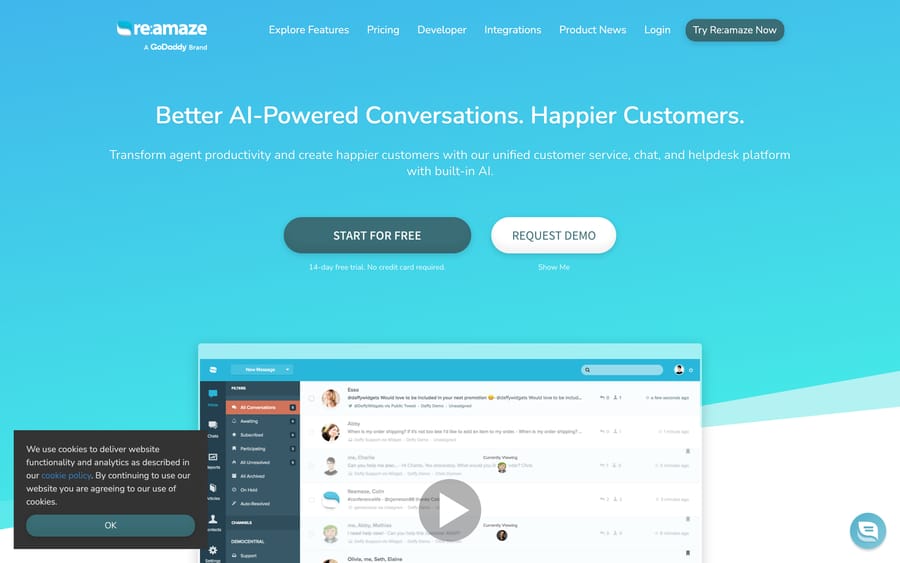
Re:amaze is a unified inbox for email, live chat, social messaging, SMS, voice and video, aimed squarely at online stores. SMS and voice channels start on the Pro plan and video calls on Plus. It bundles a public FAQ/help center, workflow automation and live visitor monitoring into one interface, and it integrates with the tools an ecommerce team already runs: Shopify, Slack, Stripe and Jira among them. GoDaddy acquired the company in 2021, per industry reports at the time, and Re:amaze's own announcement says "Our daily operations will not change as a result of this acquisition." The homepage still carries the line "A GoDaddy Brand" under the logo, and the product name and interface are Re:amaze's own.
What does Re:amaze's AI Agent actually do?
Re:amaze markets its AI as Re:amaze AI Agent, labeled "AI BETA" on the product's own AI page. The mechanism: your published Help Center articles become the AI's knowledge source directly, with no separate training step. Re:amaze's own words: "Articles created acts as a repository of knowledge that trains your AI Agent and chatbots. Updates made are added as context instantly. No complex workflows or training needed." In practice, editing a help article changes what the AI can say on the next conversation, with no re-index delay or retrain to wait for.
Inside a live conversation, the AI Agent does four things: drafts a reply for a human to review or send, summarizes a long back-and-forth so an agent doesn't have to re-read it, gauges the sentiment of the customer's message, and surfaces FAQ articles that match what's being asked. It can also help draft new Help Center articles. Re:amaze also ships a co-browse view where a human agent can "watch how AI is responding while you deep dive into research," which reads as an admission that the AI runs live traffic while someone still keeps an eye on it. This isn't a fully unsupervised deployment.
How is the AI Agent different from Re:amaze's chatbots?
Re:amaze sells two separate conversational features, and it's easy to conflate them when you're skimming the pricing page. Chatbots are the older, pre-built-and-custom automation flows, listed on the plan comparison as their own line item from Basic up and marketed around triggering "business opportunities" like upsells and proactive outreach. The AI Agent is the newer, knowledge-base-driven layer described above. Re:amaze's site doesn't spell out whether the chatbot builder runs on fixed decision trees or something more flexible, so test both against the same handful of real questions before deciding which one handles your FAQ traffic and which one handles proactive messaging.
How do you set up Re:amaze's AI Agent?
Getting the AI Agent running has three real steps. First, build out your Help Center: the more complete your published FAQ and article library, the more the AI has to draw from, since there's no separate ingestion pipeline beyond what you've already published. Second, turn on the AI Agent in your plan (it's included from Basic up) and set which channels it's allowed to touch. Third, decide its posture: autonomous replies on simple, FAQ-shaped questions, or draft-and-review, where every AI-written reply waits for a human to approve it. Re:amaze doesn't publish a hard rule for what counts as a "resolution" for billing beyond what's on the pricing page, so test it on a handful of real tickets before turning it loose. The 14-day free trial needs no credit card, which is enough time to run that test.
How much does Re:amaze AI cost?
AI is bundled into every per-seat plan instead of sold as a separate SKU. On Re:amaze, the question isn't whether to buy the AI Agent, it's how many resolutions you'll use.
- Basic ($29 a seat monthly, $26.10 billed annually): 5 AI Agent resolutions per user per month included, extra resolutions $0.85 each.
- Pro ($49 a seat monthly, $44.10 annually): 10 resolutions included, same $0.85 overage, plus AI Intents, SMS and voice.
- Plus ($69 a seat monthly, $62.10 annually, Re:amaze's "most popular" plan): 20 resolutions included, same overage rate.
- Starter ($59 a month flat, unlimited seats, capped at 500 responded conversations a month): includes Basic-tier features.
The arithmetic is simple. A 4-seat team on Pro pays $196 a month and gets 40 resolutions. If the AI Agent closes 300 conversations that month, the other 260 cost $221 at $0.85 each, which is more than the seats.
The per-resolution overage is the detail worth naming: Re:amaze earns $0.85 every time the AI Agent closes a ticket beyond your allowance, so the vendor has a built-in reason to count more interactions as a "resolution," the same incentive every per-resolution AI product carries. That's not a reason to avoid the feature. It's a reason to check your resolution count against the invoice in month one instead of assuming the included allowance covers you.
What can't Re:amaze's AI Agent do?
The AI Agent works only with what's in your Help Center. It doesn't look up an order status, process a refund or check inventory unless that logic is built separately through Re:amaze's workflow automation, and the AI page doesn't describe any built-in action-taking beyond drafting, summarizing and suggesting articles. It's a knowledge and drafting layer on top of your existing content. Pulling a tracking number from Shopify on its own is outside what it does.
It's also explicitly Beta. Re:amaze doesn't publish accuracy numbers, hallucination rates or a documented escalation policy for when the AI should hand off to a human beyond the co-browse view. A team running high ticket volume with real financial stakes in each answer should treat the current AI Agent as a drafting assistant to review until Re:amaze publishes more about how it decides a conversation is resolved.
Language support is another open question. The AI page lists no supported languages beyond whatever your articles are written in. If your store serves customers in more than one language, test the AI Agent against a non-English Help Center article before assuming it performs the same way it does in English.
Which teams is Re:amaze's AI Agent a good fit for?
Re:amaze's AI Agent is for teams already running Re:amaze as their helpdesk who want faster first drafts and fewer repeat Help Center lookups, without adding a vendor. If your ticket volume is FAQ-heavy (shipping windows, return policy, sizing) and your Help Center is genuinely maintained, the AI Agent earns its keep quickly, since it draws straight from content an agent would otherwise search by hand.
It's a weaker fit if your support load is mostly account-specific lookups (order status, subscription state, refund eligibility) that live in Shopify or a billing system, not in a help article. Those questions need the AI to reach into another system, take an action and confirm it, which is a different job from drafting out of a knowledge base.
What if you need an AI agent that takes actions?
This is the shape of automation Re:amaze's AI Agent doesn't cover: acting on customer and order data across the tools around the helpdesk, not just drafting from what's published in it. That's the gap Macha is built for. Macha runs as an agent layer on Zendesk, Freshdesk, Gorgias, Front, HubSpot or Intercom, connected to Shopify, Slack, Stripe and other systems, so an agent can look up an order, check a refund policy against the actual order state and take the next step, with a confirmation gate on anything customer-facing. Macha doesn't connect to Re:amaze itself, so it's the relevant option for a store whose support desk is one of those, or one already weighing a move. Pricing is on monthly ticket volume from $299/month for 750 tickets, about $0.40 a ticket at every tier (see pricing), with setup and monitoring by the Macha team included and $50 of free usage to start.
FAQ
What is Re:amaze? Re:amaze is a helpdesk built for ecommerce teams, combining email, live chat, social messaging, SMS, voice and video into one inbox, owned by GoDaddy since 2021.
What does Re:amaze's AI Agent do? It drafts replies, summarizes conversations, gauges sentiment and suggests relevant Help Center articles, drawing directly on your published FAQ content with no separate training step.
How much does Re:amaze AI cost? It's bundled into every per-seat plan rather than sold separately. Basic includes 5 AI resolutions per user monthly, Pro includes 10 and Plus includes 20, with additional resolutions billed at $0.85 each on every plan.
Is Re:amaze's AI Agent fully autonomous? It can reply on its own, but Re:amaze also supports a draft-and-review mode where a human approves each AI-written reply before it sends, and the product includes a co-browse view for watching AI responses live.
Can Re:amaze's AI look up an order or process a refund? Not on its own. The AI Agent works from your Help Center content. Any action that reaches into Shopify or a billing system needs separate workflow automation.
Is GoDaddy involved in running Re:amaze day to day? GoDaddy owns the company since the 2021 acquisition, and Re:amaze's announcement said its daily operations and support channels would not change. The product still runs under the Re:amaze name.
Does Re:amaze have a free trial? Yes. The pricing page offers a 14-day free trial with no credit card, and plans are month-to-month with no contract.
What are good alternatives if I need more than Re:amaze's AI Agent? Teams that need an AI agent to take action across connected systems (order lookups, refunds, account changes), not just draft from a help center, look at an agent layer such as Macha. Macha runs on Zendesk, Freshdesk, Gorgias, Front, HubSpot or Intercom rather than on Re:amaze, so it applies when your support desk is one of those.
Sources: Re:amaze homepage, Re:amaze pricing, Re:amaze AI page, Re:amaze chatbot features, Re:amaze blog: Re:amaze joins GoDaddy.






