





 Shopify
 Stripe
 Slack
Slack Notion
 Google Workspace
 Confluence

How Do You Summarize Long Ticket Threads with AI? (On Demand or Automatic)


A ticket that is five days old, 23 messages deep and handed through three agents costs the next person minutes of scrolling before they can reply. An AI agent with one Get Ticket tool can read the whole thread and hand back a structured brief, either when asked or automatically at handoff.
Key takeaways
- A Macha ticket-summarizer agent needs one tool, Get Ticket, to turn a nine-comment thread spanning four days into a brief with Issue, Timeline and Outstanding sections.
- Zendesk's AI ticket summary returns up to 100 words and is available on Suite and Support Professional plans and above, but only when an agent manually refreshes it.
- Including internal notes in a Zendesk ticket summary, or storing it in a ticket field for workflows, requires the Copilot add-on at $50 per agent per month.
- A Macha summary agent can run on a Ticket Updated trigger and post the brief as an internal note when a ticket is escalated or reassigned.
- A Macha summary rides inside its ticket's single charge, with pricing from $299 a month for 750 tickets, about $0.40 per ticket, with setup by the Macha team and a dedicated success manager included.

To summarize a long ticket thread with AI, give an agent one tool, Get Ticket, and instructions to return a fixed brief (Issue, Timeline, Actions taken, Current status, Outstanding, Recommended next step); it can then run on demand in chat or automatically on a Ticket Updated trigger. Zendesk's built-in alternative writes a summary of up to 100 words, but only when an agent manually refreshes it.
| Option | How it runs | Format | Plan or price |
|---|---|---|---|
| Read the thread yourself | Manual | Whatever you remember | Agent time |
| Zendesk AI ticket summary | Manual refresh per ticket | Up to 100 words, Zendesk's shape | Suite or Support Professional and above, monthly allowance |
| Macha summary agent | On demand or on a trigger | Your sections, every time | Per ticket, from $299 a month for 750 tickets, setup and a dedicated success manager included |
The rest of this page shows how to build the third option with Macha. Macha isn't a helpdesk; it's an AI agent layer that sits on top of the one you already run (Zendesk, Freshdesk, Gorgias, Front, HubSpot or Intercom). You give an agent the right tools, and it reads the thread so you don't have to.
What should a ticket thread summary contain?
A good thread summary isn't a paragraph that paraphrases the conversation. It's a structured brief that answers the five questions an agent actually has when they pick up a ticket cold:
- Issue: what is the customer's underlying problem, in one line?
- Timeline: when did it start, when did it escalate, who got involved?
- Actions taken: what has support already tried, so you don't repeat it?
- Current status: where does it stand right now?
- Outstanding: what's still unresolved or unconfirmed?
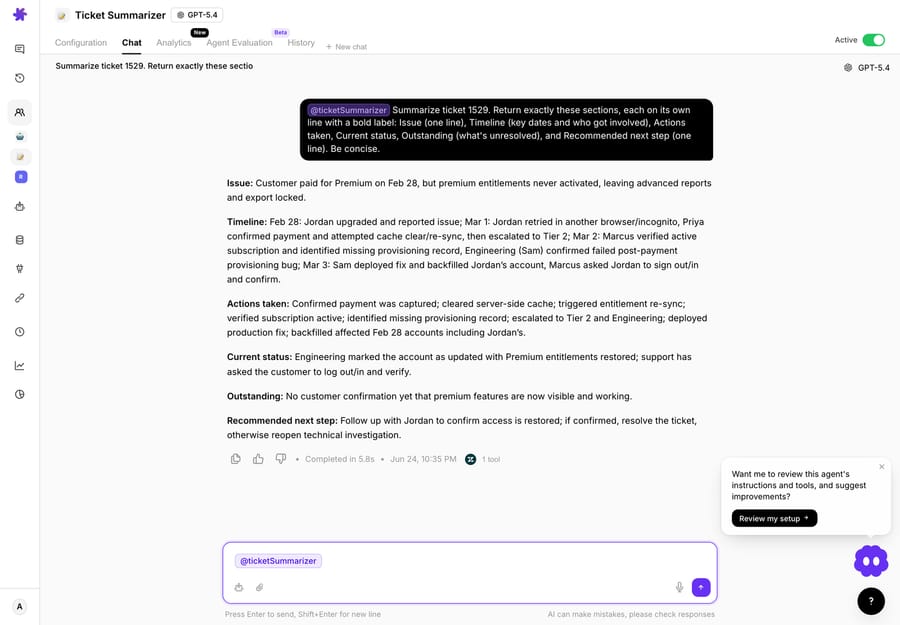
Plus, ideally, a recommended next step. Here's the shape a Macha agent returns: this is a real run against ticket #1529 in our test Zendesk, a nine-comment thread spanning Feb 28 to Mar 3 that passed through two support tiers and engineering:
Issue: Customer paid for Premium on Feb 28, but premium entitlements never activated, leaving advanced reports and export locked. Timeline: Feb 28: Jordan upgraded and paid; Mar 1, issue persists after retrying (different browser, incognito); Priya (Support) confirmed payment, cleared cache, re-synced, escalated to Tier 2; Mar 2: Marcus (Tier 2) verified the active subscription and found the missing provisioning record; engineering on-call (Sam) confirmed a failed post-payment webhook affecting some Feb 28 upgrades; Mar 3: Sam deployed the fix and backfilled Jordan's account. Actions taken: Payment verified; cache cleared; entitlement re-sync attempted; escalated to Tier 2; Stripe charge validated; root cause traced to failed provisioning after the payment webhook; production fix deployed; affected accounts backfilled. Current status: Engineering says Premium entitlements now show on Jordan's account; support has asked the customer to sign out/in and verify. Outstanding: Customer confirmation is still missing, so the ticket remains open pending verification. Recommended next step: Follow up with Jordan for confirmation after re-login; if confirmed, close; otherwise reopen the engineering investigation.
That's nine comments across four days, with three people involved, collapsed into something you can read in ten seconds and act on immediately. The agent did it in a single Get Ticket call. The "Outstanding" and "Recommended next step" lines are what separate a summary you can use from a summary you have to re-read the ticket to trust.
What does Zendesk's built-in ticket summary do?
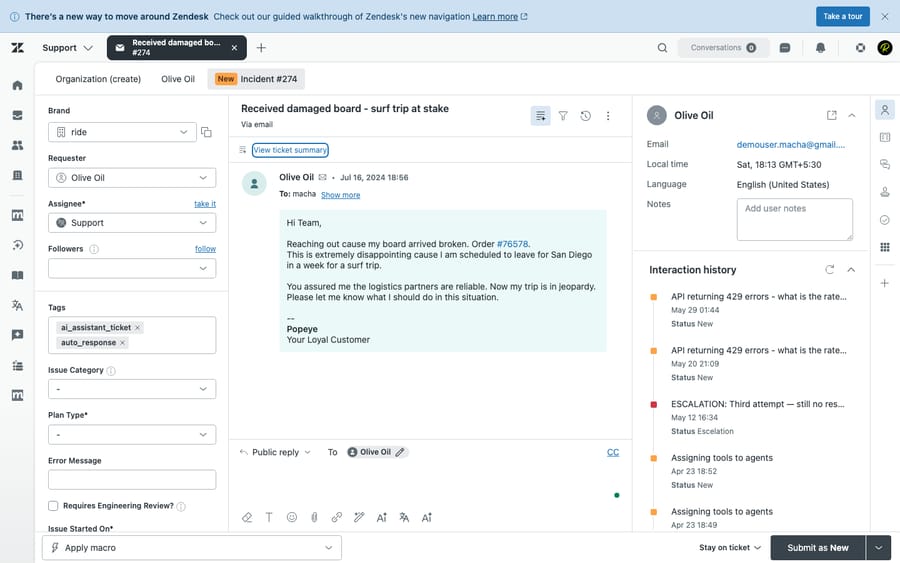
Zendesk ships its own AI ticket summaries, and for a lot of teams that's a sensible starting point, so let's be fair about it. In the Agent Workspace you click View ticket summary and Zendesk recaps the ticket's public comments; including internal notes as well requires the Copilot add-on. The feature has moved on: Zendesk's enhanced Copilot summarization no longer returns a loose paragraph: it captures the main problem, customer expectations, actions taken, outcomes, current status, and explicitly stated next steps, in a single summary of up to 100 words. It's a good structured recap. Zendesk says AI-generated ticket summaries are available on Suite and Support Professional plans and above, with a usage allowance that resets monthly. The Copilot add-on ($50 per agent per month, Suite Professional and above) adds internal notes to the summary and stores summaries in ticket fields you can use in workflows. Summaries aren't stored for closed tickets, and side conversations are left out.
So the difference is not "free text vs structured"; that's an outdated comparison. The real gaps are about control, context, and reach:
- It's manual, not a workflow. An agent has to remember to click the button on each ticket. There's no "always summarize on handoff" or "summarize when status flips to Escalated": Zendesk generates the native summary only when an agent manually refreshes it. With Copilot the result can be stored in a ticket field that workflows read, but someone still has to press the button.
- The format is Zendesk's, not yours. You get Zendesk's ~100-word shape. You can't enforce your handoff template, say an "Outstanding" line that must always be present, or a one-line "Recommended next step" your leads insist on, because the sections and length are fixed by the feature.
- It only sees the helpdesk. The summary is built from the ticket's comments. It can't tell you the customer has two open Shopify orders or a disputed Stripe charge unless someone already typed that into the thread.
- It lives only inside Zendesk. If your team works partly in Slack, or you run a different help desk, the native feature doesn't follow you there, and you can't pipe its output into an internal note on another tool or a Slack channel automatically.
None of that makes it bad; it's a solid manual recap. It's a fine reason to reach for an agent when you want the summary automatic, shaped to a format you define, enriched with context the helpdesk can't see, and portable across the helpdesks you run.
How do you build a summary agent in Macha?
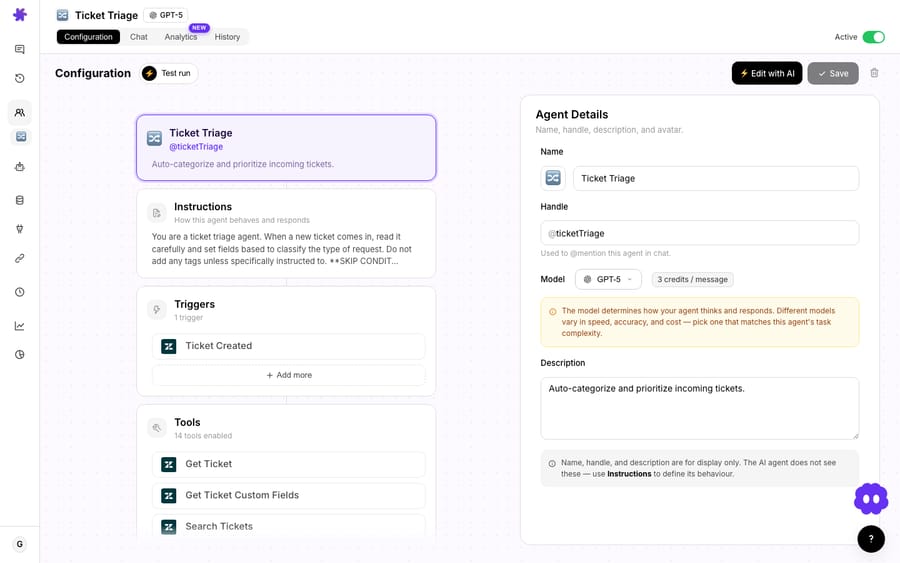
The use case here is deliberately small, which is the point: it's a good first agent. You need exactly one tool to start: Get Ticket. (Add Search Tickets if you want to reference related tickets in the summary.)
1. Connect your helpdesk
In Macha, connect Zendesk or any other help desk Macha supports (Zendesk, Freshdesk, Gorgias, Front, HubSpot or Intercom). This is the connector that gives the agent its Get Ticket action: the ability to fetch a ticket's full comment thread by ID.
2. Create the agent
Create an agent and give it instructions in plain language. You can type them, or describe what you want and let Macha's builder draft the configuration for you: name, handle, tools, and instructions.
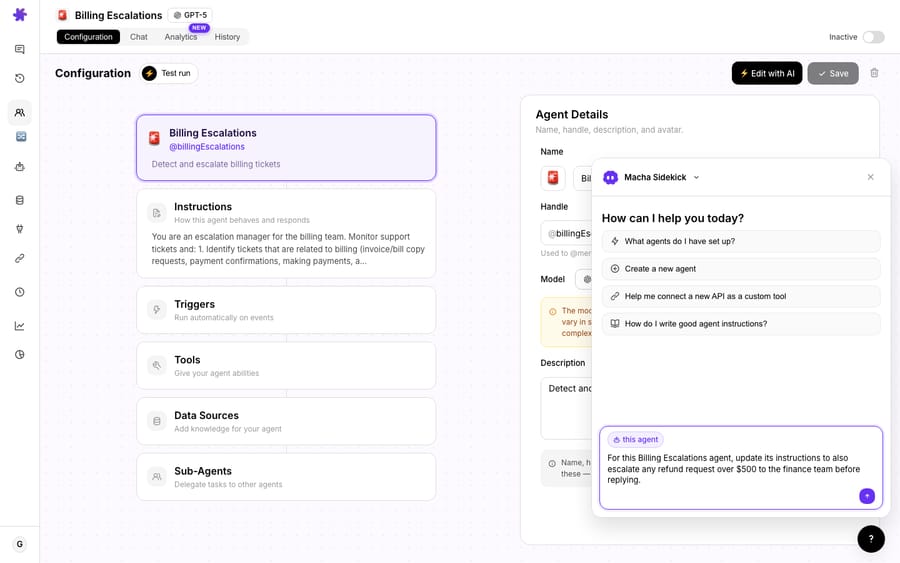
Instructions that produce the structured brief above look roughly like this:
You are a ticket summarizer. When asked to summarize a ticket, call Get Ticket for that ID and read the entire comment thread. Return a summary with exactly these sections: Issue (one line), Timeline (key dates and who got involved), Actions taken (what support has already tried), Current status, Outstanding (what's unresolved or unconfirmed), and a one-line Recommended next step. Be concise. Never invent details that aren't in the thread.
Pick a model that fits the job. Summarizing a thread is a reading task, not a reasoning marathon. The default model, GPT-5.4, handles it well, and GPT-5.4 Mini is the lighter option if you want replies back faster during a handoff. Model choice doesn't change what you pay: Macha bills per ticket, from $299 a month for up to 750 tickets, one conversation charged once however many steps the agent takes inside it, so a summary rides along on the ticket you're already paying for. See pricing for the tiers.
3. Invoke it on demand or on a trigger
There are two ways to run it, and you'll probably want both:
On demand (chat). Anyone on the team can ask:
"Can you summarize ticket #1529? It has a really long thread and I need to get up to speed."
The agent calls Get Ticket, reads the whole thread, and replies with the brief. No clicking through the ticket, no remembering which button does what.
On a trigger. Point the agent's trigger at Ticket Updated with a condition, for example, when a ticket is flagged for escalation or reassigned. Now the summary is posted as an internal note automatically at exactly the moment the next agent needs it. That "summarize on handoff" behavior is the thing native summaries can't do.
Here's that exact run in the product: the Ticket Summarizer agent returning the structured brief for ticket #1529 in Macha chat, produced from one Get Ticket call:
What can an agent add that a helpdesk summary can't?
Because Macha is an agent layer, the summary doesn't have to stop at what's in the ticket. Give the same agent a couple more connectors and it can fold in context the native feature literally cannot see:
| Add this connector | And the summary can now include… |
|---|---|
| Shopify | "Customer has 2 orders in the last 30 days, one partially fulfilled" |
| Stripe | "$198 in charges, one currently disputed" |
| Notion / Confluence | "Matches known issue: provisioning bug, fix shipped Mar 3 (KB-412)" |
| Slack | Post the summary straight into #escalations instead of just the ticket |
This is the same pattern behind our guide on how to escalate tickets with a full context bundle: the thread summary plus the order, billing, and KB context, assembled into one brief so whoever picks it up next starts with everything in hand. The same context principle shows up when you handle reopened tickets with full context: the agent re-reads the original thread instead of making the next person reconstruct it. A native helpdesk summary can recap the conversation; an agent can recap the conversation and the customer's account state.
When should you not use an AI thread summary?
An honest summary of the tradeoffs:
- A summary is a starting point, not a verdict. For a billing dispute, a cancellation, or anything legal/financial, read the actual messages before you act. Use the summary to orient, then verify the lines that matter.
- Garbage in, garbage out on private notes. If your team buries critical context in side channels the agent can't read, the summary won't include it. Make sure the relevant comments and the connectors you care about are actually wired up.
- Don't over-summarize short tickets. A three-message ticket doesn't need an AI brief; just read it. The ROI is in the 15+ message threads, the multi-day escalations, and shift/handoff moments. If you fire the trigger on every update, you'll bury the summaries that matter under a pile nobody needed. Scope the condition.
- If a one-click manual recap inside Zendesk is genuinely all you need, the native Zendesk summary may be enough, and that's a fine answer. Reach for an agent when you want it automatic, cross-tool, or running on another help desk.
How does the Macha agent compare with Zendesk's summary?
| Native Zendesk summary | Macha summary agent | |
|---|---|---|
| Trigger | Manual refresh, every time | On demand or auto on Ticket Updated |
| Scope of context | Ticket comments only (internal notes need Copilot) | Thread + Shopify / Stripe / KB / related tickets |
| Output format | Structured recap, up to 100 words, shape fixed by Zendesk | The exact format you define: your sections, your "Outstanding" + "Next step" lines, enforced every time |
| Portability | Lives inside Zendesk | Post to an internal note, Slack, or wherever, across Zendesk, Freshdesk, Gorgias, Front, HubSpot or Intercom |
| Cost model | Monthly allowance on Suite/Support Professional and above; Copilot $50/agent/month for notes and field storage | Per ticket (from $299/mo for 750), setup and a dedicated success manager included |
Frequently asked questions
Does Macha replace my helpdesk? No. Macha is an AI agent layer that runs on top of Zendesk, Freshdesk, Gorgias, Front, HubSpot or Intercom. You keep your helpdesk; Macha's agents read tickets and take actions inside it.
How does this differ from Zendesk's built-in ticket summaries? Both are structured; that part is a tie. Since Zendesk's enhanced Copilot summarization, the native summary captures problem, actions, outcomes, status, and stated next steps in up to 100 words, and it's a good manual recap on Suite/Support Professional and above. The differences are control, context, and reach: a Macha agent summarizes on demand or automatically on a trigger, enforces the exact format you define (not Zendesk's fixed 100-word shape), pulls in context from tools like Shopify, Stripe, and your knowledge base that the native feature can't see, and runs on, and posts into, any of the supported helpdesks.
How much does a summary cost? Macha bills per ticket, one conversation, charged once, however many steps the agent takes inside it. A summary is one of those steps, so it doesn't add a charge on top of the ticket it belongs to. Pricing starts at $299 a month for 750 tickets, about $0.40 each, and that includes setup by the Macha team and a dedicated success manager who handles your changes afterwards, such as a new summary format, instruction changes or new tools. See pricing for the full table.
Can it summarize automatically when a ticket is escalated or handed off? Yes. Set the agent's trigger to Ticket Updated with a condition (e.g., status changed to Escalated or the ticket was reassigned), and it will post the summary as an internal note at the handoff moment.
Which helpdesks does this work with? Zendesk, Freshdesk, Gorgias, Front, HubSpot or Intercom. The agent uses the helpdesk's "Get Ticket" action to read the full thread.
Ready to stop reading 23-message threads by hand? Start a free trial ($50 of usage, no credit card required), connect your helpdesk, and build a summary agent in a few minutes, or browse the rest of the use-case library for more agents you can ship the same day.






