





 Shopify
 Stripe
 Slack
Slack Notion
 Google Workspace
 Confluence

Does Twilio Have a Zendesk Integration? Flex, SMS Apps and Custom Tools (2026)


Twilio's only first-party Zendesk app is for Twilio Flex, its contact center product; plain Twilio SMS has no Twilio-built Zendesk app. Teams add SMS through third-party Marketplace connectors, Twilio Functions they code themselves, or a Custom Tool that lets an AI agent send a text or check a message log from inside the ticket.
Key takeaways
- Twilio's only first-party Zendesk integration is the Flex app, which logs Twilio Flex calls and chats on tickets; plain Twilio SMS has no Twilio-built Zendesk app.
- Third-party Marketplace apps such as Twilio SMS by OAppS add SMS and WhatsApp to Zendesk as a channel, so inbound texts become tickets that agents answer by SMS.
- Twilio's November 2025 tutorial uses a Twilio Function and the Zendesk API v2 to create tickets from inbound SMS, which is code a team hosts and maintains itself.
- A Macha Custom Tool calls Twilio's REST API with an Account SID and Auth Token, and any Write tool that sends an SMS requires confirmation before it runs.
- Macha is done for you: the Macha team builds and tests the Twilio tool and the agent, included on the trial and every plan at about $0.40 a ticket from $299 a month for 750 tickets, with a dedicated success manager.

Twilio's only first-party Zendesk integration is the Twilio Flex app, which connects Twilio's contact center product (voice and chat) to Zendesk tickets; for plain Twilio SMS there is no Twilio-built app, so teams use a third-party Marketplace connector such as Twilio SMS by OAppS, write Twilio Functions against the Zendesk API, or give an AI agent a Custom Tool that calls Twilio's REST API from inside the ticket. Which one fits depends on whether you want SMS as a channel or one precise action per ticket.
| Option | Built by | What it gives you | Effort |
|---|---|---|---|
| Twilio Flex app for Zendesk | Twilio | Flex contact center (voice, chat) with ticket lookup, interaction logging and click-to-dial | You must run Twilio Flex |
| Marketplace SMS/WhatsApp apps | Third parties (e.g. OAppS) | SMS and WhatsApp as a Zendesk channel: inbound texts become tickets, agents reply by SMS | Install and configure; a vendor in the loop |
| Twilio Functions + Zendesk API | You | Inbound SMS creates tickets; a Zendesk webhook sends SMS alerts | Code you write and maintain |
| Macha Custom Tool | The Macha team, for you (or you, with no code) | The AI agent sends an SMS or reads a message log mid-ticket | Done for you by the Macha team, with a dedicated success manager, included |
Framing first. Macha runs on top of the help desk you already use (Zendesk, Freshdesk, Gorgias, Front, HubSpot or Intercom). It is an AI agent layer, not a Zendesk or Twilio replacement. Your agents keep working in Zendesk; Macha reads the ticket, reasons, and reaches into Twilio to answer or act.
Does Twilio have a native Zendesk integration?
Only for Flex. Twilio builds and maintains the Flex-Zendesk integration, installed from the Zendesk Marketplace, and Twilio lists it as generally available. It shows the matching ticket when a call or chat arrives, logs the interaction on the ticket, stores chat transcripts and call recordings, and adds click-to-dial (still in beta). It assumes you run Twilio Flex as your contact center. If you only use Twilio Programmable Messaging to send SMS, there is no Twilio-built app to install. What exists instead:
- Third-party Marketplace apps. Connectors like Twilio SMS by OAppS or Twilio SMS WhatsApp for Support add SMS and WhatsApp as a channel in Zendesk, so inbound texts become tickets and agents can reply. Useful if you want SMS as a channel, but it is a full channel product, not a lightweight "send this one message" action, and it puts a third party in the loop.
- Twilio Functions and webhooks. Twilio's own tutorial from November 2025 uses a Twilio Function to turn inbound SMS into tickets through the Zendesk API v2, and a Zendesk trigger plus webhook to send SMS alerts when a ticket is created. That is a developer project in JavaScript, not a packaged integration, and you maintain the glue code.
None of these lets an AI agent decide, mid-ticket, to send a specific SMS or read a specific message log and reason over the result. For that there is a lighter path.
What should an AI agent do with Twilio inside a ticket?
The high-value version of this integration is not a whole SMS channel. It is the agent doing one precise thing. A customer emails Zendesk asking to re-send a verification code; the agent recognizes the intent and sends the SMS through Twilio from the ticket. Or a customer says "I never got the confirmation text" and the agent looks up the Twilio message log by phone number and answers "it was delivered at 2:14pm, let me resend it." A Custom Tool makes that possible, grounded in live Twilio data rather than a separate channel product.
How do you connect Twilio to Zendesk with a Custom Tool?
A Custom Tool is a single action you define once and point at Twilio's REST API. No marketplace app and no code.
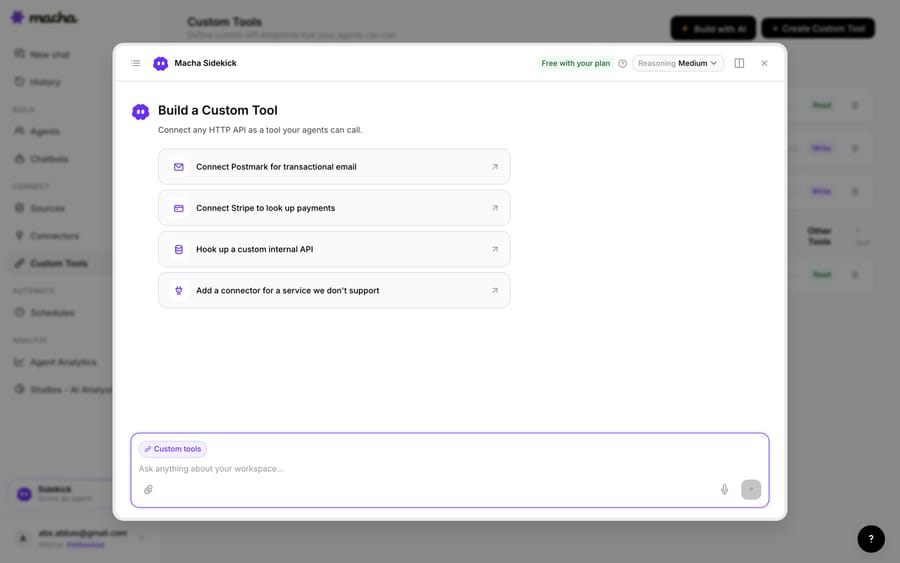
1. Point it at the Twilio API. Twilio's REST API authenticates with your Account SID and Auth Token; you give Macha the endpoint and credentials. The built-in Sidekick can scaffold the request from a plain-English description if you would rather not fill in the form.
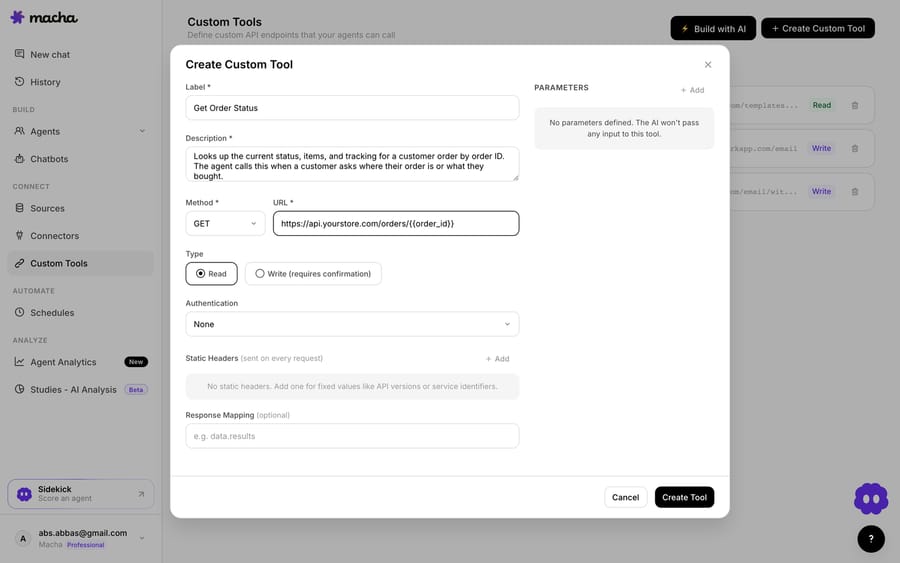
2. Define the action. Give it a label and a description the AI uses to decide when to call it, such as "Send an SMS to a customer via Twilio". Set the method and URL (a POST to the Twilio Messages endpoint, with {{to}} and {{body}} placeholders), and choose Read or Write. Looking up a message log is a Read; sending an SMS or OTP is a Write, which requires confirmation before it runs.
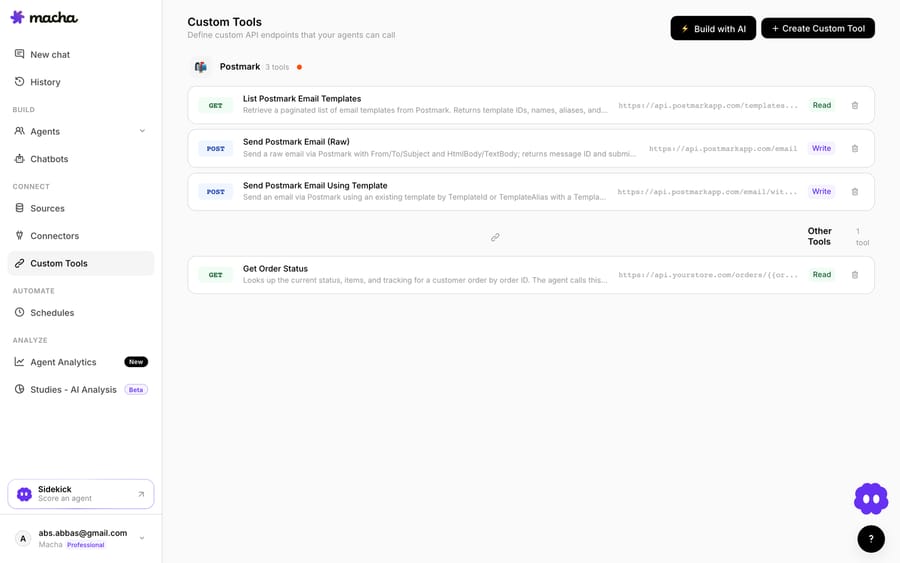
3. The agent uses it live. Once the tool exists, the agent calls it mid-ticket, passes the phone number and message (or the number to look up), and reasons over what Twilio returns, confirming the send or reporting the delivery status.
How do you stop an agent texting customers by mistake?
Because a Custom Tool can reach into Twilio, the guardrails matter, and they matter more when the action sends a message to a customer. Read tools (message and call log lookups) run freely; Write tools (send an SMS, trigger an OTP) require confirmation before they run, so an agent cannot silently text someone. Each tool is scoped to one action, permissioned per agent, and every call is audited. Twilio's Account SID and Auth Token handle authentication, so secrets never appear in the conversation.
Teams usually build a few Twilio tools and group them: a "send SMS" writer, a "message log lookup" and a "call history lookup", alongside tools for their other systems.
Should you use a Marketplace app, Flex or a Custom Tool?
- Use the Twilio Flex app if Flex is already your contact center and you want calls and chats logged against Zendesk tickets.
- Use a third-party Marketplace app (or Twilio Functions) if you want SMS or WhatsApp as a full inbound channel in Zendesk, with texts becoming tickets and agents replying by SMS, and you are comfortable with a third party or some glue code in the loop.
- Use a Custom Tool when you want your AI agent to send a specific message or look up a specific Twilio log from the ticket, you need one precise action rather than a whole channel, or you would rather not add another connector. These options can coexist.
What else can the agent do once it reaches Twilio?
The same pattern covers more: send a verification code or OTP on request, text an order-shipped or appointment confirmation, check whether a message was delivered before resending, read call logs tied to a customer's number, or trigger a callback flow. Custom Tools are not Twilio-specific, so the same approach connects your CRM, billing system or internal API. The Custom Tools integration directory lists 210 tools, and the pillar guide covers building custom Zendesk integrations.
Macha fits teams on Zendesk, Freshdesk, Gorgias, Front, HubSpot or Intercom whose tickets keep stalling on a fact that lives in Twilio. Macha is the done-for-you option: the Macha team analyzes your past tickets, builds and tests the Twilio tool, the knowledge base and the agent, and runs it in safe mode, with drafts as internal notes, until the drafts are right. It is one plan priced on ticket volume, from $299 a month for 750 tickets, about $0.40 a ticket, which includes setup and a dedicated success manager who handles your changes, such as a new message template. See how Custom Tools work, browse the integration directory, or start a free trial and wire up your first Twilio tool.
Frequently asked questions
Does Zendesk have a native Twilio integration? Only for Twilio Flex: Twilio builds the Flex-Zendesk app, which logs Flex calls and chats on tickets. For plain Twilio SMS there are third-party Marketplace apps that add SMS and WhatsApp as a Zendesk channel, and Twilio's Functions-based DIY route. A Custom Tool is a lighter alternative that lets your AI agent send a specific SMS or read a specific Twilio log from the ticket, with no code.
Do I need an engineer to connect Twilio to Zendesk this way? No. The Macha team builds and tests the Twilio tool for you as part of setup, included on the trial and every plan. If you'd rather build it yourself, you describe the action in plain English and Macha's Sidekick scaffolds the Twilio request, auth and parameters. Technical teams can go deeper with full control over the Messages endpoint, headers and response mapping.
Can the agent send messages, or only read logs? Both. Reads (message and call log lookups) run freely; writes, such as sending an SMS or OTP, require a confirmation step before they run, and you control which agents can use them.
Is it secure? Yes. The tool is scoped to a single action, permissioned per agent, authenticated with Twilio's Account SID and Auth Token, and every call is audited.
What does Twilio's own Zendesk SMS tutorial build? Twilio's November 2025 tutorial builds two pieces: a Twilio Function that creates a Zendesk ticket from each inbound SMS through the Zendesk API v2, and a Zendesk trigger and webhook that send an SMS alert through Twilio when a ticket is created. It is code you host and maintain yourself.






